Free Lessons
Courses
Seminars
TechHelp
Fast Tips
Templates
Topic Index
Forum
ABCD
 
Home   Courses   TechHelp   Forums   Help   Contact   Merch   Join   Order   Logon  
 
Back to Access Developer Forum    Comments List
Upload Images   @Reply   Bookmark    Link   Email   Next Unseen 
Line Numbers in Access VBA Editor
Mubeezi Micah 
   
3 months ago
is there now a way to add line numbers to the access VBA editor? i really need it
Sami Shamma  @Reply  
             
3 months ago
Here's your answer from ChatGPT

Short answer: No. There still isn't a native setting in the Microsoft Access VBA editor that lets you display persistent line numbers in the code window like you see in other IDEs (e.g., Visual Studio). The built-in Visual Basic for Applications environment simply doesn't support that feature.

Here's how it actually works today:

The VBA editor does not show line numbers down the left margin. There's no option in Tools  Options to turn them on like in modern IDEs.

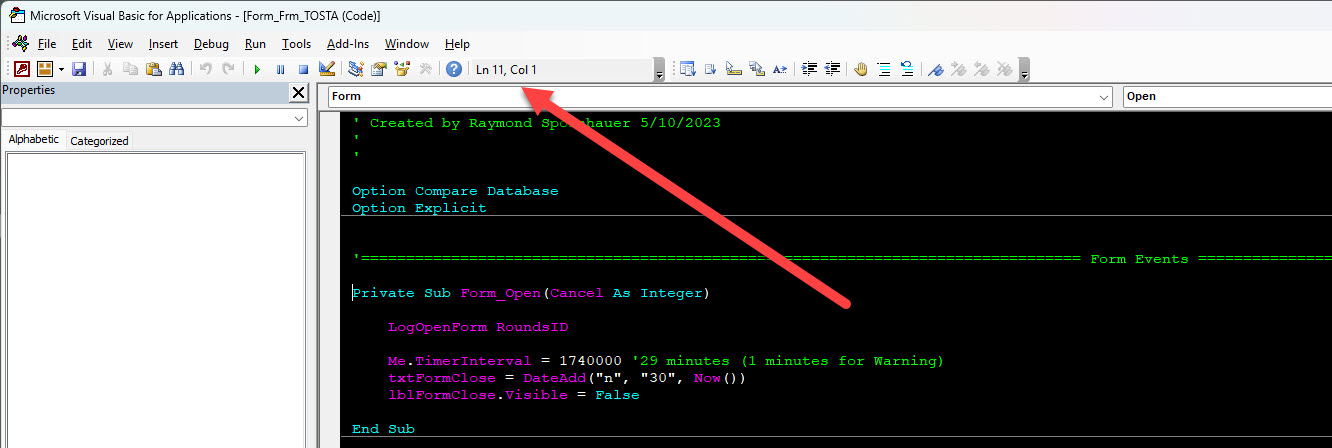
With the standard toolbar you can see the current cursor's line and column in the status display, but that's it - no permanent line numbering.

Workarounds people use:

External tools/add-ins (e.g., MZ-Tools or other VBA utilities) can overlay or inject line numbers in your modules, or at least help with navigation and error tracing. These tools actually modify or annotate your code rather than enabling a native editor feature.

Manual numbering or code modules: In old BASIC/VB fashion some developers insert numeric labels (e.g., 10, 20, 30:) manually or with a script to support the Erl function in error handlers - but this is purely a coding convention and not a live editor feature.

Bottom line: if you want real on-screen line numbers in the Access VBA IDE, you still need a third-party add-in or a custom macro to stick them in - Access/VBA itself doesn't provide that feature out of the box.
Matt Hall  @Reply  
          
3 months ago
You just have to put them in manually.  The compiler will ignore them.  Line numbers are generally considered obsolete.

You also have to manage them manually.  If you reference a duplicate line number with something like a GOTO statement, the compiler will complain.
Mubeezi Micah OP  @Reply  
   
3 months ago
Thanks Matt and Sami
Alex Hedley  @Reply  
           
3 months ago
Hi Mubeezi long time no speak, hope you're well :-)

I think https://www.mztools.com/v8/features.aspx does it. Maybe other tools do too.
I'm sure I read an article on it recently just need to find the link, let me circle back when I find it.
Alex Hedley  @Reply  
           
3 months ago
Richard Rost  @Reply  
          
3 months ago
I'm just curious what you need them for. I've been developing with VBA for like 30 years now, and I've never needed line numbers.
Richard Rost  @Reply  
          
3 months ago
Mubeezi here's a little gift for you:

Add Line Numbers in the Code Vault.

And since you've been a long-time customer since 2010, I gave you a month of Gold membership for free so you can see it.
Raymond Spornhauer  @Reply  
          
3 months ago

Raymond Spornhauer  @Reply  
          
3 months ago
The Line and Column is indicated at the top if you need it for reference.

-Raymond

This thread is now CLOSED. If you wish to comment, start a NEW discussion in Access Developer Forum.
 

Next Unseen

 
New Feature: Comment Live View


The following is a paid advertisement
Computer Learning Zone is not responsible for any content shown or offers made by these ads.
 

Learn
 
Access - index
Excel - index
Word - index
Windows - index
PowerPoint - index
Photoshop - index
Visual Basic - index
ASP - index
Seminars
More...
Customers
 
Login
My Account
My Courses
Lost Password
Memberships
Student Databases
Change Email
Info
 
Latest News
New Releases
User Forums
Topic Glossary
Tips & Tricks
Search The Site
Code Vault
Collapse Menus
Help
 
Customer Support
Web Site Tour
FAQs
TechHelp
Consulting Services
About
 
Background
Testimonials
Jobs
Affiliate Program
Richard Rost
Free Lessons
Mailing List
PCResale.NET
Order
 
Video Tutorials
Handbooks
Memberships
Learning Connection
Idiot's Guide to Excel
Volume Discounts
Payment Info
Shipping
Terms of Sale
Contact
 
Contact Info
Support Policy
Mailing Address
Phone Number
Fax Number
Course Survey
Email Richard
[email protected]
Blog RSS Feed    YouTube Channel

LinkedIn
Copyright 2026 by Computer Learning Zone, Amicron, and Richard Rost. All Rights Reserved. Current Time: 5/6/2026 8:06:24 PM. PLT: 1s