Free Lessons
Courses
Seminars
TechHelp
Fast Tips
Templates
Topic Index
Forum
ABCD
 
Home   Courses   TechHelp   Forums   Help   Contact   Merch   Join   Order   Logon  
 
Back to Access Forum    Comments List
Upload Images   @Reply   Bookmark    Link   Email   Next Unseen 
Combo Box to List Players
Lee Shastid 
    
4 months ago
Hi all...I am going to build a DB for my Sports Cards. I have seen this video several times and never used the method because I have never needed to. I want to create a combo box that will allow the list of players to choose from. I want to concatenate I believe where when the field opens I see the first and last name. Which video shows me how to do this?
Donald Blackwell  @Reply  
       
4 months ago
The two that come to mind for me are: Last Name, First and Concatenation
Lee Shastid OP  @Reply  
    
4 months ago
Thank you Donald. One follow up question that I am confused on maybe you can answer. I have a PlayerT that has last name, First Name in it with other criteria. Would I put a PlayerNameID field with Number in this table also, and then create a table for PlayerID and Player Name to supply the Player ID field in the original table. Hope I asked that correctly.
Donald Blackwell  @Reply  
       
4 months ago
I almost always have an ID field, for instance "PlayerID" that way you don't have to deal with double-double quotes, etc. or trying to remember field names every time you open a record.

DetailsIt's much easier to use:

docmd.openform "PlayerT",,,"PlayerID=" & PlayerID, acFormEdit

Than

docmd.openform "PlayerT",,,"PlayerNameLast=""" & PlayerNameLast & """"
Lee Shastid OP  @Reply  
    
4 months ago
I am just confused for some reason. My Fields in the playerT  is ID autoNumber, PlayerID Number, Firstname short Text, Lastname short text, Position Number. Do I make a separate table for just the player name and player id  for storing the id number for the combo box?
Donald Blackwell  @Reply  
       
4 months ago
ah, no, unless you are usin PlayerID for something else for your own records, what I typed above was rather than not having an autonumber field. since you have 'ID" as an autonumber, that is what you would use for your combobox id field example rowsource:

SELECT ID, PlayerLastName & ", " & PlayerFirstName FROM PlayerT ORDER BY PlayerLastName, PlayerFirstName

Replace PlayerLastName and PlayerFirstName with your actual field names.
Lee Shastid OP  @Reply  
    
4 months ago
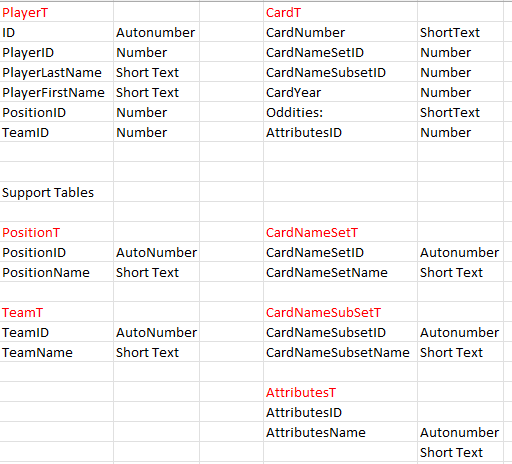
Would you please look at this and see what I need to do. I dont know why but for some reason I am confused with this one.
Lee Shastid OP  @Reply  
    
4 months ago

Lee Shastid OP  @Reply  
    
4 months ago
My relationship will be Player to CardNumber one to many
Donald Blackwell  @Reply  
       
4 months ago
I would add a PlayerID field to your CardT

Then your relationship would be PlayerT.ID to CardT.PlayerID.

I might also recommend a CardID field in the CardT set to Autonumber as the Primary Key just to help keep your linking simple. For example you might have a player form that has a subform that lists all the cards they are on that you could double-click a field to open up that Card's form for editing and vice versa, you could double click the Player Combo to open up the player form, etc.
Kevin Robertson  @Reply  
          
4 months ago
I would remove ID from PlayerT and make PlayerID the AutoNumber and Primary Key.
Lee Shastid OP  @Reply  
    
4 months ago
Thank you all for your help. I will follow suggestions.
Richard Rost  @Reply  
          
4 months ago
Yeah, the only way you'd want a separate player ID for the player would be if they were assigned some kind of number, like by their team, and you had to track that natural key. Kind of like how United States citizens have a social security number. Aside from that, the auto number is almost always fine.
Lee Shastid OP  @Reply  
    
4 months ago
Good deal. Thank you
Lee Shastid OP  @Reply  
    
4 months ago
Donald I took your advise and it works fine. When I double click to open the player form and add the player, the data does not show up immediately. I have to close out and open it back up is there a way to have it populate without closing out?
Donald Blackwell  @Reply  
       
4 months ago
In the "On Got Focus" event for the control you are double clicking, you could add a requery. For example:

DetailsPrivate Sub PlayerCombo_GotFocus()

     PlayerCombo.Requery

End Sub


This way, the database will refresh that list every time you land on it which will happen when you close the player form. Alternatively, you could add code to the form unload event of the player form to tell it to requery the other form before it closes:
Details
Private Sub Form_Unload()

     On Error Resume Next
     Forms("FORMNAME").Requery
     On Error GoTo 0

End Sub


That will update the data in the calling form only when the player form is  closed. I added the error handling in case that form isn't open, for example if you opened it from a different form.
Kevin Robertson  @Reply  
          
4 months ago
Donald I usually use the IsFormLoaded function. I love this function. Before, I had to type it out every time. But at least I memorized it. LOL.
Donald Blackwell  @Reply  
       
4 months ago
Kevin I usually add Me.Name to OpenArgs to my call to open the form then use that for the form name so it works for any form but I didn't want to overwhelm Lee with too many additional things at once.
Lee Shastid OP  @Reply  
    
4 months ago
Thank you. Lee gets overwhelmed easy with VBA especially. That’s why I try to keep it simple. Lol

This thread is now CLOSED. If you wish to comment, start a NEW discussion in Access Forum.
 

Next Unseen

 
New Feature: Comment Live View


The following is a paid advertisement
Computer Learning Zone is not responsible for any content shown or offers made by these ads.
 

Learn
 
Access - index
Excel - index
Word - index
Windows - index
PowerPoint - index
Photoshop - index
Visual Basic - index
ASP - index
Seminars
More...
Customers
 
Login
My Account
My Courses
Lost Password
Memberships
Student Databases
Change Email
Info
 
Latest News
New Releases
User Forums
Topic Glossary
Tips & Tricks
Search The Site
Code Vault
Collapse Menus
Help
 
Customer Support
Web Site Tour
FAQs
TechHelp
Consulting Services
About
 
Background
Testimonials
Jobs
Affiliate Program
Richard Rost
Free Lessons
Mailing List
PCResale.NET
Order
 
Video Tutorials
Handbooks
Memberships
Learning Connection
Idiot's Guide to Excel
Volume Discounts
Payment Info
Shipping
Terms of Sale
Contact
 
Contact Info
Support Policy
Mailing Address
Phone Number
Fax Number
Course Survey
Email Richard
[email protected]
Blog RSS Feed    YouTube Channel

LinkedIn
Copyright 2026 by Computer Learning Zone, Amicron, and Richard Rost. All Rights Reserved. Current Time: 6/16/2026 4:16:46 PM. PLT: 1s