Free Lessons
Courses
Seminars
TechHelp
Fast Tips
Templates
Topic Index
Forum
ABCD
 
Home   Courses   TechHelp   Forums   Help   Contact   Merch   Join   Order   Logon  
 
Back to Access Forum    Comments List
Upload Images   @Reply   Bookmark    Link   Email   Next Unseen 
Duplicate Record with Message Box Also VBA Nomacro
Lee Shastid 
    
2 months ago
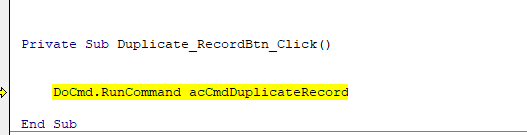
I want to make a duplicate record button using VBA instead of the wizard (Macro). I have done this before and made notes but can read a certain part of my notes now. VBA I have is missing something can someone help me? Missing something in the space what am I missing? Thank you

Docmd.RunCommand     acCmdDuplicateRecord

Alex Lewis  @Reply  
       
2 months ago
Duplicate Record: 599cd.com/Duplicate
Lee Shastid OP  @Reply  
    
2 months ago
Thank you....I have seen that video but it uses macros. I want to use VBA.
Lee Shastid OP  @Reply  
    
2 months ago
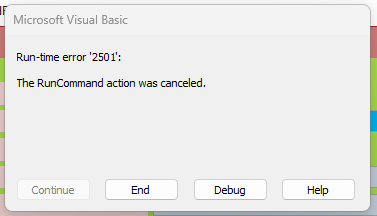
Okay I figured out what I said in my notes. I told myself to leave a single space there. When I try and use the code I get this message.
Lee Shastid OP  @Reply  
    
2 months ago

Lee Shastid OP  @Reply  
    
2 months ago

Lee Shastid OP  @Reply  
    
2 months ago
That's what I get when I choose debug
Darrin Harris  @Reply  
     
2 months ago
Hello Lee

Just Convert Macro to VBA

and this is the VBA of the Macro

DetailsPrivate Sub DuplicateRecordBtn_Click()

On Error GoTo DuplicateRecordBtn_Click_Err

    On Error Resume Next
    DoCmd.RunCommand acCmdSelectRecord
    If (MacroError = 0) Then
        DoCmd.RunCommand acCmdCopy
    End If
    If (MacroError = 0) Then
        DoCmd.RunCommand acCmdRecordsGoToNew
    End If
    If (MacroError = 0) Then
        DoCmd.RunCommand acCmdSelectRecord
    End If
    If (MacroError = 0) Then
        DoCmd.RunCommand acCmdPaste
    End If
    If (MacroError <> 0) Then
        Beep
        MsgBox MacroError.Description, vbOKOnly, ""
    End If

DuplicateRecordBtn_Click_Exit:
    Exit Sub

DuplicateRecordBtn_Click_Err:
    MsgBox Error$
    Resume DuplicateRecordBtn_Click_Exit

End Sub
Alex Hedley  @Reply  
           
2 months ago
You can convert a Macro into VBA with a button on the Ribbon
Darrin Harris  @Reply  
     
2 months ago
Alex we where about 30 seconds apart

Lee you need to be in the from design view to see the convert macro to vba in the ribbon right Alex
Lee Shastid OP  @Reply  
    
2 months ago
Thank you all for the help.
Lee Shastid OP  @Reply  
    
2 months ago
Alex Thank you. I am aware of that. Some reason I thought the simple one line VBA would do it. Thought I had done it before. I am just starting to learn VBA a little and didn't want to cheat. Thought I would pick easy stuff to try and write code for. I guess I am wrong and its not that simple one line. Guess I will stick to the wizard.
Lee Shastid OP  @Reply  
    
2 months ago
Darrin Thank you also. That is a lot of code for a newbie like me. Its overwhelming...LOL
Darrin Harris  @Reply  
     
2 months ago
Lee

I start making database's in the late 90's, and I still have the Microsoft
Visual Basic 6.0 Professional Editions.

Like a lot of people I pulled Northwind apart and learned a lot.

I finished a Music database not long ago, and its awesome the best database I've made to date, thanks to Richard and the Tech Help videos, I'm learning a lot more.

One of the features is a Import button that imports all of the music from the hard drive, in seconds no manual input.

All I can say is, it maybe overwhelming now but in time you will only get better and better, and being here with Richard and the gang your in great hands.
Lee Shastid OP  @Reply  
    
2 months ago
I agree with you totally....I have come along ways.....need more time that's all...I get wrapped up in things like this button VBA...I tell myself I have done it before with simple one line code but apparently I ain't remembering like I used too...I appreciate everyone's help....I am still trying to figure out or finally convince myself I haven't done that button like that...LOL

This thread is now CLOSED. If you wish to comment, start a NEW discussion in Access Forum.
 

Next Unseen

 
New Feature: Comment Live View


The following is a paid advertisement
Computer Learning Zone is not responsible for any content shown or offers made by these ads.
 

Learn
 
Access - index
Excel - index
Word - index
Windows - index
PowerPoint - index
Photoshop - index
Visual Basic - index
ASP - index
Seminars
More...
Customers
 
Login
My Account
My Courses
Lost Password
Memberships
Student Databases
Change Email
Info
 
Latest News
New Releases
User Forums
Topic Glossary
Tips & Tricks
Search The Site
Code Vault
Collapse Menus
Help
 
Customer Support
Web Site Tour
FAQs
TechHelp
Consulting Services
About
 
Background
Testimonials
Jobs
Affiliate Program
Richard Rost
Free Lessons
Mailing List
PCResale.NET
Order
 
Video Tutorials
Handbooks
Memberships
Learning Connection
Idiot's Guide to Excel
Volume Discounts
Payment Info
Shipping
Terms of Sale
Contact
 
Contact Info
Support Policy
Mailing Address
Phone Number
Fax Number
Course Survey
Email Richard
[email protected]
Blog RSS Feed    YouTube Channel

LinkedIn
Copyright 2026 by Computer Learning Zone, Amicron, and Richard Rost. All Rights Reserved. Current Time: 4/30/2026 11:02:56 AM. PLT: 1s