Free Lessons
Courses
Seminars
TechHelp
Fast Tips
Templates
Topic Index
Forum
ABCD
 
Home   Courses   TechHelp   Forums   Help   Contact   Merch   Join   Order   Logon  
 
Back to Access Forum    Comments List
Upload Images   @Reply   Bookmark    Link   Email   Next Unseen 
Keystrokes Instead of Double Click
Lee Shastid 
     
2 months ago
I am getting Richards habit of not liking to stop and get the mouse while working. I would rather just use keyboard. Can someone point in the right direction to where I can open a form in a field with hitting the Enter key instead of stopping and getting the mouse and double clicking?
Darrin Harris  @Reply  
     
2 months ago
Donald Blackwell  @Reply  
        
2 months ago
KeyDown would probably be the best video to start with.

Donald Blackwell  @Reply  
        
2 months ago
The Button Shortcut Keys video Darrin linked is good as well and probably has more detail
Darrin Harris  @Reply  
     
2 months ago
Yeah both are very good, Donald is KeyDown in blue a mod thing, or can anyone can do that, instead of the link?
Lee Shastid OP  @Reply  
     
2 months ago
Thank you. Gives me a starting point
Donald Blackwell  @Reply  
        
2 months ago
Darrin Access Veterans and MODs have a drop-down we can use to select various pages on the site, including videos, etc., and then it will link it.

Or, as it's called in HTML, a "Select" element, lol.
Lee Shastid OP  @Reply  
     
2 months ago
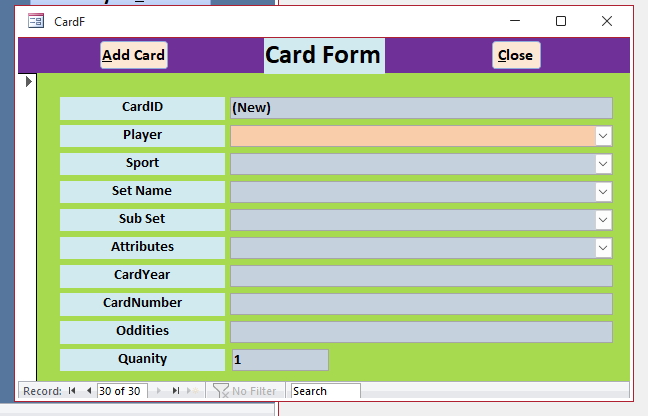
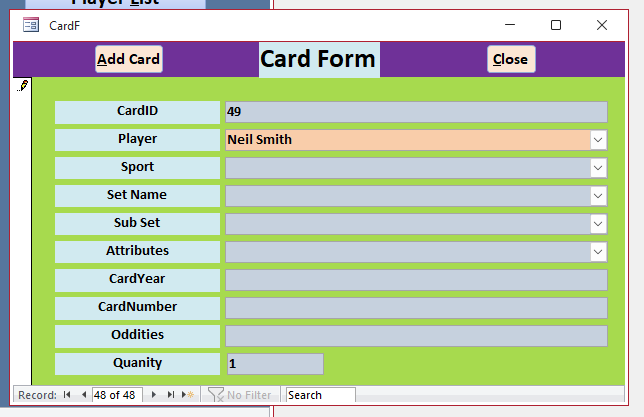
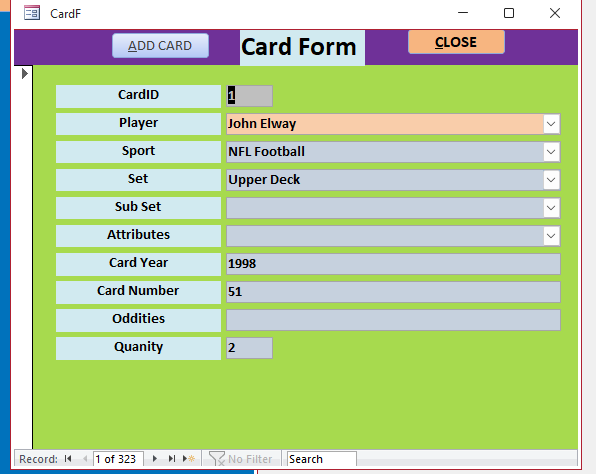
The video you provided Darrin is a good one. I have most of that down comfortably. Donald that one is way over my head. LOL....What I am trying to do is I have a field (attached screenshot) instead of double clicking I want to possibly maybe just hit enter to open the form. The field that is orange is my double click event. Donald this is derived from your idea the other day. Just trying to save time because of so much data entry. Like 50+ thousand records to enetr.
Darrin Harris  @Reply  
     
2 months ago
Thank you Donald, I was wondering how that worked now I know.
Lee Shastid OP  @Reply  
     
2 months ago

Lee Shastid OP  @Reply  
     
2 months ago
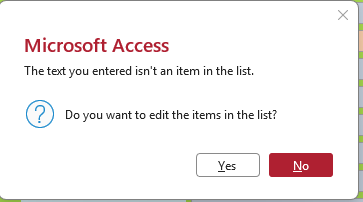
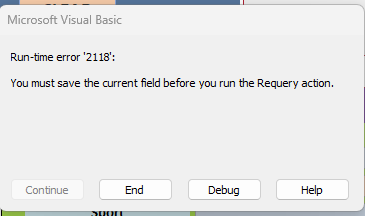
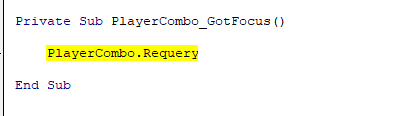
I can do it all by keyboard if this wouldn't happen. So this may be easier to solve then me trying to hit the enter key. If I go to the Player field and type Ex: Donald Blackwell you will see what kind of warnings I get. Screenshots attached.
Lee Shastid OP  @Reply  
     
2 months ago

Lee Shastid OP  @Reply  
     
2 months ago

Lee Shastid OP  @Reply  
     
2 months ago

Lee Shastid OP  @Reply  
     
2 months ago

Lee Shastid OP  @Reply  
     
2 months ago
That's what I get I get if I try and use List Edit Form Method. I can do it by keyboard if that wouldn't pop up.
Darrin Harris  @Reply  
     
2 months ago
Lee I'm not sure but maybe a On Error resume Next above PlayerCombo.Requery might help, Donald would probably have a better solution.
Donald Blackwell  @Reply  
        
2 months ago
If you're using the method in the List Items Edit Form video, it should automatically requery the field for you so the requery shouldn't be necessary. Now, if you want to add code in the list form (if you're using a form you created) to automatically select the new player, that's just one line of code in the list items edit form you created.

In the Form_Unload() Event: (of your list items edit form)

Private Sub Form_Unload(Cancel as Integer)

     Forms("CardF")!PlayerCombo = PlayerID

End Sub

Lee Shastid OP  @Reply  
     
2 months ago
On the card form I double click on the player field to open the player form. I only use the List Items Edit form because I am getting the playercombo.requery problem. I want to solve that requery issue and I will use that way. Which instead of double clicking is why I was asking if I can figure out how to just hit enter to open the form instead of double clicking the field.
Donald Blackwell  @Reply  
        
2 months ago
OK, doing that would look something like this:

DetailsPrivate Sub PlayerCbo_KeyDown(KeyCode As Integer, Shift As Integer)

    If KeyCode = vbKeyEnter then ' Check to see if it was the Enter key that was pressed
          docmd.openform "PlayerF",,,, acFormAdd
          KeyCode = 0 ' Swallow the Key event so it doesn't move to another field
    end if

End Sub


Replace PlayerCbo with the name of your combo box and PlayerF with the name of the form you are opening. I would then still add the code from above to your player form. I did modify it just in case you've opened that form from somewhere else so it doesn't throw an error:

DetailsPrivate Sub Form_Unload(Cancel as Integer)

     On Error Resume Next
     Forms("CardF")!PlayerCombo = PlayerID
     On Error Goto 0

End Sub
Lee Shastid OP  @Reply  
     
2 months ago
I understand to delete the playercombo.requery, correct? Then the top code goes in the key down event correct, form properties or combo box properties? The bottom code goes in the unload event in which properties also?
Lee Shastid OP  @Reply  
     
2 months ago

Lee Shastid OP  @Reply  
     
2 months ago
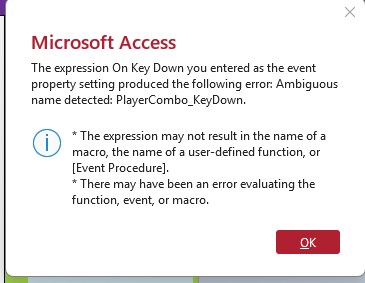
I cut and pasted your code in the combo box properties key down event and the only thing i had to change was PlayerCbo to PlayerCombo. Thats what I get
Donald Blackwell  @Reply  
        
2 months ago
You've probably already checked most of these but I'll run the list just to be sure:

1) In your Form properties in the Event tab, make sure it says [Event Procedure] next to "On Key Down"
2) In your VBA Editor, make sure this is only 1 procedure named "PlayerCombo_KeyDown" if there are multiple entries, it won't know which one you're talking about

Also, I just noticed an error in my code above, I used an invalid KeyCode constant (sorry):

DetailsPrivate Sub PlayerCombo_KeyDown(KeyCode As Integer, Shift As Integer)

    If KeyCode = vbKeyReturn Then ' Check to see if it was the Enter key that was pressed
          DoCmd.OpenForm "PlayerF", , , , acFormAdd
          KeyCode = 0 ' Swallow the Key event so it doesn't move to another field
    End If

End Sub


I accidentally used "Enter" instead of "Return" forgetting that the names are ancient, lol. From what I can see, it looks like you may have already been trying a PlayerCombo_KeyDown procedure then when you copy/pasted my code to the editor it made 2 versions and Access can't tell which one you want to work with.
Lee Shastid OP  @Reply  
     
2 months ago
Ok I cleared everything out and started from scratch. Cut and paste the code and the enter key works now. Thank you......
Lee Shastid OP  @Reply  
     
2 months ago
The only follow up question is when I add a new name and go back to the card form the name is not in the drop down list unless i close the whole form and come back into it.
Donald Blackwell  @Reply  
        
2 months ago
In that case, I would modify the code in the unload event I gave you for the "CardF" form:

DetailsPrivate Sub Form_Unload(Cancel as Integer)

     On Error Resume Next
     With Forms("CardF")!PlayerCombo
          .Value = ""
          .Requery
          .Value = PlayerID
     End With
     Forms("CardF").Dirty = False
     On Error Goto 0

End Sub


This should remove any edited value in that field, requery the field to get the new player(s), set the value to the player ID you just added, then, finally, save the form.
Lee Shastid OP  @Reply  
     
2 months ago
I have tried both of those multiple times and the combo box drop down dont update the name. I tried cut & paste and I also typed and still no difference.
Lee Shastid OP  @Reply  
     
2 months ago
Okay its working at this time. But it wont work If I dont do things in a particular order. But its working. Thank you
Lee Shastid OP  @Reply  
     
2 months ago
Not working at all. I use the Key Down event in the CardF on the field PlayerName. It takes me to the PlayerF, I fill it out and return to the CardF (Player field) it is not populated in the drop down list until I close the CardF and reopen it. I tried AI and Google and got suggestion of adding me.requery to your key down code. It did not work. Second suggestion was to have Me. requery in the Form Activate event. that did not work either. Any other ideas?
Kevin Robertson  @Reply  
          
2 months ago
You need to Requery the Combo Box when the other Form closes.
Lee Shastid OP  @Reply  
     
2 months ago
Kevin thank you. Can you tell me what to put and where to put it. I am just going in circles with what we been trying. Thank you
Donald Blackwell  @Reply  
        
2 months ago
Hi Lee, in your PlayerF, with the code I gave you for the Unload event, add:

Me.Dirty = False

Right above the On Error Resume Next. I think the problem is that we're trying to refresh the combo before the new data is saved to the table.
Lee Shastid OP  @Reply  
     
2 months ago
I think that fixed it. Thank you....I got that code in my google search but it never was clear where to put it....Thank you
Donald Blackwell  @Reply  
        
2 months ago
Happy to help. Sorry we B had to go in so many circles
Lee Shastid OP  @Reply  
     
2 months ago
Its all good.....I actually took the original DB and redone it with everything that we had done. Just without the adding and removing so many codes. Thought there may be some congestion running around in the background as an issue. But it seems fine for now. I added a button to my CardF with Caption ADD CARD. I tried code to open the CardF but it would just turn on the filter. Never had that happen before. Originally I tried Docmd.OpenForm'CardF", , , "CardID="&CardID but it wouldn't open the form just did the filter on and off. So I just used Docmd.GoToRecord,,acNewRec and it works I guess that will be okay. It works.
Donald Blackwell  @Reply  
        
2 months ago
Yeah, without seeing exactly what you had, can't really diagnose. The DoCmd.OpenForm you typed above has quotation and spacing errors but I'm guessing you were just quick typing that in here.
Lee Shastid OP  @Reply  
     
2 months ago
yes I was. I will post that tomorrow or so. No big deal. I haven't seen anything to indicate what I did to make it work will harm me...
Lee Shastid OP  @Reply  
     
2 months ago
Follow up. Issue with adding a button situation. I have three different forms and it happens to all of them. If I drop a command button on a form such as a Card form the following is what I have found out. Drop the button (Add Card) and use the wizard and it will not open the form. It just filters at the bottom of the form when I click the button. If I try and build event and enter code to open the form it will not open the form either. Tried on all three forms and it does the same thing. I can add buttons to my main menu and either use the wizard to open that same Card form or which ever form it is, or I can build vent and write to open form. So this is only on the form itself. Such as in the header of the Card form. So I have just added in the click event DoCmd.GoToRecord,,acNewRec and it works fine. So is this a normal deal and will the way I am doing be okay or does the filtering issue need to be solved.
Kevin Robertson  @Reply  
          
2 months ago
If you want to open a form for data entry with a button created by the wizard:

Right click the button then Build event - this will open the Macro Editor.
Under Data Mode select Add
Save and close the Macro.
Lee Shastid OP  @Reply  
     
2 months ago
Kevin
Thank you. I been trying to write code is what I was wanting to do with the open form command. I just tried the method you said and it still just does the filtering thing and dont open the form for editing or adding at ll.
Donald Blackwell  @Reply  
        
2 months ago
Hi Lee, clarification question: You say you're trying to add a button to open a form to add a new record. Are you trying to add a record for the same form you're on? For Example, you're on CardF and you want to add a new Card and you want it to open a new form? Or you're on CardF and you want to add a new Card and you just don't want any other Cards showing up in the form (i.e. if it's a continuous form, or so that it only shows "1 of 1" in the record navigation at the bottom.

Or are you on CardF and you want to add a new record in TeamF or something like that?

I ask because opening multiple instances of the same form is an advanced topic that Richard covers in Access Developer 47.

But if you just don't want to see any other records in the form, that's fairly simple.
Lee Shastid OP  @Reply  
     
2 months ago

Lee Shastid OP  @Reply  
     
2 months ago
Here's the code I found in another DB and it worked.

Private Sub AddCardBtn_Click()
On Error GoTo AddCardBtn_Click_Err

    On Error Resume Next
    DoCmd.GoToRecord , "", acNewRec
    If (MacroError <> 0) Then
        Beep
        MsgBox MacroError.Description, vbOKOnly, ""
    End If


AddCardBtn_Click_Exit:
    Exit Sub

AddCardBtn_Click_Err:
    MsgBox Error$
    Resume AddCardBtn_Click_Exit

End Sub
Lee Shastid OP  @Reply  
     
2 months ago
Thank you both for your patience and help.

This thread is now CLOSED. If you wish to comment, start a NEW discussion in Access Forum.
 

Next Unseen

 
New Feature: Comment Live View


The following is a paid advertisement
Computer Learning Zone is not responsible for any content shown or offers made by these ads.
 

Learn
 
Access - index
Excel - index
Word - index
Windows - index
PowerPoint - index
Photoshop - index
Visual Basic - index
ASP - index
Seminars
More...
Customers
 
Login
My Account
My Courses
Lost Password
Memberships
Student Databases
Change Email
Info
 
Latest News
New Releases
User Forums
Topic Glossary
Tips & Tricks
Search The Site
Code Vault
Collapse Menus
Help
 
Customer Support
Web Site Tour
FAQs
TechHelp
Consulting Services
About
 
Background
Testimonials
Jobs
Affiliate Program
Richard Rost
Free Lessons
Mailing List
PCResale.NET
Order
 
Video Tutorials
Handbooks
Memberships
Learning Connection
Idiot's Guide to Excel
Volume Discounts
Payment Info
Shipping
Terms of Sale
Contact
 
Contact Info
Support Policy
Mailing Address
Phone Number
Fax Number
Course Survey
Email Richard
[email protected]
Blog RSS Feed    YouTube Channel

LinkedIn
Copyright 2026 by Computer Learning Zone, Amicron, and Richard Rost. All Rights Reserved. Current Time: 4/30/2026 4:17:43 PM. PLT: 1s