Free Lessons
Courses
Seminars
TechHelp
Fast Tips
Templates
Topic Index
Forum
ABCD
 
Home   Courses   TechHelp   Forums   Help   Contact   Merch   Join   Order   Logon  
 
Back to Access Forum    Comments List
Upload Images   @Reply   Bookmark    Link   Email   Next Unseen 
Report Issue
David Clement 
      
3 months ago
I hope this a simple issue.
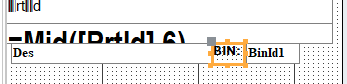
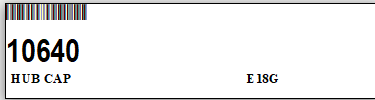
I have created a Barcode report. It all works just fine except the Label for one of the fields marked as BIN:. When I print the label, BIN: is not on the label. What did I do wrong?
David Clement OP  @Reply  
      
3 months ago

David Clement OP  @Reply  
      
3 months ago

David Clement OP  @Reply  
      
3 months ago
=Mid([PrtId],6) I used this code to trim off the leading numbers I do not need.
Kevin Robertson  @Reply  
          
3 months ago
Check the Visible property.
David Clement OP  @Reply  
      
3 months ago
Visible is YES
David Clement OP  @Reply  
      
3 months ago
I am sorry for just jumping right in with a proper greeting or something. I am doing this at work, and my boss doesn't like me doing this.  Creating this is for me, but I don't have a Barcode printer at home, so I have to test it at work.
David Clement OP  @Reply  
      
3 months ago
Richard, thanks to your Great lesson on Barcode printing, although your lesson was for a Dymo label printer, ours is a Zebra GX420t, I have made a way to print our Barcodes in 2 steps as opposed to 11 steps with the program my company uses. I will NEVER be able to convince my company to use my database for labels, but as far as I am concerned, mine works much better!

Thank you!
Donald Blackwell  @Reply  
        
3 months ago
Hi David,

Since you checked the visible property of the label, a couple other thing I might look at:

The display when property. If you want it to be visible on screen it should say always.

Another thing might be to ensure the label isn't being hidden by one of the text fields by clicking the label and going to arrange and the bring to front.

I've also had happen where I cleaned up a label caption too well. I accidentally made the caption a space and had the caption as the name of the label so I would see what I expected in design view but not report or print view..

Sorry if I listed things already posted. At eye doctor and had my eyes dilated so not seeing best right now.

Don
David Clement OP  @Reply  
      
3 months ago
Thank you Donald!

This thread is now CLOSED. If you wish to comment, start a NEW discussion in Access Forum.
 

Next Unseen

 
New Feature: Comment Live View


The following is a paid advertisement
Computer Learning Zone is not responsible for any content shown or offers made by these ads.
 

Learn
 
Access - index
Excel - index
Word - index
Windows - index
PowerPoint - index
Photoshop - index
Visual Basic - index
ASP - index
Seminars
More...
Customers
 
Login
My Account
My Courses
Lost Password
Memberships
Student Databases
Change Email
Info
 
Latest News
New Releases
User Forums
Topic Glossary
Tips & Tricks
Search The Site
Code Vault
Collapse Menus
Help
 
Customer Support
Web Site Tour
FAQs
TechHelp
Consulting Services
About
 
Background
Testimonials
Jobs
Affiliate Program
Richard Rost
Free Lessons
Mailing List
PCResale.NET
Order
 
Video Tutorials
Handbooks
Memberships
Learning Connection
Idiot's Guide to Excel
Volume Discounts
Payment Info
Shipping
Terms of Sale
Contact
 
Contact Info
Support Policy
Mailing Address
Phone Number
Fax Number
Course Survey
Email Richard
[email protected]
Blog RSS Feed    YouTube Channel

LinkedIn
Copyright 2026 by Computer Learning Zone, Amicron, and Richard Rost. All Rights Reserved. Current Time: 6/9/2026 3:23:26 PM. PLT: 0s