Free Lessons
Courses
Seminars
TechHelp
Fast Tips
Templates
Topic Index
Forum
ABCD
 
Home   Courses   TechHelp   Forums   Help   Contact   Merch   Join   Order   Logon  
 
Back to Access Forum    Comments List
Upload Images   @Reply   Bookmark    Link   Email   Next Unseen 
Bank Transactions
David Clement 
      
46 days ago
Good morning Richard,
First off, I just wanted to thank you for your video's and detailed explanations on how to build a Cheekbook Register, which I have done and it works GREAT!
I really appreciate you and your teachings. Having said all that, my register felt like it is missing something. Actual Bank Information.
So I downloaded my Banks .csv file and with some tweaking, it works really well.
I had to limit the amount of charactors in the Description field due to size.
My question, Is there a way to update my database using the .csv method without adding previous data?
Thank you.
David Clement OP  @Reply  
      
46 days ago
Sorry For The Mis Spelling Of Transactions.
Richard Rost  @Reply  
          
46 days ago
What do you mean by without adding previous data?
David Clement OP  @Reply  
      
46 days ago
Right now, the .csv file is from 4/2024 through 3/14/2026. When I download a new one with current information, it will be a new file, that I will have to tweak again because of the Banks Really long Description, and Extended Description information. When I made my form for this, I had to use Long Text Controls to hold the data. When I tried to search those fields, it would work due to their size, so I set the field size to 50 and now it works.
Why do Banks give so muck data for a simple Description?
David Clement OP  @Reply  
      
46 days ago
Sorry, my spelling is off again.
David Clement OP  @Reply  
      
46 days ago
I meant, it wouldn't work....
Sorry.
David Clement OP  @Reply  
      
46 days ago
I guess I need to take nap or something, my spelling is horrible today!
Richard Rost  @Reply  
          
46 days ago
Is there any kind of a transaction ID in that CSV file? Sometimes in addition to the date and the transaction amount in the description will give you an ID. Like one of the services that I use is called Tiller. And they not only give every institution and ID every account an ID but they also give every transaction its own ID as well. You can use that to determine which ones you have already imported.
Richard Rost  @Reply  
          
46 days ago
Can you show me a little sample of the CSV file that they're giving you? Obviously, blank out any sensitive information.
David Clement OP  @Reply  
      
46 days ago
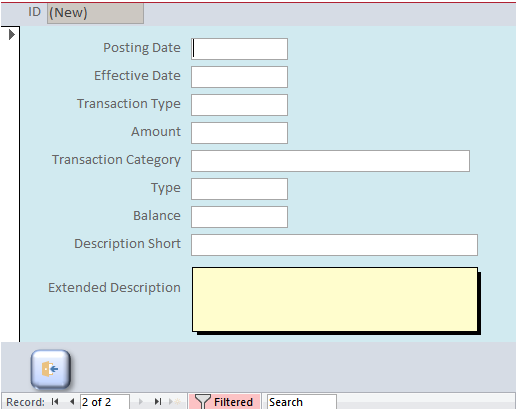
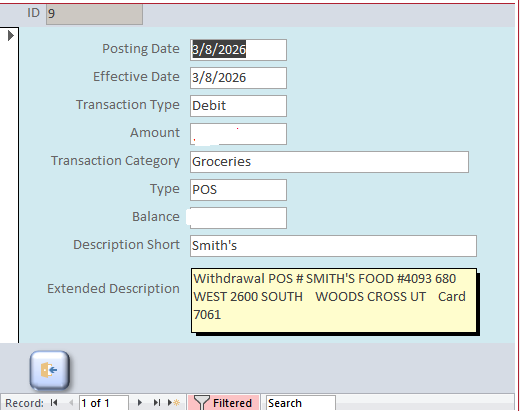
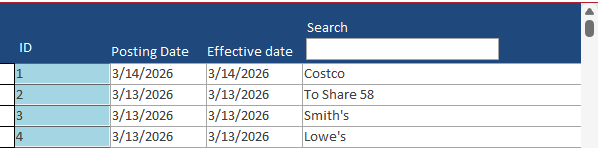
I am only using Posting Date, Effective Date and Description in my search form and it works fine, after setting the Description Field size to 50 in a Sort Text field. In my Main form, I am using Large Text Fields for Description and Extended Description so I get all the Banks information.
See Screenshots.
David Clement OP  @Reply  
      
46 days ago

David Clement OP  @Reply  
      
46 days ago

David Clement OP  @Reply  
      
46 days ago

David Clement OP  @Reply  
      
46 days ago
I understand that I can choose a Date Range from my Bank, probably 1 month at a time from now on. When I add the nre Edited .csv file to my table, would I do it an an addendum?
David Clement OP  @Reply  
      
46 days ago
new....
David Clement OP  @Reply  
      
46 days ago

David Clement OP  @Reply  
      
46 days ago

David Clement OP  @Reply  
      
46 days ago
"Set Phasers To Stun"
Donald Blackwell  @Reply  
       
46 days ago
The thing you've got to watch for when choosing a non-overlapping date range, is that sometimes, a transaction may show up after you've downloaded your previous file that occurred in the previous range. With my bank, sometimes transactions don't show up for a week but they always have the original date, or at least within 1-business day.

For my check register to handle duplicates (better), I basically have to check the date, check/draft #, description, category(s) and amount to compare if it's a transaction already in the register and then anything it can't verify, it puts in a temp table for me to check.
Bryan Coleman  @Reply  
     
46 days ago
David
Can you use the "Transaction ID" column as a ID field to prevent adding previous data?
Richard Rost  @Reply  
          
46 days ago
Yes, Bryan hit the nail on the head, that is exactly what that transaction ID is for. Create that field in your database and use that as a way to eliminate duplicates, that way you can import any range you want and your system will just ignore those duplicates. You want to use a staging table. Import all the data into a staging table, eliminate the duplicates, the ones that you already have, and then move the ones that are not duplicates to your main table. I actually have been meaning to cover this in the video so I'll be bumping it up the list.
Donald Blackwell  @Reply  
       
46 days ago
Yeah, that makes it much easier, lol. My bank doesn't provide those in their CSV/QIF files.
David Clement OP  @Reply  
      
46 days ago
Thank you all. I understand the concept of a Staging Table, just not sure how to use one, and then tie it to the Main Table.
Bryan Coleman  @Reply  
     
46 days ago
David One way to do a Staging Table is to copy your csv file into tempT and the use a delete query to remove duplicates;
DELETE FROM tempT
WHERE EXISTS
   (SELECT transactionID                                        
   FROM transactionT                                    
   WHERE transactionT.transactionID = tempT.transactionID);
then use an append query to copy tempT to transactionT
Richard Rost  @Reply  
          
46 days ago
I'm putting something together now. It'll probably be in the next developer lesson since there will be some VBA coding involved. Not a ton, but a little bit. It's mostly conceptual, but I need to go through and update all my stuff because I haven't done my 2025 taxes yet, so this is a good opportunity for me to download statements from all my different banks and credit cards and stuff and see what kind of formats they provide. This is something that I've personally been doing by hand for the past 20-some years so I could use an automated system for this myself because it's a pain every year. Takes me two or three days to gather everything and put it all together. So hold tight, something's coming.
David Clement OP  @Reply  
      
46 days ago
Thank you. Will I be able to see a Developer Video as am not A Developer?
I appreciate your help and videos!
I would like to see what you come up with.
Just "Boldly Go Where You Have Not Gone Berfore"! What ever you come up with I am sure will be amazing!
Ben Perry  @Reply  
      
43 days ago
Not to but in out of context but David, you mentioned the check register video and I see you've started the expert lessons. If youre referring to the tech help video and have not gotten far in expert, then I'd recommend you check out expert 29(I think). I feel like I remember seeing Richard walk through the entire process, including exporting that csv file to a temp table. If you've seen it then I'd recommend listening to Richard and "holding tight" until he sends out something new.
Richard Rost  @Reply  
          
43 days ago
Yeah, anybody can get a hold of the Developer content. They're just lessons you can purchase, and as a gold member, you'd get a discount, obviously. But I find that lately, it's been working better to release new stuff as developer lessons because I can take my time and explain things better. You know, the developer level is such that I can expect the developer students will understand. And then later on, if I've got a bunch of lessons that make sense to put together into a seminar, I can do that as well.

But I always try to tell people, okay, before you watch this, watch these other videos first if you need help understanding some basic features like recordsets or whatever. I do my best to try to point out the prerequisites. It's just very difficult to take something like this, bank transactions and stuff, and do it properly without programming. Especially once you start dealing with staging tables and stuff. Is it possible? Yes. It's just a whole lot easier with a little bit of VBA code.

This thread is now CLOSED. If you wish to comment, start a NEW discussion in Access Forum.
 

Next Unseen

 
New Feature: Comment Live View


The following is a paid advertisement
Computer Learning Zone is not responsible for any content shown or offers made by these ads.
 

Learn
 
Access - index
Excel - index
Word - index
Windows - index
PowerPoint - index
Photoshop - index
Visual Basic - index
ASP - index
Seminars
More...
Customers
 
Login
My Account
My Courses
Lost Password
Memberships
Student Databases
Change Email
Info
 
Latest News
New Releases
User Forums
Topic Glossary
Tips & Tricks
Search The Site
Code Vault
Collapse Menus
Help
 
Customer Support
Web Site Tour
FAQs
TechHelp
Consulting Services
About
 
Background
Testimonials
Jobs
Affiliate Program
Richard Rost
Free Lessons
Mailing List
PCResale.NET
Order
 
Video Tutorials
Handbooks
Memberships
Learning Connection
Idiot's Guide to Excel
Volume Discounts
Payment Info
Shipping
Terms of Sale
Contact
 
Contact Info
Support Policy
Mailing Address
Phone Number
Fax Number
Course Survey
Email Richard
[email protected]
Blog RSS Feed    YouTube Channel

LinkedIn
Copyright 2026 by Computer Learning Zone, Amicron, and Richard Rost. All Rights Reserved. Current Time: 4/30/2026 5:48:57 AM. PLT: 0s