Free Lessons
Courses
Seminars
TechHelp
Fast Tips
Templates
Topic Index
Forum
ABCD
 
Home   Courses   TechHelp   Forums   Help   Contact   Merch   Join   Order   Logon  
 
Back to Access Forum    Comments List
Upload Images   @Reply   Bookmark    Link   Email   Next Unseen 
Maybe Im Over Complicating Things on a Query...
Mike Ackland 
       
43 days ago
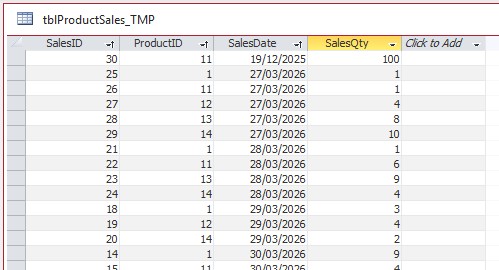
Table1; Sales (SalesID, ProductID, SalesDate, SalesQty) - This is imported weekly from a checkout.
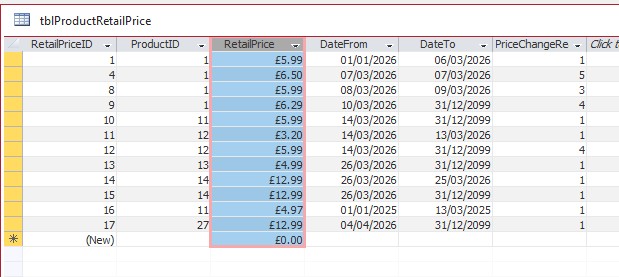
Table2; Retail prices(RetailPriceID, ProductID, RetailPrice, DateFrom, DateTo)

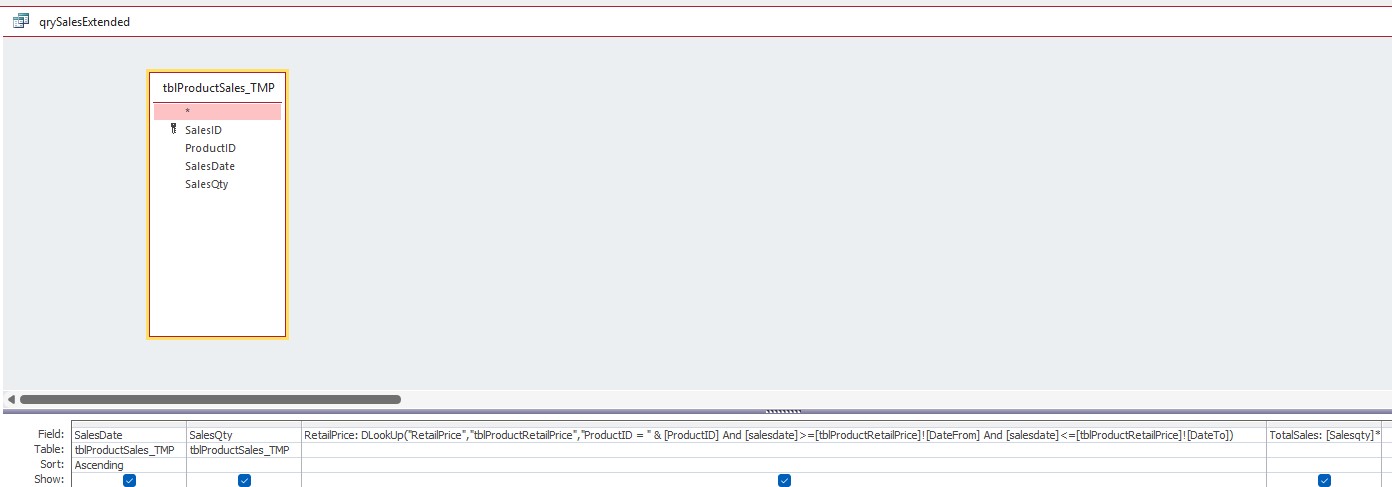
I'm trying to create a dlookup in a query  using the Sales Table to determine the total sales using the correct RetailPrice for that days sales. But sometimes, the price can change overnight before the import has taken place.

Query1; Current Retail Price is a simple query and works for todays sales but I also need to determine the retail price from, say 4 days ago, but has had a price change since.

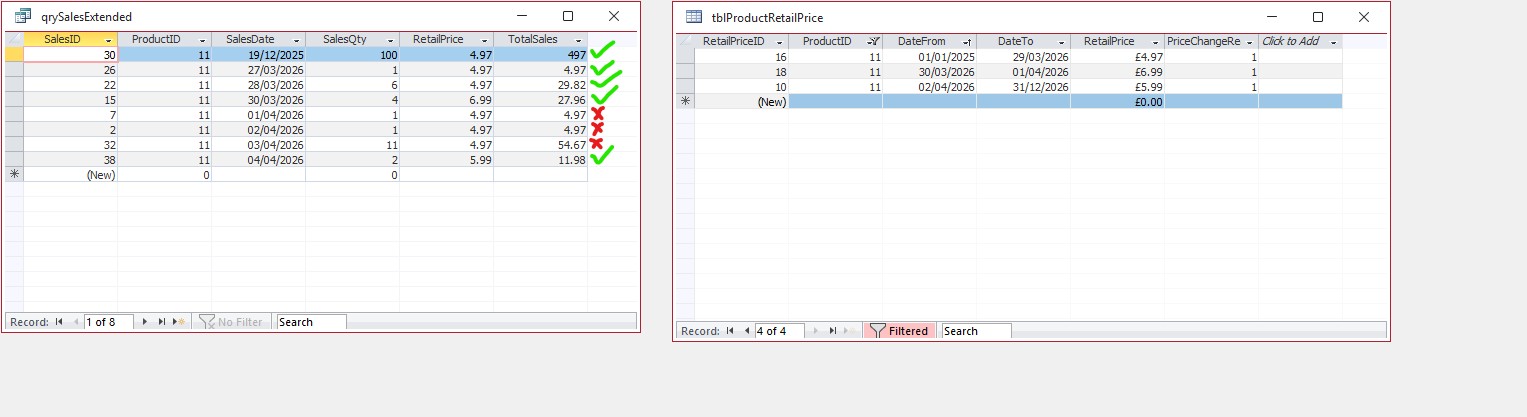
I'll post a couple of screen shots to help...
Mike Ackland OP  @Reply  
       
43 days ago

Mike Ackland OP  @Reply  
       
43 days ago

Mike Ackland OP  @Reply  
       
43 days ago

Mike Ackland OP  @Reply  
       
43 days ago
I'm getting bad results, and the price is the same for each product. Can someone please tell me where I'm going wrong? I hate using forums, and I'm like to try and solve problems myself, and learn. But I've been at this for days, and just can't get my head around it. So maybe I am overcomplicating things...
Donald Blackwell  @Reply  
       
43 days ago
Have you tried:

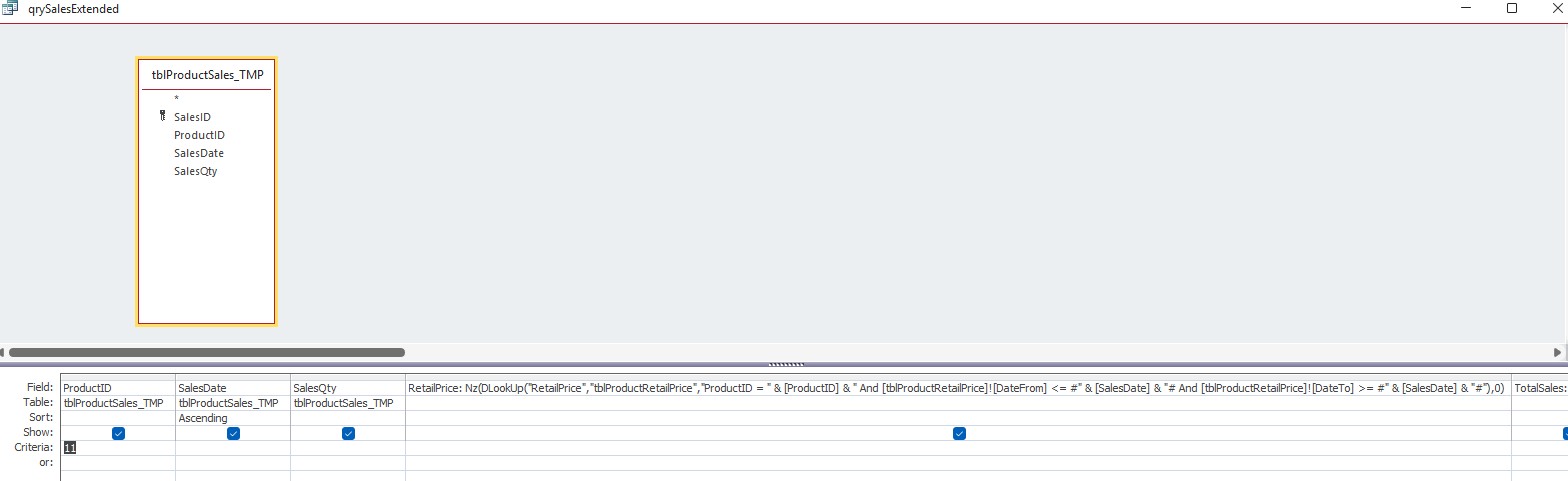
Price = nz(DLookup("RetailPrice","tblProductRetailPrice","ProductID=" & PRODUCTID & " And DateFrom <= #" & DATEOFINTEREST & "# And DateTo >= #" & DATEOFINTEREST & "#"),0)

That should get your Retail Price for a product on a given date then you would just need to multiply that times the # of sales for that date for the total. The nz is just to prevent errors popping up. And, of course, replace PRODUCIT and DATEOFINTEREST with the appropriate field or variable names.
Kevin Robertson  @Reply  
           
43 days ago
Donald You beat me to it.
Mike Ackland OP  @Reply  
       
43 days ago
Donald, Many thanks. That's a shove in the right direction for sure. So it was just a matter of "'s and #'s and using the right reference for the dlookup.
As you can see, I'm nearly there. I just have to figure out the erroneous results and where the prices are coming from, and I'm done.  Should keep me busy over the weekend :)

Many thanks guys. As always, help is much appreciated.
Mike Ackland OP  @Reply  
       
43 days ago

Mike Ackland OP  @Reply  
       
43 days ago

Mike Ackland OP  @Reply  
       
42 days ago
so... it seems the incorrect prices are date related somehow? looks like month/day switched maybe? Maybe not!
I Clng the date in both the sales table and query and they return the correct number, for example 02/04/2026 returns value of 46114, so I know the date formats are correct.
I keep digging :)
Donald Blackwell  @Reply  
       
42 days ago
Yeah, definitely in the dates. That is why Richard strongly promotes ISO Date Format and Convert ISO Date Time.

To fix your current problem, I would look first at the date formatting at the table level as well as checking what the system date setting are on the computer(s) hosting the database.
Matt Hall  @Reply  
          
42 days ago
What Donald said.

Also, another approach may be to record the actual sale price in tblProductSales, at the moment the sale is recorded.  This is a distinct piece of data from retail price and directly related to that individual sale.  It saves looking up the data from tblProductRetailPrice, using SalesDate, and allows the flexibility for one-off discounts like family discounts, scratch and dent, etc..  You would just total sales for a given date.

You could use the retail price as the default value in your sale form.
Mike Ackland OP  @Reply  
       
41 days ago
I thought about that. But sadly sometimes the checkout will transfer data in the early hours the following morning. This has happened on a couple of occasions and there's been a price change and it's been logged incorrect for the previous days sales. Today I'm converting all tills to ISO (this is an option, as well as a couple of PC's which can run the access prog) and said PC's too. I'm also deleting the tables, and starting from scratch - thankfully the data in minimal I can manually input. So we'll see what happens tonight after todays sales. Fingers crossed.
Darrin Harris  @Reply  
     
41 days ago
Mike

The problem I found with ISO dates is you have to change all the computers you want to run your databases on?
Since I changed to ISO I now code so I can run the databases on any computer?

Have you tried formatting the date:

format([SalesDate], "yyyy-mm-dd")

This works for me.
Mike Ackland OP  @Reply  
       
41 days ago
Yes, thankfully I can change to ISO date format on the couple of tills in use so the imports aren't a problem. I've also changed the format on the three PC's that is using this access program, and all is working perfectly as it should.

Many thanks to Donald, Kevin and Darrin helping me with this thread. It just goes to show how much of a pain date formats are, and that ISO date format is the way forward. This shall be my only option moving forward.

The Struggle is real!

This thread is now CLOSED. If you wish to comment, start a NEW discussion in Access Forum.
 

Next Unseen

 
New Feature: Comment Live View


The following is a paid advertisement
Computer Learning Zone is not responsible for any content shown or offers made by these ads.
 

Learn
 
Access - index
Excel - index
Word - index
Windows - index
PowerPoint - index
Photoshop - index
Visual Basic - index
ASP - index
Seminars
More...
Customers
 
Login
My Account
My Courses
Lost Password
Memberships
Student Databases
Change Email
Info
 
Latest News
New Releases
User Forums
Topic Glossary
Tips & Tricks
Search The Site
Code Vault
Collapse Menus
Help
 
Customer Support
Web Site Tour
FAQs
TechHelp
Consulting Services
About
 
Background
Testimonials
Jobs
Affiliate Program
Richard Rost
Free Lessons
Mailing List
PCResale.NET
Order
 
Video Tutorials
Handbooks
Memberships
Learning Connection
Idiot's Guide to Excel
Volume Discounts
Payment Info
Shipping
Terms of Sale
Contact
 
Contact Info
Support Policy
Mailing Address
Phone Number
Fax Number
Course Survey
Email Richard
[email protected]
Blog RSS Feed    YouTube Channel

LinkedIn
Copyright 2026 by Computer Learning Zone, Amicron, and Richard Rost. All Rights Reserved. Current Time: 5/17/2026 4:23:37 AM. PLT: 1s