Free Lessons
Courses
Seminars
TechHelp
Fast Tips
Templates
Topic Index
Forum
ABCD
 
Home   Courses   TechHelp   Forums   Help   Contact   Merch   Join   Order   Logon  
 
Back to Access Forum    Comments List
Upload Images   @Reply   Bookmark    Link   Email   Next Unseen 
Slideshow Using Microsoft Access
Colin Eastaugh 
     
41 days ago
Attempt one
I used FollowHyperlink to open a photo, the result was a single image photo, Windows Photo Viewer navigation panels didn't work.

Paraphrasing the internet: this occurs because FollowHyperlink passes only the path of a specific file to the operating system, rather than the context of the folder containing it.

Attempt two
I switched from FollowHyperLink to ShellEx, thanks Richard and his Code Vault, but it doesn't seem to solve the problem, the navigation panels don't work as each photo was still treated as a separate entity.

I was wondering whether I need to tweak the ShellEx parameters:

"ShellExecute 0, "open", Path, Parameters, "", IIf(HideWindow, 0, 1)" to activate Windows Photo Viewer.

Does anyone have any views on this topic?
Donald Blackwell  @Reply  
       
41 days ago
I don't have any experience using the photo viewer from access. Does it have specific features you want to use or could you create a form with an unbound image control and have code in the timer event that applies and changes the source at x interval?
Colin Eastaugh OP  @Reply  
     
41 days ago
Donald, thanks for replying.

Windows Photo Viewer seems to be the software that Windows uses when I'm in Windows Explorer, I click on a photo in a folder and then hey presto I'm in Windows Photo Viewer, I just use the navigation panels to move through the photos.  

Hold the front page, I've just checked, Windows is now using Photos App rather than Windows Photo Viewer.

I'll hopefully come up with a workaround but it is 'interesting' to note that I don't have the same problem when using FollowHyperlink for PDFs files.  Adobe links the PDFs files together so navigation is reasonably easy.


Juan Rivera  @Reply  
            
41 days ago
I created a slideshow in Access by first adding pictures to each record, similar to the method Richard showed in the attached image. Then I added navigation buttons to move from record to record. After that, I built in a timer so the records would cycle automatically and display the pictures like a slideshow. It is not a full photo viewer, but I used different "lego pieces" of Access and combined them into a working slideshow, with the picture on the left and the description on the right. I used it on a construction project to show the progress from the early stages all the way to the completed finished product.
Donald Blackwell  @Reply  
       
41 days ago
Juan that's kinda what I was thinking of. I just wasn't sure if the Photo Viewer app had special functionality for animated slide transitions, etc., or any other special feature that was needed. But if Colin gets what he needs working GREAT!.

I just couldn't be as descriptive. was sitting in a Doctors waiting room for my mom's doctor appointment.
Kevin Robertson  @Reply  
          
41 days ago
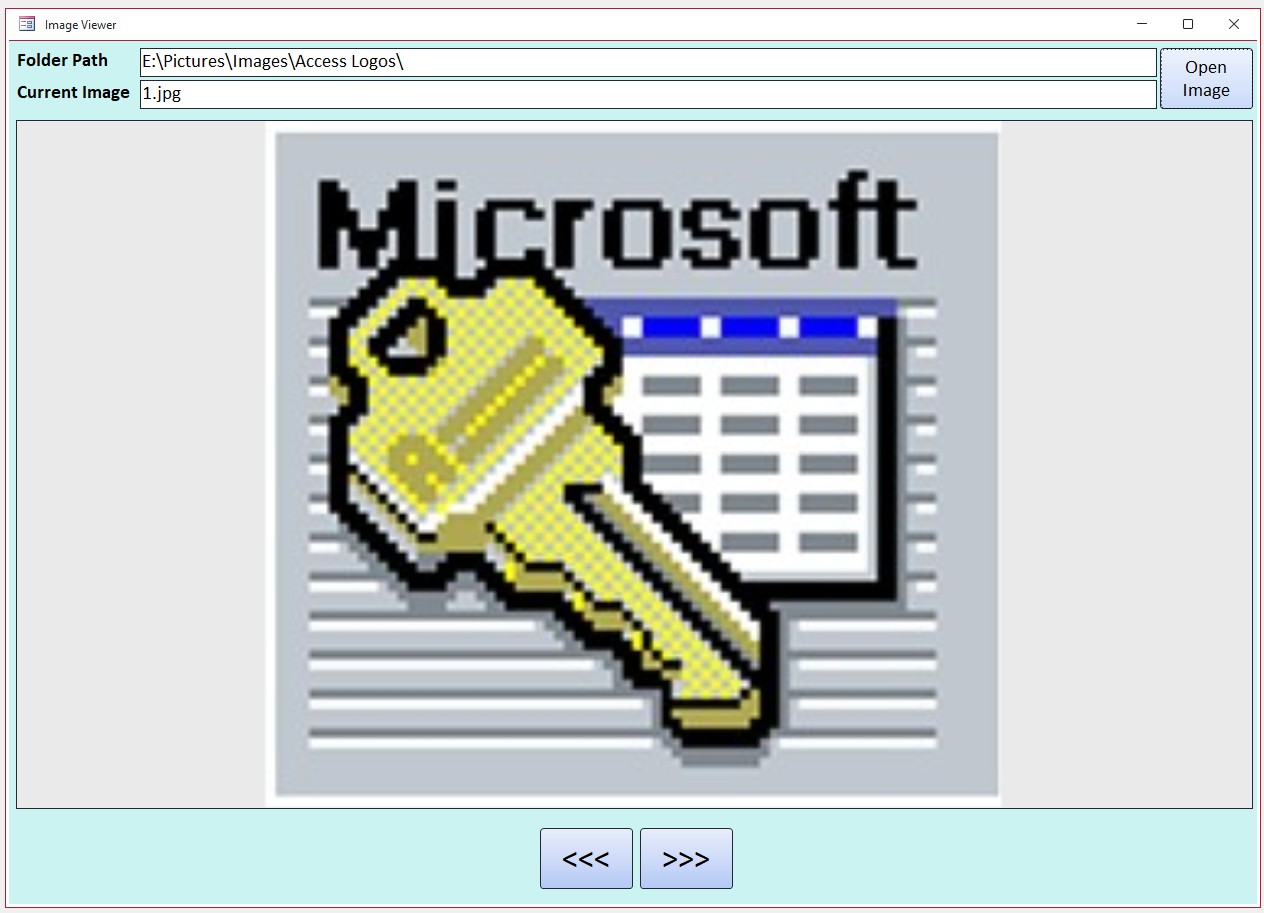
Here is the image viewer I built.
The Next / Previous will display the appropriate image within the specified folder.
Kevin Robertson  @Reply  
          
41 days ago

Richard Rost  @Reply  
          
41 days ago
Kevin love the vintage logo. :)
Colin Eastaugh OP  @Reply  
     
40 days ago
Thanks for all the comments. Much appreciated. And thanks to everyone for pointing out diplomatically that I don't need to use Microsoft's Photo app to produce a slideshow.  If I had my brain in gear, it happens occasionally, I should have realised that I could have typed into Access Learning Zone the word 'Images' hey presto, I would have discovered that Richard has produced close to a dozen videos on images.  What was I doing?  Access can so much, well apart from making a good cup of tea.
Colin Eastaugh OP  @Reply  
     
40 days ago
Well that is truly embarrassing.  I have just used the Images option in a Microsoft Access form for the first time ever, and wow, works a treat.  Today is not wasted.  Time for a cup of English (Earl Grey) tea.

Thanks everyone.
Richard Rost  @Reply  
          
40 days ago
Colin just make sure it's HOT! :)

This thread is now CLOSED. If you wish to comment, start a NEW discussion in Access Forum.
 

Next Unseen

 
New Feature: Comment Live View


The following is a paid advertisement
Computer Learning Zone is not responsible for any content shown or offers made by these ads.
 

Learn
 
Access - index
Excel - index
Word - index
Windows - index
PowerPoint - index
Photoshop - index
Visual Basic - index
ASP - index
Seminars
More...
Customers
 
Login
My Account
My Courses
Lost Password
Memberships
Student Databases
Change Email
Info
 
Latest News
New Releases
User Forums
Topic Glossary
Tips & Tricks
Search The Site
Code Vault
Collapse Menus
Help
 
Customer Support
Web Site Tour
FAQs
TechHelp
Consulting Services
About
 
Background
Testimonials
Jobs
Affiliate Program
Richard Rost
Free Lessons
Mailing List
PCResale.NET
Order
 
Video Tutorials
Handbooks
Memberships
Learning Connection
Idiot's Guide to Excel
Volume Discounts
Payment Info
Shipping
Terms of Sale
Contact
 
Contact Info
Support Policy
Mailing Address
Phone Number
Fax Number
Course Survey
Email Richard
[email protected]
Blog RSS Feed    YouTube Channel

LinkedIn
Copyright 2026 by Computer Learning Zone, Amicron, and Richard Rost. All Rights Reserved. Current Time: 5/17/2026 4:18:30 AM. PLT: 1s