Free Lessons
Courses
Seminars
TechHelp
Fast Tips
Templates
Topic Index
Forum
ABCD
 
Home   Courses   TechHelp   Forums   Help   Contact   Merch   Join   Order   Logon  
 
Back to Access Forum    Comments List
Upload Images   @Reply   Bookmark    Link   Email   Next Unseen 
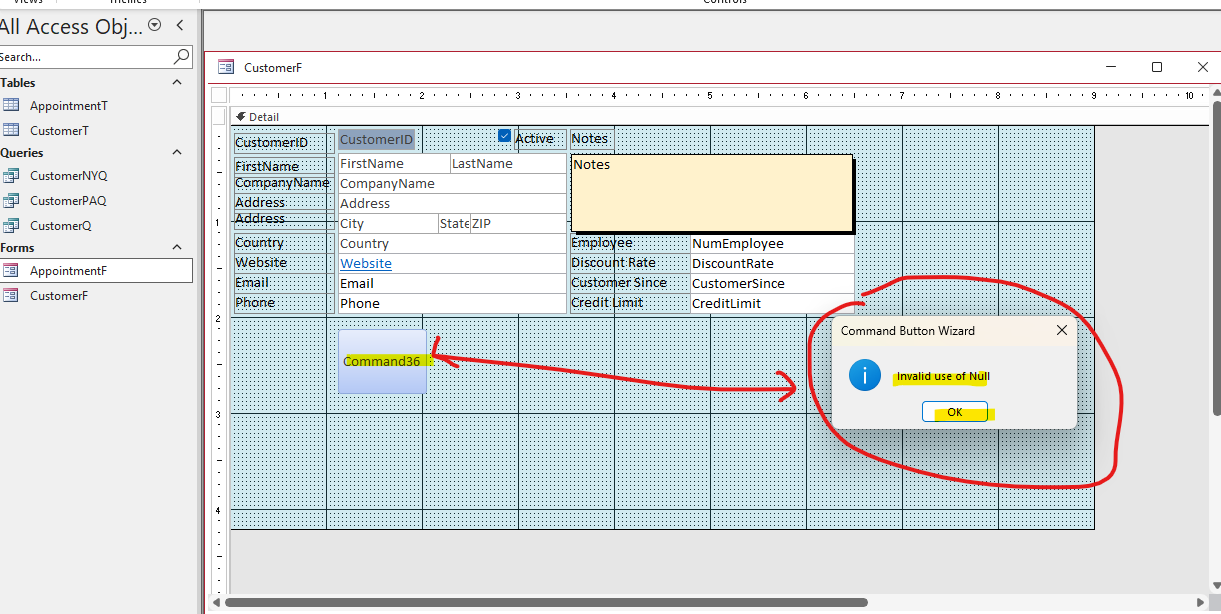
Invalid Use of Null - When Adding a Command Button
Vannak Hou 
    
3 days ago
Hey Richard,

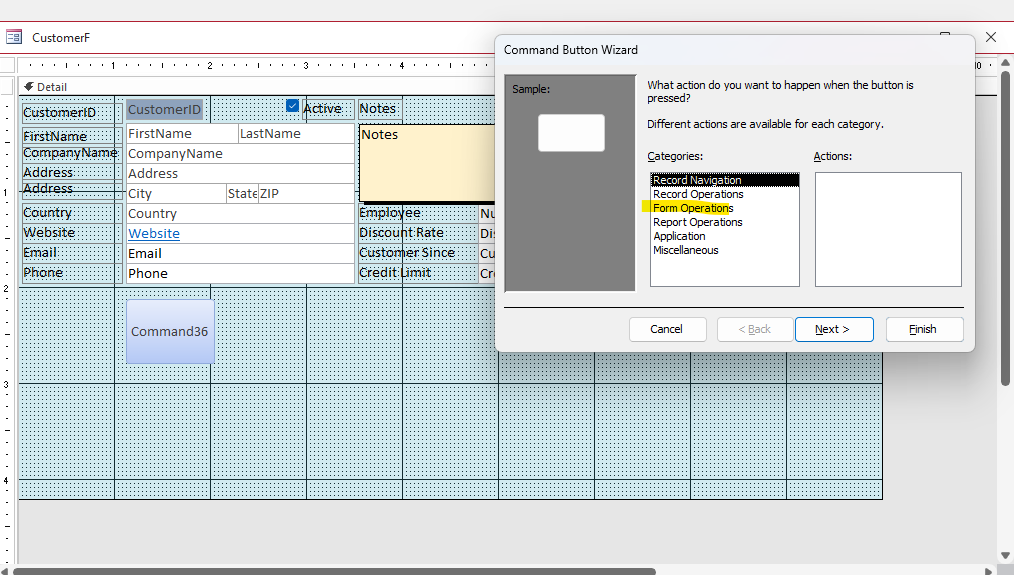
I remember 10+ years ago, never had any issue while adding a form but somehow while trying to add a Command button using MS Professional+ 2024; I'm getting "Invalid use of Null".  By I got the screen shots - is there away I can post on the Forum?  

Or is this because of the Office version that I'm using?
Vannak Hou OP  @Reply  
    
3 days ago

Vannak Hou OP  @Reply  
    
3 days ago

Vannak Hou OP  @Reply  
    
3 days ago

Vannak Hou OP  @Reply  
    
3 days ago
hope these photos were uploaded correctly.  Trying to get familiar w/ the Forum
Juan Rivera  @Reply  
            
3 days ago
Intro to VBA
Recomend this video It will make the button wizard look like your worst option.  VBA is the way to go.
John Davy  @Reply  
         
3 days ago
Is CustomerID and autonumber? john
Kevin Robertson  @Reply  
          
3 days ago
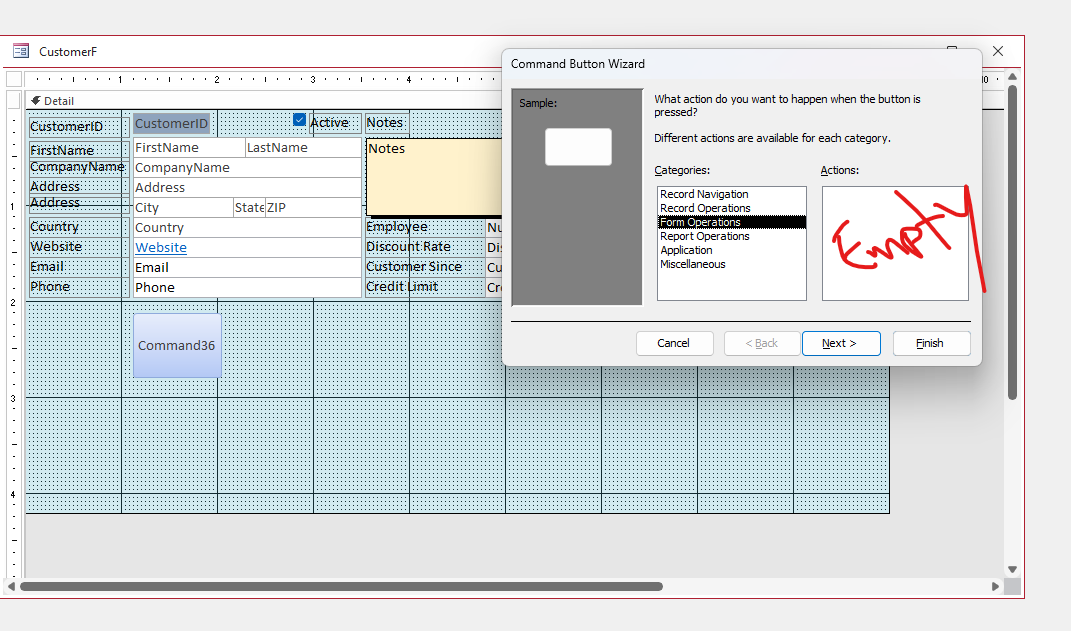
The clue is on the right side: "Actions:" is completely empty for Form Operations. That should never happen if the wizard is working properly.
This almost always means Access can't load the wizard libraries, usually due to a broken or missing reference.

Most likely cause
    You've got a missing reference in VBA, so the Command Button Wizard can't populate the actions list.

Quick check / fix
    Press ALT + F11 (open VBA editor)
    Go to Tools  References
    Look for anything marked MISSING
    Uncheck it (or fix it if you know the correct library)
    Close and reopen the form / Access

Other less common causes
    Wizard libraries not registered (e.g. ACWZMAIN.ACCDE)
    Corrupt Access install
    Disabled wizards (rare)
Vannak Hou OP  @Reply  
    
2 days ago
thank you for the suggestion - but I didn't want to wait; I installed the Office 2021 version and it's working fine now.  But I'll make sure follow your instruction once I install the Office version 2024 back.  Thank you your support/suggestions.
Add a Reply Upload an Image
Next Unseen

 
New Feature: Comment Live View


The following is a paid advertisement
Computer Learning Zone is not responsible for any content shown or offers made by these ads.
 

Learn
 
Access - index
Excel - index
Word - index
Windows - index
PowerPoint - index
Photoshop - index
Visual Basic - index
ASP - index
Seminars
More...
Customers
 
Login
My Account
My Courses
Lost Password
Memberships
Student Databases
Change Email
Info
 
Latest News
New Releases
User Forums
Topic Glossary
Tips & Tricks
Search The Site
Code Vault
Collapse Menus
Help
 
Customer Support
Web Site Tour
FAQs
TechHelp
Consulting Services
About
 
Background
Testimonials
Jobs
Affiliate Program
Richard Rost
Free Lessons
Mailing List
PCResale.NET
Order
 
Video Tutorials
Handbooks
Memberships
Learning Connection
Idiot's Guide to Excel
Volume Discounts
Payment Info
Shipping
Terms of Sale
Contact
 
Contact Info
Support Policy
Mailing Address
Phone Number
Fax Number
Course Survey
Email Richard
[email protected]
Blog RSS Feed    YouTube Channel

LinkedIn
Copyright 2026 by Computer Learning Zone, Amicron, and Richard Rost. All Rights Reserved. Current Time: 5/6/2026 11:07:29 AM. PLT: 1s