Free Lessons
Courses
Seminars
TechHelp
Fast Tips
Templates
Topic Index
Forum
ABCD
 
Home   Courses   TechHelp   Forums   Help   Contact   Merch   Join   Order   Logon  
 
Back to Access Forum    Comments List
Upload Images   @Reply   Bookmark    Link   Email   Next Unseen 
Ignoring SetFocus Command
Will Schmidt 
     
3 days ago
Here is the after update event I created:

DetailsPrivate Sub PartName_AfterUpdate()
      IsPresent = ""
    On Error Resume Next
    IsPresent = DLookup("SkuNumber", "PartsCatalogueT", "SkuNumber =" & "PartName")
     On Error GoTo 0

    If IsPresent = "" Then
        Me.description.SetFocus
    Else
        MsgBox "WARNING! This Part Number already exist!"
        Me.PartName.SetFocus
        PartName = ""
    End If
End Sub


BUT: If "IsPresent" = True it sets focus on "description" instead of "PartName" What am i doing wrong? (Actually it sets focus on "description" no matter what.
Kevin Robertson  @Reply  
          
3 days ago
Look at the criteria of your DLookup:
    IsPresent = DLookup("SkuNumber", "PartsCatalogueT", "SkuNumber=""" & PartName & """")

Why is the criteria comparing SkuNumber to PartName? They sound like two different fields.
Will Schmidt OP  @Reply  
     
2 days ago
Ok, I changed the name from PartName to SkuNumber. I guess i was confusing it. Then I changed the DLookup like you have it.
IsPresent = DLookup("SkuNumber", "PartsCatalogueT", "SkuNumber =""" & SkuNumber & """")
However it is still setting focus on "description"
I know the Dlookup is working right because if i msgbox "IsPresent" if tells me that i am finding a match.
Alex Hedley  @Reply  
           
2 days ago
Is it description or Description?
Kevin Robertson  @Reply  
          
2 days ago
What type of field is IsPresent?
In your code it is treated as text, but below the code you say "IsPresent" = True.

Also, I would wrap the DLookup in the NZ Function.
If you remove the errorhandling you are probably getting an Invalid Use of Null error.

Try this:

Dim ID AS Long

ID = Nz(DLookup("PartID", "PartsCatalogueT", "SkuNumber=""" & SkuNumber & """"), 0)

If ID = 0 Then
    Description.SetFocus
Else
    MsgBox "WARNING! This Part Number already exist!"
    PartName.SetFocus
    PartName = ""
End If
Will Schmidt OP  @Reply  
     
2 days ago

Will Schmidt OP  @Reply  
     
2 days ago

Will Schmidt OP  @Reply  
     
2 days ago
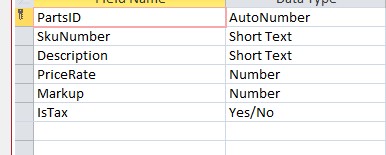
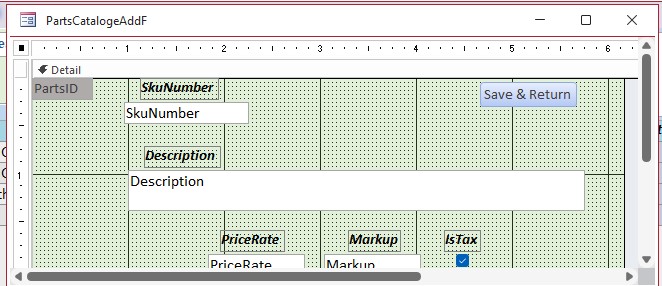
Here is the Table names and the form. I did your suggestion and it is still jumping to Description (and yes, it is Description, Not description. I had the control named PartName even though the table name was SkuNumber, but i changed it back to SkuNumber. I have noticed though, that the curser seems to stop at SkuNumber for just a split second before going to Description as though something is causing it to end up at Description, but I can't imagine what that would be.
So, I did this:

DetailsPrivate Sub SkuNumber_AfterUpdate()
     ID = Nz(DLookup("PartsID", "PartsCatalogueT", "SkuNumber =" & "SkuNumber"), 0)
    MsgBox ID
      
        MsgBox "WARNING! This Part Number already exist!"
        SkuNumber.SetFocus
        SkuNumber = ""
End Sub


And it still jumps to Description!!
Will Schmidt OP  @Reply  
     
2 days ago
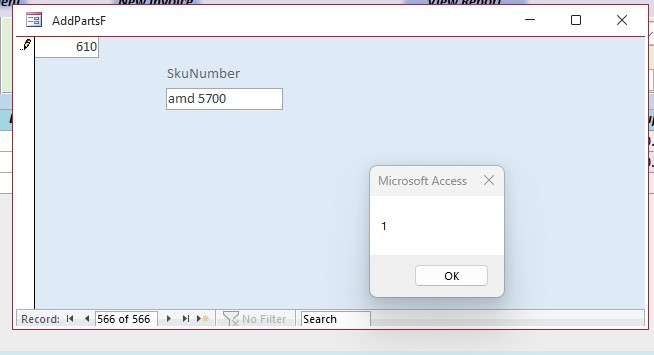
msgbox returns a 1
i figured out that the curser is stopping for a split second to clear out Skunumber. If i comment out "SkuNumber = """ it just jumps to Description.
Will Schmidt OP  @Reply  
     
2 days ago
"IsPresent" was not a field. it was a Dim Statement as in: Dim IsPresent as string.
Will Schmidt OP  @Reply  
     
2 days ago
In the Table i have a record that equals; PartsID 561 > SkuNumber = AMD 5700
So, I created a new form with only the SkuNumber Field, and here is what i get:

Will Schmidt OP  @Reply  
     
2 days ago

Will Schmidt OP  @Reply  
     
2 days ago

Will Schmidt OP  @Reply  
     
2 days ago
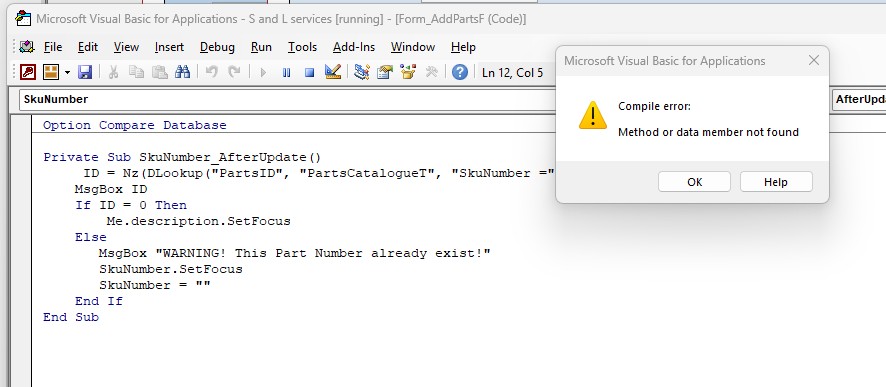
Somehow VBA thinks ID is 0 when msgbox says 1
Kevin Robertson  @Reply  
          
2 days ago
Will Schmidt OP  @Reply  
     
2 days ago
Kevin, Can you explain?
Donald Blackwell  @Reply  
       
2 days ago
Will I think what Kevin was referring to was that you should move your code for checking the value from the SkuNumber_AfterUpdate() event to the SkuNumber_BeforeUpdate(Cancel as Integer) event.

Then you can check if ID <> 0 and give your msgbox, Clear the SkuNumber and set the focus to it and then change cancel to true and your cursors should stay in that field. In the after update event it has already started moving.

So your code might look like:

DetailsPrivate Sub SkuNumber_BeforeUpdate(Cancel as Integer)
     ID = Nz(DLookup("PartsID", "PartsCatalogueT", "SkuNumber =""" & SkuNumber & """"), 0)

     If ID <> 0 then
          MsgBox "WARNING! This Part Number already exist!"
          SkuNumber.SetFocus
          SkuNumber = ""
          Cancel = True
     End If

End Sub


Since it appears that description is the next field in your tab order, you don't need to add code to move there as tabbing out of the SkuNumber will put you there anyway.
Add a Reply Upload an Image
Next Unseen

 
New Feature: Comment Live View


The following is a paid advertisement
Computer Learning Zone is not responsible for any content shown or offers made by these ads.
 

Learn
 
Access - index
Excel - index
Word - index
Windows - index
PowerPoint - index
Photoshop - index
Visual Basic - index
ASP - index
Seminars
More...
Customers
 
Login
My Account
My Courses
Lost Password
Memberships
Student Databases
Change Email
Info
 
Latest News
New Releases
User Forums
Topic Glossary
Tips & Tricks
Search The Site
Code Vault
Collapse Menus
Help
 
Customer Support
Web Site Tour
FAQs
TechHelp
Consulting Services
About
 
Background
Testimonials
Jobs
Affiliate Program
Richard Rost
Free Lessons
Mailing List
PCResale.NET
Order
 
Video Tutorials
Handbooks
Memberships
Learning Connection
Idiot's Guide to Excel
Volume Discounts
Payment Info
Shipping
Terms of Sale
Contact
 
Contact Info
Support Policy
Mailing Address
Phone Number
Fax Number
Course Survey
Email Richard
[email protected]
Blog RSS Feed    YouTube Channel

LinkedIn
Copyright 2026 by Computer Learning Zone, Amicron, and Richard Rost. All Rights Reserved. Current Time: 5/6/2026 10:54:53 AM. PLT: 1s