Free Lessons
Courses
Seminars
TechHelp
Fast Tips
Templates
Topic Index
Forum
ABCD
 
Home   Courses   TechHelp   Forums   Help   Contact   Merch   Join   Order   Logon  
 
Back to Access Forum    Comments List
Upload Images   @Reply   Bookmark    Link   Email   Next Unseen 
Mark Selected Customers and Children Records
James Hopkins 
     
18 hours ago
Hey Richard and the Guys, I am trying to figure out how to write a Sub Procedure that I can “Mark Active” the selected Customers on a Continuous Form and mark the Customer Table and Recover the Children Records that are associated with the selected Customers’ ID in other Tables like, “Estimates”, “Contacts”, and “Invoices”. Question I have is, what is the better way to Look Up the Child Records in the associated Tables to find and set them "Active"?
Richard Rost  @Reply  
          
17 hours ago
Need more. What's this for? A report? Screen shots? Excel mockup? Your question is kinda vague. Gimme some details. :)
James Hopkins OP  @Reply  
     
13 hours ago
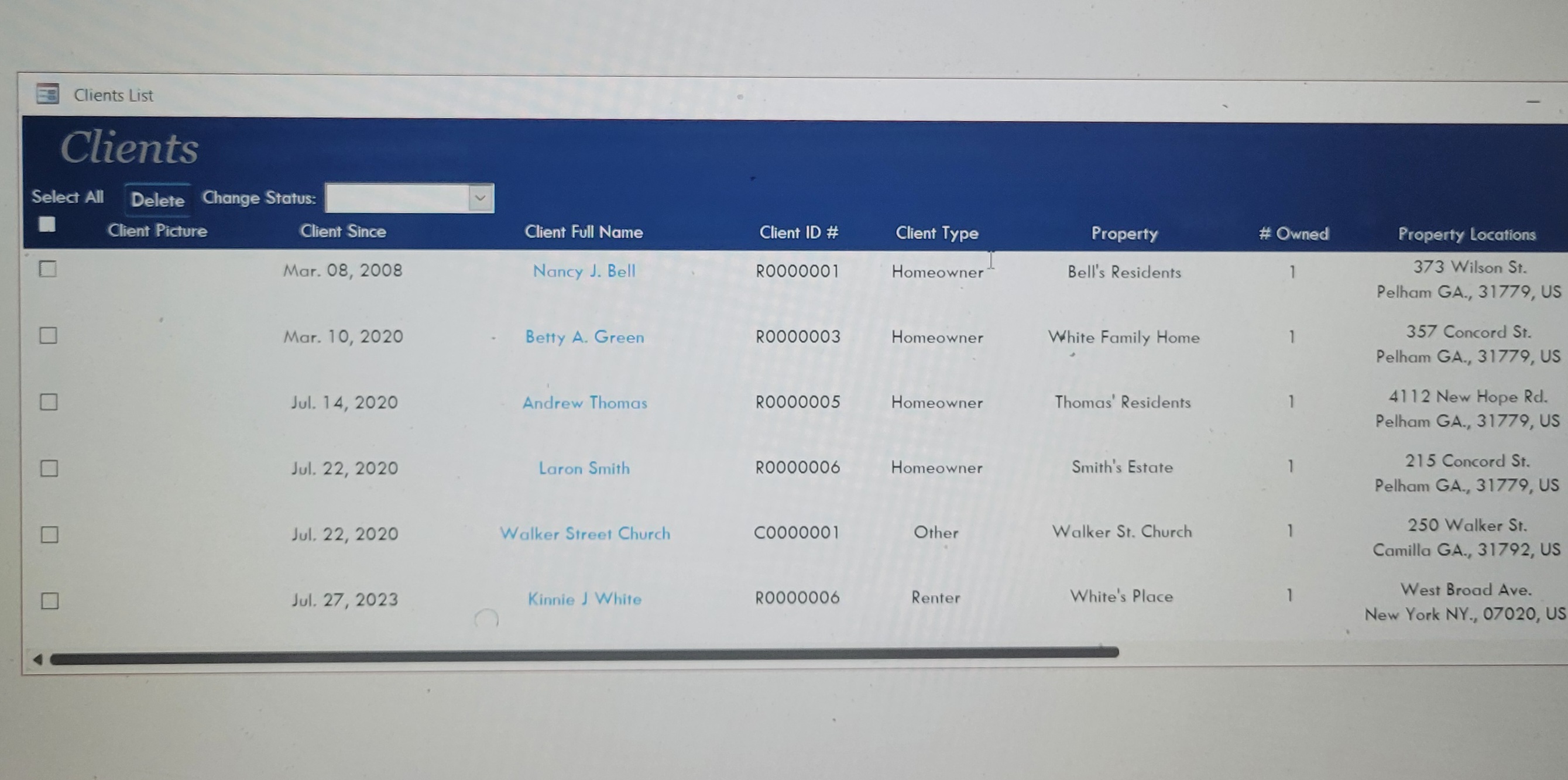
Sorry, I have a Combo Box to Change the Status of the selected Customer(s) from 'Active' or 'Inactive'. If selected  'Active', I am trying to Recover Properties and Invoices that were not Sent to the Customer(s).
James Hopkins OP  @Reply  
     
13 hours ago
Here's the Code I have:

DetailsPrivate Sub MarkClientActive(ID As Long)
    
    Dim MyTables As Variant, i As Long, S As String

    ID = TempVars("ClientID")
    
    MyTables = Array("PropertyT", "ContactT", "ScheduleT", "RecurringInvoiceTemplateT", "ContractT", "ServiceWorkorderT")
    
    For i = 0 To UBound(MyTables)
        On Error GoTo MyErr
        CurrentDb.Execute "UPDATE " & MyTables(i) & " SET Status = 'Active', IsDeleted = False WHERE ClientID=" & ID, dbFailOnError
        On Error GoTo 0
    Next
    
MyExit:
    Exit Sub

MyErr:
    MsgBox "Unable to Update the Client Status and Ass. Child Records?"
    Resume MyExit

End Sub

Private Sub MarkClientInactive(ID As Long)
    
    Dim MyTables As Variant, i As Long, S As String

    ID = TempVars("ClientID")
    
    MyTables = Array("PropertyT", "ContactT", "ScheduleT", "RecurringInvoiceTemplateT", "ContractT", "ServiceWorkorderT")
    
    For i = 0 To UBound(MyTables)
        On Error GoTo MyErr
        CurrentDb.Execute "UPDATE " & MyTables(i) & " SET Status = 'Archived', IsDeleted = True WHERE ClientID=" & ID, dbFailOnError
        On Error GoTo 0
    Next
    
MyExit:
    Exit Sub

MyErr:
    MsgBox "Unable to Delete Client and Ass. Child Records?"
    Resume MyExit

End Sub
James Hopkins OP  @Reply  
     
13 hours ago
DetailsPrivate Sub CboChangeStatus_Click()
    
    If CboChangeStatus = "Active" Then
        
        Dim N As Long
            
        N = CustomMsgBox("These Clients will be marked as 'Active'. Do you won't to Proceed?", "Allow these Clients to be 'Mark Active", "Yes", "No", "Cancel", 2, 3, _
            "FCFC1C", "0E309A", "Times New Roman", 12, 2800, 7000, IconExclamation, 3)
                    
        If N = 1 Then
                    
            Dim N2 As Long
                
            N2 = CustomMsgBox("Do you want to Recover Properties and Invoices that were not Sent to these Clients? Do you won't to Proceed?", "Allow the Recovery of Properties and Invoices for these Clients", "Yes", "", "Cancel", 1, 3, _
                "FCFC1C", "0E309A", "Times New Roman", 12, 2800, 7000, IconExclamation, 3)
                        
            If N2 = 1 Then
            
                'Code for Recovering the Properties and Invoices
                TempVars("ClientID") = ClientID.Value
            
                MarkClientActive 6
            
                On Error GoTo MyActiveErr
                CurrentDb.Execute "UPDATE CLientT SET Status = 'Active', LnSelect = False WHERE LnSelect = True"
                On Error GoTo 0
            
                Me.Requery
                Me.CboChangeStatus = ""
                
MyActiveExit:
    Exit Sub

MyActiveErr:
    MsgBox "Unable to Update these selected Clients Status!"
    Resume MyActiveExit
    
            Else
                CurrentDb.Execute "UPDATE CLientT SET Status = 'Active', LnSelect = False WHERE LnSelect = True"
                Me.Requery
                Me.CboChangeStatus = ""
            End If
            
        ElseIf N = 2 Then
            Exit Sub
        Else
            Exit Sub
        End If
        
    ElseIf CboChangeStatus = "Inactive" Then
        
        Dim N3 As Long
    
        N3 = CustomMsgBox("These Clients will be marked as 'Inactive'. Do you won't to Proceed?", "Allow these Clients to be 'Mark Inactive", "Yes", "No", "Cancel", 2, 3, _
            "FCFC1C", "0E309A", "Times New Roman", 12, 2800, 7000, IconExclamation, 3)
                
        If N3 = 1 Then
            
            Dim N4 As Long
                
            N4 = CustomMsgBox("Do you also want to remove all Open Visits and Invoices that were not Sent to these Clients? Do you won't to Proceed?", "Allow the Removal of all Open Visits and Invoices for these Clients", "Yes", "", "Cancel", 1, 3, _
                "FCFC1C", "0E309A", "Times New Roman", 12, 2800, 7000, IconExclamation, 3)
                        
            If N4 = 1 Then
            
                'Code for Remove Open Visits and Invoices were not Sent
                TempVars("ClientID") = ClientID.Value
            
                MarkClientInactive 6
                
                On Error GoTo MyInactiveErr
                CurrentDb.Execute "UPDATE CLientT SET Status = 'Inactive', LnSelect = False WHERE LnSelect = True"
                On Error GoTo 0
                
                Me.Requery
                Me.CboChangeStatus = ""
        
MyInactiveExit:
    Exit Sub

MyInactiveErr:
    MsgBox "Unable to Update these selected Clients Status!"
    Resume MyInactiveExit
    
            Else
                CurrentDb.Execute "UPDATE CLientT SET Status = 'Inactive', LnSelect = False WHERE LnSelect = True"
                Me.Requery
                Me.CboChangeStatus = ""
            End If
            
        ElseIf N3 = 2 Then
            Exit Sub
        Else
            Exit Sub
        End If
        
    End If
    
End Sub
Adam Schwanz  @Reply  
           
9 hours ago
Just pointing out that you are passing the ID with MarkClientInactive 6 and then in MarkClientInactive you are not doing anything with it and instead going to your tempvars value. You either should use the ID you send, or use the tempvars value, don't need both.

You could just do

Private Sub MarkClientActive()
    
    Dim MyTables As Variant, i As Long, S As String, ID As Long
    ID = TempVars("ClientID")


and then just
MakeClientActive

Since you are also setting the tempvar value in the line right before that.
Or skip tempvars and use the value you pass.

Add a Reply Upload an Image
Next Unseen

 
New Feature: Comment Live View


The following is a paid advertisement
Computer Learning Zone is not responsible for any content shown or offers made by these ads.
 

Learn
 
Access - index
Excel - index
Word - index
Windows - index
PowerPoint - index
Photoshop - index
Visual Basic - index
ASP - index
Seminars
More...
Customers
 
Login
My Account
My Courses
Lost Password
Memberships
Student Databases
Change Email
Info
 
Latest News
New Releases
User Forums
Topic Glossary
Tips & Tricks
Search The Site
Code Vault
Collapse Menus
Help
 
Customer Support
Web Site Tour
FAQs
TechHelp
Consulting Services
About
 
Background
Testimonials
Jobs
Affiliate Program
Richard Rost
Free Lessons
Mailing List
PCResale.NET
Order
 
Video Tutorials
Handbooks
Memberships
Learning Connection
Idiot's Guide to Excel
Volume Discounts
Payment Info
Shipping
Terms of Sale
Contact
 
Contact Info
Support Policy
Mailing Address
Phone Number
Fax Number
Course Survey
Email Richard
[email protected]
Blog RSS Feed    YouTube Channel

LinkedIn
Copyright 2026 by Computer Learning Zone, Amicron, and Richard Rost. All Rights Reserved. Current Time: 5/6/2026 11:07:51 AM. PLT: 0s