Free Lessons
Courses
Seminars
TechHelp
Fast Tips
Templates
Topic Index
Forum
ABCD
 
Home   Courses   TechHelp   Forums   Help   Contact   Merch   Join   Order   Logon  
 
Back to Access Calendar Seminar    Comments List
Upload Images   @Reply   Bookmark    Link   Email   Next Unseen 
Daily Calendar SQL Challenge
Peter Smolens 
   
2 days ago
I’m having problems getting the SQL statement below to return data. I substituted the Calendar field for StartDate. I know the Calendar field has data because I pass it to the TodayDate field at the top of the form. Below is the SQL

SELECT CalendarQ.CalendarID, CalendarQ.ApptTime, CalendarQ.Category, CalendarQ.Description, CalendarQ.DateTime FROM CalendarQ WHERE DateTime>=[Forms]![DatePickerF]![Calendar]AND<[Forms]![DatePickerF]![Calendar]+1 ORDER BY CalendarQ.ApptTime;

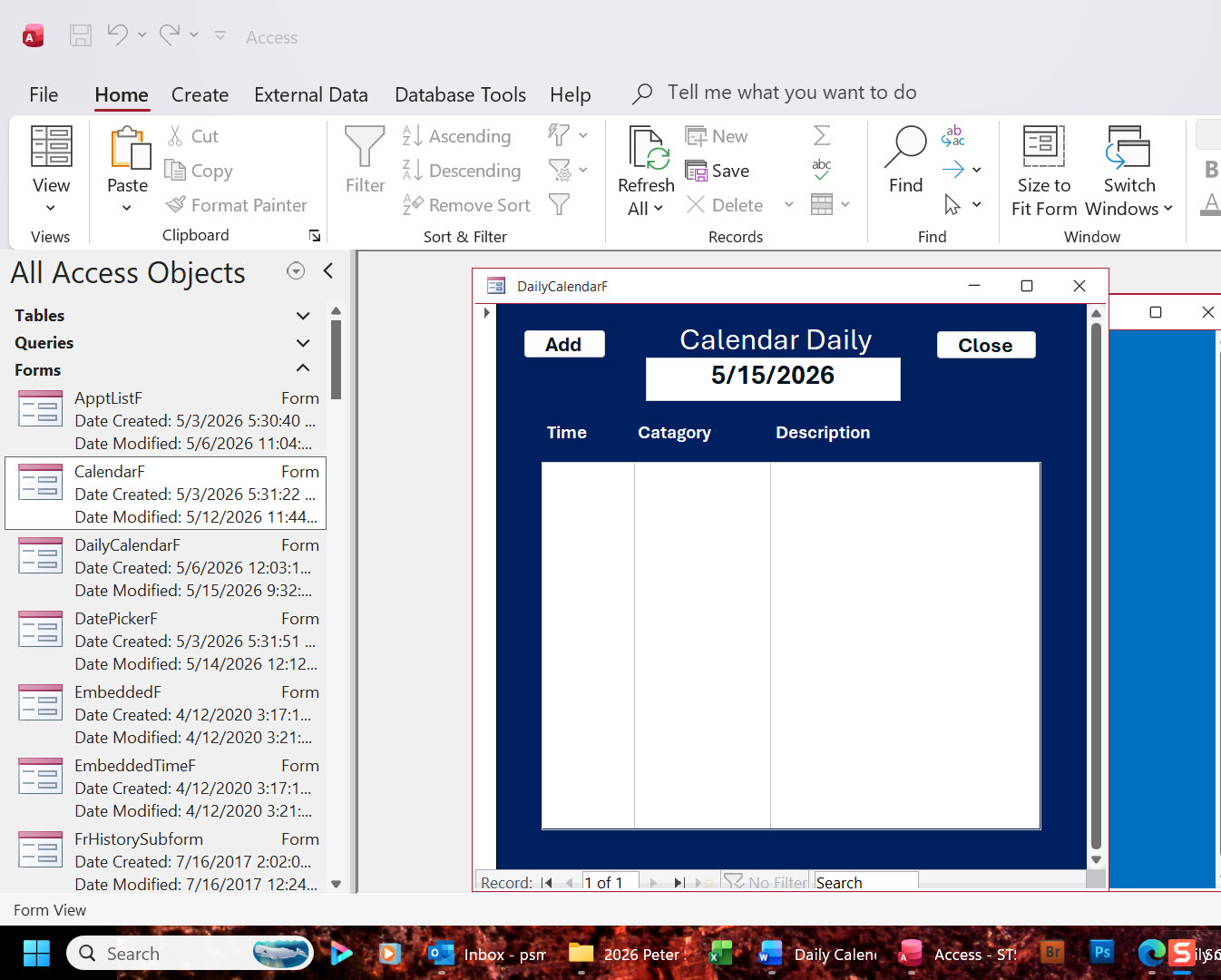
When I pass to the form with no WHERE clause, I get all the records. However, when I navigate to the form with the WHERE clause, the DailyCalendarF form list box shows no records.

When I attempt to debug, I get an error message saying “syntax error (missing operator) in the Where clause. What operator am I missing? Any suggestions?

Peter
Alex Hedley  @Reply  
           
2 days ago
Are you missing the #'s around the date?
And SPACES between keywords.
Kevin Robertson  @Reply  
          
2 days ago
Also missing the field name before the less than operator.
Richard Rost  @Reply  
          
2 days ago
What Alex is saying is...

SQL = "SELECT OrderID FROM OrderT WHERE StartDate <= #" & DateValue & "#"
Peter Smolens OP  @Reply  
   
2 days ago

I'm confused. So where do I put the #"& in this string? DateTime>=[Forms]![DatePickerF]![Calendar]
Donald Blackwell  @Reply  
       
2 days ago
If you put your code together with the suggestions above, you would get:

"SELECT CalendarQ.CalendarID, CalendarQ.ApptTime, CalendarQ.Category, CalendarQ.Description, CalendarQ.DateTime FROM CalendarQ WHERE DateTime>=#" & [Forms]![DatePickerF]![Calendar] & "# AND DateTime<#" & [Forms]![DatePickerF]![Calendar]+1 & "# ORDER BY CalendarQ.ApptTime;"

As Alex and Kevin pointed, the biggest reason it wouldn't work was that you didn't have a space around the "AND" and you didn't list "DateTime" again before the less than <
Alex Lewis  @Reply  
       
22 hours ago
DateTime is a reserved word as well, so you’d also have to format it as  “[DateTime]” in your SQL statement.
Alex Hedley  @Reply  
           
14 hours ago
Let's break it down into easier steps.

Start off with a hardcoded query first to confirm it works:

Replace with your Fields, Table etc
SELECT my_date
  FROM MyTable
WHERE my_date >= #2008-09-01#
       AND my_date < #2010-09-01#;
Peter Smolens OP  @Reply  
   
14 hours ago
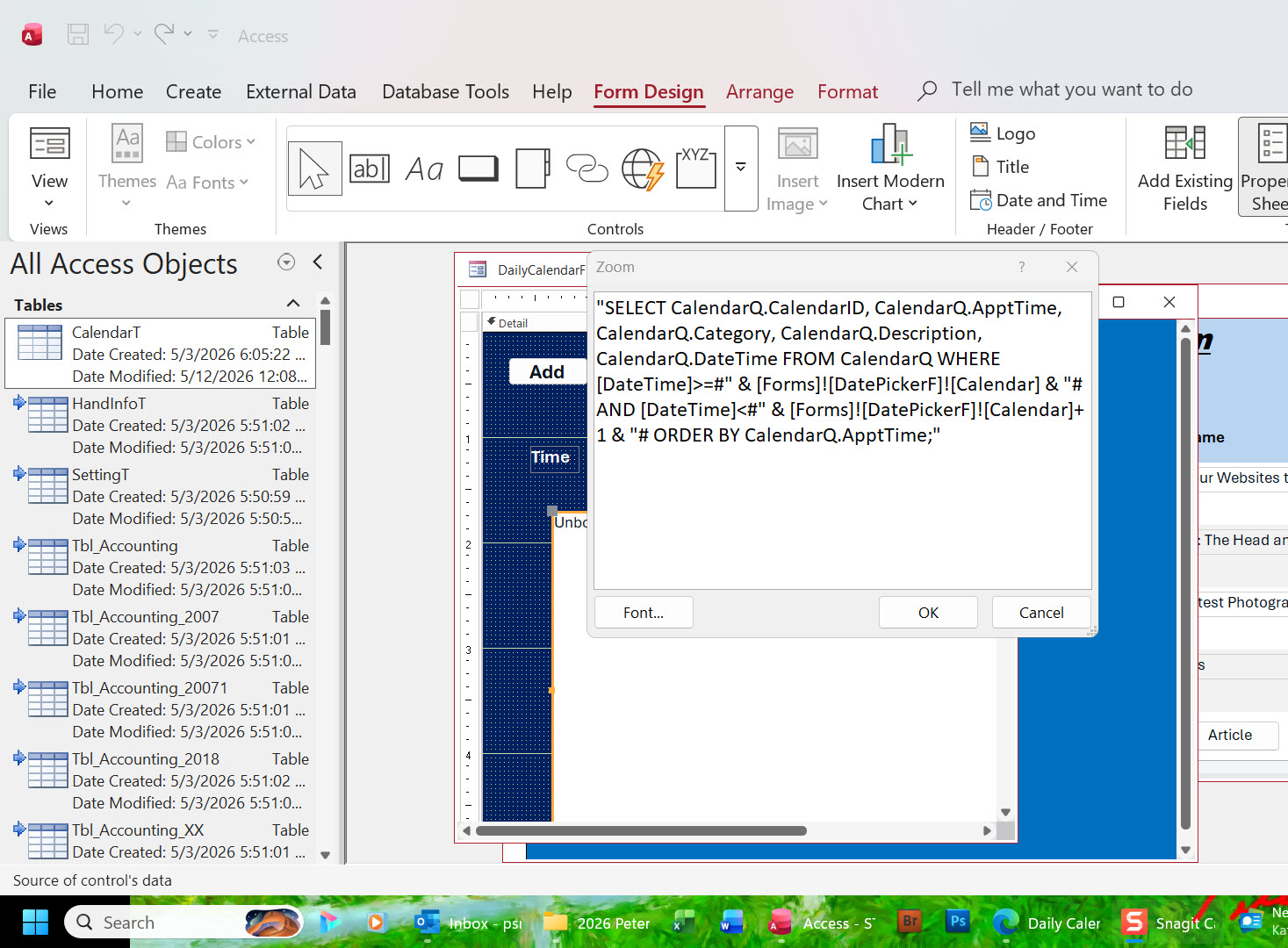
Here isa my revised SQL
"SELECT CalendarQ.CalendarID, CalendarQ.ApptTime, CalendarQ.Category, CalendarQ.Description, CalendarQ.DateTime FROM CalendarQ WHERE [DateTime]>=#" & [Forms]![DatePickerF]![Calendar] & "# AND [DateTime]<#" & [Forms]![DatePickerF]![Calendar]+1 & "# ORDER BY CalendarQ.ApptTime;"

I'm still not getting records. What am I missing?
Peter Smolens OP  @Reply  
   
14 hours ago

Alex Hedley  @Reply  
           
14 hours ago
Does it work with a hardcoded date?
Kevin Robertson  @Reply  
          
13 hours ago
Is there any criteria in the Query that could possibly be limiting the results?
Does your criteria work directly in the Query?
Add a Reply Upload an Image
Next Unseen

 
New Feature: Comment Live View


The following is a paid advertisement
Computer Learning Zone is not responsible for any content shown or offers made by these ads.
 

Learn
 
Access - index
Excel - index
Word - index
Windows - index
PowerPoint - index
Photoshop - index
Visual Basic - index
ASP - index
Seminars
More...
Customers
 
Login
My Account
My Courses
Lost Password
Memberships
Student Databases
Change Email
Info
 
Latest News
New Releases
User Forums
Topic Glossary
Tips & Tricks
Search The Site
Code Vault
Collapse Menus
Help
 
Customer Support
Web Site Tour
FAQs
TechHelp
Consulting Services
About
 
Background
Testimonials
Jobs
Affiliate Program
Richard Rost
Free Lessons
Mailing List
PCResale.NET
Order
 
Video Tutorials
Handbooks
Memberships
Learning Connection
Idiot's Guide to Excel
Volume Discounts
Payment Info
Shipping
Terms of Sale
Contact
 
Contact Info
Support Policy
Mailing Address
Phone Number
Fax Number
Course Survey
Email Richard
[email protected]
Blog RSS Feed    YouTube Channel

LinkedIn
Copyright 2026 by Computer Learning Zone, Amicron, and Richard Rost. All Rights Reserved. Current Time: 5/14/2026 7:04:54 AM. PLT: 1s