Free Lessons
Courses
Seminars
TechHelp
Fast Tips
Templates
Topic Index
Forum
ABCD
 
Home   Courses   TechHelp   Help   Contact   Merch   Join   Order   Logon   Forums   
 
Back to Access Forum    Comments List
Upload Images   @Reply   Bookmark    Link   Email   Next Unseen 
Remembering Record You Are On
Ryan Fazio 
     
48 days ago
I inherited a spreadsheet of names and addresses.  I have converted it into a database but there are over 3500 records.  I am trying to edit them and eliminate ones that are outdated.  Other than writing down the ID number how can i get a form to remember where i left off editing.
Richard Rost  @Reply  
          
48 days ago
How about just simply adding a yes/no checkbox field to the record? You can just check off the ones that are done, or at least where you left off.
Sandra Truax  @Reply  
         
48 days ago
What I have done in the past is use the SettingT table. You could make a button and when you are done for the day, click the button, it will save the ID to the SettingT table using PutSetting , and then you could load it when you are ready to work on it again with GetSetting. App Settings
Thomas Gonder  @Reply  
      
48 days ago
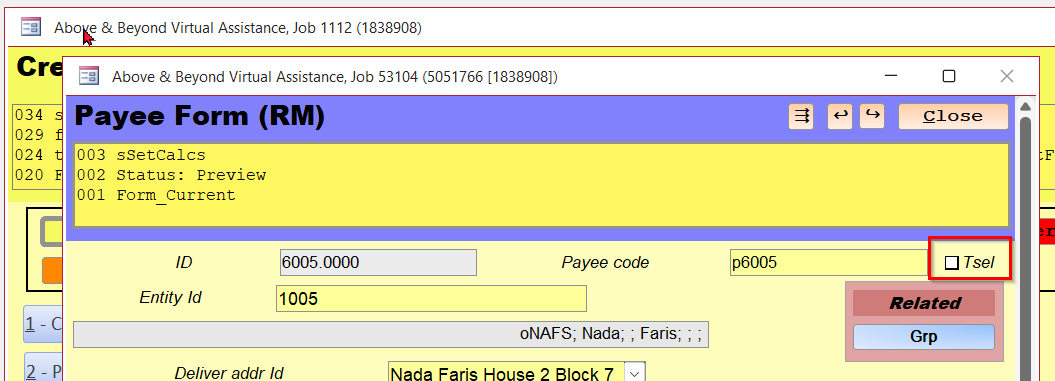
Almost every one of my tables that I create has a field, like Richard suggested, for a Yes/No check box called Tsel and that stands for Client Selection (T = client). Every form touches that field with a check box in the top right corner so people that can only work in a form can flag a record that needs attention. Somebody working in the table could use the same field as a Yes/No for needs attention. I use it all the time in development for testing fixes or as a reminder.
Thomas Gonder  @Reply  
      
48 days ago

Ryan Fazio OP  @Reply  
     
47 days ago
Great suggestions.  Thanks all.
Sam Domino  @Reply  
      
46 days ago
When I read the title, I immediately thought....TempVars!  I guess I've been properly trained.  LOL!!!
Thomas Gonder  @Reply  
      
45 days ago
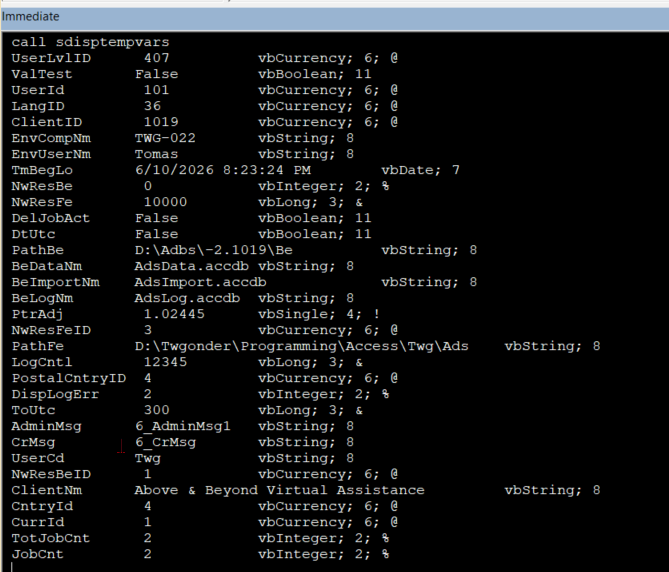
Here is my $0.02 on TempVars. They were a great feature that Access needed, that wasn't there in the first versions, although they had lots of variables both global and modular. The problem with those variables was once there is a reset, crash or the program has ended those variable values were lost.

I think you want to use TempVars for data that are relatively permanent independent of any particular form or report that you might run. I tend to load TempVars when someone logs on with some environmental variables that I always want to have available without having to do a lot of coding or calling subroutines each time one is needed. It comes in handy during development, when I reset using the VBA Editor. My menu form can then start again without having to reset all the environmental variables I have in my applications. Otherwise, global variables are there for objects that lack permanence.

TempVars isn't good for remembering data once the Access db shuts down, so they don't serve for the OP's question. That's what table fields are for.
Thomas Gonder  @Reply  
      
45 days ago

This thread is now CLOSED. If you wish to comment, start a NEW discussion in Access Forum.
 

Next Unseen

 
New Feature: Comment Live View


The following is a paid advertisement
Computer Learning Zone is not responsible for any content shown or offers made by these ads.
 

Learn
 
Access - index
Excel - index
Word - index
Windows - index
PowerPoint - index
Photoshop - index
Visual Basic - index
ASP - index
Seminars
More...
Customers
 
Login
My Account
My Courses
Lost Password
Memberships
Student Databases
Change Email
Info
 
Latest News
New Releases
User Forums
Topic Glossary
Tips & Tricks
Search The Site
Code Vault
Collapse Menus
Help
 
Customer Support
Web Site Tour
FAQs
TechHelp
Consulting Services
About
 
Background
Testimonials
Jobs
Affiliate Program
Richard Rost
Free Lessons
Mailing List
PCResale.NET
Order
 
Video Tutorials
Handbooks
Memberships
Learning Connection
Idiot's Guide to Excel
Volume Discounts
Payment Info
Shipping
Terms of Sale
Contact
 
Contact Info
Support Policy
Mailing Address
Phone Number
Fax Number
Course Survey
Email Richard
[email protected]
Blog RSS Feed    YouTube Channel

LinkedIn
Copyright 2026 by Computer Learning Zone, Amicron, and Richard Rost. All Rights Reserved. Current Time: 7/26/2026 1:05:40 AM. PLT: 1s