Free Lessons
Courses
Seminars
TechHelp
Fast Tips
Templates
Topic Index
Forum
ABCD
 
Home   Courses   TechHelp   Help   Contact   Merch   Join   Order   Logon   Forums   
 
Back to Access Forum    Comments List
Upload Images   @Reply   Bookmark    Link   Email   Next Unseen 
Multi-Select Combo Problem
Dan North 
      
25 days ago
Forgive me Richard, I have sinned and used a multi-select combo in a form.  Now I'm trying to correct it but getting write conflict errors, and the row stays dirty.  Here is the code:
Private Sub UseageIDCombo_AfterUpdate()
    '[20260708-DAN]-Add code to update stationT useage field as string from UseageIDCombo
    DoCmd.SetWarnings False
    DoCmd.RunSQL "UPDATE StationT SET StationT.Usage = UseageIDCombo.text, StationT.UpdatedDate = Now(), StationT.UpdatedBy = GetUserName() WHERE [callsign]=callsigncombo.value"
    DoCmd.SetWarnings True
    Exit Sub
    Me.Requery
End Sub
Besides using the multi-select to save space on the form, what am I doing wrong?  Please and thank you, to all.
Dan North OP  @Reply  
      
25 days ago

Dan North OP  @Reply  
      
25 days ago

Dan North OP  @Reply  
      
25 days ago
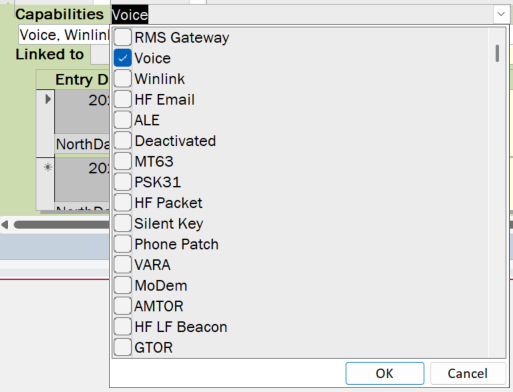
Here are screencaps of the dropdown
Kevin Robertson  @Reply  
          
25 days ago
You are exiting the Sub before you Requery the form.

Is CallSign Text or a Number?
Kevin Robertson  @Reply  
          
25 days ago
Dan North OP  @Reply  
      
25 days ago
Alphanumeric, stored as text.  An example would be my FCC call sign W5FJN
Kevin Robertson  @Reply  
          
25 days ago
Assumming CallSign is in the second column of your Combo Box:

    WHERE CallSign=""" & CallSignCombo.Column(1) & """"

Double Double Quotes

It would be a good idea to switch to a proper relational Combo Box rather the Multi-Select.
You will run into more problems later.

Evil Access Stuff
Donald Blackwell  @Reply  
       
25 days ago
Richard's Multivalued Fields video shows how to move the data from a multi-valued field into relational tables. Once you get those moved into proper relational tables, having a multi-select list box built in a form isn't bad.

Richard discusses multi-select listboxes in Access Developer 15
Richard Rost  @Reply  
           
24 days ago
Dan I wash my hands of you. You are dead to me, sinner.

LOL

Honestly, like the other guys are saying, I would rather you take some time to learn how to do it the right way with a proper relational table than try to fix what you've got there. It'd be a waste of all of our time. And I say that lovingly, as your teacher.

It's not that I don't want to help you. It'd be like if someone was trying to build a house using duct tape. I'm like, "Dude, just learn how to properly use nails."
Richard Rost  @Reply  
           
24 days ago
But since we're here, just so you understand what the code is doing, you're trying to take all of the selected values from the multivalued combo box, convert them into one text string, and then write that string back into the same station record. That gives you two different representations of the same information, neither of which is properly relational.

The write conflict is probably happening because the form still has the current StationT record dirty, while your UPDATE query is trying to change that same record behind the form's back. On top of that, UseageIDCombo.Text and CallSignCombo.Value aren't actually being inserted into the SQL string, your CallSign needs quotes because it's text, and the Me.Requery can never run because it comes after Exit Sub.

We could spend time patching each of those problems, but we'd only be helping you build a more elaborate duct-tape house. The proper solution is a StationUsageT junction table with one record for each station and capability. Then you can still use a multi-select list box on the form if you like that interface, but the data underneath it remains properly relational.
Dan North OP  @Reply  
      
21 days ago
As usual you are correct sir.  I've purchased Access Developer 15 and will use it and everyone's comments to correct my sin.  That is what I get for trying to take a short cut instead of doing it right the first time.
Richard Rost  @Reply  
           
21 days ago
Atta boy. We're here if you need more help.
Add a Reply Upload an Image
Next Unseen

 
New Feature: Comment Live View


The following is a paid advertisement
Computer Learning Zone is not responsible for any content shown or offers made by these ads.
 

Learn
 
Access - index
Excel - index
Word - index
Windows - index
PowerPoint - index
Photoshop - index
Visual Basic - index
ASP - index
Seminars
More...
Customers
 
Login
My Account
My Courses
Lost Password
Memberships
Student Databases
Change Email
Info
 
Latest News
New Releases
User Forums
Topic Glossary
Tips & Tricks
Search The Site
Code Vault
Collapse Menus
Help
 
Customer Support
Web Site Tour
FAQs
TechHelp
Consulting Services
About
 
Background
Testimonials
Jobs
Affiliate Program
Richard Rost
Free Lessons
Mailing List
PCResale.NET
Order
 
Video Tutorials
Handbooks
Memberships
Learning Connection
Idiot's Guide to Excel
Volume Discounts
Payment Info
Shipping
Terms of Sale
Contact
 
Contact Info
Support Policy
Mailing Address
Phone Number
Fax Number
Course Survey
Email Richard
[email protected]
Blog RSS Feed    YouTube Channel

LinkedIn
Copyright 2026 by Computer Learning Zone, Amicron, and Richard Rost. All Rights Reserved. Current Time: 8/7/2026 11:52:07 AM. PLT: 1s