Free Lessons
Courses
Seminars
TechHelp
Fast Tips
Templates
Topic Index
Forum
ABCD
 
Home   Courses   TechHelp   Help   Contact   Merch   Join   Order   Logon   Forums   
 
Back to Access Developers    Comments List
Upload Images   @Reply   Bookmark    Link   Email   Next Unseen 
Text Import Turning Into Zombie Feast...
Donald Blackwell 
       
2 months ago
Hi all. I've spent nearly half a day reviewing Richard's TechHelp and Courses in regards to importing data from a CSV file.

I can handle doing imports easily enough when the CSV has the same number of fields, however, in this scenario, sometimes the user may not select them all or have them in the same column order.

What I've been trying to do is create a simple import which counts the column header row as the actual first row of data into a temp table. I then set up a table that matches the values in the first row to an appropriate field name in a staging table.

First Row of Text FileStatus,Veteran,Unit,Member #,Last Name,Suffix,First Name,Middle Name,Clock #,Address 1,Address 2,City,State,Postal Code,Country,Mail Undeliverable,Home Phone,Cell Phone,Work Phone,Email,Congr Distr,State House,State Senate,Created By,Created On,Updated By,Last Updated,IStatus,Plant Code


Mapping Field Name to First RowField1 -> Status
Field2 -> Veteran
Field3 -> Unit
Field4 -> Member #
etc.


As stated above, they're not always in the same order which I handle by mapping the text in record 1 to a cross-match table. The problem comes because some of the fields on the server are custom fields and could potentially have the names changed between updates (which has happened twice in the last 4 months).

Any suggestions or better recommendations for how to handle this step as I've been looking at it so long it feels like Zombies have started feasting on my brains...

Thanks in advance for ideas and sorry for the long post.
Don
Joe Holland  @Reply  
      
2 months ago
Any chance you can get access to and control over the CSV creation/export?
Donald Blackwell OP  @Reply  
       
2 months ago
Joe
No... The CSV gets created by the user selecting and ordering the fields in the web portal which means they may not always select all the fields or in the same order.

I've also talked to the developers maintaining the web portal and they've assured me they are working on a new version that has an API and it will be available after the next Union Convention... This was in 2021 - the next convention was in 2022 and the next 2025... Just another case of a small developer group handling all IT resources for 1.3 million members and employees globally and several leadership changes in the last half decade as well refocusing priorities.

Matt Hall  @Reply  
          
2 months ago
If you alphabetize your fields, that could provide a "known" order for you to sort the incoming fields to.  

Maybe create a FieldName table where you could look up the field names.  If a name if found, no problem.  If It doesn't, use an input box to correlate the new name to the appropriate field.

Joe Holland  @Reply  
      
2 months ago
Matt interesting idea. Can you use VBA to get the input field names and create a map to each import field names?
Donald Blackwell OP  @Reply  
       
2 months ago
Matt I had thought about a FieldName cross reference table. I was thinking of a variation of Richard's Multi Language video but instead of different languages, just different names (or aliases) for the same field.

After thinking about it a bit, I don't think the order of the fields is as big of a concern as ensuring they have the critical fields and handling new fields.

I'm kind of leaning to just refusing to do the import if certain columns/fields aren't present (from the list above) just because there won't be enough data to compare for update or to add a new record. As for new fields that I don't already have in the database I was thinking of something like Richard's Add Anything video.

Mainly trying to figure the best way to get from the 1st row to the cross ref table to the staging table.

Example:First Row values:
Status,Veteran,Unit,Member #,Last Name

Cross Ref values:
Status, Veteran, Unit, MemberNbr, LastName

rs2.Add (or rs2.Edit)
rs2(StagingValue) = rs!Field1
rs2(StagingValue) = rs!Field2
etc.
Donald Blackwell OP  @Reply  
       
2 months ago
Joe For the VBA, I was thinking of creating an Array such that whatever the mapped name for Field1 is would be in the # 1 index slot, Field2 in the 2nd and so on but, not sure if that's best approach. I thought maybe a Dictionary would work better, but I've never worked with those... Or, if there's a better approach, probably something super simple that I'm not seeing.
Donald Blackwell OP  @Reply  
       
2 months ago
The other method I thought of would be to first, use vba to edit the csv file's first row by using the cross table as above then replacing the first row of the CSV file and THEN import the file.

As a side note, the export from source can be other formats as well, but all of them will eventually run into the field names conundrum.

Options:
CSV (Text File)
XML (Text File)
DOC (Word Table)
PDF (Table)
XLS (Excel Sheet)

However, the other formats often have issues. The DOC and XLS are old format not the modern format. The XLS version when opened in Excel throws errors about it not being properly formatted and Excel tries to format as HTML so I typically stick with the CSV format because that way everything comes in as text and I can convert to proper format once I get it into Access without having to guess what other funky format issues I'll have.
Thomas Gonder  @Reply  
       
2 months ago
As one of my better bosses used to say, "A job not worth doing is a job not worth doing well."
I mean really, you're going to import non-standardized files? What if a critical field or two is missing?
My clients in the past had enough trouble just getting their data files to have the proper relationships (Sales for a customer that they didn't send in the Customer import file).
Spend the time on a good error reporting cycle for gunked up data.
Also, figure out a way to normalize their data that they send in a non-normalized fashion (Addresses in a customer import file).
I use a generalized import set of menu jobs that define the file layout, import using definitions, VBA and a translate table, error codes, and a second step to take the source and write it to a target Access table.
Thomas Gonder  @Reply  
       
2 months ago

Donald Blackwell OP  @Reply  
       
2 months ago
Thomas thanks for your feedback.

The data being imported all comes from one source and goes into one database. However, since there may be different users preparing the export file, there may be different fields available in the import file. To be sure, if critical fields aren't included, the import will halt as soon as the header list is checked, as I had suggested to Matt (DateTime Index 2026-07-18 15:40:32).

However, one person may be doing a full update pulling down all fields, another may be updating a mailing list for one unit needing only name and address fields, another might be assembling an updated phone and/or email list.

I could create separate import specs for each case, but that will still require each person to take extra time to select exact fields and then to rearrange them before creating the export, download it and go thru a multitude of steps to it into Access.

I'm trying to create a system that predicts what might come in, knows when to gracefully say it doesn't have enough, but otherwise does what is needed without the user having to be a Sheldon to understand the intricacies. Separate interfaces will be available for key administrators when needed to add new fields to the core import, but not available to the average user, similar to locking down the navigation pane.

Essentially, I'm trying allow for IDIC where possible because most of the people using the system are not computer scientists/specialists who only get a couple hours a month to do everything that's asked of them so I'm trying to make the system work for them instead of the other way around.
Richard Rost  @Reply  
           
2 months ago
I think everyone is heading toward the same solution.

Personally, I wouldn't bother rewriting the CSV. I'd leave the source file exactly as it came in and do all of the translation during the import. That way you always have the original file if you ever need to troubleshoot something.

I'd also make the cross-reference table work as a list of aliases rather than just a one-to-one mapping. For example:

Member # -> MemberNbr
Member Number -> MemberNbr
Membership Number -> MemberNbr

Then if the vendor changes a column name again, you just add another alias to the table instead of changing code.

Once you've read the header row, I'd build a dictionary keyed on the incoming header names that points to the destination fields. Then the column order becomes irrelevant. You simply look up each header and know exactly where that value belongs.

I'd also classify fields into Required, Optional, and Unknown. If a required field is missing, stop the import. Optional fields are used if present. Unknown fields get logged, and an administrator can map them once so future imports recognize them automatically.

That gives you a pretty flexible import process that can adapt over time without users having to care about the order of the columns.

This would make for an interesting Developer project. Hmmm....
Thomas Gonder  @Reply  
       
2 months ago
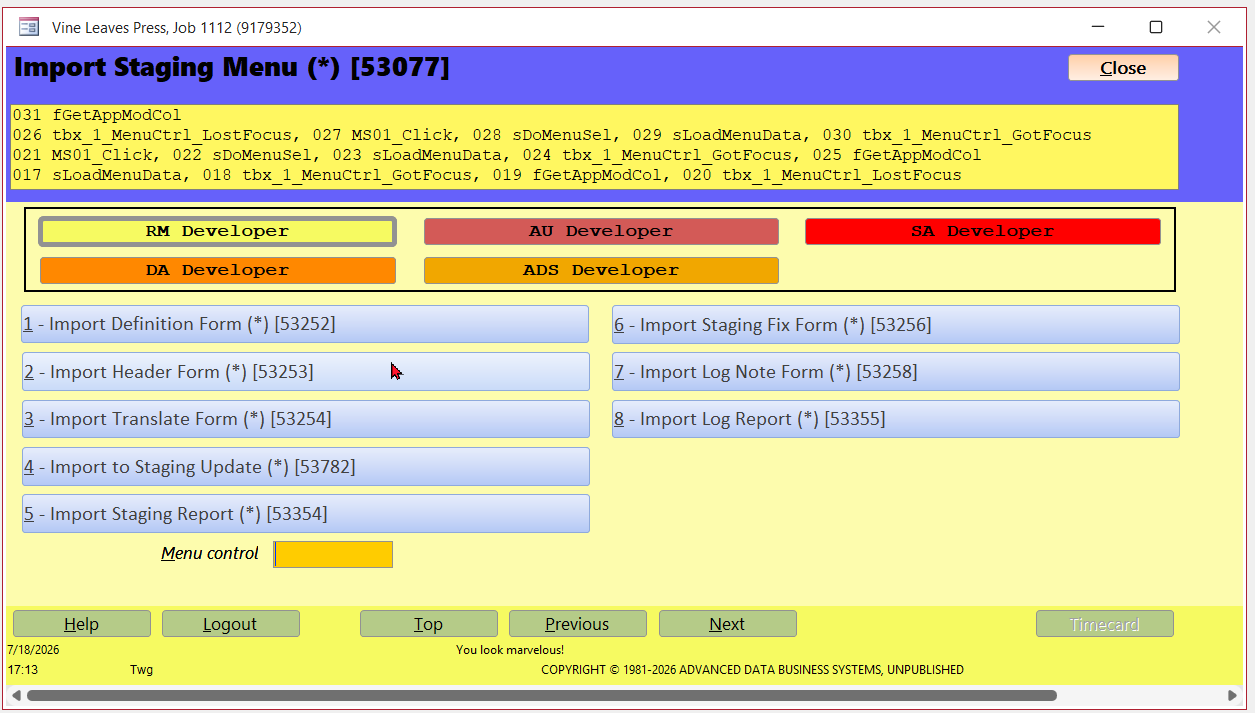
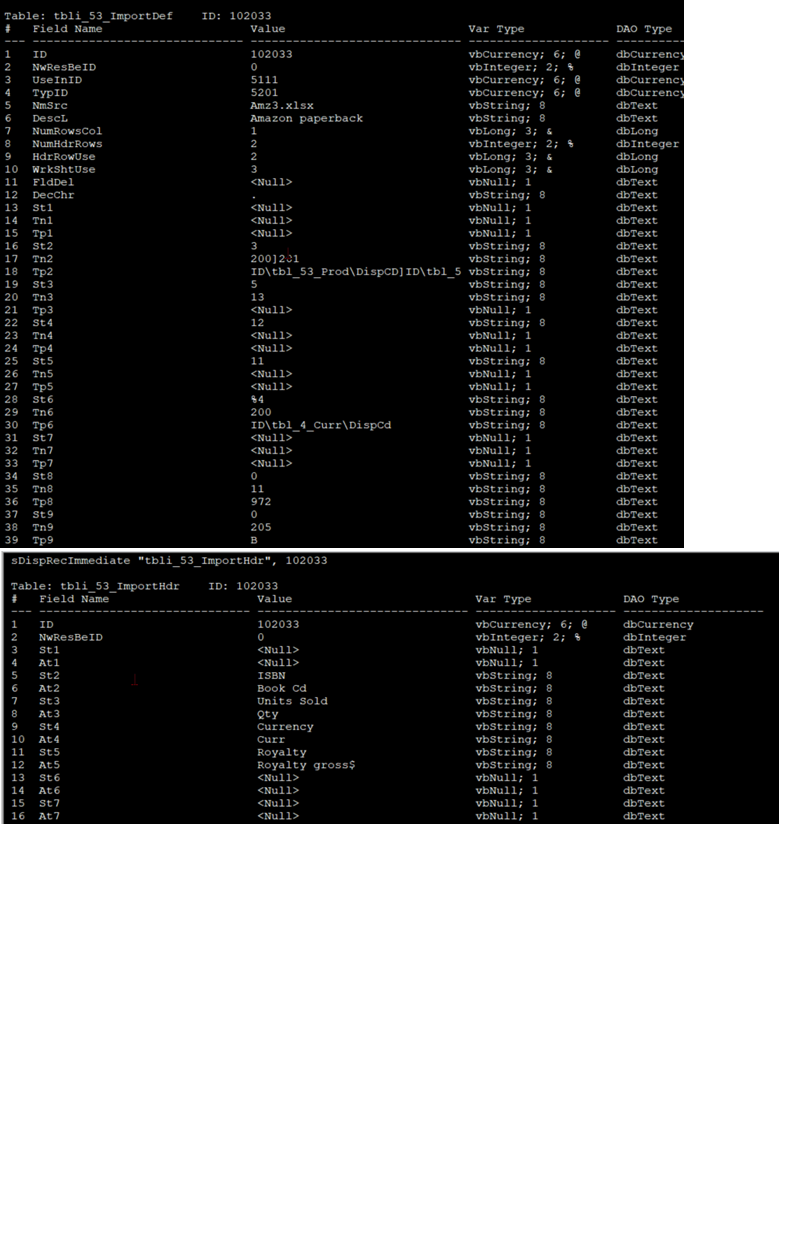
Donald If I wanted to do what you're wanting to do, in my design I would create another menu job (a form with a big subroutine) that would build a new definition table recored based upon the header layout that was passed in the import file. I would also create another table to translate headers as Richard suggested. I'll see if I can find my utility to show a record in vertical formatting.
Thomas Gonder  @Reply  
       
2 months ago

Thomas Gonder  @Reply  
       
2 months ago
In the top image, this is the record that defines how to import and place in a staging table. As Richard suggested, I don't touch the original import file as it was passed to me, I modify the data into a standardized layout in my staging table that can later be placed into the production Access table.

Looking at rows 16-18, here I'm using Tn1 to define using column 3 from the source, doing some tweaking based upon codes 200 & 201 with parameters in Tp2.  Code for 200 & 201 looks like:
      Case 200 'Do a string where translate from an ADS table to get a translated value for a field
        temp1 = Nz(DLookup(wpTp(1), wpTp(2), wpTp(3) & " = " & fQt(wSt)), """!""")
        If temp1 = """!""" Then
          tpErr = wTn
        Else
          wSt = temp1
        End If

      Case 201 'Do a numeric where translate from an ADS table to get the translated value for a field
        temp1 = Nz(DLookup(wpTp(1), wpTp(2), wpTp(3) & " = " & wSt), """!""")
        If temp1 = """!""" Then
          tpErr = wTn
        Else
          wSt = temp1
        End If
In this field, I'm using a product code they gave me to get a product ID, and then get a contract ID for the product.

In the lower image I have what I expect to be the header in each column. In your case I would rebuild a temporary Definition record using the expected headers from the sources based upon a standard template layout, either using a translate table like Richard suggested, or in my case I would just multi value the data with a delimiter, since I do a lot of that kind of thing in my code as you can see in upper row 18, Tp2.
Donald Blackwell OP  @Reply  
       
2 months ago
Richard Good to see the Zombies didn't eat too much of my brain while I was looking at this, lol.

I was thinking of my CrossReference table as similar to the Helper tables I use that have an ID, a Category, an AliasID, a Mask field, a Name, a Description, and a SortOrder. So my Cross table might be something like:

ImportFieldID auto
ImportSrcID nbr (fk for future proofing)
     - Currently only one source of data but this way the table could be used for multiple sources
ImportAliasID nbr (self join or 0/Null) -- If null, this is the field used in database, otherwise use the field with with the AliasID
ImportFieldName txt
ImportFriendlyName txt -- This would be the "caption" if used
IsRequired Boolean
Comments longtxt - (notes)

I haven't used dictionaries so was thinking of using a UDT:
Type ImportFields
     Fields (1 to [# of fields]) as long ' Field1, Field2, etc
     Req ( 1 to [# of fields]) as integer ' -1 Required, 0 Not Required, 1 Field not found
        ' Once all the fields are checked, do a loop prompting to add fields not found with another function
        ' But this is above and beyond my goal for right now
End Type

But if a dictionary would be better, I'll do more research.

This thread is now CLOSED. If you wish to comment, start a NEW discussion in Access Developers.
 

Next Unseen


What's This?


The following is a paid advertisement
Computer Learning Zone is not responsible for any content shown or offers made by these ads.
 

Learn
 
Access - index
Excel - index
Word - index
Windows - index
PowerPoint - index
Photoshop - index
Visual Basic - index
ASP - index
Seminars
More...
Customers
 
Login
My Account
My Courses
Lost Password
Memberships
Student Databases
Change Email
Info
 
Latest News
New Releases
User Forums
Topic Glossary
Tips & Tricks
Search The Site
Code Vault
Collapse Menus
Help
 
Customer Support
Web Site Tour
FAQs
TechHelp
Consulting Services
About
 
Background
Testimonials
Jobs
Affiliate Program
Richard Rost
Free Lessons
Mailing List
PCResale.NET
Order
 
Video Tutorials
Handbooks
Memberships
Learning Connection
Idiot's Guide to Excel
Volume Discounts
Payment Info
Shipping
Terms of Sale
Contact
 
Contact Info
Support Policy
Mailing Address
Phone Number
Fax Number
Course Survey
Email Richard
[email protected]
Blog RSS Feed    YouTube Channel

LinkedIn
Copyright 2026 by Computer Learning Zone, Amicron, and Richard Rost. All Rights Reserved. Current Time: 9/5/2026 6:48:40 PM. PLT: 1s