Free Lessons
Courses
Seminars
TechHelp
Fast Tips
Templates
Topic Index
Forum
ABCD
 
Home   Courses   TechHelp   Help   Contact   Merch   Join   Order   Logon   Forums   
 
Back to Access Forum    Comments List
Upload Images   @Reply   Bookmark    Link   Email   Next Unseen 
Database Look
Ryan Fazio 
     
17 days ago
Has anyone been told their database looks old.

I has someone in my company tell me my database looks old.

What does that mean?  

Any ideas on how to make a database look new?
Richard Rost  @Reply  
          
17 days ago
For those of us who learned software development back in the '80s and '90s, I actually like the old-school look. That's why I build databases the way I do. I prefer overlapping windows instead of the tabbed document interface that Access defaults to. I like forms that are clean, simple, and utilitarian. They're designed to get the job done efficiently, not necessarily to win a graphic design award.

It's the same philosophy I have with my website. Every now and then someone tells me it looks like it's from 2003. My response is usually, "Yep, and you can find exactly what you're looking for in about 10 seconds." I'd much rather have a site that's easy to navigate than one full of giant hero images, animations, and other artsy-fartsy design trends that just get in the way.

Now, if your goal is to impress clients or executives, there's certainly nothing wrong with spending extra time on the visual design. I've done a couple of videos on form aesthetics and making Access applications look more polished. There are plenty of little tricks you can use without sacrificing usability.

That said, when someone says, "Your database looks old," I'd ask them exactly what they mean. That's like telling your mechanic, "My car doesn't sound right." OK... what sound? A squeak? A rattle? A grinding noise?

It's the same thing I run into all the time with my students. Someone will email me and say, "I followed your video and it doesn't work." OK... what doesn't work? Are you getting an error message? If so, what exactly does it say? Did you get different results than I did? Does the button do nothing? Did your computer burst into flames? "It doesn't work" isn't enough information for me to diagnose the problem. Likewise, saying a database "looks old" doesn't really tell you what needs to be improved. Ask them to be specific. The more details they can give you, the easier it is to decide what, if anything, should be changed.

Likewise, what about the database looks old? Is it the colors? The fonts? The buttons? The layout? The icons? Or are they really saying the user experience feels dated? The more specific they can be, the easier it is to decide whether it's worth changing.

For me, function has always come before form. If a database is fast, intuitive, and helps people get their work done efficiently, then it's doing its job. Looking modern is nice, but usability is what keeps people happy.
Matt Hall  @Reply  
           
17 days ago
My first instinct would be to say thank-you, for the reasons Richard outlines above.  

People say the same thing about Craigslist.  To me, Craigslist is one of the best designed websites you can find because it does the one thing it is supposed to do better and faster than "new" websites.  Maybe I just feel that way because I am old too.  :)

In my mind, it's like having a 15 year-old tell someone that their 1966 Shelby Cobra looks old.  They really don't understand what they are looking at, beyond the surface level.  They are just comparing it's color and shininess to the Camrys they see on the road.  If they did know, they would be asking how it is built and how it performs.  They would also know that changing the aesthetics is just cosmetic and can be done any time.

I wouldn't worry about it.  I would focus on intuitiveness, simplicity, and clarity.  That will make it easier to use.
Richard Rost  @Reply  
          
17 days ago
Matt you are correct, sir.
Richard Rost  @Reply  
          
17 days ago
Just to add something to that: that's like when young kids nowadays listen to Rush, and they're like, "That's old people's music." I tell them, "You are out of your damn mind. That is the best music ever made." Today's music is all electronic garbage, which I'm not against. Electronic music, don't get me wrong. I love synthesizers just as much as anybody else, but when you put a drum track and a bass pattern on repeat and that's the whole song, that's not music. Don't get me started. Then again, I did hear Metallica in an elevator the other day.
Joe Holland  @Reply  
      
17 days ago
Can you share a screenshot or 2 so we can see?
Alex Lewis  @Reply  
       
17 days ago
There is a case to be made that databases that look nice and polished are easier to use. That is true, to a point. A well-designed menu with clearly captioned buttons/list boxes is far more intuitive than a jumbled mess that gives the user no idea which form they’re opening or what’s going on behind the scenes.

With that said, overall aesthetics are pleasing, but overall I agree that functionality and usability is far more important to an Access database, or any piece of software for that matter.
Donald Blackwell  @Reply  
       
17 days ago
While it may be nice to have the latest graphics and animations, they only have value if your database application works.

Beyond that little bit, I agree with Joe and everyone else, without seeing a screenshot or two we can't give any valid suggestions as to whether your database appears to be outdated or if it's a classic design that some people just don't appreciate.
Richard Rost  @Reply  
          
17 days ago
A polished layout absolutely can make an application easier to use, especially when it helps users immediately see where they need to go and what they need to do. Alex is right - good aesthetics and good usability often overlap.

But "modern" should not mean adding graphics, animations, or trendy clutter just for the sake of it. Clean spacing, consistent fonts and colors, clearly labeled controls, sensible tab order, and buttons that look like buttons will get you 90 percent of the way there.

Ryan, if you can share a couple of screenshots, we can give you more useful feedback. Otherwise, ask the person who made the comment what specifically feels old to them. They may be reacting to one small thing, like gray command buttons, crowded forms, or inconsistent formatting, rather than the database as a whole.

Does it still have that "Windows 95" look? Does it play "Start Me Up" when it loads? LOL
Juan Rivera  @Reply  
            
16 days ago
Just for kicks, make a form that looks like a punch card - and tell them it's COBOL. LOL
Joe Holland  @Reply  
      
16 days ago
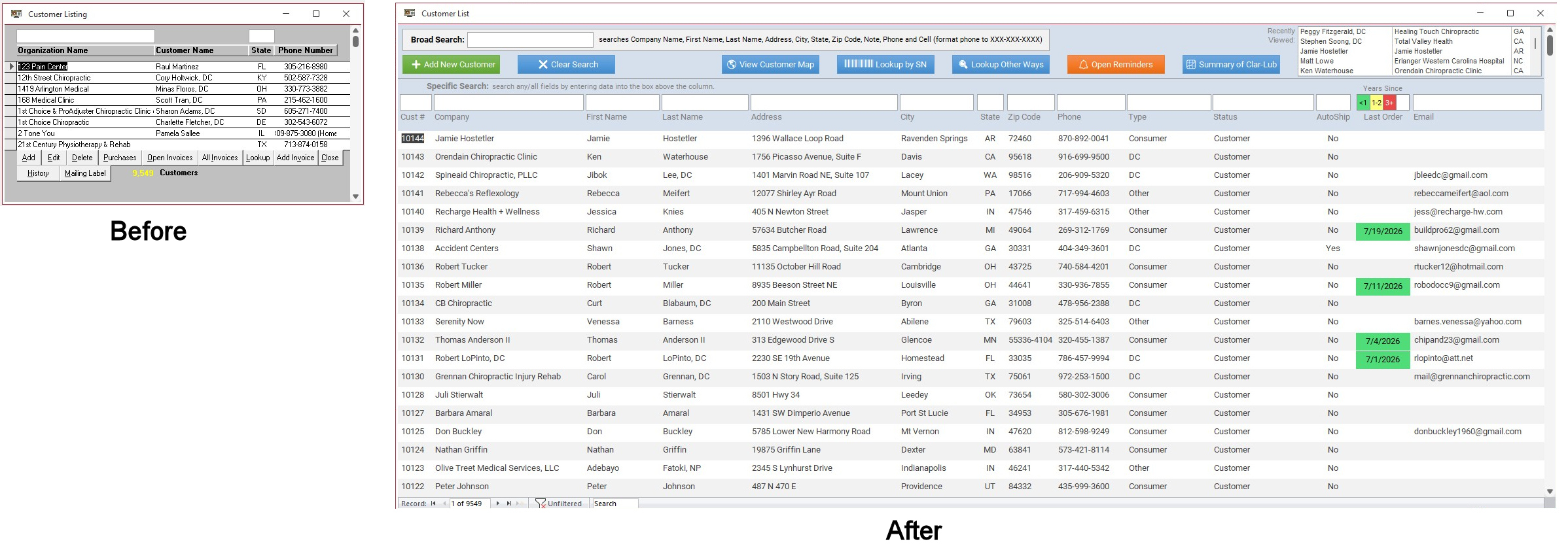
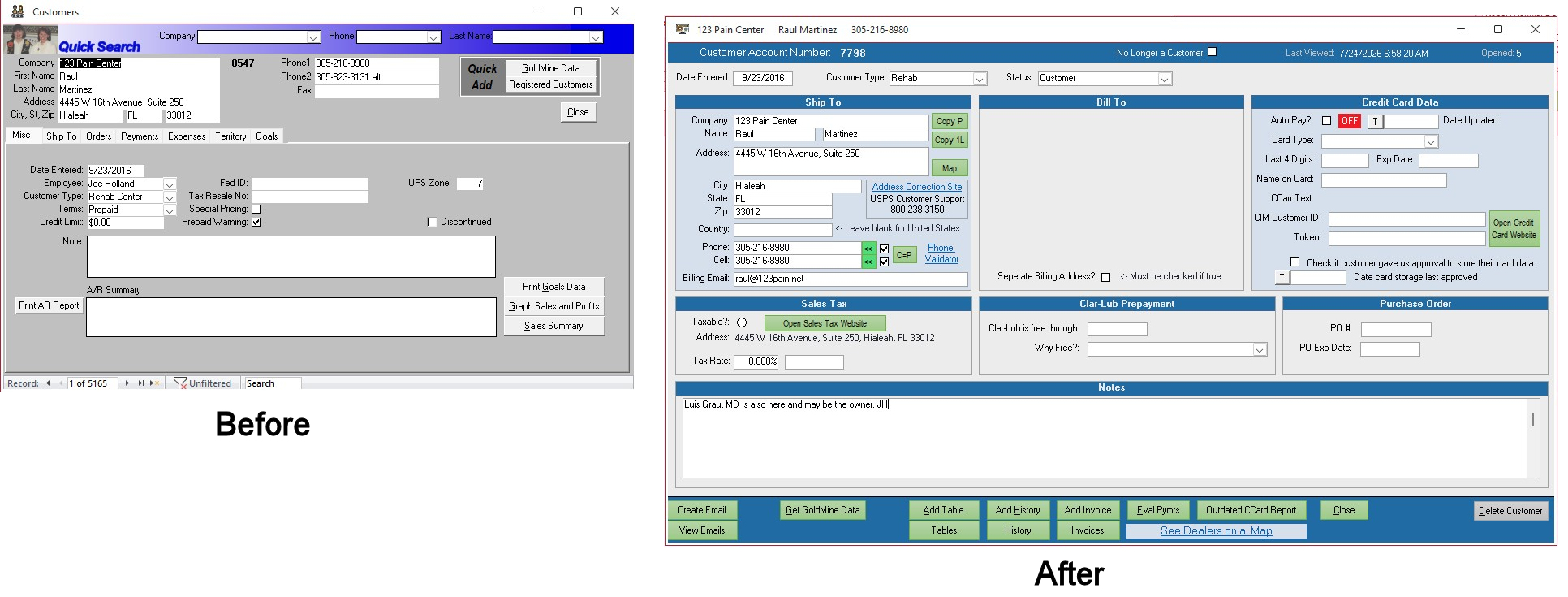
Maybe it would help to see what others have done. My database has been in use since 1995. Here are some before and after shots. The before images were built for smaller screens and look like Windows 1995 while the after are much more pleasing to the eye and are designed for today's larger screens.
Joe Holland  @Reply  
      
16 days ago

Joe Holland  @Reply  
      
16 days ago

Richard Rost  @Reply  
          
16 days ago
Joe, I love it. That's exactly the perfect example of taking an existing Access database and modernizing it. Structurally, it is probably very similar under the hood, but it looks a lot newer.
Joe Holland  @Reply  
      
16 days ago
Richard You had a lot to do with the redo. The improvements came as I went through every lesson from beginner to developer. It was the best 2+ years of my programming life. THANK YOU!
Richard Rost  @Reply  
          
16 days ago

Add a Reply Upload an Image
Next Unseen

 
New Feature: Comment Live View


The following is a paid advertisement
Computer Learning Zone is not responsible for any content shown or offers made by these ads.
 

Learn
 
Access - index
Excel - index
Word - index
Windows - index
PowerPoint - index
Photoshop - index
Visual Basic - index
ASP - index
Seminars
More...
Customers
 
Login
My Account
My Courses
Lost Password
Memberships
Student Databases
Change Email
Info
 
Latest News
New Releases
User Forums
Topic Glossary
Tips & Tricks
Search The Site
Code Vault
Collapse Menus
Help
 
Customer Support
Web Site Tour
FAQs
TechHelp
Consulting Services
About
 
Background
Testimonials
Jobs
Affiliate Program
Richard Rost
Free Lessons
Mailing List
PCResale.NET
Order
 
Video Tutorials
Handbooks
Memberships
Learning Connection
Idiot's Guide to Excel
Volume Discounts
Payment Info
Shipping
Terms of Sale
Contact
 
Contact Info
Support Policy
Mailing Address
Phone Number
Fax Number
Course Survey
Email Richard
[email protected]
Blog RSS Feed    YouTube Channel

LinkedIn
Copyright 2026 by Computer Learning Zone, Amicron, and Richard Rost. All Rights Reserved. Current Time: 8/9/2026 12:41:18 AM. PLT: 0s