Free Lessons
Courses
Seminars
TechHelp
Fast Tips
Templates
Topic Index
Forum
ABCD
 
Home   Courses   TechHelp   Help   Contact   Merch   Join   Order   Logon   Forums   
 
Back to Access Forum    Comments List
Upload Images   @Reply   Bookmark    Link   Email   Next Unseen 
Navigation
Mitchell Layne 
     
2 days ago
I'm having an issue which should be simple, but I cannot figure out why it is happening.
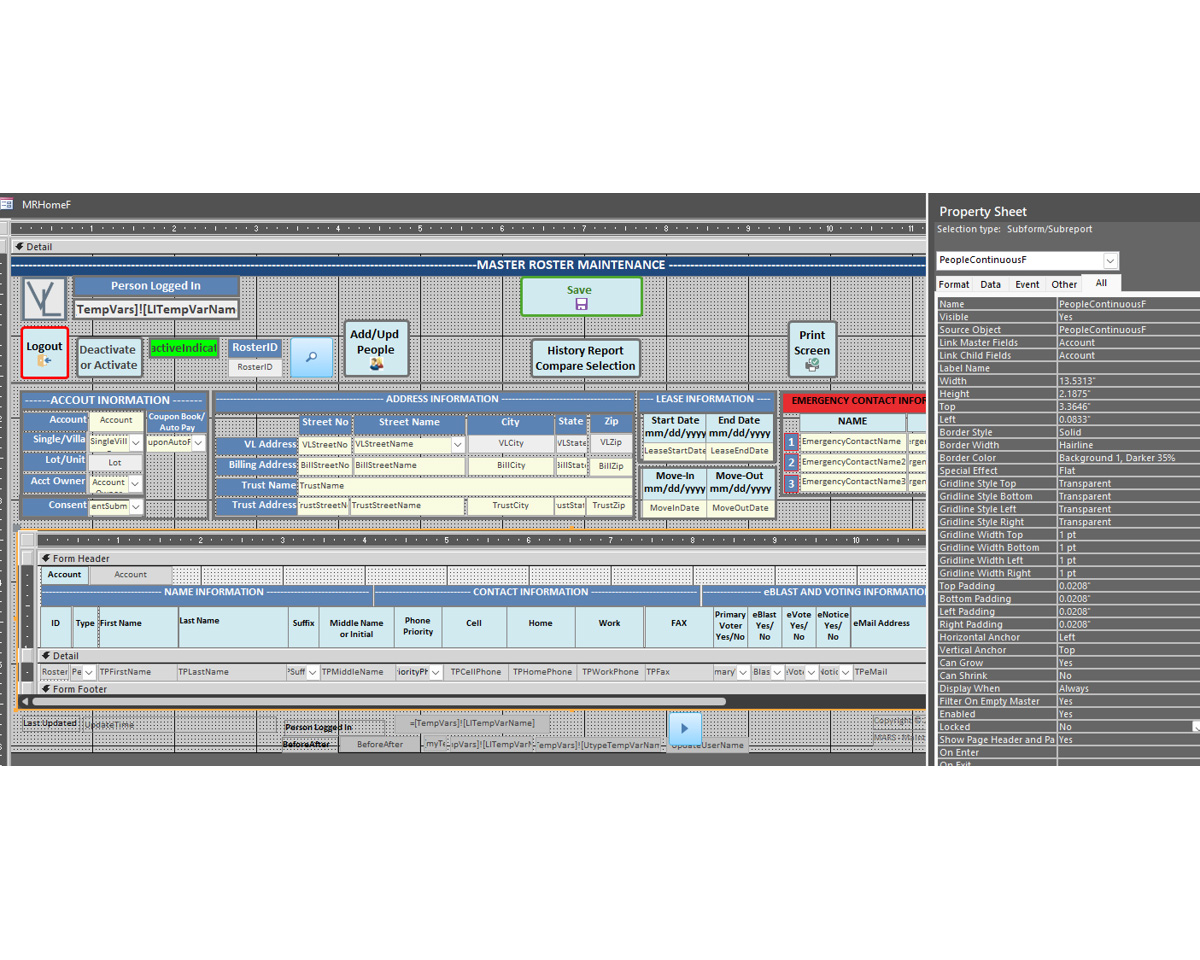
I have a main form that has a subform. They are related by account number. I eliminate the standard navigation bar on the subform so it no longer shows. When I use the navigation bar on the main form to go to the next record it reacts as follows:

If the subform has only one record on the form (it's a continuous form), the navigation goes to the next record on the main form, which is correct.

If, however, the subform has multiple records listed, even though I click next record on the main navigation bar, it will continue to display the same information for as many records that are on the subform for that account. Then it will go to the next record on the main form.

I was expecting the navigation to always go to the next record on the main form, which will then display the associated records for that account on the subform.
Donald Blackwell  @Reply  
        
2 days ago
Have you verified that the Link Master Fields and Link Child Fields are set properly in the Data Properties tab of the Subform control?

Link Master Fields

Even if the tables are related, if the proper child and master fields aren't provided, the sub form won't necessarily update to match the new records
A Toykan  @Reply  
      
2 days ago
Based on what you've said, here are a few things to check:
1. The subform still has the focus (most likely)
The built in navigation buttons in Access work on whatever form has the focus. If the subform had the focus, you can still navigate the subform records by clicking on the navigation buttons, only now the navigation bar of the subform is hidden.

2. Check the Link Master fields / Link Child fields properties
Make sure that the subform is properly linked, for instance:
Link Master Fields: AccountID
Link Child Fields: AccountID

If the link master / link child fields are left blank or are somehow modified (in VBA) this could also cause the type of issue you're describing.

3. The recordset of the subform isn't refreshing
By default, the recordset of a subform should update / refresh when ever the record of the main form changes. However, if you are using some kind of custom filter or modifying the record source of the subform control in code, you may need to manually do a requery of the subform in the main forms Current Event:

Me.SubformControlName.Requery

Since you didn't give us much detail on your main form or the code involved these are the main three things I would look at.
Mitchell Layne OP  @Reply  
     
2 days ago
Yes, both master and child have Acct as the linked property on the property sheet. mitch
Mitchell Layne OP  @Reply  
     
2 days ago

Mitchell Layne OP  @Reply  
     
2 days ago
A Thanks. Unless I did it incorrectly, I tried to set focus to the main form. I set it at open. It is not that it is not refreshing. If the child record, meaning the subform, has 5 records, when I use the standard navigation, it will show the form above 5 times as if it were going to the next record in the subform and then it changes to the next record in the main form with its associated records in the subform. When there is only 1 record in the subform, it works fine.
Donald Blackwell  @Reply  
        
2 days ago
I've tried recreating your situation in a database i have with no success.. even with the navigation bars turned off in subform, it always just navigates the main form for me regardless if there is 1 record in the subform or 30. Regardless of whether the focus is in the subform or the main form.

That said, if it is loading the main form over and changing the subform pointer, then you may need to look at the record source of your main form. Is your main form's record source a table or a query? If it's a query, are there any joins that may be repeating copies of the record.

Mitchell Layne OP  @Reply  
     
2 days ago
Donald Thanks. that will take me a bit to research. As long as I know, that it should work, I will find the bug. thanks mitch
A Toykan  @Reply  
      
2 days ago
Donald's question was pretty pointed. So if the form's RecordSource is not a table but a query which joins the main table with the child table (the one related to the subform), the join would result in more than one record for each account (each related to a child record).

Furthermore, you said that you tried to set focus to the main form, but you can't call Me.SetFocus on a form, it may work but not reliably because the focus always goes to a control - so try to focus on a control of main form. Also, the Form_Open event is too early to call SetFocus, you should use the Form_Load and/or Form_Activate events.

Another possibility is that you accidentally set the Cycle property of the main form to Current Record in the Properties/Other/Cycle. It should be All Records by default, if it is not, you cannot tab from one record to another, and you can only navigate within a record.
Mitchell Layne OP  @Reply  
     
2 days ago
I figured it out. What I did was the following:

I created a copy of the form as to not touch the original
In that copy I deleted all the code to see if it was a code related issue.
After deleting all of the code exact same thing happened.
I then looked at the record source, which was the only thing left, and saw that not only did it have the main table as the source, it had a select statement that referenced the main table and the people table, which is the subform, with inner and outer joins. Why it did that I do not yet understand.
In any case, I change the record source to only have the table name of the main table.
It then worked.
I went back to the original version that had all the code and changed the record source.
That all worked with all of the code present and working.

Bottom line is that it was not the code, it was only the record source that was created with a select statement that access created since I do not know how to create a select that way.

Thanks to everyone that gave me clues as to what to look for. It was what eventually got me thinking of an approach to test why it was happening and correct it. mitch
Donald Blackwell  @Reply  
        
2 days ago
Glad I was able to help :)
Add a Reply Upload an Image
Next Unseen

 
New Feature: Comment Live View


The following is a paid advertisement
Computer Learning Zone is not responsible for any content shown or offers made by these ads.
 

Learn
 
Access - index
Excel - index
Word - index
Windows - index
PowerPoint - index
Photoshop - index
Visual Basic - index
ASP - index
Seminars
More...
Customers
 
Login
My Account
My Courses
Lost Password
Memberships
Student Databases
Change Email
Info
 
Latest News
New Releases
User Forums
Topic Glossary
Tips & Tricks
Search The Site
Code Vault
Collapse Menus
Help
 
Customer Support
Web Site Tour
FAQs
TechHelp
Consulting Services
About
 
Background
Testimonials
Jobs
Affiliate Program
Richard Rost
Free Lessons
Mailing List
PCResale.NET
Order
 
Video Tutorials
Handbooks
Memberships
Learning Connection
Idiot's Guide to Excel
Volume Discounts
Payment Info
Shipping
Terms of Sale
Contact
 
Contact Info
Support Policy
Mailing Address
Phone Number
Fax Number
Course Survey
Email Richard
[email protected]
Blog RSS Feed    YouTube Channel

LinkedIn
Copyright 2026 by Computer Learning Zone, Amicron, and Richard Rost. All Rights Reserved. Current Time: 8/4/2026 5:11:37 PM. PLT: 1s