Free Lessons
Courses
Seminars
TechHelp
Fast Tips
Templates
Topic Index
Forum
ABCD
 
Home   Courses   TechHelp   Help   Contact   Merch   Join   Order   Logon   Forums   
 
Back to Access Forum    Comments List
Upload Images   @Reply   Bookmark    Link   Email   Next Unseen 
Simple Question
Kenneth A Thomas 
       
5 hours ago
How do I program a form to open to the last record I was working on when I last closed the form?
Matt Hall  @Reply  
          
4 hours ago
The key is have a place to store that record ID, like a settings table or the tag property of the form.  The only way I can think of to do that would require a little VBA.  Maybe someone else has another way.

You might check out App Settings.
Donald Blackwell  @Reply  
       
4 hours ago
This simplest method I think, would be to have a yes/no field in the table behind the form "LastEdited". Then in the on current event of the form have a global function run to set that record as the last viewed. Then look that up again on form load. Something like:

Global Function to Set the Last Viewed RecordPublic Function SetLastViewedRecord( TName as String, RecID as Long, PKey as String)

     Dim DB as Database
     Set DB as CurrentDb

     ' Make sure that the table name and record ID # were supplied; Exit if they weren't
     If Nz(TName,"") = "" OR Nz(RecID,0) = 0 Then
          Beep
          Exit Function
     End If

     ' Set all records "LastViewed" field to False and get an error if something doesn't work
     DB.Execute "UPDATE " & TName & " Set LastEdited = False", dbFailOnError

     ' Set the "LastViewed" field to True for the record you are viewing, and get an error if something goes awry
     DB.Execute "UPDATE " & TName & " Set LastEdited = True WHERE " & PKey & " = " & RecID, dbFailOnError

     Set DB = Nothing

End Function


Global Function to Retrieve the Last Viewed RecordPublic Function GetLastViewedRecord( TName as String, PKey as String) as Long

     GetLastViewedRecord = Nz(DLookup(PKey, TName, "LastViewed = True),0)

End Function


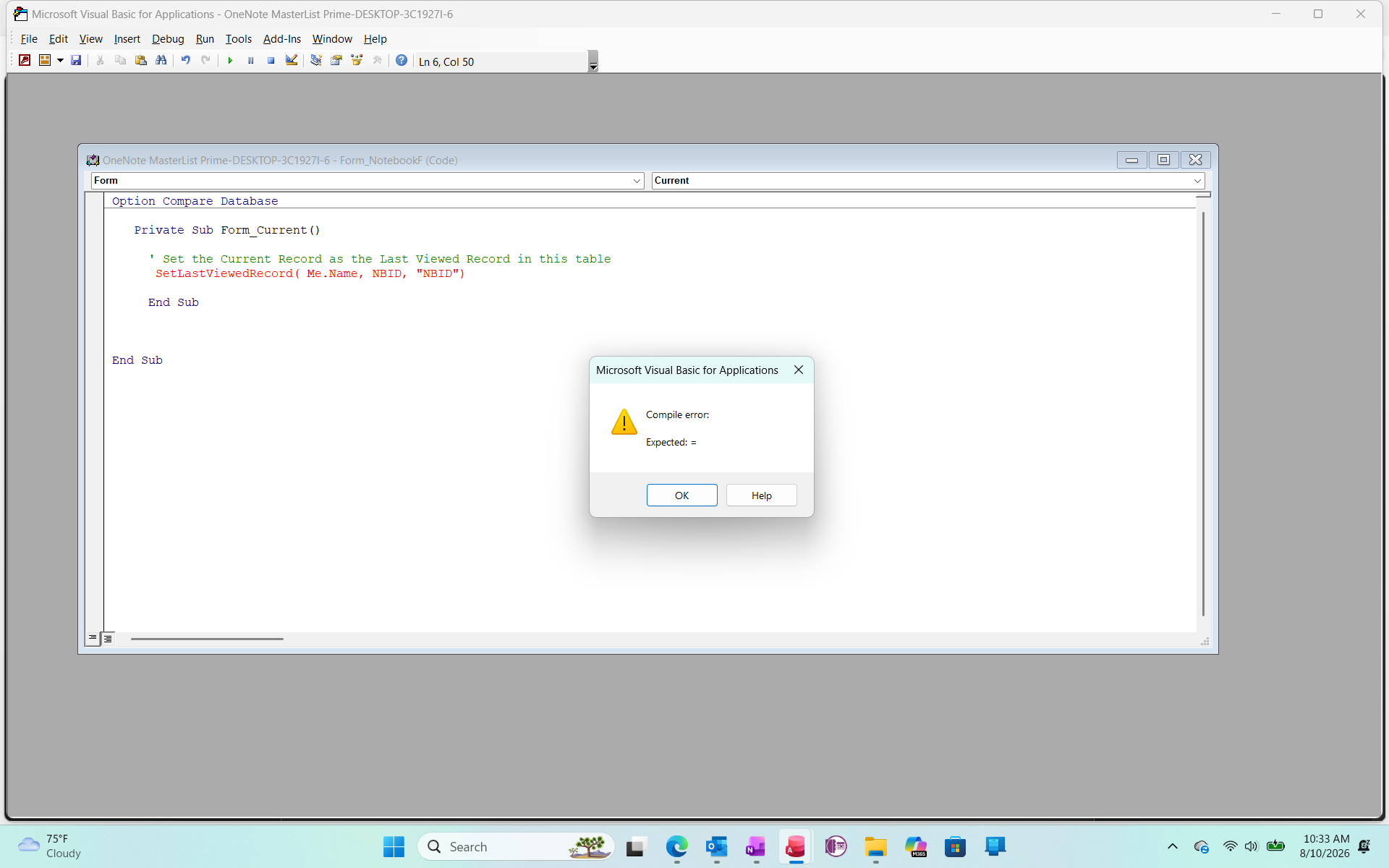
Form_Current procedure to set the LastViewed recordPrivate Sub Form_Current()

     ' Set the Current Record as the Last Viewed Record in this table
     SetLastViewedRecord( Me.Name, CurrentID, "CurrentID" )

End Sub


Form_Load procedure to retrieve the Last Viewed record and go to itPrivate Sub Form_Load()

     Dim ID as Long, rs as Recordset

     ' Retrieve the ID of the Last Viewed Record in the table
     ID = GetLastViewedRecord( Me.Name, "CurrentID" )
    
     ' If a Zero was returned, no records were set as last viewed
     ' If there are no records in the table, this will take you to the New Record form (or row in a continuous form)
     If ID = 0 Then
          SelTop = 1 ' This will either take you the first record in the table as it is sorted or to the new record row if there are no records
     Else
          Set rs = Me.RecordsetClone
          ' Find the record with the matching ID
          rs.FindFirst "CurrentID=" & ID

          ' Move the form to the found record
          Me.Bookmark = rs.Bookmark
          Set rs = nothing
     End If

End Sub


Anywhere you see CurrentID, replace it with the name of the ID/Primary Key field for the table in that form.

The sections listed as "Global Function"s would go in a Global Module, the rest would go in each form. The other option I thought of was to do something like Matt suggested with App Settings.
Matt Hall  @Reply  
          
3 hours ago
Donald , I like that.  For Kenneth's purposes, it may be able to be distilled to something pretty simple, if it was local to the form.
Donald Blackwell  @Reply  
       
3 hours ago
Matt I was trying to keep it basic but I wanted him to be able to plug in to any form he wanted as well. But, I actually didn't refer to any of my projects while I was typing so the fact that it wasn't more bloated actually surprised me, lol.

If he wanted, if he opens and closes forms a lot, it could also have a TempVar added for each form that would remember the last record as well. That way it wouldn't have to go to the tables every time to get the last viewed but only if he closed the database and reopens it.
Donald Blackwell  @Reply  
       
3 hours ago
Oops, just noticed a typo:

Typo RepairPublic Function GetLastViewedRecord( TName as String, PKey as String) as Long

     GetLastViewedRecord = Nz(DLookup(PKey, TName, "LastViewed = True"),0)

End Function


I had left out a closing quotation mark in the DLookup.
Jeffrey Kraft  @Reply  
       
18 minutes ago
Private Sub Form_Load()
    On Error Resume Next
    Dim lastID As Long
    
    ' Retrieve the stored record ID
    lastID = CurrentDb.Properties("LastEditedID")
    
    ' If an ID was found, tell the form recordset to find it
    If Err.Number = 0 And lastID > 0 Then
        With Me.RecordsetClone
            .FindFirst "YourPrimaryKeyField = " & lastID
            If Not .NoMatch Then
                Me.Bookmark = .Bookmark
            End If
        End With
    End If
End Sub

I'm sure there is something better
Add a Reply Upload an Image
Next Unseen

 
New Feature: Comment Live View


The following is a paid advertisement
Computer Learning Zone is not responsible for any content shown or offers made by these ads.
 

Learn
 
Access - index
Excel - index
Word - index
Windows - index
PowerPoint - index
Photoshop - index
Visual Basic - index
ASP - index
Seminars
More...
Customers
 
Login
My Account
My Courses
Lost Password
Memberships
Student Databases
Change Email
Info
 
Latest News
New Releases
User Forums
Topic Glossary
Tips & Tricks
Search The Site
Code Vault
Collapse Menus
Help
 
Customer Support
Web Site Tour
FAQs
TechHelp
Consulting Services
About
 
Background
Testimonials
Jobs
Affiliate Program
Richard Rost
Free Lessons
Mailing List
PCResale.NET
Order
 
Video Tutorials
Handbooks
Memberships
Learning Connection
Idiot's Guide to Excel
Volume Discounts
Payment Info
Shipping
Terms of Sale
Contact
 
Contact Info
Support Policy
Mailing Address
Phone Number
Fax Number
Course Survey
Email Richard
[email protected]
Blog RSS Feed    YouTube Channel

LinkedIn
Copyright 2026 by Computer Learning Zone, Amicron, and Richard Rost. All Rights Reserved. Current Time: 8/10/2026 1:36:56 AM. PLT: 1s