Free Lessons
Courses
Seminars
TechHelp
Fast Tips
Templates
Topic Index
Forum
ABCD
 
Home   Courses   TechHelp   Help   Contact   Merch   Join   Order   Logon   Forums   
 
Back to Access Developers    Comments List
Upload Images   @Reply   Bookmark    Link   Email   Next Unseen 
Cant Add a Record Duplicate Value in Index
Gary Becker 
     
19 days ago
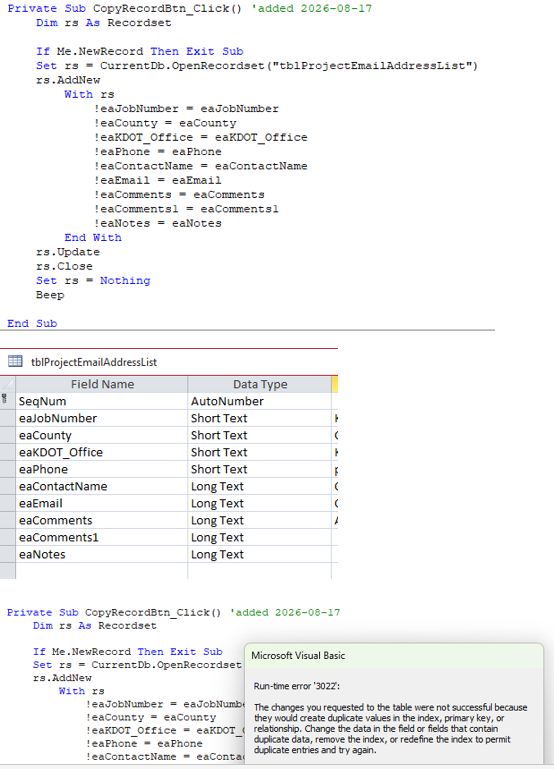
I'm trying to copy and add a record with a recordset like in Fitness 45 and I'm getting error 3022. The only field that is indexed is the Autonumber field. I'm puzzled.
Gary Becker OP  @Reply  
     
19 days ago

Kevin Heine  @Reply  
     
19 days ago
Did you allow Duplicates in the Autonumber field when you set up the table?
John Davy  @Reply  
         
19 days ago
Hi Gary, Check other fields to see if you don't allow duplicates. John
Richard Rost  @Reply  
          
18 days ago
Kevin and John are both on the right track. Error 3022 specifically means you're trying to add a duplicate value to a field or combination of fields that has a unique index. A missing required field would produce a different error, usually error 3314.

If the only unique field is the Autonumber primary key, then the most likely culprit is that your copy routine is also copying the Autonumber value from the source record. When you use AddNew, don't assign anything to the ID field. Let Access generate the new Autonumber value.

For example, if you're looping through the fields:

If rsSource.Fields(fld.Name).Name <> "ID" Then

    rsTarget.Fields(fld.Name) = rsSource.Fields(fld.Name)

End If

Replace "ID" with the actual name of your Autonumber field.

Also, open the table in Design View and check the Indexes property. A multi-field unique index can exist at the table level even if none of the individual fields says Indexed: Yes (No Duplicates).

You could also try scaling back and just doing one field at a time until you find the one that's causing problems.

Gary Becker OP  @Reply  
     
15 days ago
Thanks for your responses. I had checked the indexes, etc and couldn't see anything wrong. However, today when I tried to manually add a record to the table, it gave me the same message. The (primary key) id field was set to auto number. But. The last auto number was 376. And it was trying to add 325 which was a duplicate. So, I copied the table structure and appended the data into a new table and now it all works great. The old table was linked from a .mdb database. Maybe it got confused.
Richard Rost  @Reply  
          
15 days ago
Glad you got it sorted out. That definitely sounds like the Autonumber seed in the old linked table got out of sync somehow. If Access was trying to generate 325 when records already existed through 376, error 3022 is exactly what you'd see.

Creating a fresh table and appending the data was a perfectly good fix. Linked legacy .mdb tables can occasionally develop odd little issues like that, especially after imports, deletes, or other changes to the data. Sometimes compacting and repairing the back-end will correct it too, but since the new table is working properly, I'd stick with it.
Add a Reply Upload an Image
Next Unseen


What's This?


The following is a paid advertisement
Computer Learning Zone is not responsible for any content shown or offers made by these ads.
 

Learn
 
Access - index
Excel - index
Word - index
Windows - index
PowerPoint - index
Photoshop - index
Visual Basic - index
ASP - index
Seminars
More...
Customers
 
Login
My Account
My Courses
Lost Password
Memberships
Student Databases
Change Email
Info
 
Latest News
New Releases
User Forums
Topic Glossary
Tips & Tricks
Search The Site
Code Vault
Collapse Menus
Help
 
Customer Support
Web Site Tour
FAQs
TechHelp
Consulting Services
About
 
Background
Testimonials
Jobs
Affiliate Program
Richard Rost
Free Lessons
Mailing List
PCResale.NET
Order
 
Video Tutorials
Handbooks
Memberships
Learning Connection
Idiot's Guide to Excel
Volume Discounts
Payment Info
Shipping
Terms of Sale
Contact
 
Contact Info
Support Policy
Mailing Address
Phone Number
Fax Number
Course Survey
Email Richard
[email protected]
Blog RSS Feed    YouTube Channel

LinkedIn
Copyright 2026 by Computer Learning Zone, Amicron, and Richard Rost. All Rights Reserved. Current Time: 9/5/2026 5:45:08 PM. PLT: 0s