Free Lessons
Courses
Seminars
TechHelp
Fast Tips
Templates
Topic Index
Forum
ABCD
 
Home   Courses   TechHelp   Help   Contact   Merch   Join   Order   Logon   Forums   
 
Back to Access Forum    Comments List
Upload Images   @Reply   Bookmark    Link   Email   Next Unseen 
Access Build 20228 Rendering Bug
Adam Schwanz 
           
12 hours ago
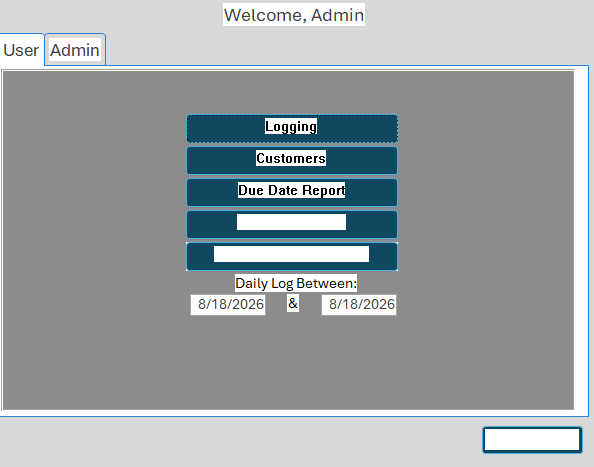
Yesterday I started encountering a strange Access bug on multiple computers. Fields would randomly become highlighted, and mousing over them would sometimes clear the highlighting, but not always. I also noticed reports displaying incorrect/changed font colors.

A couple of other clients have also contacted me about experiencing the same issue starting yesterday.

Has anyone else encountered this?

My first suspicion is Access Build 20228.20190, which was released last week and may have recently been installed on these machines.

I'm wondering if the new build introduced a rendering/display issue.
Adam Schwanz OP  @Reply  
           
12 hours ago


None of these fields or labels have white behind them

A Toykan  @Reply  
      
11 hours ago
The current situation is not officially a Microsoft Confirmed Bug, but rather a community identified suspicious version regression. Similar scenarios have been shared across various forums and communities. However, because it is still very recent or hasn't gathered enough feedback yet, there is no specific information available in the Microsoft KB. Generally speaking, the fact that this issue is appearing on multiple computers and if no code or .accdb changes were made, serves as strong evidence of a probable rendering regression.
In this case, I believe the mmediate work around is to roll back the office build or roll back this update, keep an eye on Microsoft's updates, and re-apply the update once a fix is released.
A Toykan  @Reply  
      
11 hours ago
I shared my feedback assuming you had already run the other checks, given your experience.
I didn't see the need to list out the usual troubleshooting steps for Access issues.
John Campbell  @Reply  
     
9 hours ago
There is something funny with that build and the next one.  I posted a few day ago about lines showing up randomly on reports and box outlines off center.  I have been contacted by clients about this issue, which is pretty big as clients send invoice reports to customers.
Richard Rost  @Reply  
          
7 hours ago
After Adam emailed me yesterday about this, I looked into it a little further, and this issue has been reported by multiple Access users, and similar rendering problems are currently being discussed within the Microsoft Access MVP community as well.

There appear to be several recent reports involving display and rendering problems in Access, particularly with forms, reports, Print Preview, and PDF output. Some of the symptoms may be related, while others may be separate issues, so I don't want to speculate yet about exactly which builds are affected or whether they all have the same cause.

For now, if you're experiencing this, please post your exact Access version and build number along with a description of what you're seeing. You can find this under File > Account > About Access. That information will help determine whether everyone is experiencing the same problem.

So, yes, you're not imagining things. Something appears to be going on, and I'll post additional information here as it becomes publicly available.

I am personally very slow to upgrade Access, even on my training machine. I have a separate beta/test machine that I use to play with new features like form zooming, but I don't use that machine nearly as heavily as my everyday systems. My actual production machines, including the one that runs my business and the one I use for recording classes, generally stay a build or two behind specifically so I don't get bitten by bugs like this. That's also why I'm not always the first person to notice these problems. I have noticed a little wonkiness lately in one or two of my databases, particularly with continuous forms not refreshing or updating their display properly, but until now I just chalked it up to one of those random Access glitches.
A Glenn Yesner  @Reply  
     
5 hours ago
The last several days we have been experiencing a flickering other behaviors noted in this post. We are at Version 2607 (Build 20228.20190)
There was a post about lines rendering in print preview the other day that seemed to be in Versions 2608 and/or 2609. I've been checking each time to see if an Office365 update snuck in. We're still at Version 2607.
John Campbell  @Reply  
     
3 hours ago
Here is the link from Microsoft.  Build 2607 is fine.  Build 2608 is bad.

https://techcommunity.microsoft.com/discussions/access/access-2608-build-20326-line-controls-disappear-in-print-preview/4545366
Add a Reply Upload an Image
Next Unseen

 
New Feature: Comment Live View


The following is a paid advertisement
Computer Learning Zone is not responsible for any content shown or offers made by these ads.
 

Learn
 
Access - index
Excel - index
Word - index
Windows - index
PowerPoint - index
Photoshop - index
Visual Basic - index
ASP - index
Seminars
More...
Customers
 
Login
My Account
My Courses
Lost Password
Memberships
Student Databases
Change Email
Info
 
Latest News
New Releases
User Forums
Topic Glossary
Tips & Tricks
Search The Site
Code Vault
Collapse Menus
Help
 
Customer Support
Web Site Tour
FAQs
TechHelp
Consulting Services
About
 
Background
Testimonials
Jobs
Affiliate Program
Richard Rost
Free Lessons
Mailing List
PCResale.NET
Order
 
Video Tutorials
Handbooks
Memberships
Learning Connection
Idiot's Guide to Excel
Volume Discounts
Payment Info
Shipping
Terms of Sale
Contact
 
Contact Info
Support Policy
Mailing Address
Phone Number
Fax Number
Course Survey
Email Richard
[email protected]
Blog RSS Feed    YouTube Channel

LinkedIn
Copyright 2026 by Computer Learning Zone, Amicron, and Richard Rost. All Rights Reserved. Current Time: 8/19/2026 7:18:57 PM. PLT: 1s