Free Lessons
Courses
Seminars
TechHelp
Fast Tips
Templates
Topic Index
Forum
ABCD
 
Home   Courses   TechHelp   Help   Contact   Merch   Join   Order   Logon   Forums   
 
Back to Access Expert 4    Comments List
Upload Images   @Reply   Bookmark    Link   Email   Next Unseen 
Option Group Wizard
Alan Joseph Fealey 
     
2 days ago
Hi Richard.
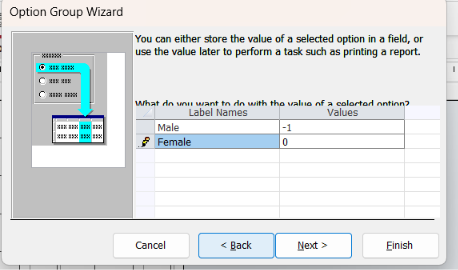
When I use the Option Group Wizard, I do not get the step to Save the value for later use or Store the value in this field, as this been removed from the new versions of Access?
Richard Rost  @Reply  
          
2 days ago
Hi Alan. No, that step should still be there if the Option Group Wizard is actually running. Make sure the Use Control Wizards button is turned on in the Controls group on the Form Design ribbon before you add the option group.

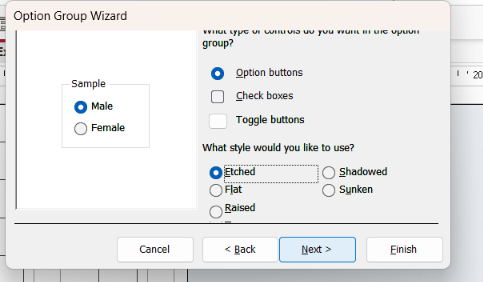
If it is on and you are still not seeing the "Save the value for later use" or "Store the value in this field" step, please post a couple of screenshots of the wizard pages you are getting, plus the ribbon showing whether Control Wizards is enabled. That will let me see exactly where things are going sideways.
Alan Joseph Fealey OP  @Reply  
     
2 days ago

Alan Joseph Fealey OP  @Reply  
     
2 days ago

Alan Joseph Fealey OP  @Reply  
     
2 days ago

Alan Joseph Fealey OP  @Reply  
     
2 days ago
Hi Richard, I forward the three screenshots as requsted,
Alex Lewis  @Reply  
       
27 hours ago
Alan Joseph I recreated your problem in my database, and the wizard is doing the same thing on my end.

Is your Option Group bound to a field in your table/query? If so, you can update the Control Source to the field you’re trying to bind.

This is part of the reason I personally don’t use Option Groups, not the most reliable tool in my experience.
Richard Rost  @Reply  
          
26 hours ago
It's been a while since I've used Option Groups. I don't use them a lot myself, but Alex is correct. In the newer versions of Access, the wizard can finish without showing that final "Save the value for later use" or "Store the value in this field" page.

After you create the Option Group, just open its property sheet and set its Control Source property to the field you want to store the selected numeric value in. That's effectively what the wizard used to do for you.

And yeah, this is one reason I'm not a huge fan of Option Groups either. A combo box is usually easier to work with and more flexible.
Alan Joseph Fealey OP  @Reply  
     
24 hours ago
Thanks Richard and Alex,

I updated the control soure in the property sheet.
Add a Reply Upload an Image
Next Unseen


What's This?


The following is a paid advertisement
Computer Learning Zone is not responsible for any content shown or offers made by these ads.
 

Learn
 
Access - index
Excel - index
Word - index
Windows - index
PowerPoint - index
Photoshop - index
Visual Basic - index
ASP - index
Seminars
More...
Customers
 
Login
My Account
My Courses
Lost Password
Memberships
Student Databases
Change Email
Info
 
Latest News
New Releases
User Forums
Topic Glossary
Tips & Tricks
Search The Site
Code Vault
Collapse Menus
Help
 
Customer Support
Web Site Tour
FAQs
TechHelp
Consulting Services
About
 
Background
Testimonials
Jobs
Affiliate Program
Richard Rost
Free Lessons
Mailing List
PCResale.NET
Order
 
Video Tutorials
Handbooks
Memberships
Learning Connection
Idiot's Guide to Excel
Volume Discounts
Payment Info
Shipping
Terms of Sale
Contact
 
Contact Info
Support Policy
Mailing Address
Phone Number
Fax Number
Course Survey
Email Richard
[email protected]
Blog RSS Feed    YouTube Channel

LinkedIn
Copyright 2026 by Computer Learning Zone, Amicron, and Richard Rost. All Rights Reserved. Current Time: 9/5/2026 3:49:23 AM. PLT: 1s