Free Lessons
Courses
Seminars
TechHelp
Fast Tips
Templates
Topic Index
Forum
ABCD
 
Home   Courses   TechHelp   Help   Contact   Merch   Join   Order   Logon   Forums   
 
Home > Courses > Access > Missing Microsoft Excel 16.0 Object Library by Tom Juric >
Back to Microsoft Access    Comments List
Upload Images   @Reply   Bookmark    Link   Email   Next Unseen 
Missing Microsoft Excel 16.0 Object Library
Tom Juric 
      
3 days ago
I have a database build in Access 2021. Customer just upgraded to Access 2024. My database will not run as it is missing reference "Excel 16.0 Object Library". The only installed Office program installed is Access 2024 so I cannot find this library.

I am desperate. Can anyone help me figure out what to do?
Kevin Robertson  @Reply  
           
3 days ago
Tom Juric OP  @Reply  
      
3 days ago
Is it possible to place the late binding code in a standard or better, global, mod so i do not have to refer to it every time i click a button.  The only place I can see so far that refers to Excel is importing and exporting excl when i shut down or when i download certain files
Kevin Yip  @Reply  
     
3 days ago
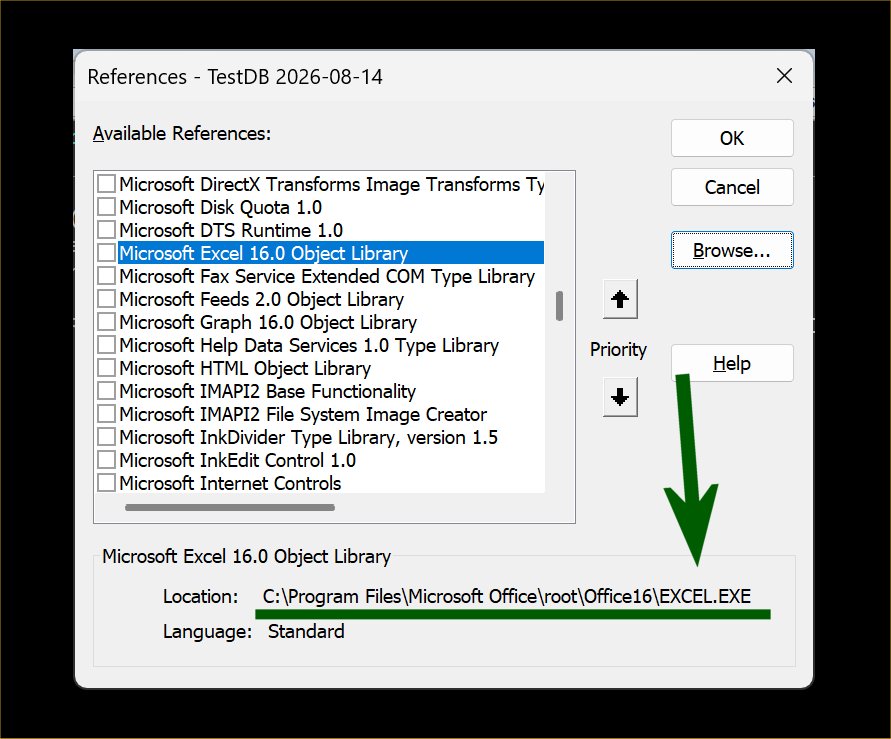
Tom  The actual library file is required in the user's computer whether your code uses late or early binding.  The reference dialog box shows that the library is inside the Excel.exe file itself (pictured below), so your users must have Excel on their PC.
Kevin Yip  @Reply  
     
3 days ago

Richard Rost  @Reply  
          
3 days ago
Kevin is correct. If you are actually automating Excel - creating workbooks, formatting sheets, saving XLSX files, etc. - Excel itself has to be installed on that PC. The Excel Object Library is part of the Excel installation.

Late binding lets your Access database compile and run without a checked Excel reference. You can put the Excel automation routines in a standard module and call them from any button click, so you do not have to duplicate the code everywhere. However, late binding does not magically provide Excel on a machine where it is not installed.

If your "export to Excel" is just an Access export, such as DoCmd.TransferSpreadsheet or DoCmd.OutputTo, you may not need Excel at all. Access can create an XLSX file directly. But if your code uses Excel.Application, Workbook, Worksheet, Range, or other Excel objects, then Excel needs to be installed, regardless of whether you use early or late binding.

Also, make sure no variables, function parameters, or return values are declared with Excel types if you switch to late binding. They need to be declared As Object instead.
Tom Juric OP  @Reply  
      
2 days ago
Thank you, Kevin and Richard. I fixed the database to work as you suggested.  In additions I got to use Richard's "Ptr" examples so now it runs perfectly.  Thank you so very much!!
Add a Reply Upload an Image
Next Unseen


What's This?


The following is a paid advertisement
Computer Learning Zone is not responsible for any content shown or offers made by these ads.
 

Learn
 
Access - index
Excel - index
Word - index
Windows - index
PowerPoint - index
Photoshop - index
Visual Basic - index
ASP - index
Seminars
More...
Customers
 
Login
My Account
My Courses
Lost Password
Memberships
Student Databases
Change Email
Info
 
Latest News
New Releases
User Forums
Topic Glossary
Tips & Tricks
Search The Site
Code Vault
Collapse Menus
Help
 
Customer Support
Web Site Tour
FAQs
TechHelp
Consulting Services
About
 
Background
Testimonials
Jobs
Affiliate Program
Richard Rost
Free Lessons
Mailing List
PCResale.NET
Order
 
Video Tutorials
Handbooks
Memberships
Learning Connection
Idiot's Guide to Excel
Volume Discounts
Payment Info
Shipping
Terms of Sale
Contact
 
Contact Info
Support Policy
Mailing Address
Phone Number
Fax Number
Course Survey
Email Richard
[email protected]
Blog RSS Feed    YouTube Channel

LinkedIn
Copyright 2026 by Computer Learning Zone, Amicron, and Richard Rost. All Rights Reserved. Current Time: 9/18/2026 4:50:28 PM. PLT: 1s