Free Lessons
Courses
Seminars
TechHelp
Fast Tips
Templates
Topic Index
Forum
ABCD
 
Home   Courses   TechHelp   Help   Contact   Merch   Join   Order   Logon   Forums   
 
Back to Access Forum    Comments List
Upload Images   @Reply   Bookmark    Link   Email   Next Unseen 
Is VBA Required to Automate and Update Button
Kenneth A Thomas 
       
13 hours ago
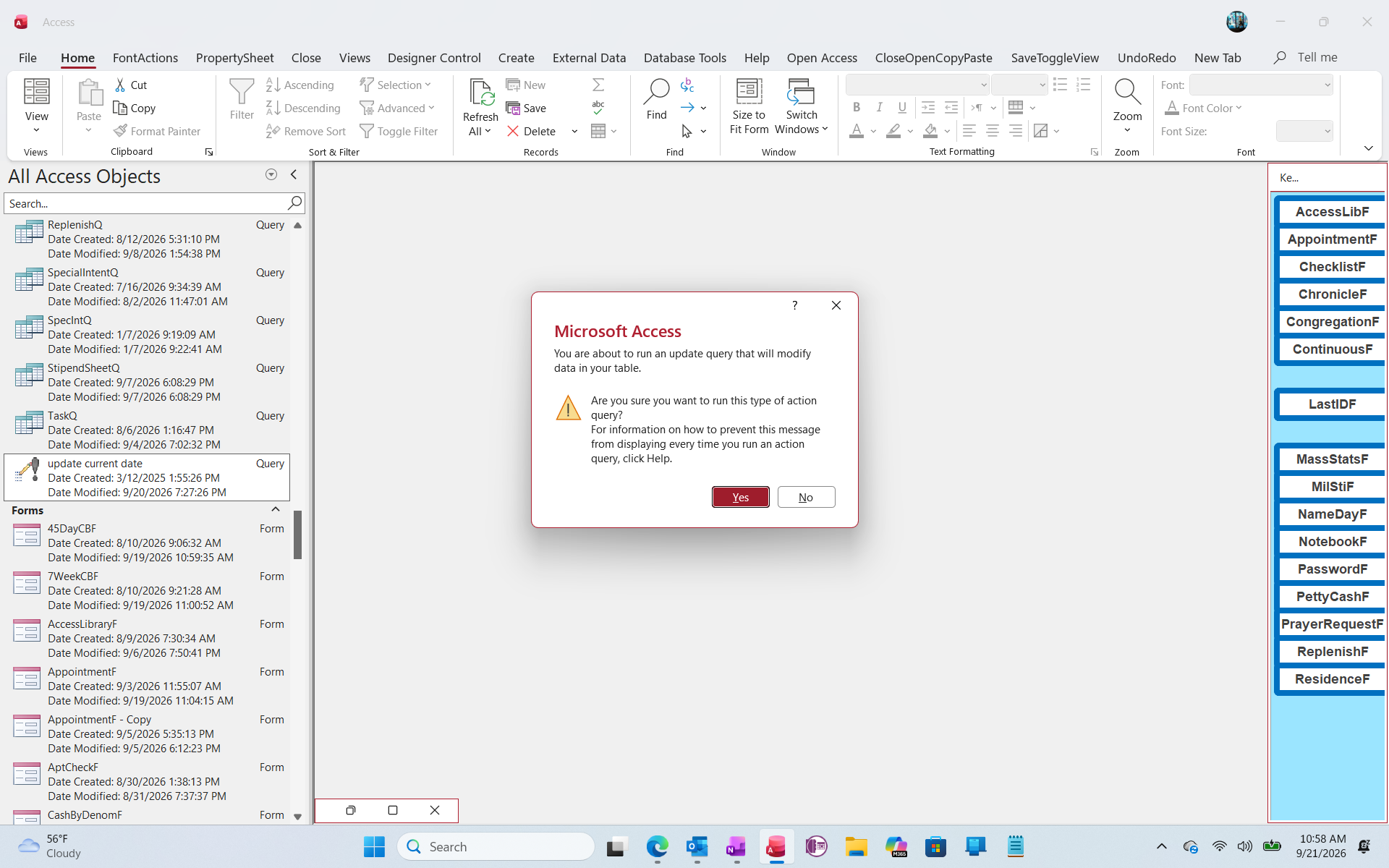
GM all.  I have about 3 tables that deal with member's ages, with a simple Update Query attached and is used to update the current date in each table.  Up until now I have to remember to manually click on the query each time I wish to update the tables.  How would I go about automating this query so that I don't need to remember to click on it every day.  If you view the attached screenshot, the Query is titled "Update Current Data" and the middle of the screen shows what the action looks like before I click "yes or No".  Please advise and thank you.
Kenneth A Thomas OP  @Reply  
       
13 hours ago

Kenneth A Thomas OP  @Reply  
       
13 hours ago
P.s.., Richard, I realize that the Query isn't formatted in accordance with your Query Naming Patterns.  However, our IT guy set that up for me and I've never taken the time to change it.
Kevin Yip  @Reply  
     
13 hours ago
It's not good practice to store "dynamic" data in tables -- data that change constantly like current date and time.  To know the people's ages, all you need to store in your tables are their dates of birth.  Then you calculate their ages *somewhere else*, such as on forms or reports, where you can use Now() to get the current date and time.  Any data that is ever-changing, like date and time, shouldn't be put in a table.  That's why tables don't allow the use of Now(), Date(), or Time() as the default value of a date/time field.
Kenneth A Thomas OP  @Reply  
       
13 hours ago
Thank you, Kevin.  I wasn't aware of that at the time I setup the tables.  I will review to see what I need to correct.
Joe Holland  @Reply  
      
12 hours ago
Kevin's comment is correct so I am glad you are looking into that. If you need to run an event every day, you can attach a macro or VBA to the OnLoad event of your main menu form. I have an event I want to run every Friday and that is how I do it.
Kenneth A Thomas OP  @Reply  
       
12 hours ago
Thank you, Joe.  Can you define "OnLoad Event" as it pertains to this situation?
Richard Rost  @Reply  
          
11 hours ago
Yes, there are a lot of ways to automate something like that. First, yes, it's possible. You'll need some way to kick it off.

If you open the database yourself every day, you could put code to run it in your main menu startup form. Put a little VBA code in that form's On Load event that runs the query. You'll have to turn warnings off first, otherwise you'll get the confirmation prompt every time the update query runs.

Another option is Windows Task Scheduler. You can have Windows open the database and run whatever startup code you need on a schedule. I have a video coming out on that pretty soon - how to get Windows to open your database and do stuff automatically.

I also have a database that I have running 24/7 called Looper. Basically, its only job is to sit there, and I launch different events, backups, checking email, forum posts, and all that stuff. It just runs 24/7 doing different stuff for me, and I can launch other databases from that database.

Now, for the deeper question: what exactly is this query doing? I agree with Kevin that you generally shouldn't store dynamic values like the current date, current time, or calculated age in a table. Store the member's DateOfBirth, then calculate the age when you need it on a form, report, or query.

There are cases where saving a static value is appropriate. For example, I save monthly sales snapshots in a historical reporting table. If an old sale later gets corrected, the snapshot might not match the current live data, but that snapshot is intended as rough historical reporting, not the gospel of my sales. Temporary tables and reporting tables can have legitimate uses too. You just have to ask what this particular update is accomplishing and whether it needs to be permanently stored.

There's nothing inherently wrong with spaces in names like "Update Current Data." You just have to remember brackets around the name whenever you refer to it, like [Update Current Data]. Personally, I avoid spaces because it makes VBA and SQL less annoying to type.

And regarding Joe's suggestion, a form has several events that occur while it is opening, including On Open, On Load, and On Current. The On Load event occurs after the form has loaded, and it is often a good place to run startup tasks like this. I cover the differences here:

Form Opening Events
Kenneth A Thomas OP  @Reply  
       
11 hours ago
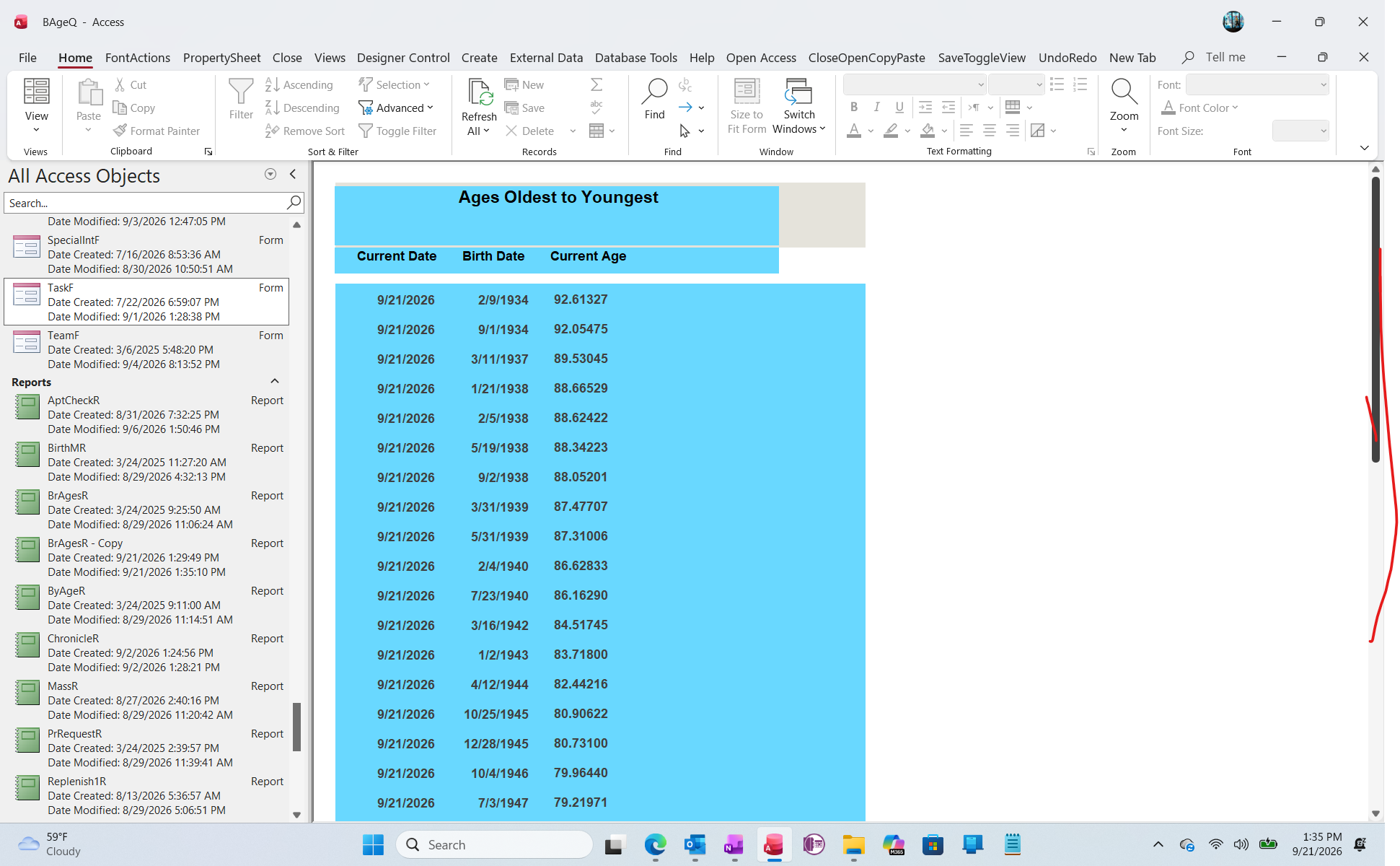
The current Screenshot is a copy of a Report of individuals in a group, from Oldest to Youngest.  I scrubbed the copy and delete names and other sensitive information and am only showing "Current Date", "Birth Date" and "Current Age" as of today.
Kenneth A Thomas OP  @Reply  
       
11 hours ago

Joe Holland  @Reply  
      
10 hours ago
I don't know if your last post has a question behind it, but Richard has a good video on Calculating Age.
Add a Reply Upload an Image
Next Unseen


What's This?


The following is a paid advertisement
Computer Learning Zone is not responsible for any content shown or offers made by these ads.
 

Learn
 
Access - index
Excel - index
Word - index
Windows - index
PowerPoint - index
Photoshop - index
Visual Basic - index
ASP - index
Seminars
More...
Customers
 
Login
My Account
My Courses
Lost Password
Memberships
Student Databases
Change Email
Info
 
Latest News
New Releases
User Forums
Topic Glossary
Tips & Tricks
Search The Site
Code Vault
Collapse Menus
Help
 
Customer Support
Web Site Tour
FAQs
TechHelp
Consulting Services
About
 
Background
Testimonials
Jobs
Affiliate Program
Richard Rost
Free Lessons
Mailing List
PCResale.NET
Order
 
Video Tutorials
Handbooks
Memberships
Learning Connection
Idiot's Guide to Excel
Volume Discounts
Payment Info
Shipping
Terms of Sale
Contact
 
Contact Info
Support Policy
Mailing Address
Phone Number
Fax Number
Course Survey
Email Richard
[email protected]
Blog RSS Feed    YouTube Channel

LinkedIn
Copyright 2026 by Computer Learning Zone, Amicron, and Richard Rost. All Rights Reserved. Current Time: 9/22/2026 12:40:45 AM. PLT: 0s