Free Lessons
Courses
Seminars
TechHelp
Fast Tips
Templates
Topic Index
Forum
ABCD
 
Home   Courses   TechHelp   Help   Contact   Merch   Join   Order   Logon   Forums   
 
Home > TechHelp > Directory > Access > Shared Library > Using Access Code Libraries by Thomas Gonder >
Back to Shared Library    Comments List
Upload Images   @Reply   Bookmark    Link   Email   Next Unseen 
Using Access Code Libraries
Thomas Gonder 
       
2 days ago
done this months, if not years, ago. I was afraid of this "library stuff" given the MS proclivity to cross-contaminate variables. I bit the bullet and after several tests, I'm happy to report "it works". Now if we could get forms and reports to use a library, then a lot of my "I forgot to copy this to another .accdb" would go away. Wouldn't help with my control tables though. Those really bite me a lot.
Richard Rost  @Reply  
          
2 days ago
Yeah, a few things that I've done with my databases: I've got four databases that I work with all day long for different things, but I want them to have some shared information. I just have a shared table that's just a back-end database with shared settings in it. It's literally a SharedSettingsT table, and I can post name-value pairs to that table. I've covered that in a couple other videos.

I also have a shared table set up online on my website and SQL Server that all of my databases and my website can use. I wouldn't use that for local stuff, though, because there is a little bit of latency going round trip to the server there.

So I essentially have three levels of settings tables:

For the database itself, for things specific to that database, like positioning coordinates on the screen and stuff like that.

For the shared databases in my office, the stuff that I want to pass values between databases.

For the website, a table that the website can also use.

Now, as far as the libraries themselves, one of the pains in the butt is that if you want to change stuff in the library file, you have to shut all of those databases down. Two of mine are databases that run continuously in a loop, so if I want to make a change to the library file, I have to shut them all down first.

Another problem, and I don't know if I mentioned this in the video or not, is that if you make changes to a library file from inside one of your databases, it'll look like you're making changes. You can hit Save and all that, but it doesn't actually save to the library file. Watch out for that and be careful.

As far as getting shared forms and reports, you can do that with add-ins. I'm actually working on something for that right now. I'm putting together a way to have a few shared forms that you can use between databases. More is coming on that. Stay tuned.
Thomas Gonder OP  @Reply  
       
2 days ago
Oh, what a (flexible) mess I've made, .accdb(s) for control tables at the universal and client level, data at both levels (do you want your own custom and small postal code table, or do you want to use my monster?) and now a library .accdb that needs to work as an .accde too.

That not saving library changes from the FE is NOT going to be fun considering I make a lot of changes while debugging. ChatGPT said one could (raspberry).

What have you seen happen to running FE instances if you do make a change to the library?
Since all my database projects start with a core set of forms, the add-ins should be interesting. Is that along the lines of the AccDevTools "add-in"and the Database Tools > Add-ins (which I haven't played with)?
I want developers to be able to "adjust" those core forms if they wish, I wonder how that will happen if the form isn't actually in the .accdb.
Thomas Gonder OP  @Reply  
       
2 days ago
During some testing I found that the front-end database, if it modifies the code for the library, the VBAE will keep a local copy and those changes will persist until the database closes at which point they will revert back to the main library code. I've embarked on an ambitious adventure to create a robust system to backup changes in the front end to a folder by exporting them to .bas text type files and then importing them back into the library module in bulk. Of course, including backups of original code in both the FE and the library.
Richard Rost  @Reply  
          
2 days ago
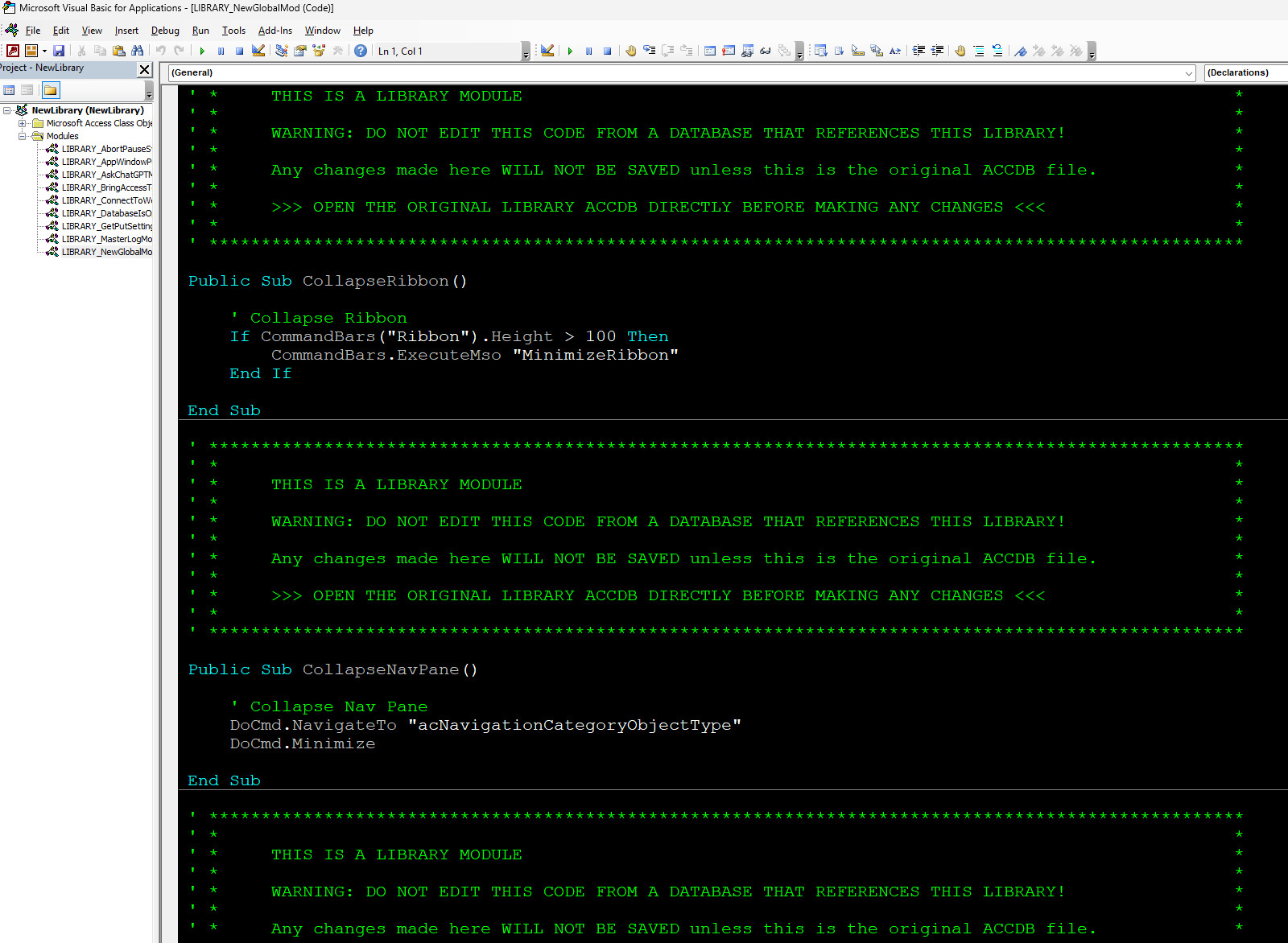
Yeah, I thought about doing that too, and then I realized it was probably too much work. What I do now is I just put big warnings to myself whenever I try to edit something in a code module that's a library file.
Richard Rost  @Reply  
          
2 days ago

Richard Rost  @Reply  
          
2 days ago
I put those in my library file so that I can see if I right-click Go to Definition and it brings me to a sub. This way, I can clearly see that I'm in the library file now and not make any changes. If my dumbass still does, which I still catch myself doing, then that's on me. I make sure at least one of those blocks is on every screen so I don't make that mistake again.
Thomas Gonder OP  @Reply  
       
22 hours ago
You could write the subroutines, which were a bit of work with lots of testing.  Or clear someone's tab for a copy of them. I have a standard of where my db files reside, so that bit is hardcoded, but maintained in a variable in a third subroutine to find paths where to save and restore from. I was able to put all my VBA code that isn't a class module for a form or report into the one library. So, it's pretty easy to remember that I need to export and import based on it not being a class module. This is going to be a godsend when needing to interactively debug and test in various FEs. I've got to overcome the habit of closing a FE without thinking, because any changes are lost if not exported.

Here are the comments from my two routines.

'*** Export & Import VBA Code

'
' Module source files in ModSrc folder:
'   .bas  - Current module exported from an FE and waiting to be imported.
'   .basp - Previous .bas export, retained as a rollback of the prior FE version.
'   .basr - Library module saved immediately before its code is replaced.
'   .basx - .bas file renamed after it has been successfully imported.
'
' A .bas file therefore indicates a pending library update. After a successful
' import, no .bas remains for that module; .basr and .basx preserve the before
' and after versions of the update.


'*** Procedure: sModSrcExport
' Purpose: Exports the currently selected standard VBA module to the ModSrc
'          folder for later import into the library database.
'
' Parameters
'   None.
'
' Notes
'   - The ModSrc folder is located beneath the Adbs folder.
'   - An existing .basp file is deleted.
'   - An existing .bas file is renamed to .basp before the new export.
'   - Only standard modules are processed.
'
Public Sub sModSrcExport()

>>>>>>>>>>


'*** Procedure: sModSrcImport
' Purpose: Replaces the code in existing standard VBA modules using pending
'          .bas source files in the ModSrc folder.
'
' Parameters:
'   None.
'
' Notes
'   - Each .bas file represents a standard module waiting to be updated.
'   - The existing module is exported to .basr before its code is replaced.
'   - Existing .basr and .basx files are deleted before processing.
'   - The existing VBComponent is retained and only its code is replaced.
'   - A successfully processed .bas file is renamed to .basx.
'   - Do not step or break while module code is being replaced.
'
Public Sub sModSrcImport()

Add a Reply Upload an Image
Next Unseen


What's This?


The following is a paid advertisement
Computer Learning Zone is not responsible for any content shown or offers made by these ads.
 

Learn
 
Access - index
Excel - index
Word - index
Windows - index
PowerPoint - index
Photoshop - index
Visual Basic - index
ASP - index
Seminars
More...
Customers
 
Login
My Account
My Courses
Lost Password
Memberships
Student Databases
Change Email
Info
 
Latest News
New Releases
User Forums
Topic Glossary
Tips & Tricks
Search The Site
Code Vault
Collapse Menus
Help
 
Customer Support
Web Site Tour
FAQs
TechHelp
Consulting Services
About
 
Background
Testimonials
Jobs
Affiliate Program
Richard Rost
Free Lessons
Mailing List
PCResale.NET
Order
 
Video Tutorials
Handbooks
Memberships
Learning Connection
Idiot's Guide to Excel
Volume Discounts
Payment Info
Shipping
Terms of Sale
Contact
 
Contact Info
Support Policy
Mailing Address
Phone Number
Fax Number
Course Survey
Email Richard
[email protected]
Blog RSS Feed    YouTube Channel

LinkedIn
Copyright 2026 by Computer Learning Zone, Amicron, and Richard Rost. All Rights Reserved. Current Time: 9/25/2026 8:24:45 AM. PLT: 1s