Free Lessons
Courses
Seminars
TechHelp
Fast Tips
Templates
Topic Index
Forum
ABCD
 
Home   Courses   TechHelp   Help   Contact   Merch   Join   Order   Logon   Forums   
 
Back to Access Forum    Comments List
Upload Images | @Reply | Bookmark | Link | Email | Next Unseen |
Calculating Standard Deviation
Kenneth A Thomas 
       
3 days ago
I am collecting some numeric data on an Access form and I would eventually like to use this data to calculate and apply Standard Deviation simple data analysis.  Can Standard Deviation be calculated in an Access query, or would I need to export the data to Excel, then calculate the Standard Deviation(s)?  Thank you.
John Davy  @Reply  
         
3 days ago
Hi Ken, I did it with a calculator years ago, then later checked my work at Dartmouth on a timeshare computer (wished I had a laptop then). I would do it in steps and not try a single query. Or, I would consider using  a recordset.

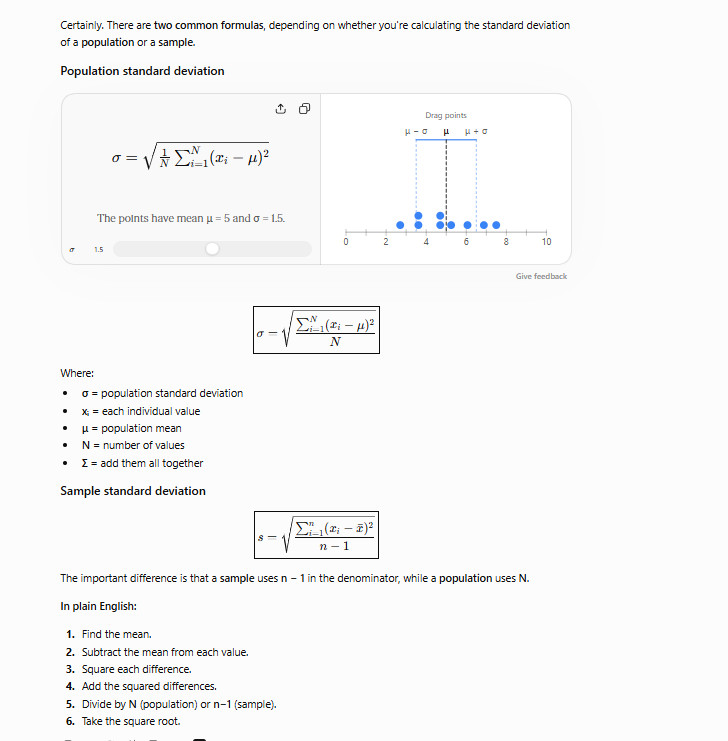
Here is Chat's 2 cents worth:  There are two common formulas, depending on whether you're calculating the standard deviation of a population or a sample.

Population standard deviation
\(\sigma = \sqrt{\frac{1}{N}\sum_{i=1}^{N}(x_i-\mu)^2}\)
The points have mean  = 5 and  = 1.5.


Drag points
Give feedback
$$ \boxed{\sigma=\sqrt{\frac{\sum_{i=1}^{N}(x_i-\mu)^2}{N}}} $$

Where:

= population standard deviation
x = each individual value
= population mean
N = number of values
= add them all together
Sample standard deviation
$$ \boxed{s=\sqrt{\frac{\sum_{i=1}^{n}(x_i-\bar{x})^2}{n-1}}} $$

The important difference is that a sample uses n - 1 in the denominator, while a population uses N.

In plain English:

Find the mean.
Subtract the mean from each value.
Square each difference.
Add the squared differences.
Divide by N (population) or n-1 (sample).
Take the square root.

HTH John
John Davy  @Reply  
         
3 days ago

Kevin Yip  @Reply  
      
3 days ago
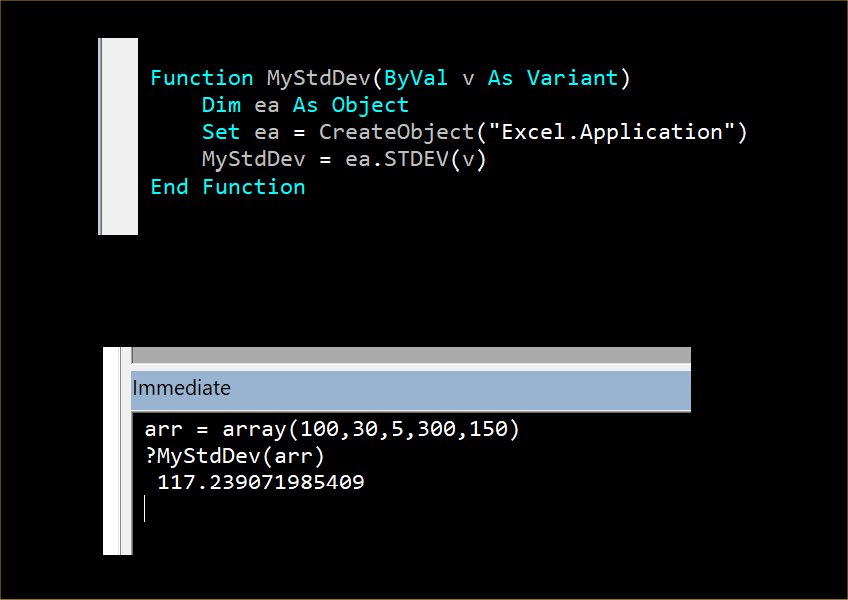
Kenneth   You can use Excel functions in Access by referencing Excel in VBA.  The code below lets Access VBA use Excel's STDEV function.  Put this code in a custom function (such as MyStdDev below), and use this custom function in your query or other VBA code.  This technique is called automation.  Richard must have courses for it somewhere.  The immediate window below shows that it runs successfully.  The STDEV() function takes a range of cells in Excel, which is equivalent to an array in VBA.

If you are wondering whether you can use this function on a whole column of data in a query, like what Sum() or Count() does, the answer is unfortunately no, you cannot.  This is because you cannot create custom aggregate functions in VBA.  You must retrieve data from all rows, store them in an array, then feed the array to the function as shown below.
Kevin Yip  @Reply  
      
3 days ago

Richard Rost  @Reply  
          
2 days ago
Kevin, you must be a mind reader. Using Excel functions in Access VBA has been on my developer to-do list for a while now.

I've covered quite a bit of Excel automation, such as using Access to create spreadsheets. I used it myself for pulling stock portfolio data, but I haven't yet covered tapping into Excel's function library like this. I've got a couple of other topics to cover first, but this is definitely coming up after that.
Kevin Yip  @Reply  
      
2 days ago
SQL Server also has a STDEV function, if the user doesn't have Excel on their PC.  But automation is still useful in many situations.  

P.S.  "Automation," coined in the 90s, is an unfortunate word because it sounds like AI today.  But it's just a coding technique, and has nothing to do with AI.
Richard Rost  @Reply  
          
2 days ago
Yeah, I think of automation more as issuing commands to another program and having it do work in that program. With Excel, for example, Access can create a new workbook, put values in worksheet cells, call Excel functions, format the sheet, and save the finished file. Access is basically telling Excel what to do rather than just borrowing one of Excel's tools.

I do the same thing with Word. My handbook generator gathers the data in Access, then issues automation commands to Word to build the final document, insert pictures, set fonts, and so on. That's what I consider automation.
Richard Rost  @Reply  
          
2 days ago
I will talk about this in the next Quick Queries video: https://599cd.com/QQ
Kenneth A Thomas OP  @Reply  
       
35 hours ago
I know how to figure out STDEV in Excel, I just wanted to knowif I could formulate right in Access.  I will continue using Excel.  Thank you. Go Bills
Add a Reply Upload an Image
Next Unseen


What's This?


The following is a paid advertisement
Computer Learning Zone is not responsible for any content shown or offers made by these ads.
 

Learn
 
Access - index
Excel - index
Word - index
Windows - index
PowerPoint - index
Photoshop - index
Visual Basic - index
ASP - index
Seminars
More...
Customers
 
Login
My Account
My Courses
Lost Password
Memberships
Student Databases
Change Email
Info
 
Latest News
New Releases
User Forums
Topic Glossary
Tips & Tricks
Search The Site
Code Vault
Collapse Menus
Help
 
Customer Support
Web Site Tour
FAQs
TechHelp
Consulting Services
About
 
Background
Testimonials
Jobs
Affiliate Program
Richard Rost
Free Lessons
Mailing List
PCResale.NET
Order
 
Video Tutorials
Handbooks
Memberships
Learning Connection
Idiot's Guide to Excel
Volume Discounts
Payment Info
Shipping
Terms of Sale
Contact
 
Contact Info
Support Policy
Mailing Address
Phone Number
Fax Number
Course Survey
Email Richard
[email protected]
Blog RSS Feed    YouTube Channel

LinkedIn
Copyright 2026 by Computer Learning Zone, Amicron, and Richard Rost. All Rights Reserved. Current Time: 9/28/2026 6:17:24 PM. PLT: 1s