Free Lessons
Courses
Seminars
TechHelp
Fast Tips
Templates
Topic Index
Forum
ABCD
 
Home   Courses   TechHelp   Help   Contact   Merch   Join   Order   Logon   Forums   
 
Back to Access Developers    Comments List
Upload Images | @Reply | Bookmark | Link | Email | Next Unseen |

VBA Not Working When First Opening Access Database
Will Schmidt 
      
6 days ago
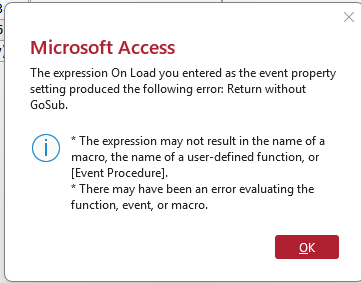
Whenever I first open my access database and try to open up anything that uses vba i get this message: "The expression on load you entered as the event property setting produced the following error: Return without GoSub. The expression may not result in the name of a macro, the name of a user-defined function, or [Event Proccedure]. There may have been a error evaluating the function, event, or macro." So, if I open up an event in VBA and close it without even changing anything it will ask me if i want to save the changes. i select "yes" and then everything works fine. What is the cause of this and how do i fix it? I made sure that the file is in a trusted folder.
Will Schmidt OP  @Reply  
      
6 days ago

Alex Hedley  @Reply  
           
6 days ago
Can you also share the code?
Thomas Gonder  @Reply  
       
6 days ago
Ah those lovely Microsoft error messages.
Did you make any recent code changes?
Have you compiled the VBA code?
Any signs of database corruption?
Does your last functioning backup do the same when run now?
Richard Rost  @Reply  
          
6 days ago
Yeah, the first thing you should always try whenever weird errors like this pop up is a Compact and Repair. It can clear up minor corruption in the database or the VBA project.

Did you run down the troubleshooter? What steps have you taken so far?

Also, as Thomas mentioned, open the VBA editor and go to Debug - Compile. If it stops on anything, fix that first. Since simply opening and saving a procedure makes it work again, it sounds like Access may be recompiling or refreshing something that was out of sync.
Alkan Toykan  @Reply  
       
6 days ago
Your problem most likely due to a corrupt VBA compiled state, a broken reference, or corrupt Access object/event metadata. It is very unlikely to be a Trusted Location issue, since your VBA code executes correctly immediately after forcing the VBA project to save.
My suggestion is back up your database first. Decompile it than open it normally, go to the VBA editor debug & compile, and check Tools/References for any missing libraries. Finally, run Compact & Repair. As Richard said follow the troubleshooter steps.
Thomas Gonder  @Reply  
       
6 days ago
This is an interesting one. For fun I went into my startup routine and added a Return (without a Gosub, taking your error message at face value). It would compile but when running it came up with a runtime error. I don't know what would happen if I didn't have error trapping in force. So, there seems to be a small problem with the VBA compiler because normally it will reject a missing End If and the like. Why allow a spurious Return?
Richard Rost  @Reply  
          
5 days ago
Thomas, VBA does allow a Return statement to compile even if there is no matching GoSub. It doesn't know until runtime whether that particular line will actually be reached. If execution hits Return without having arrived there through a GoSub, you get error 3, "Return without GoSub."

I just tested it. This will compile just fine:

Private Sub HelloWorldBtn_Click()
    Status "Hello world!"
    Return    
End Sub


But as soon as you click the button... Error 3. Now I gotta add this to my Error Messages series. LOL.

In Will's case, though, I agree that the error itself may be a symptom rather than the real problem. Since opening a procedure and saving it makes the form work, I would suspect a damaged or stale compiled VBA project, a missing reference, or corrupted event-property metadata before assuming there is literally a stray Return in the code.

Will, I would still check for Return statements in your startup code and any form Load event code. But after making a backup, I would work through the standard repair sequence: Compact and Repair, Debug - Compile in the VBA editor, check Tools - References for anything marked MISSING, and then decompile/recompile if needed.
Richard Rost  @Reply  
          
5 days ago
I will talk about this in the next Quick Queries video: https://599cd.com/QQ
Thomas Gonder  @Reply  
       
4 days ago
Richard I try to be a good Access adherent. Foolishly, I first try to understand if the Access error message makes any sense given my recent modifications. After a few moments of thought on that, I often move straight into skeptic mode. My principal comments here reflect the first thought process, given I don't know what mods Will S. made.

I have yet to find that a Compact & Repair fixes anything. Decompile & recompile has fixed 90% or more of the code creepies. Only twice have I had to move all the objects to a new database because of some deep and hidden corruption that buggers up VBA and Queries.
Tony Godfrey  @Reply  
     
4 days ago
Richard encountered the “GoSub” error in Multiple Addresses 2:

https://599cd.com/blog/display-article.asp?ID=3167

It comes up at about the 7:21 mark in the video. The discussion is brief, but I’ve found that his solution works for me whenever I encounter the same error.
Richard Rost  @Reply  
          
4 days ago
Yep, that's a good catch, Tony. I had completely forgotten about that one. In that case, the error was caused by an event property that had gotten messed up, and resetting the event to [Event Procedure] cleared it.

Will, check the form's On Load property in the Property Sheet. If it doesn't say [Event Procedure], clear it, save the form, and then set it back to [Event Procedure]. Since the error happens when the form loads, that may be the specific event property that needs to be reset.
Will Schmidt OP  @Reply  
      
4 days ago
I want to thank you all for your comments on this issue and this week i plan to address this when i get time. (may have to burn some midnight oil)
Will Schmidt OP  @Reply  
      
28 hours ago
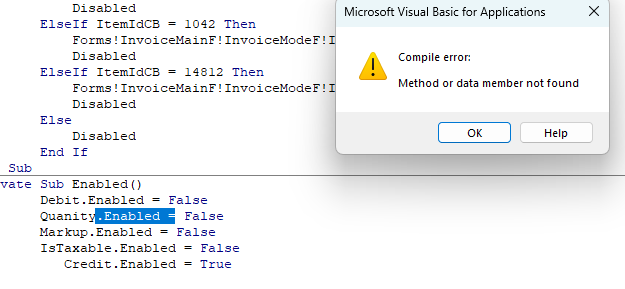
when running the debugger it comes up with "method of data member not found" What is wrong with this? (I know that "Quanity is a typo, but i named it that way in the table and everywhere else, then later i realized it was spelled wrong but don't want to change it at this point, so even though it is spelled wrong, there is a field called "Quanity!")
Will Schmidt OP  @Reply  
      
28 hours ago

Will Schmidt OP  @Reply  
      
28 hours ago
Is the method not correct?
Kevin Robertson  @Reply  
          
28 hours ago
What type of control is Quantity?
Calling the procedure Enabled may be causing conflicts.
Alkan Toykan  @Reply  
       
27 hours ago
If Quanity is actually the name of the control, the spelling itself is not a problem. However, I'd check the control's Name property rather than the underlying field name. In the form's code module, try typing Me.Qua and press Ctrl+Space. If Quanity is a control on the form, intellisense should normally show it. Also check whether Quanity is a label, because a label does not expose an Enabled property.
Richard Rost  @Reply  
          
24 hours ago
Use the exact Name of the control as shown in its Property Sheet. If it really is Quanity, then your VBA has to use:

Quanity.Enabled = False

The fact that the underlying table field is misspelled is fine as long as you use that same spelling consistently everywhere.

And wait a minute, what's that inside of? Did you make another Sub called Enabled? Because Enabled itself is a reserved word, and you shouldn't use that as the name of a subroutine. It'd be like making your own function called Caption. If you try to access the Caption property, it's going to cause issues.
Add a Reply Upload an Image
Next Unseen


What's This?


The following is a paid advertisement
Computer Learning Zone is not responsible for any content shown or offers made by these ads.
 

Learn
 
Access - index
Excel - index
Word - index
Windows - index
PowerPoint - index
Photoshop - index
Visual Basic - index
ASP - index
Seminars
More...
Customers
 
Login
My Account
My Courses
Lost Password
Memberships
Student Databases
Change Email
Info
 
Latest News
New Releases
User Forums
Topic Glossary
Tips & Tricks
Search The Site
Code Vault
Collapse Menus
Help
 
Customer Support
Web Site Tour
FAQs
TechHelp
Consulting Services
About
 
Background
Testimonials
Jobs
Affiliate Program
Richard Rost
Free Lessons
Mailing List
PCResale.NET
Order
 
Video Tutorials
Handbooks
Memberships
Learning Connection
Idiot's Guide to Excel
Volume Discounts
Payment Info
Shipping
Terms of Sale
Contact
 
Contact Info
Support Policy
Mailing Address
Phone Number
Fax Number
Course Survey
Email Richard
[email protected]
Blog RSS Feed    YouTube Channel

LinkedIn
Copyright 2026 by Computer Learning Zone, Amicron, and Richard Rost. All Rights Reserved. Current Time: 10/1/2026 5:17:02 PM. PLT: 1s