Free Lessons
Courses
Seminars
TechHelp
Fast Tips
Templates
Topic Index
Forum
ABCD
 
Home   Courses   TechHelp   Help   Contact   Merch   Join   Order   Logon   Forums   
 
Back to Access Forum    Comments List
Upload Images | @Reply | Bookmark | Link | Email | Next Unseen |
Calculation Depending on the Values of Comboboxes
Peter Dibbets 
   
22 hours ago
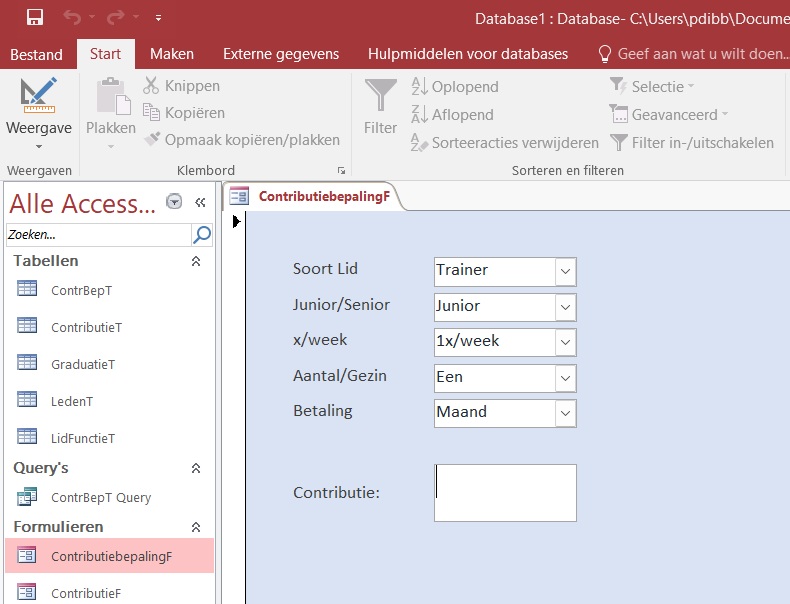
I want to display an amount in a text box based on the selections made in five combo boxes—for example, combo box 2 offers a choice of once or twice a week, and combo box 3 covers one or multiple family members (which alone results in four possible outcomes). However, I have no idea how to configure the form so that the amount updates whenever one of the combo boxes changes. Combo box 4 specifies "Junior" or "Senior," and combo box 5 specifies the payment frequency (monthly or quarterly).
(Combo box 1 covers "Trainer," "Member," or "Single Session.") The amount in the text box should change according to the selections made in the combo boxes.
Peter Dibbets OP  @Reply  
   
22 hours ago

Donald Blackwell  @Reply  
       
19 hours ago
What are the actual rowsource and control source for your combo boxes.

For instance, are they typical Relational Combo Boxes or are the values specified in a list in the control.

You might also want to check out Cascading Combo Boxes if each subsequent combo box's options are dependent upon the previous.

Start with your first combo box. Does the selection there effect the options in the next combo box? Does it effect the value you want to put in the text box? Then work from there setting or updating the field value as each combo is adjusted.
Peter Dibbets OP  @Reply  
   
9 hours ago
Hello Donald,

The ControlSource for the first combo = Trainer,
The rowsource = "Hoofdtrainer";"Clubtrainer";"Trainer";"Lid";"Losse Les"

The ControlSource for the second combo = JunSen
The rowsource = "Junior";"Senior"

ControlSource for the third combo = Week
The rowsource = "1x/week";"2x/week"

ControlSource for the fourth combo = Meer
The rowsource = "1 lid";"meer leden"

ControlSource for the fifth combo = Maand
The rowsource = "Maand";"Kwartaal"

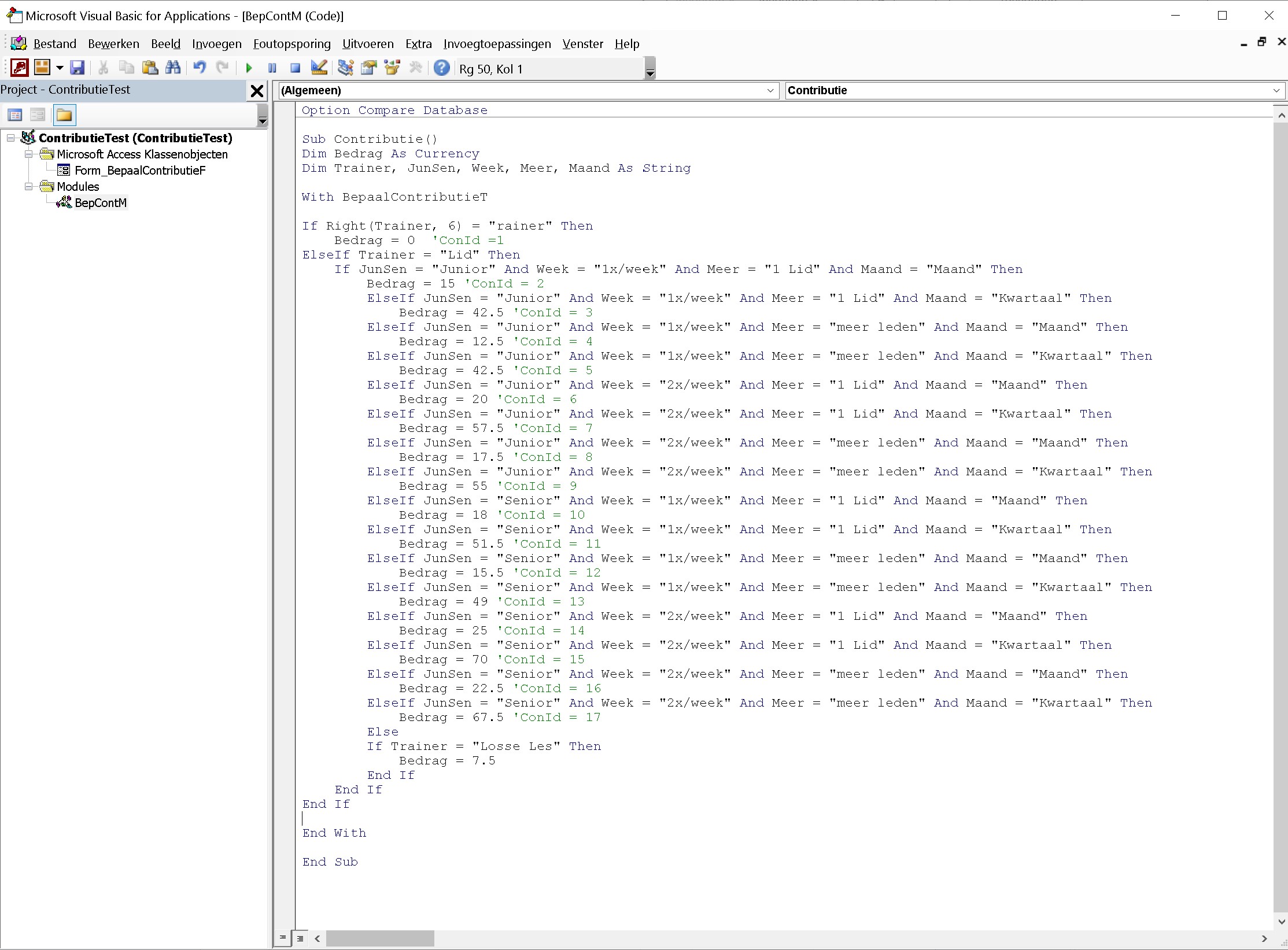
The idea was to use it like a Karnaugh diagram
Peter Dibbets OP  @Reply  
   
9 hours ago

Peter Dibbets OP  @Reply  
   
9 hours ago
No, the selection in the every combobox should only have effect on the Textbox "Bedrag"
Richard Rost  @Reply  
          
7 hours ago
I'd put the pricing in a table instead of trying to build a giant nest of IIf statements. Create a table such as PriceT with these fields:

Trainer
JunSen
[Week]
Meer
Maand
Bedrag

Add one record for each valid combination and its price. You may also want a unique index across the first five fields so you can't accidentally enter the same combination twice.

Then put this procedure in your form's module. This assumes the combo boxes have the same names as their ControlSource fields:

Private Sub UpdateBedrag()
    Dim Criteria As String

    If IsNull(Trainer) Or IsNull(JunSen) Or IsNull([Week]) Or IsNull(Meer) Or IsNull(Maand) Then
        Bedrag = Null
        Exit Sub
    End If

    Criteria = "Trainer=""" & Trainer & """ AND JunSen=""" & JunSen & """ AND [Week]=""" & [Week] & """ AND Meer=""" & Meer & """ AND Maand=""" & Maand & """"
    Bedrag = Nz(DLookup("Bedrag", "PriceT", Criteria), 0)
End Sub

Then, in the After Update event for each of the five combo boxes, call that procedure:

Private Sub Trainer_AfterUpdate()
    UpdateBedrag
End Sub

Private Sub JunSen_AfterUpdate()
    UpdateBedrag
End Sub

Private Sub Week_AfterUpdate()
    UpdateBedrag
End Sub

Private Sub Meer_AfterUpdate()
    UpdateBedrag
End Sub

Private Sub Maand_AfterUpdate()
    UpdateBedrag
End Sub

Set each combo box's After Update event property to [Event Procedure].

This way, every time the user changes a selection, Access looks up the matching amount and puts it in Bedrag. If it returns 0, that means there isn't a matching combination in PriceT, which is also a handy way to spot a missing price record.

One small caution: if Bedrag is the actual amount charged to a customer, storing it with the customer record is usually correct. That preserves the historical price if you later change your prices in PriceT.
Add a Reply Upload an Image
Next Unseen


What's This?


The following is a paid advertisement
Computer Learning Zone is not responsible for any content shown or offers made by these ads.
 

Learn
 
Access - index
Excel - index
Word - index
Windows - index
PowerPoint - index
Photoshop - index
Visual Basic - index
ASP - index
Seminars
More...
Customers
 
Login
My Account
My Courses
Lost Password
Memberships
Student Databases
Change Email
Info
 
Latest News
New Releases
User Forums
Topic Glossary
Tips & Tricks
Search The Site
Code Vault
Collapse Menus
Help
 
Customer Support
Web Site Tour
FAQs
TechHelp
Consulting Services
About
 
Background
Testimonials
Jobs
Affiliate Program
Richard Rost
Free Lessons
Mailing List
PCResale.NET
Order
 
Video Tutorials
Handbooks
Memberships
Learning Connection
Idiot's Guide to Excel
Volume Discounts
Payment Info
Shipping
Terms of Sale
Contact
 
Contact Info
Support Policy
Mailing Address
Phone Number
Fax Number
Course Survey
Email Richard
[email protected]
Blog RSS Feed    YouTube Channel

LinkedIn
Copyright 2026 by Computer Learning Zone, Amicron, and Richard Rost. All Rights Reserved. Current Time: 9/28/2026 6:17:52 PM. PLT: 1s