Free Lessons
Courses
Seminars
TechHelp
Fast Tips
Templates
Topic Index
Forum
ABCD
 
Home   Courses   TechHelp   Help   Contact   Merch   Join   Order   Logon   Forums   
 
Back to Access Forum    Comments List
Upload Images | @Reply | Bookmark | Link | Email | Next Unseen |
Making a Large Report Into Several Smaller Reports
Kenneth A Thomas 
       
5 hours ago
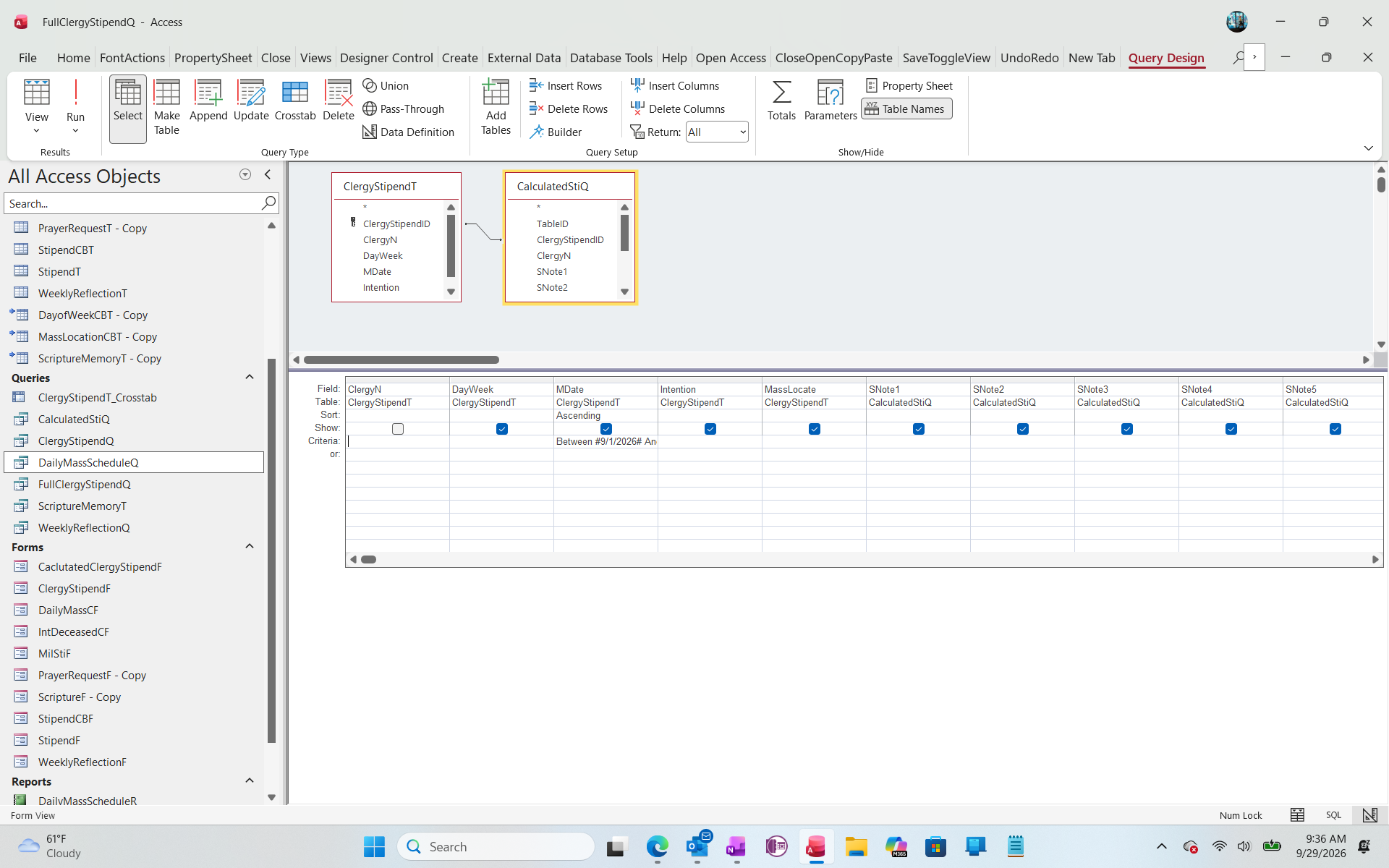
Ok, so I have the object for a Calculated Clergy Stipend Report all set up and ready to go for monthly reporting.  The objects currently contain 5 different Catholic Priests, and I can print the report that way, but I would like to be able to sort the Query so I can print a separate report for each priest.  The priests are coded by number (1-5) and I thought it would be as easy as using ="1" (or proper number) under ClergyN Criteria. However, that doesn't work, so what coding do I use for this purpose?  I am attaching a Screen Shot for the Query.
Kenneth A Thomas OP  @Reply  
       
5 hours ago

Alex Lewis  @Reply  
       
4 hours ago
What type of field is ClergyN?
Kenneth A Thomas OP  @Reply  
       
4 hours ago
It's a combo Box that shows up as numbers instead of the Priests Names.
Kevin Robertson  @Reply  
           
4 hours ago
Use a Combo Box on a Form for the priest's name.
Open the Report with a Button. Use the Where Condition to determine which records show up in the Report.
Richard Rost  @Reply  
           
2 hours ago
The Combo Box itself doesn't determine the field type. Check the underlying ClergyN field in the table design.

If ClergyN is a Number field, the query criterion should simply be:

1

No quotes are needed. If it is a Short Text field, then use:

"1"

That said, Kevin's recommendation is the better long-term setup. Don't make a separate query or report for each priest. Select the priest from a Combo Box on a form and use that selection as the report's WhereCondition when you open it.
Add a Reply Upload an Image
Next Unseen


What's This?


The following is a paid advertisement
Computer Learning Zone is not responsible for any content shown or offers made by these ads.
 

Learn
 
Access - index
Excel - index
Word - index
Windows - index
PowerPoint - index
Photoshop - index
Visual Basic - index
ASP - index
Seminars
More...
Customers
 
Login
My Account
My Courses
Lost Password
Memberships
Student Databases
Change Email
Info
 
Latest News
New Releases
User Forums
Topic Glossary
Tips & Tricks
Search The Site
Code Vault
Collapse Menus
Help
 
Customer Support
Web Site Tour
FAQs
TechHelp
Consulting Services
About
 
Background
Testimonials
Jobs
Affiliate Program
Richard Rost
Free Lessons
Mailing List
PCResale.NET
Order
 
Video Tutorials
Handbooks
Memberships
Learning Connection
Idiot's Guide to Excel
Volume Discounts
Payment Info
Shipping
Terms of Sale
Contact
 
Contact Info
Support Policy
Mailing Address
Phone Number
Fax Number
Course Survey
Email Richard
[email protected]
Blog RSS Feed    YouTube Channel

LinkedIn
Copyright 2026 by Computer Learning Zone, Amicron, and Richard Rost. All Rights Reserved. Current Time: 9/29/2026 2:14:14 PM. PLT: 0s