Free Lessons
Courses
Seminars
TechHelp
Fast Tips
Templates
Topic Index
Forum
ABCD
 
Home   Courses   TechHelp   Help   Contact   Merch   Join   Order   Logon   Forums   
 
Back to Access Forum    Comments List
Upload Images | @Reply | Bookmark | Link | Email | Next Unseen |
Error 2450 Requerying an Open Form
Lee Shastid 
     
29 hours ago
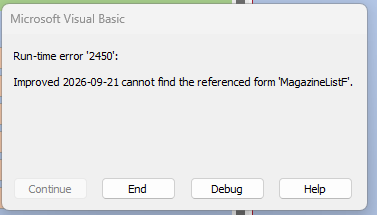
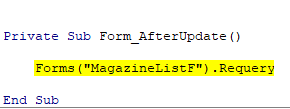
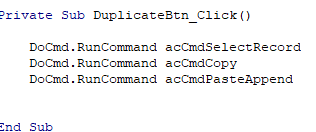
I have a form that an item is entered on. At times there are duplicate items and I created a Duplicate Record button. When I click the duplicate button I get the error message that is below. Then the debug message. Someone here gave the code to requery the list form that this form sends the data to fill that list form that does it just fine. The code for the  duplicate button is listed also. Can someone tell me why i am getting this error message?
Lee Shastid OP  @Reply  
     
29 hours ago

Lee Shastid OP  @Reply  
     
29 hours ago

Lee Shastid OP  @Reply  
     
29 hours ago

Donald Blackwell  @Reply  
       
28 hours ago
I would guess that either MagazineListF is spelled differently as the form name, or the form is not open or it is a subform of another form in which case you would need to use subform notation: Form!MainFormF!SubFormControlName.Form.Requery
Tom Juric  @Reply  
      
27 hours ago
If you are on the form try: Me.Requery      OR MagazineListF.Requery
If you are not on the form try: Forms!FormName.Requery
Alkan Toykan  @Reply  
       
26 hours ago
If MagazineListF is not a subform, then Forms("MagazineListF").Requery is valid as long as MagazineListF is currently open. If it is a subform, then you need to use the subform notation as Donald pointed out. Check the form's Name property first, then determine whether it is a main form or a subform.

Error 2450 can also occur if the form is not currently loaded. You can verify whether the form is loaded with:
CurrentProject.AllForms("MagazineListF").IsLoaded
I wouldn't open the form just to perform the Requery unless the application actually requires that form to be open. If the form is closed, simply skip the Requery rather than opening it just for that purpose.
Lee Shastid OP  @Reply  
     
17 hours ago
Ok sounds like my issue may be because it is a subform of another form. So Donald which part of your command do i change to match what form and so on?
Donald Blackwell  @Reply  
       
16 hours ago
Change "MainForm" to the name of the form containing the sub form.
Change "SubFormControlName" to the actual name of the subform control. It's often the name of the form if you drag it in from the navigation pane, but not always.
Lee Shastid OP  @Reply  
     
7 hours ago
Okay I was incorrect. It is NOT a sub form of another form. I have checked spelling so I am at a lost. I am close to scrapping the duplicate button idea since its acting up. I have already tried what Tom suggested which is what brought me to ask the question to begin with to get the current code I am using. I keep the form (MagazineListF) open on another screen when I am on the entry form so I can see how many duplicates I have made of that record. It is more convenient that way because sometimes I may only one or two additional records to copy and sometimes maybe ten. When the error pops up if whether I choose debug or end when I close the dialog box, it does duplicate the record, but its a pain to have to do it between each duplicate record.
Richard Rost  @Reply  
           
6 hours ago
The duplicate code itself is working. Since the record gets copied before the error appears, the failing line is the Requery afterward.

If MagazineListF is definitely open, then Access isn't recognizing that as the form's actual Name property. Make sure you're not looking at the form's Caption, which can be different. Open MagazineListF in Design View, open the Property Sheet, and check the Name property on the Other tab.

Also, put this immediately before the Requery:

Debug.Print CurrentProject.AllForms("MagazineListF").IsLoaded

Then open the Immediate Window with Ctrl+G and click your duplicate button. If it prints False, the open window isn't actually the form named MagazineListF.

Once you confirm the exact Name property, use:

If CurrentProject.AllForms("MagazineListF").IsLoaded Then
    Forms("MagazineListF").Requery
End If

If it still fails with the correct name and reports True, post the duplicate button code as text, along with a screenshot of the form's Property Sheet showing its Name property.
Lee Shastid OP  @Reply  
     
6 hours ago
Richard Thank you I will try that.
Donald Blackwell  @Reply  
       
6 hours ago
Forms don't actually show the form name in the other tab, that property just doesn't display. However, in design view you can look at the title bar of the design window of the form and it will show the name of the form there. When you switch to form view, that is when the caption displays.

If you are using tabbed documents, then it will display the form name in the tab until you switch to form view.

Found this out the hard way a while back, but Kevin got it straightened out for us :)
Lee Shastid OP  @Reply  
     
5 hours ago
I guess this is the point I have to wave the white flag and say the wizard will be my friend. I have tried everything advised and to no avail. Here is the duplicate button code

DoCmd.RunCommand acCmdSelectRecord
DoCmd.RunCommand acCmdCopy
DoCmd.RunCommand acCmdPasteAppend
Donald Blackwell  @Reply  
       
5 hours ago
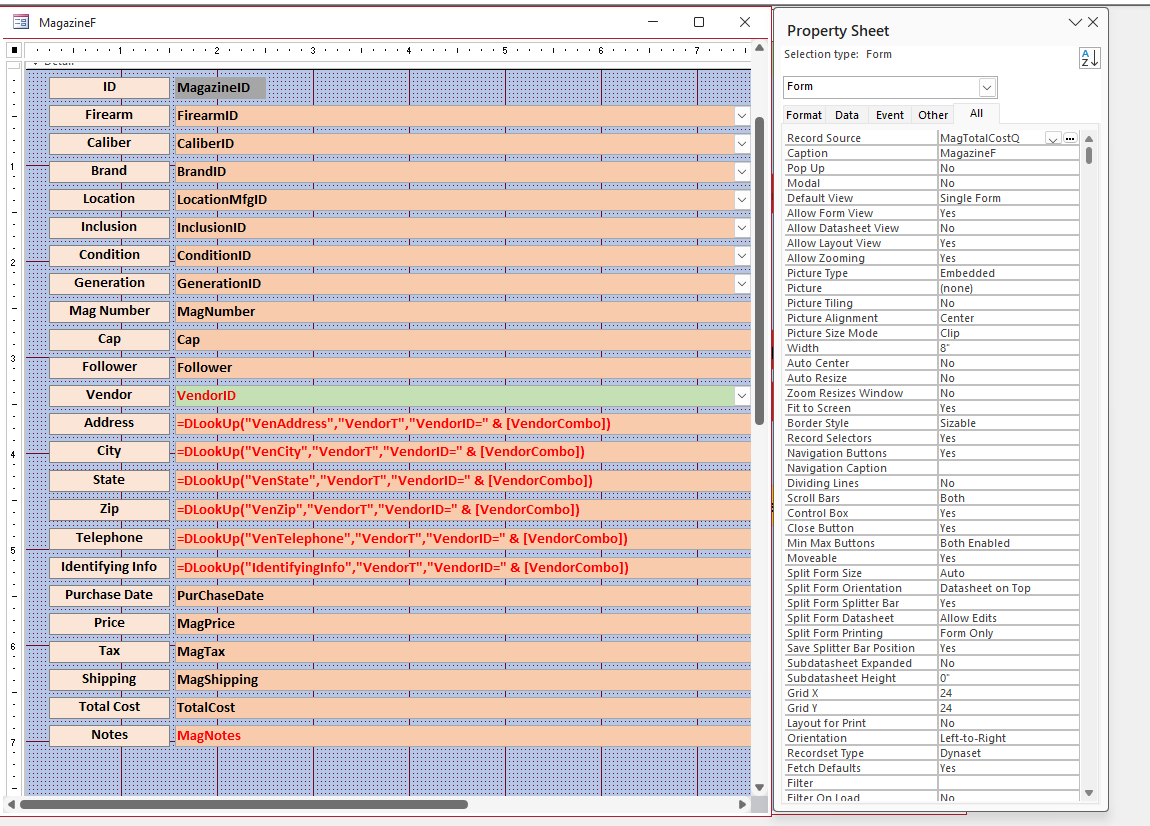
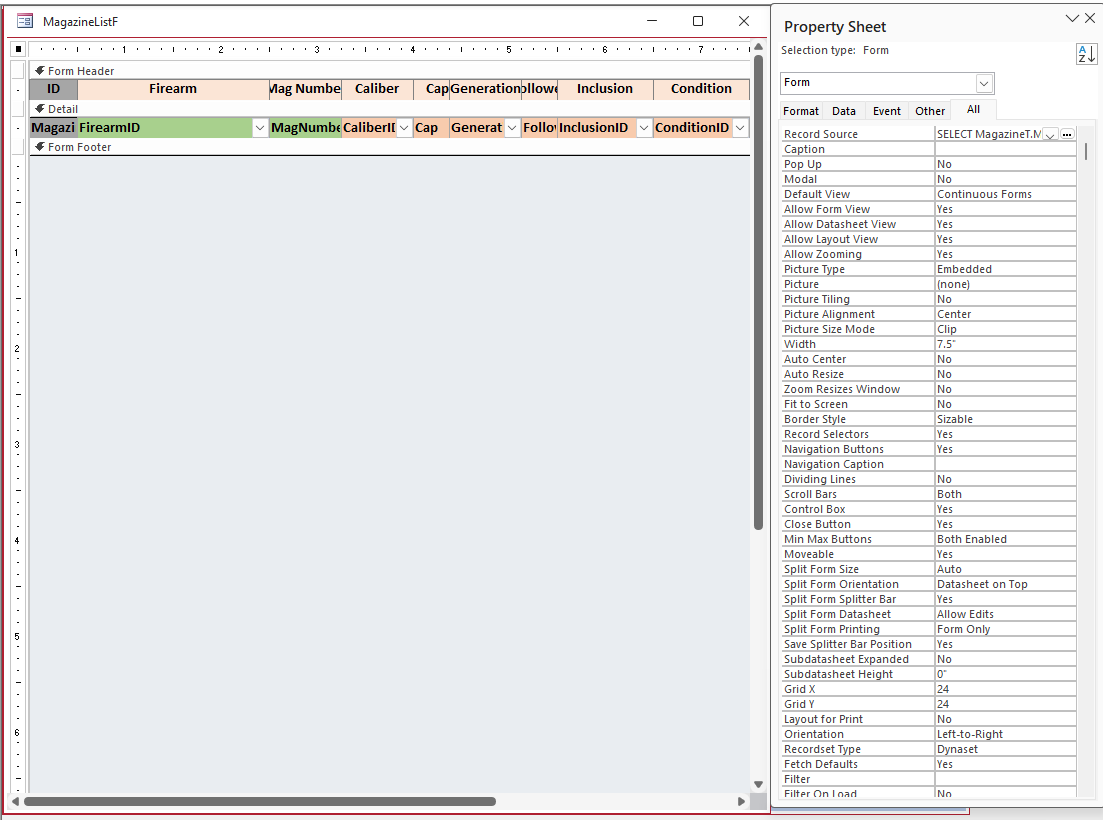
Maybe if you could show us a view of your MagazineListF form in design view, so that we can see the controls, properties and access window, something might jump out that isn't catching your eye.

As Richard said, if it is duplicating the record, then that part of your code is working. The disconnect has to be something about that form not being recognized by the procedure. Another test you could do would be to comment out the requery line and add:
DoCmd.OpenForm "MagazineListF" and just see if something new opens or if it gives a different error.

Also, a more far-fetched possibility: Do you have a 2nd copy of your database open on the other screen that has MagazineListF showing?

I've found this issue at an office that had gotten a new computer with multiple monitors and they opened a separate copy on each monitor and couldn't figure out why they weren't talking to each other. I've also seen where someone was running 2 separate front ends on two separate computers and wondering why the 2nd computer didn't refresh since they had a shared back end
Richard Rost  @Reply  
           
2 hours ago
I've had bad experiences in the past trying to use RunCommand for copying records. It can work, but it's dependent on the current form, record, selection, focus, and so on. I'd skip the wizard approach, but I would replace those RunCommand lines with a straightforward SQL append query instead.

That gives you complete control over exactly which fields get copied, lets you omit the primary-key AutoNumber field, and avoids the clipboard/selection issues that can crop up with acCmdSelectRecord, acCmdCopy, and acCmdPasteAppend.
Lee Shastid OP  @Reply  
     
2 hours ago
Donald using the command DoCmd.OpenForm that using you suggested just opens the MagazineListF. To answer your question on a second copy open is no I do not open a 2nd copy I just move that form to the second screen. One open for me is a nightmare much less 2 of them...LOL....I will post a screen shot of the MagazineF and also the MagazineListF in design view with the property sheet open shortly. I am starting to think this is something I need not fool with at this point. Richard I see your point but I think this may be a little over my head at this point.
Lee Shastid OP  @Reply  
     
2 hours ago

Lee Shastid OP  @Reply  
     
2 hours ago

Lee Shastid OP  @Reply  
     
71 minutes ago
I tried Google just now and got this code and it duplicates the record but it does not requery the magazinelistF and update it.
If SysCmd(acSysCmdGetObjectState, acForm, "MagazineListF") = acObjectStateOpen Then
        Forms!MagazineListF.Requery
Donald Blackwell  @Reply  
       
59 minutes ago
Yeah, I figured that was a long shot, but worth ruling out.

Lol, something like that was my next recommendation. It verifies if the form is actually open, and if so, requery, if not, it does nothing. The question now is, is it requerying the list when you need it to or do you have to do it manually.

AI says that sometimes Access won't see a form in one naming convention but will in another - not sure why. So Forms!MagazineListF.Requery may be working better than Forms("MagazineListF").Requery.

As long as it is requerying for you, I would a) make a back up of the form just in case there is something else going on and it mucks up in the future, b) enjoy using it, lol.

If it's still not requerying, among all the other suggestions others have given could be just a simple msgbox in the MagazineListF's on open or on load event: MsgBox Me.Name and make sure it matches what it should. Even if you're spelling it right, if it gives a different name, there could be some gremlins having dinner after hours in your database.
Lee Shastid OP  @Reply  
     
12 minutes ago
I corrected it with a Gremlin exorcism I guess. I kept deleting the after update event and putting in the original command
Forms ("MagazineListF").Requery it seems to be working for now. Keeping my fingers crossed. A Big Thank you to all that held their frustration in and helped. Thank you
Add a Reply Upload an Image
Next Unseen


What's This?


The following is a paid advertisement
Computer Learning Zone is not responsible for any content shown or offers made by these ads.
 

Learn
 
Access - index
Excel - index
Word - index
Windows - index
PowerPoint - index
Photoshop - index
Visual Basic - index
ASP - index
Seminars
More...
Customers
 
Login
My Account
My Courses
Lost Password
Memberships
Student Databases
Change Email
Info
 
Latest News
New Releases
User Forums
Topic Glossary
Tips & Tricks
Search The Site
Code Vault
Collapse Menus
Help
 
Customer Support
Web Site Tour
FAQs
TechHelp
Consulting Services
About
 
Background
Testimonials
Jobs
Affiliate Program
Richard Rost
Free Lessons
Mailing List
PCResale.NET
Order
 
Video Tutorials
Handbooks
Memberships
Learning Connection
Idiot's Guide to Excel
Volume Discounts
Payment Info
Shipping
Terms of Sale
Contact
 
Contact Info
Support Policy
Mailing Address
Phone Number
Fax Number
Course Survey
Email Richard
[email protected]
Blog RSS Feed    YouTube Channel

LinkedIn
Copyright 2026 by Computer Learning Zone, Amicron, and Richard Rost. All Rights Reserved. Current Time: 10/4/2026 6:17:40 PM. PLT: 1s