Free Lessons
Courses
Seminars
TechHelp
Fast Tips
Templates
Topic Index
Forum
ABCD
 
Home   Courses   TechHelp   Help   Contact   Merch   Join   Order   Logon   Forums   
 
Back to Access Forum    Comments List
Upload Images | @Reply | Bookmark | Link | Email | Next Unseen |
Discovering Little Things...
Donald Blackwell 
        
2 days ago
I'm having one of those extremely nerdy moments where I'm working on a project and test out a form and see something I don't expect to see and all of a sudden - mind blown. Even the littlest things sometimes.

I was doing something I've done dozens of times - building a single form with a button to switch it to datasheet view. I was working in VBA to adjust the formatting, etc. of the datasheet and switching back and forth to make sure everything looked and worked as I expected.

Then, all of a sudden, I see something that shouldn't be there in datasheet view or at least something I never thought would be there:  A "+" appears next to the rows in the datasheet.

Now mind you, I've built datasheet forms with sub-datasheets so I knew immediately what it was (or what I thought it was), however, this particular table has no sub data sheets attached.

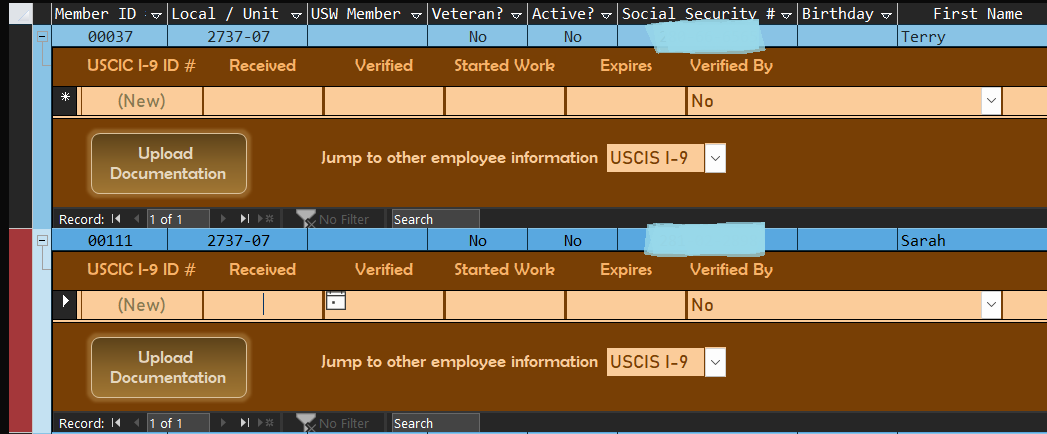
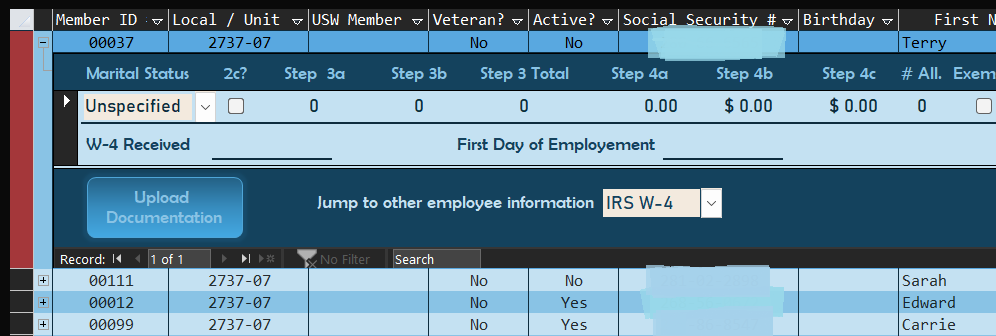
So, after making a backup of the form just to make sure it doesn't explode on me or something, I click the "+" to see what shows up. Low and behold, it's an in-line subform. Obviously this was the first time I've every used the single-to-datasheet form method when the single form had a subform in the detail section, lol.

I know for people who have been building databases in Access for decades, it's no big deal, but now that I've seen it, it's pretty handy... You can't put an inline subform in a continuous form, but you can in a datasheet, lol.
Donald Blackwell OP  @Reply  
        
2 days ago

Donald Blackwell OP  @Reply  
        
2 days ago

Lisa Snider  @Reply  
       
2 days ago
Wow!  I can see this being useful in SEW many ways!  Thank you Donald.  I'll have to check that out.  
Donald Blackwell OP  @Reply  
        
2 days ago
Yeah, I had the same reaction. And, I even briefly had the same thought... My mother had a small sewing alteration and embroidery business back around 2008. That was before I started using Access but I tracked a bunch of her stuff for her with Excel and it got me thinking all the things I could've done with her stuff back then if I'd have known. But now, I'm compiling a database of her stuff she left and I can use similar techniques for cataloguing what goes with what. I.e. this sewing machine has these items, that embroidery machine has this software and patterns, samples she made, etc.
Joe Holland  @Reply  
      
38 hours ago
The excitement of learning, creating, or discovering, never gets old. It is one of the great joys of programming.
Richard Rost  @Reply  
           
32 hours ago
Wow. Nice find. I didn't know you could do that.
Kevin Yip  @Reply  
      
32 hours ago
The extra accessibility is nice, but you may not want your users to have that.  You want a proper subform for your users so you have better control.  That's why Richard includes subdatasheets in his Evil Access Stuff.
Donald Blackwell OP  @Reply  
        
30 hours ago
Kevin that's the same subform that shows on the single view
Kevin Yip  @Reply  
      
29 hours ago
Donald  It isn't really the same, because you lose certain features such as being able to resize, make visible or invisible, etc.  An in-line subform always appears even when you make it invisible in code or design mode.  The main form is losing features too.  In datasheet view, a form is missing controls such as buttons, images, etc.  I doubt anyone would lose all these abilities just to see an in-line subform.  In my experience, it is only useful for the database developer to check relationships.
Donald Blackwell OP  @Reply  
        
29 hours ago
Kevin  if you look at the images I posted of the dataset with the online subform, the buttons are there and function, the combo box works the same, etc. The subform in the dataset function as normal with headers, footers, buttons, images, etc.

The recordset is postulate the sub dataset relationship from the subform linking fields so it maintains continuity with each record. And that combo vox I show allows me to switch which form I'm using just like on th single view
Donald Blackwell OP  @Reply  
        
29 hours ago
* datasheet
Kevin Yip  @Reply  
      
27 hours ago
Donald  I said the *main form* loses its buttons because a datasheet can't have buttons.  And as I said, you lose certain features of a subform when it's in-line.  An in-line subform is just an odd setup in most situations.  And you have to click that "+" sign to show that subform, unlike a normal subform that shows itself automatically, which is another added inconvenience.  If you find a good use for it, that's great.  But I think I've mentioned enough shortcomings for most people to not use it.
Donald Blackwell OP  @Reply  
        
27 hours ago
Kevin ah, ok, sorry for misunderstanding. I guess we'll agree to disagree on potential then :) I don't think it's perfect for every situation but it's kinda nice to be able to have the option in a list form to quickly access subform data w/o having to load or switch to the full form.

It's nice to know about all the Lego's in the toy chest, and knowing how to use them and that not using them all the time is a wise decision also.
Add a Reply Upload an Image
Next Unseen


What's This?


The following is a paid advertisement
Computer Learning Zone is not responsible for any content shown or offers made by these ads.
 

Learn
 
Access - index
Excel - index
Word - index
Windows - index
PowerPoint - index
Photoshop - index
Visual Basic - index
ASP - index
Seminars
More...
Customers
 
Login
My Account
My Courses
Lost Password
Memberships
Student Databases
Change Email
Info
 
Latest News
New Releases
User Forums
Topic Glossary
Tips & Tricks
Search The Site
Code Vault
Collapse Menus
Help
 
Customer Support
Web Site Tour
FAQs
TechHelp
Consulting Services
About
 
Background
Testimonials
Jobs
Affiliate Program
Richard Rost
Free Lessons
Mailing List
PCResale.NET
Order
 
Video Tutorials
Handbooks
Memberships
Learning Connection
Idiot's Guide to Excel
Volume Discounts
Payment Info
Shipping
Terms of Sale
Contact
 
Contact Info
Support Policy
Mailing Address
Phone Number
Fax Number
Course Survey
Email Richard
[email protected]
Blog RSS Feed    YouTube Channel

LinkedIn
Copyright 2026 by Computer Learning Zone, Amicron, and Richard Rost. All Rights Reserved. Current Time: 10/8/2026 8:15:08 PM. PLT: 0s