Free Lessons
Courses
Seminars
TechHelp
Fast Tips
Templates
Topic Index
Forum
ABCD
 
Home   Courses   TechHelp   Help   Contact   Merch   Join   Order   Logon   Forums   
 
Back to Access Forum    Comments List
Upload Images | @Reply | Bookmark | Link | Email | Next Unseen |
Access Database Launcher
David Forney 
    
7 hours ago
I have several databases and none are related in any way. To navigate to a specific database file (accdb) I must open my Access program where a listing of all my database files are located. If I select one, it then opens. My question is: can a new access database file be created with a menu form to access the database files and open them as they do in the Access program? I would rather not have users have unrestricted access to my databases that you have in the Access program listing.
Alkan Toykan  @Reply  
       
7 hours ago
Yes. You can do this quite easily by creating a separate Access database that acts as a small launcher for the databases you want your users to access. For example, you could create a form containing:
- A checkbox for each Access database
- The name of the database next to the checkbox
- An Open button

When the user checks a database and clicks Open, VBA can open the selected accdb file using either FollowHyperlink or Shell. For example, with a checkbox named chkStok

Private Sub btnOpen_Click()
    If Me.chkStok = True Then
        Application.FollowHyperlink "C:\AccessDB\Stok.accdb"
        ' Shell "msaccess.exe ""C:\AccessDB\Stok.accdb""", vbNormalFocus
    End If
End Sub


The If statement simply asks "Is the Stok checkbox checked?". if the answer is Yes -meaning True- Access executes the following line for either Application.FollowHyperlink ..... or Shell "msaccess.exe ..... , whichever you wanna use or understand the best. (The difference is that FollowHyperlink lets Windows handle the file, while Shell explicitly starts Microsoft Access and passes the database file to it.) If the checkbox is not checked, Access does nothing.
This way, the launcher database becomes the user's starting point, and you can decide which databases are presented to them instead of relying on Access's own list of recently opened databases.
Kevin Robertson  @Reply  
          
6 hours ago
A Glenn Yesner  @Reply  
     
4 hours ago
If there are ten different databases but some users get access only to certain ones you can set up a permissions table so the launcher, on the landing page, only shows the particular databases that are available for that particular user.
Richard Rost  @Reply  
          
4 hours ago
Yep, Kevin's got it. I have a Database Launcher video specifically for this purpose. It basically uses the method that Alkan suggested.

One important note: the launcher can limit what users see and make navigation easier, but it isn't security by itself. If users can browse to the ACCDB files and have permission to open them, they can still do so. For real protection, secure the folder with Windows permissions and consider distributing the front ends as ACCDE files.
Sam Domino  @Reply  
       
3 hours ago

Sam Domino  @Reply  
       
2 hours ago
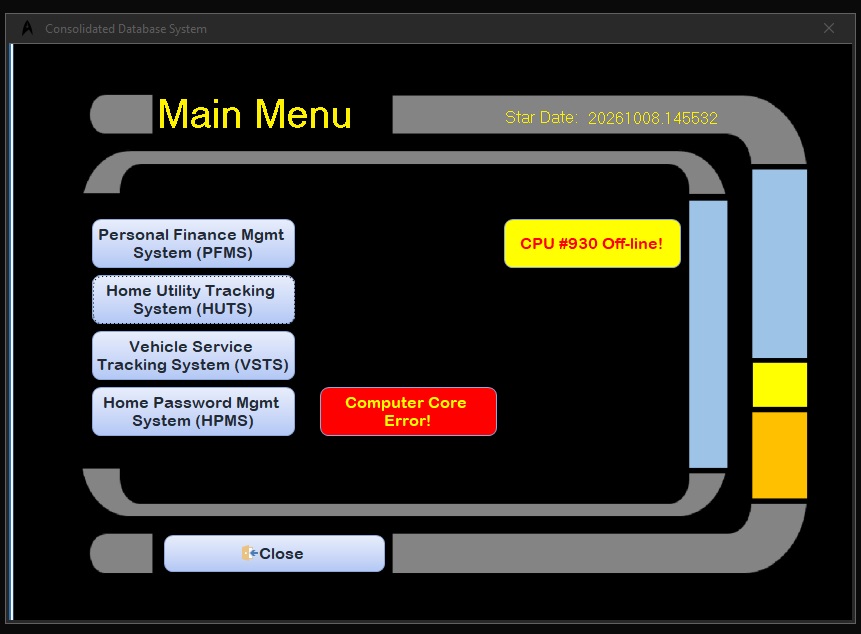
Here is the Database Launcher I built several years ago.  The right side shows a random collection of "messages".  LLAP!!!
Richard Rost  @Reply  
          
2 hours ago
Love the LCARS look!
David Forney OP  @Reply  
    
2 hours ago
Gentlemen
This is exactly what I was looking for. Security is not an issue as all my databases are exclusively for my own personal use. I just don’t want one of my grand or great grandchildren to accidentally delete one of my databases. Had I known what you call it (database launcher) perhaps I could have found it without bothering you all.
Again thank you for the help and rapid response.
Add a Reply Upload an Image
Next Unseen


What's This?


The following is a paid advertisement
Computer Learning Zone is not responsible for any content shown or offers made by these ads.
 

Learn
 
Access - index
Excel - index
Word - index
Windows - index
PowerPoint - index
Photoshop - index
Visual Basic - index
ASP - index
Seminars
More...
Customers
 
Login
My Account
My Courses
Lost Password
Memberships
Student Databases
Change Email
Info
 
Latest News
New Releases
User Forums
Topic Glossary
Tips & Tricks
Search The Site
Code Vault
Collapse Menus
Help
 
Customer Support
Web Site Tour
FAQs
TechHelp
Consulting Services
About
 
Background
Testimonials
Jobs
Affiliate Program
Richard Rost
Free Lessons
Mailing List
PCResale.NET
Order
 
Video Tutorials
Handbooks
Memberships
Learning Connection
Idiot's Guide to Excel
Volume Discounts
Payment Info
Shipping
Terms of Sale
Contact
 
Contact Info
Support Policy
Mailing Address
Phone Number
Fax Number
Course Survey
Email Richard
[email protected]
Blog RSS Feed    YouTube Channel

LinkedIn
Copyright 2026 by Computer Learning Zone, Amicron, and Richard Rost. All Rights Reserved. Current Time: 10/8/2026 6:50:06 PM. PLT: 1s