Free Lessons
Courses
Seminars
TechHelp
Fast Tips
Templates
Topic Index
Forum
ABCD
 
Home   Courses   TechHelp   Help   Contact   Merch   Join   Order   Logon   Forums   
 
Back to Access Forum    Comments List
Upload Images | @Reply | Bookmark | Link | Email | Next Unseen |
Relational Combo Boxes And Foreign Keys
Paul Jack Higginbotham 
     
39 days ago
I've bought and watched all the Beginner series, most of the Expert series, and the Access Relationship seminar and watched them all three times now and I still can't get the hang of it.

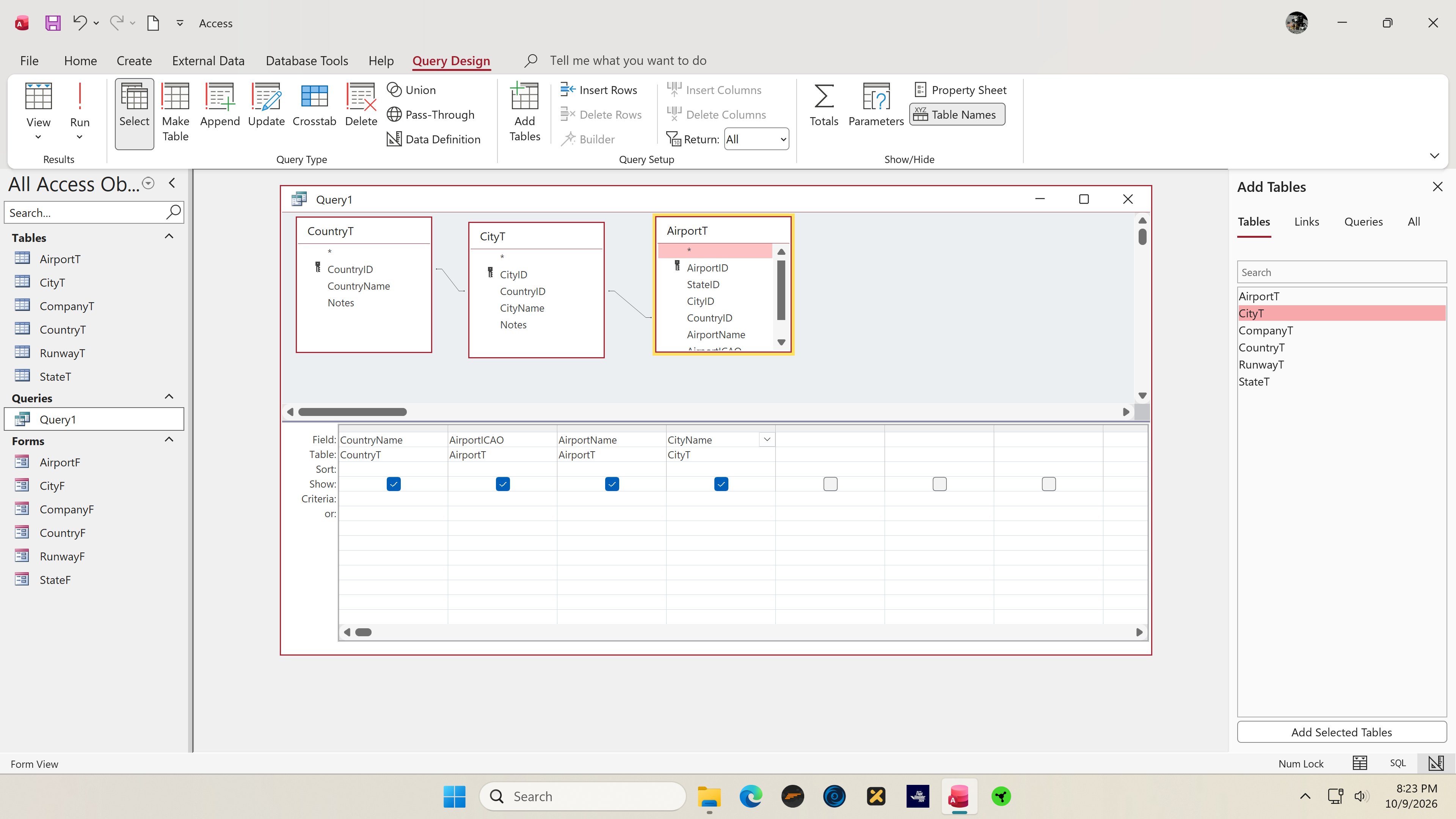
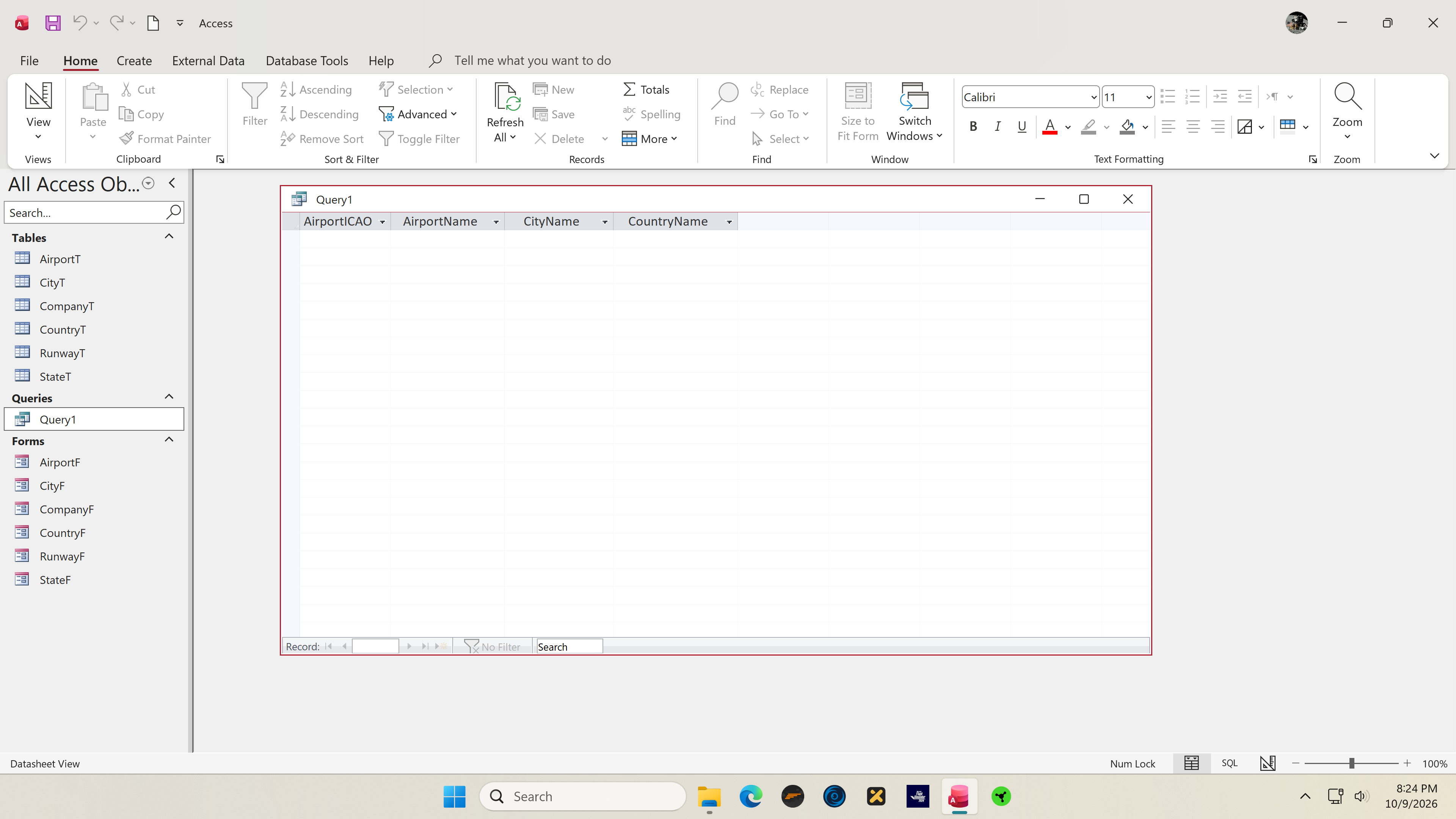
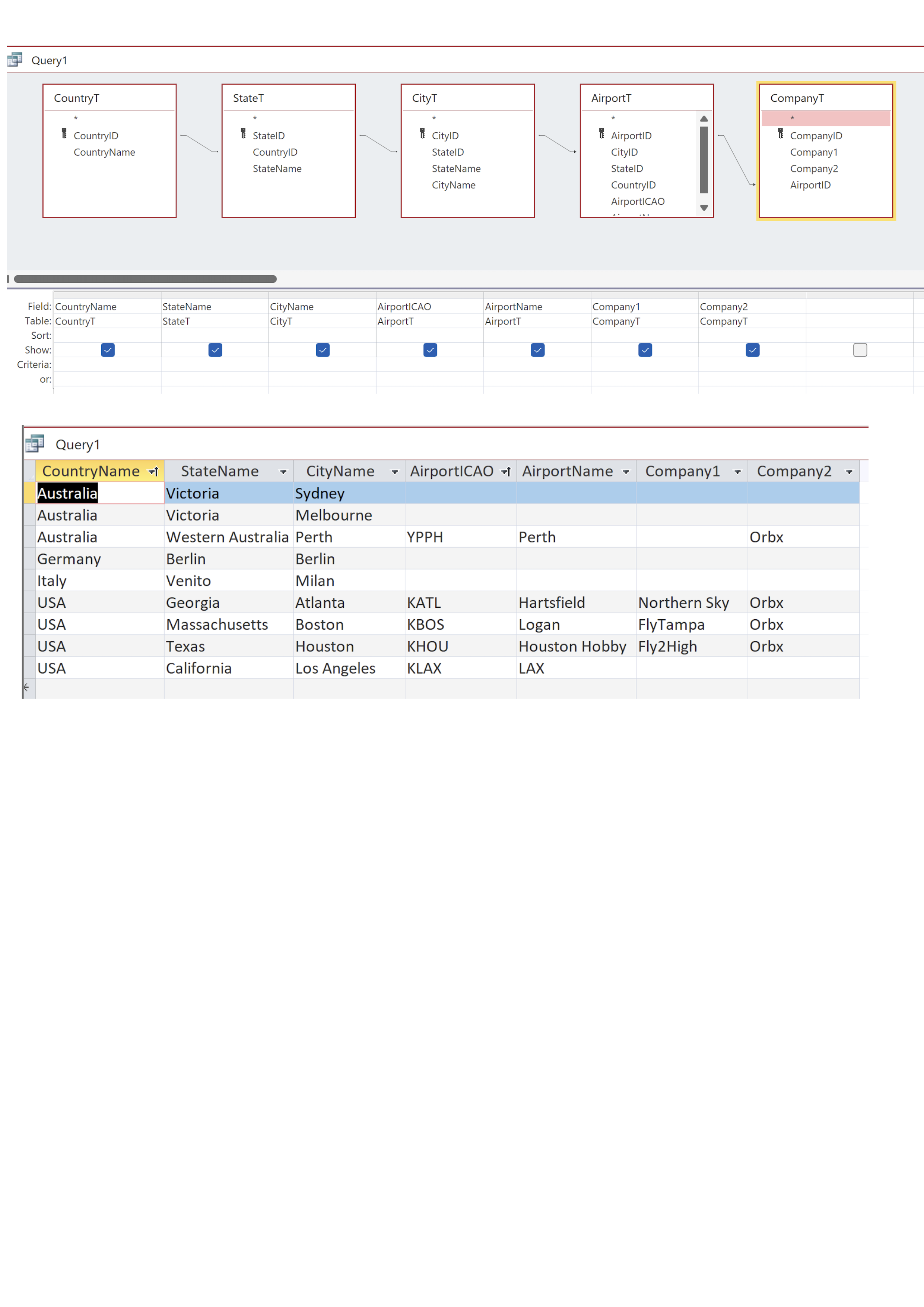
Here's just two screenshots. I'm trying to create a query and you can see my join lines but when I run it I get nothing.

I can post more information later tomorrow if anyone needs it. Please help, I'm desperate. Richard, you make it look so EASY!

PS: I'm not sure how to post images, what's the best way? I've been away for a while due to some awful medical issues.

Many thanks, Paul
Paul Jack Higginbotham OP  @Reply  
     
39 days ago

Paul Jack Higginbotham OP  @Reply  
     
39 days ago

Donald Blackwell  @Reply  
       
39 days ago
Have you tried building the query 1 Lego at a time? By this I mean, drag in the first table, the one that you consider the most prominent in the query.

In your first image, that would be CountryT. Then bring in just one other table and set the join, and see if you get data. If you do, then add the third and check again.

Secondly, you have the current joins:
CountryT.CountryID inner join to CityT.CountryID
CityT.CountryID inner join to AirportT.CountryID

I might try:
CountryT.CountryID inner or left joint to CityT.CountryID
CityT.CityID inner or left join to AirportT.CityID

Since the country in the airport table should match the country in the city table, that will get picked up with the city join and Access won't get confused on which country id it is matching.
Richard Rost  @Reply  
           
39 days ago
Well, it doesn't really tell us what you're trying to do by just showing us the screenshot of the query design. Tell us in English what you're trying to accomplish. Is it that multiple airports can be in a city? Is that what you're trying to show? For example, here in Fort Myers, we've got Southwest Florida International and we've got Page Field. Is that what you're trying to represent?
Paul Jack Higginbotham OP  @Reply  
     
38 days ago
Donald I see, thanks for that. This part of Access is the most difficult for me to grasp. the joins. I'll try this in a little while.

Richard Hi Richard, I'm trying to create a query that shows this result:

Country-> USA - State-> Georgia - City-> Atlanta - Airport ICAO->KATL - Runway Headings-> Runway 9L/27R - Runway Length-> 12,390' - Is Paved-> Yes

But I'd also like to show ALL runways and headings for KATL.
And, yes, I'd like to show multiple airports per state.
Alex Hedley  @Reply  
           
38 days ago
Can you change to SQL VIEW and paste the SQL here too
Paul Jack Higginbotham OP  @Reply  
     
38 days ago
Alex How do I change to that view? SQL of the query? Not sure what you’re asking.
Alex Hedley  @Reply  
           
38 days ago
Paul Jack Higginbotham OP  @Reply  
     
38 days ago
Alex SELECT
    CountryT.CountryName,
    AirportT.AirportICAO,
    AirportT.AirportName,
    CityT.CityName
FROM
    (
        CountryT
        INNER JOIN CityT ON CountryT.CountryID = CityT.CountryID
    )
    INNER JOIN AirportT ON CityT.CountryID = AirportT.CountryID;
Paul Jack Higginbotham OP  @Reply  
     
38 days ago
Donald Hi Donald, that didn't work. All I got was a list of countries and nothing else.
John Davy  @Reply  
         
38 days ago
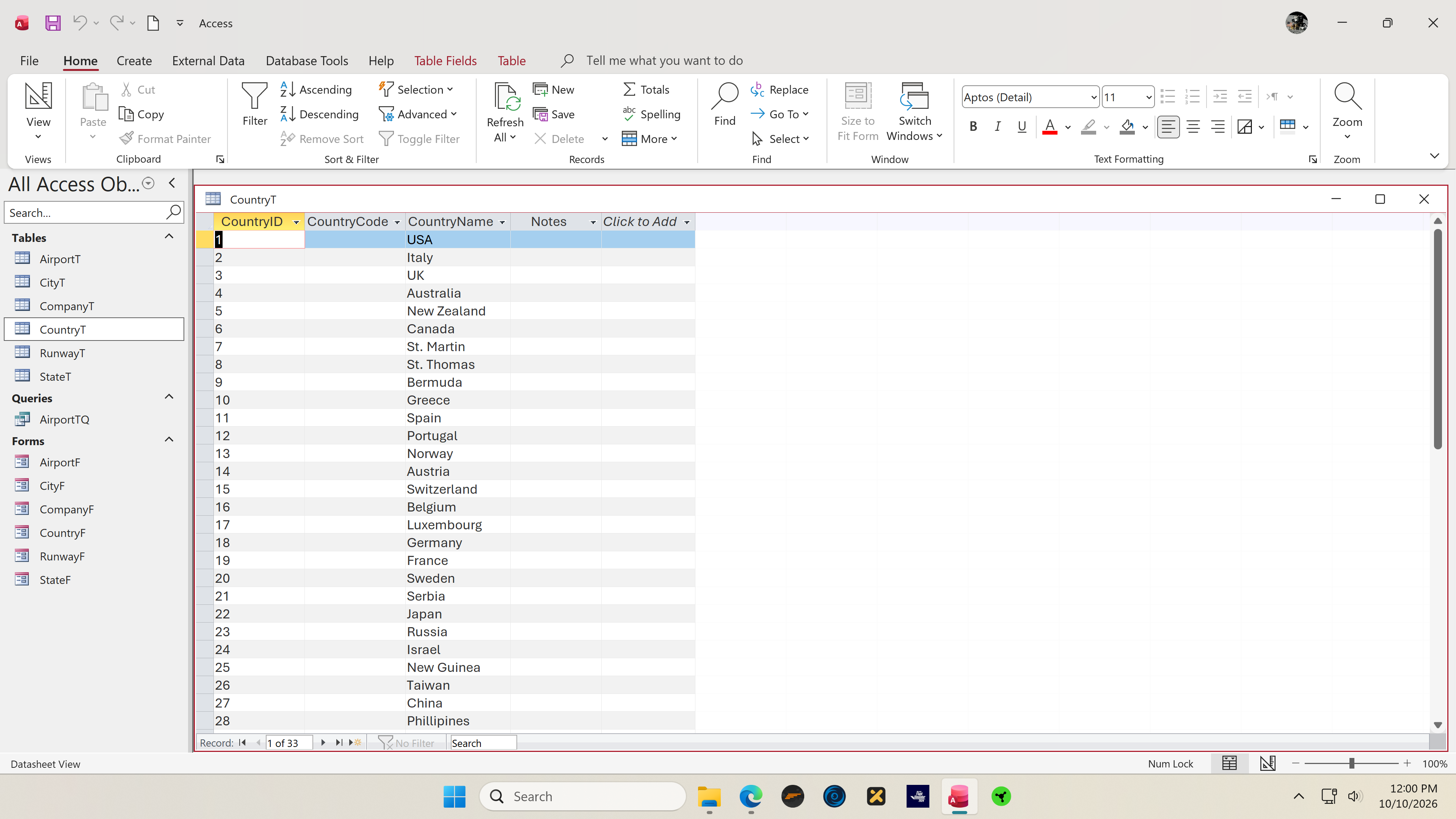
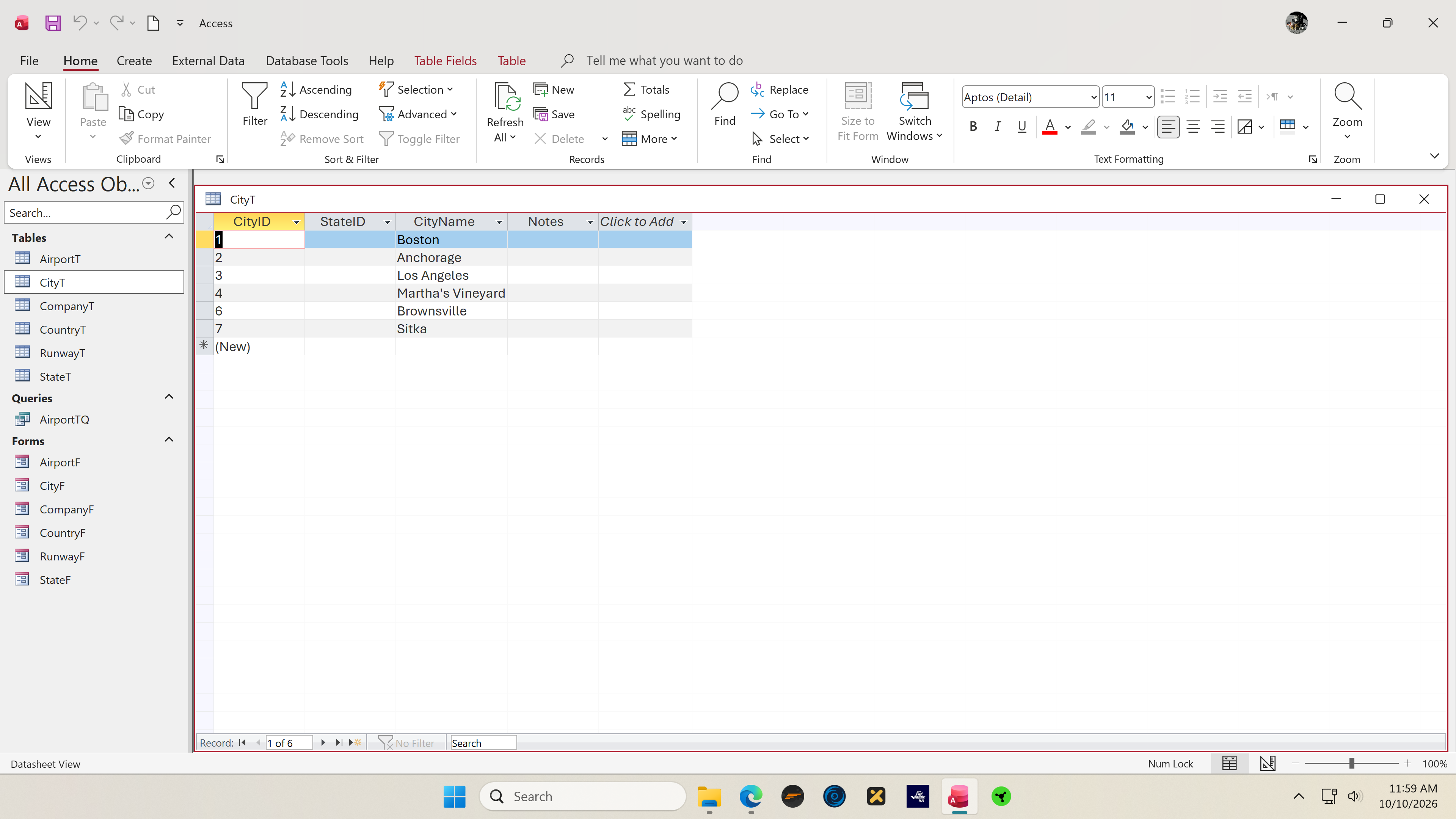
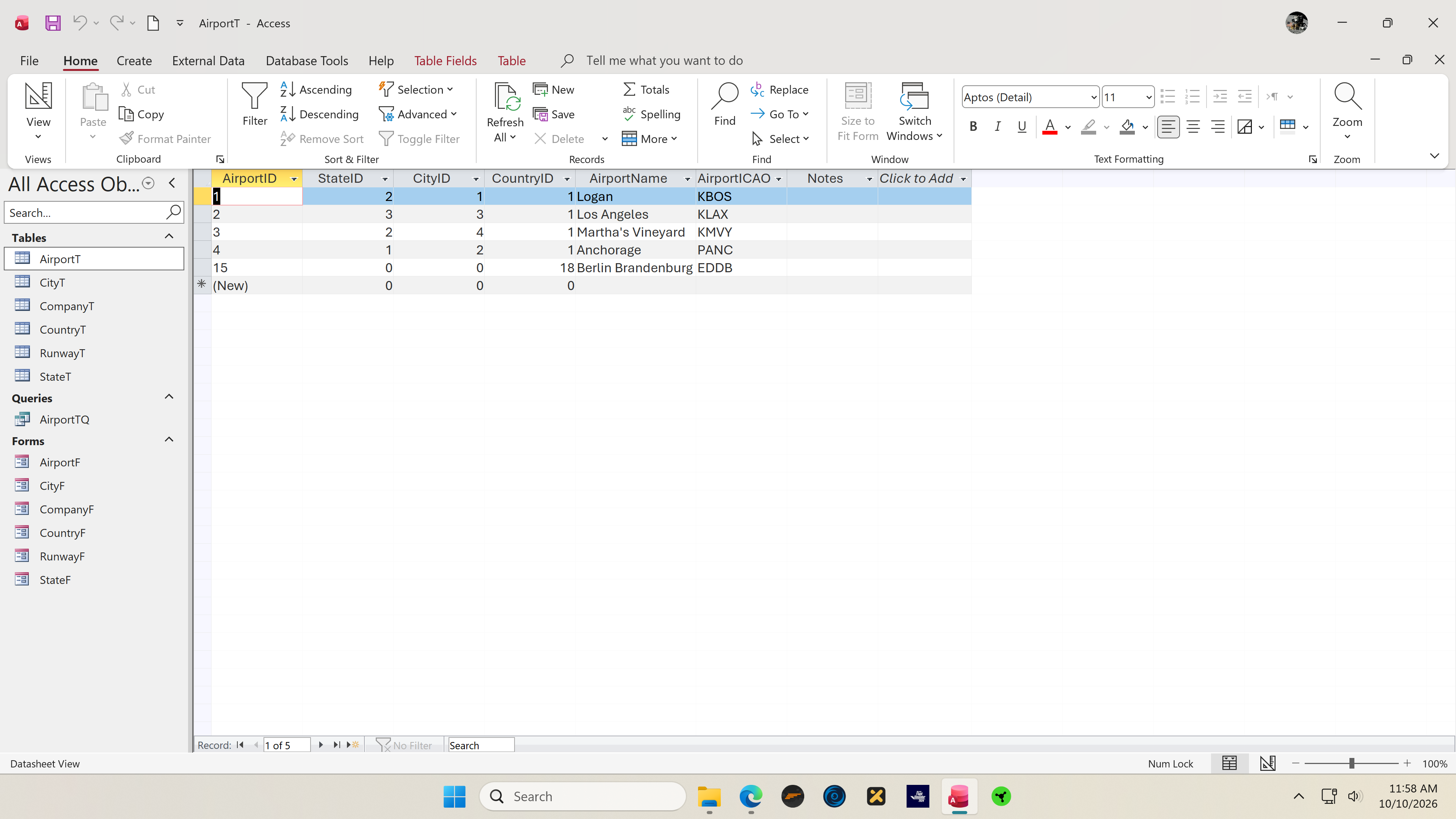
Hi, Can you show us some records in each table. As Donald said take a step at a time. Make sure each table had related records. We can help you if we see the data. John
Kevin Robertson  @Reply  
          
38 days ago
Richard Rost  @Reply  
           
38 days ago
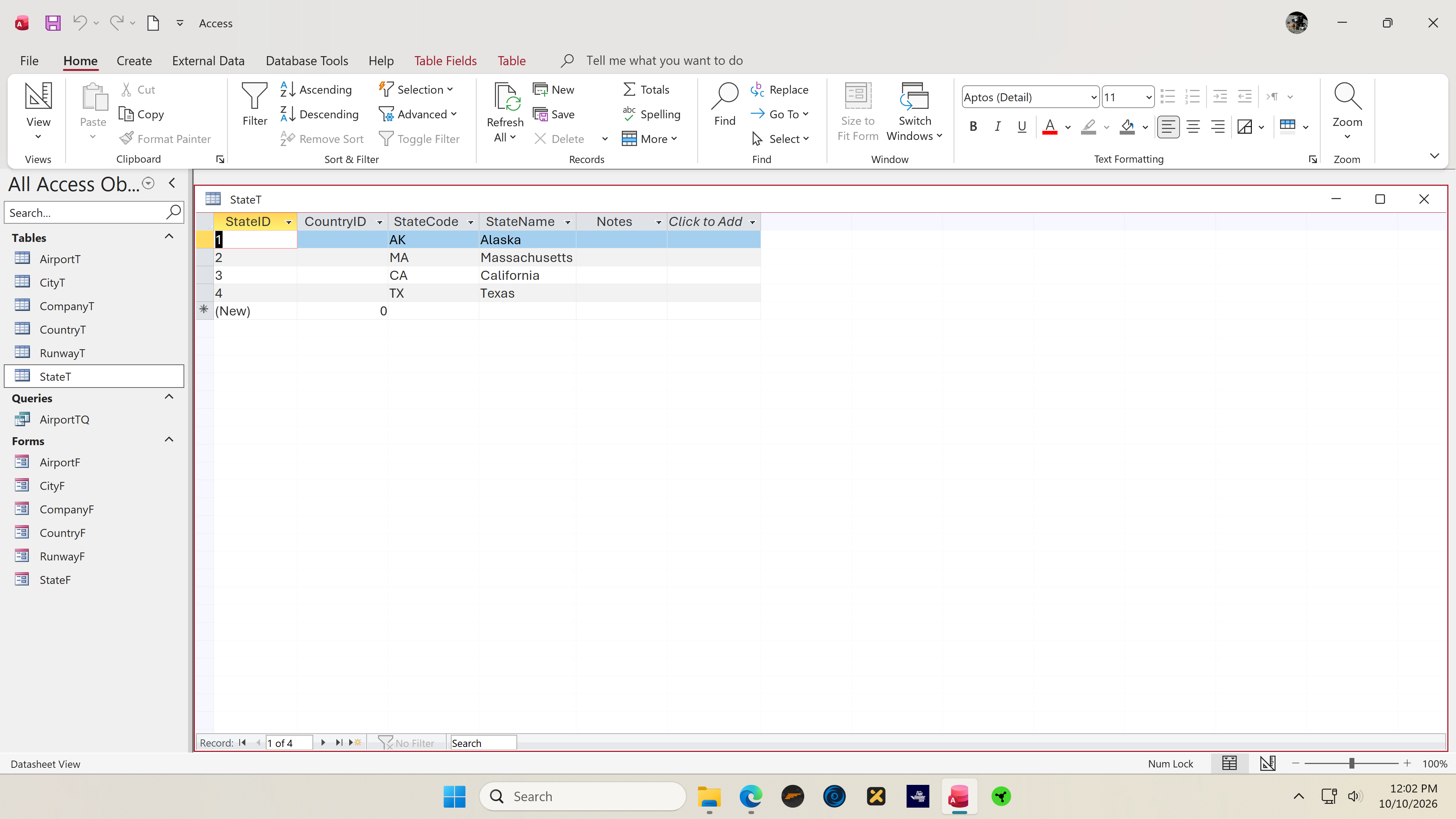
Donald is on the right track. Your query is skipping the StateT table entirely, and it joins AirportT back to CityT using CountryID. That isn't the relationship you want.

The chain should be something like:

CountryT.CountryID -> StateT.CountryID
StateT.StateID -> CityT.StateID
CityT.CityID -> AirportT.CityID
AirportT.AirportID -> RunwayT.AirportID

That last relationship is what lets one airport have multiple runway records. Your query will then return one row per runway, so KATL will appear once for each of its runways.

If an INNER JOIN returns no records, it means at least one link in that chain has no matching related record. Build it one table at a time, as Donald suggested, and run the query after each join. That will show you exactly where the related IDs stop matching.

Also, your images posted fine. For the next screenshot, show a few sample records from each table, including the ID and foreign-key fields. That will make it much easier to spot whether the issue is the joins themselves or the data in the relationship fields.
Paul Jack Higginbotham OP  @Reply  
     
38 days ago

Paul Jack Higginbotham OP  @Reply  
     
38 days ago

Paul Jack Higginbotham OP  @Reply  
     
38 days ago

Paul Jack Higginbotham OP  @Reply  
     
38 days ago

Paul Jack Higginbotham OP  @Reply  
     
38 days ago

Paul Jack Higginbotham OP  @Reply  
     
38 days ago

Paul Jack Higginbotham OP  @Reply  
     
38 days ago

Paul Jack Higginbotham OP  @Reply  
     
38 days ago

Paul Jack Higginbotham OP  @Reply  
     
38 days ago
Apologies if I upload incorrectly. PC's are very new to me, I've used Mac's since the 80's.
Paul Jack Higginbotham OP  @Reply  
     
37 days ago
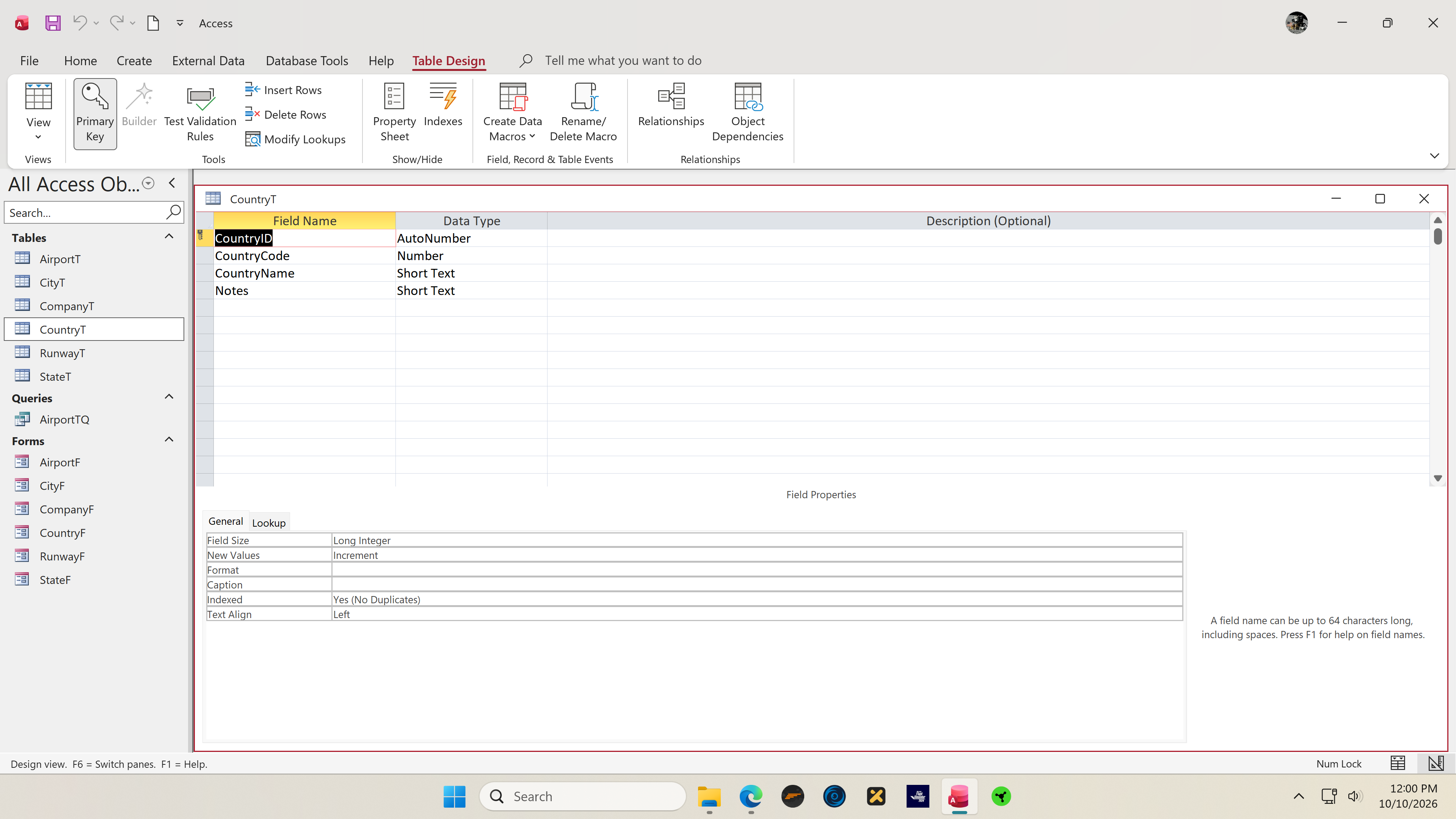
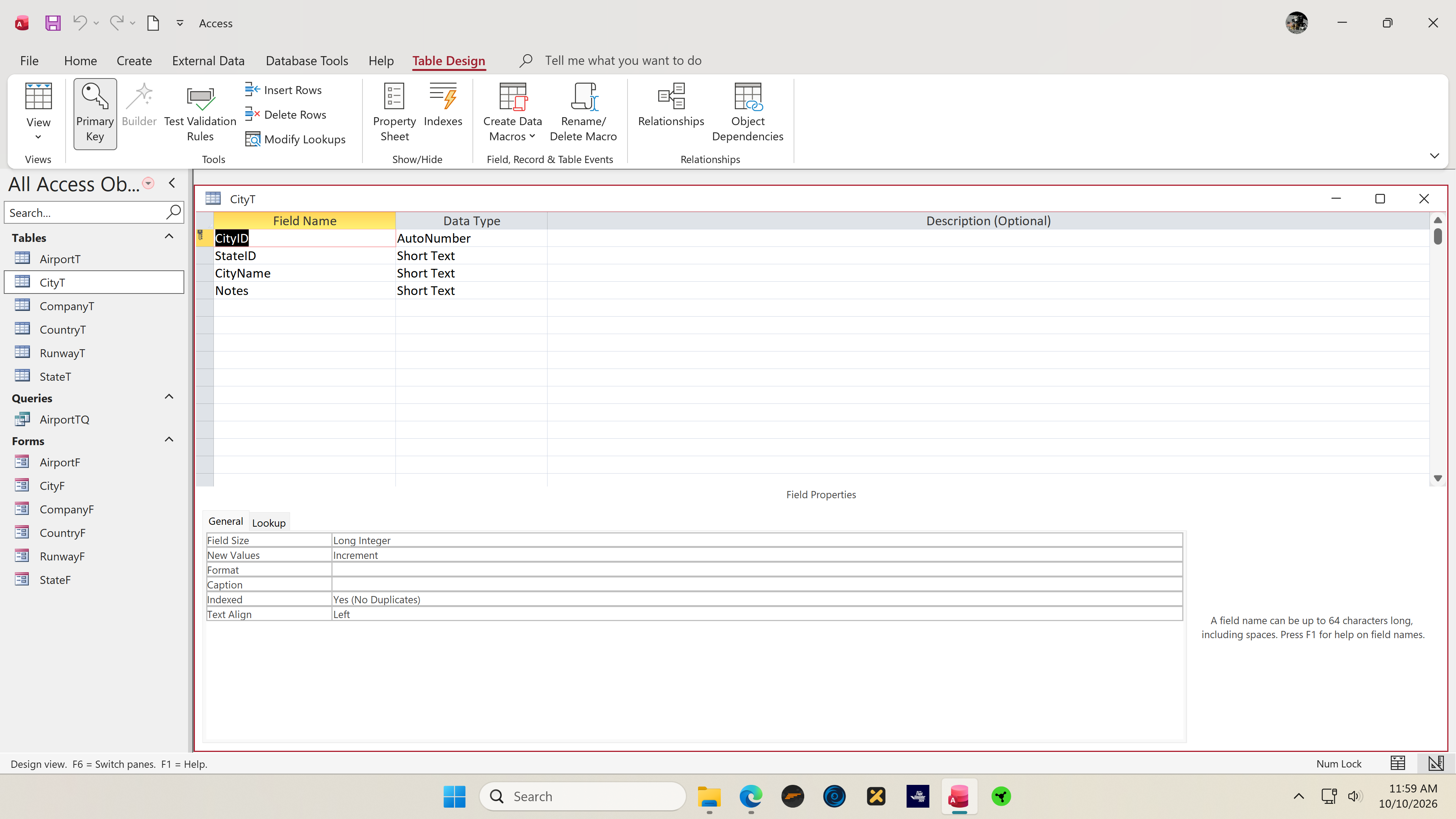
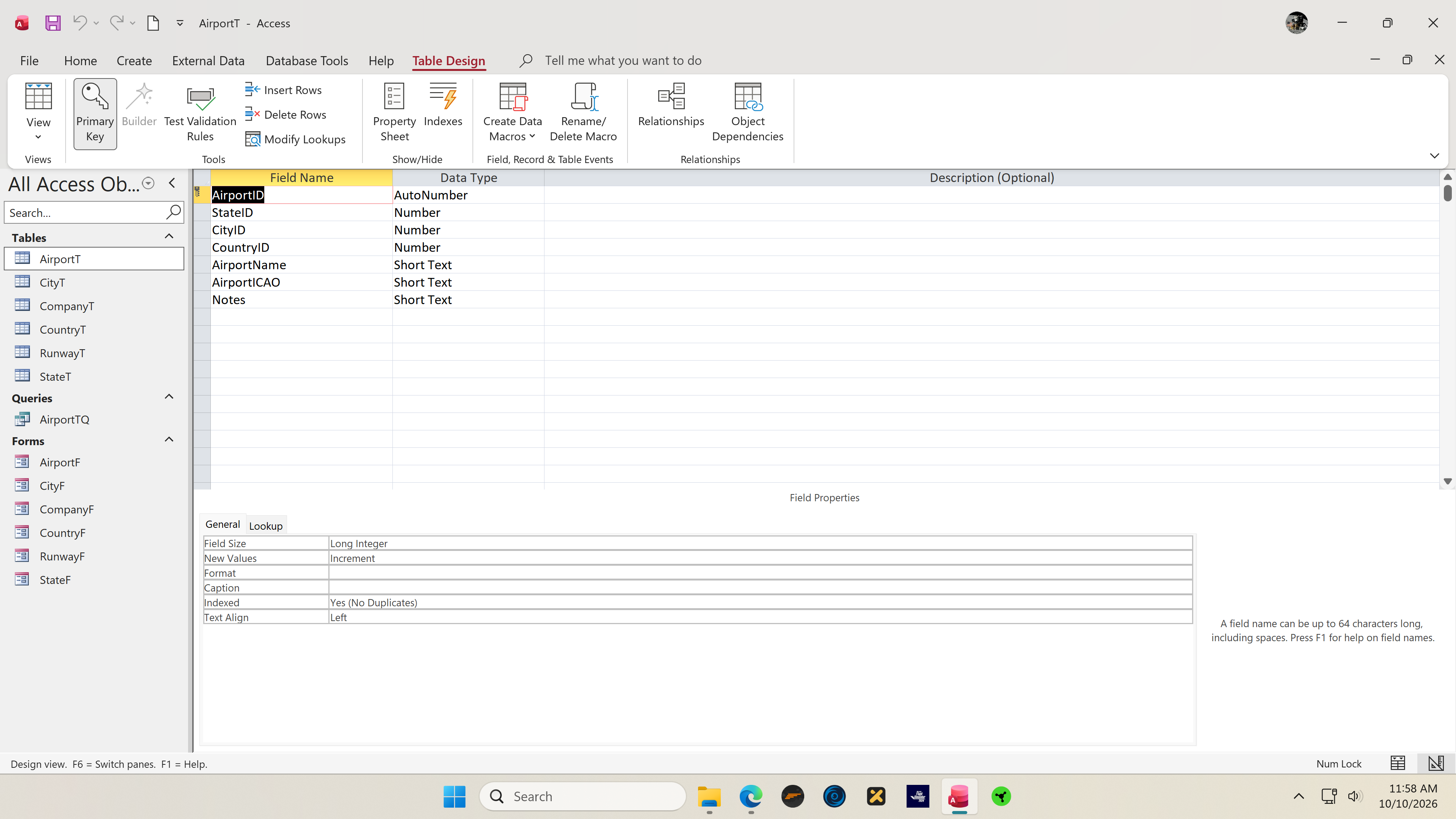
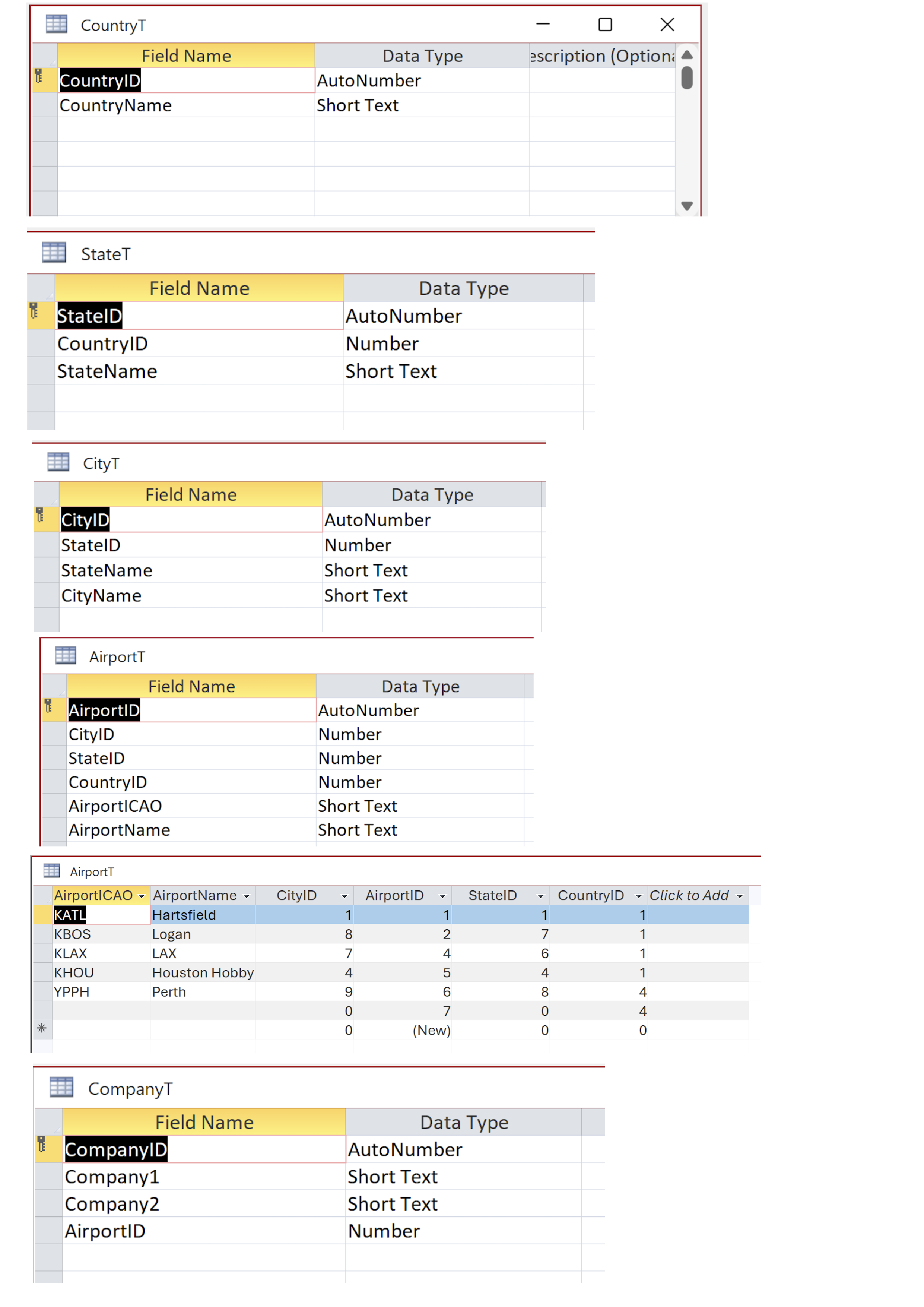
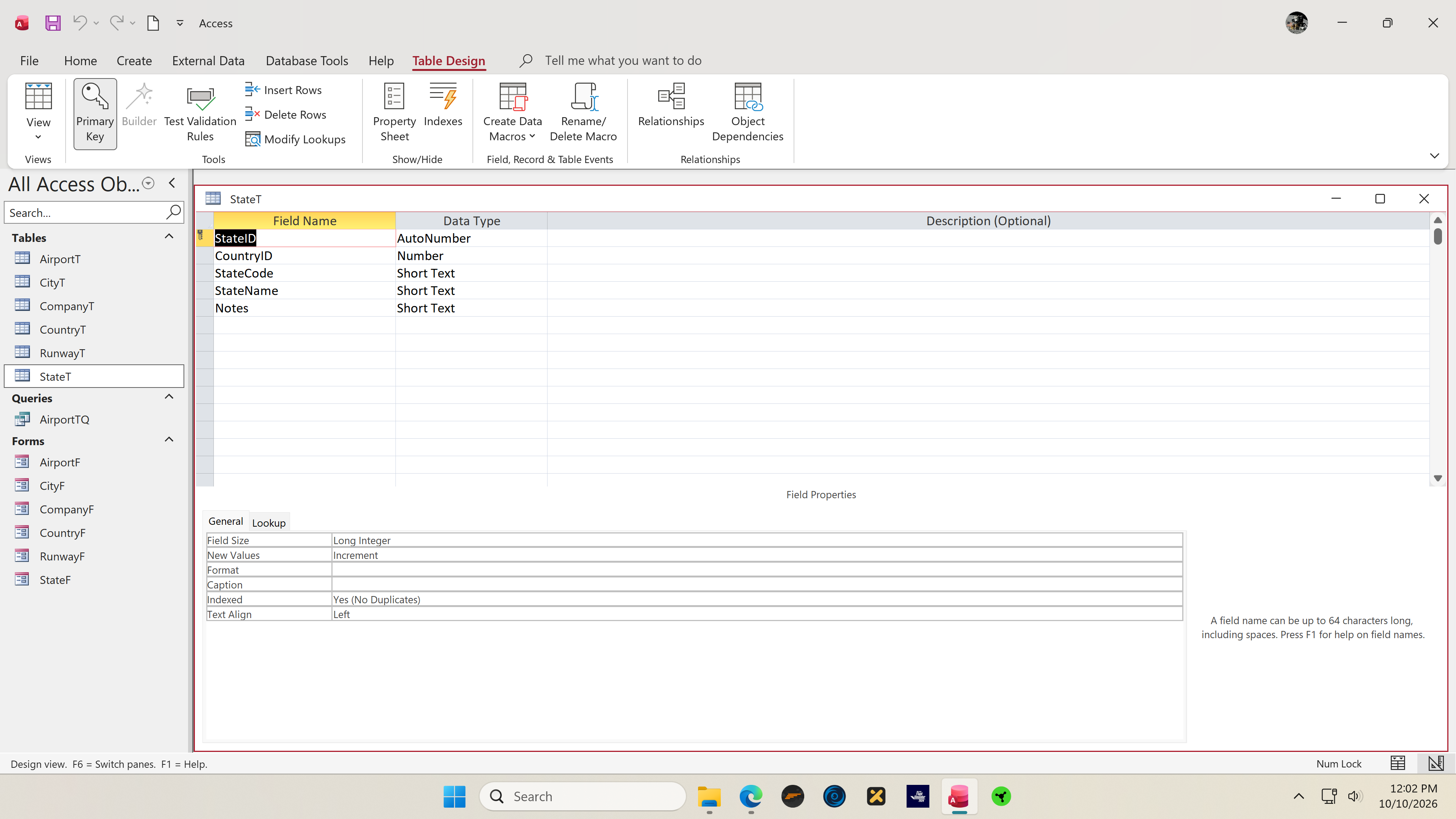
Does this look reasonable? Do I have too many fields in the AirportT?
Thanks for any help, it's really appreciated.
Paul Jack Higginbotham OP  @Reply  
     
37 days ago

Paul Jack Higginbotham OP  @Reply  
     
37 days ago

John Williams  @Reply  
     
36 days ago
Paul Jack I think you're trying to pass the relationships through too many tables.  You can link the CountryT, StateT, CityT directly to the AirportT and then pull the appropriate "Name" field intor your query.  You must set the link to each table as Join Properties 2 ""Include All Records from "AirportT" and only those records from "xxxxT" where joined fields are equal. ""
John Williams  @Reply  
     
36 days ago

Paul Jack Higginbotham OP  @Reply  
     
36 days ago
John Thanks John, I think I know what you mean. I’ll test that out.
This begs the question through, do I need to eliminate any fields from my tables? Or add any fields?
Richard Rost  @Reply  
           
36 days ago
You don't need CountryID and StateID in AirportT if each airport belongs to one CityT, each city belongs to one StateT, and each state belongs to one CountryT. That information is already available through the relationship chain. Storing it again in AirportT just creates redundant data that can eventually get out of sync.

The basic structure should be:

CountryT: CountryID, CountryName
StateT: StateID, CountryID, StateName
CityT: CityID, StateID, CityName
AirportT: AirportID, CityID, AirportICAO, AirportName, plus fields that describe the airport itself
RunwayT: RunwayID, AirportID, RunwayHeading, RunwayLength, IsPaved, etc.

So AirportT should have CityID, not separate CountryID and StateID fields. Runway-specific information definitely belongs in RunwayT, because one airport can have many runways.

John's outer join suggestion can be useful if you want to list every airport even when its related location record is missing, but get the relationships and data working with INNER JOINs first. Once the IDs are correct, then decide whether you actually need outer joins.
Paul Jack Higginbotham OP  @Reply  
     
36 days ago
Thanks Richard, this is exactly the explanation I needed. I appreciate it.

I'm having a heck of a time learning how to make Combo Boxes. I'd like combo boxes in my forms so I don't have to keep several tables open and type in just numbers that associate with another table. My biggest hurdle is trying to transfer your business database wizard procedure with my airport database. The last part of the wizard is hard to figure out, like exactly where to store the data. I'll figure it out.
Richard Rost  @Reply  
           
35 days ago
You're welcome, Paul. You're definitely on the right track now.

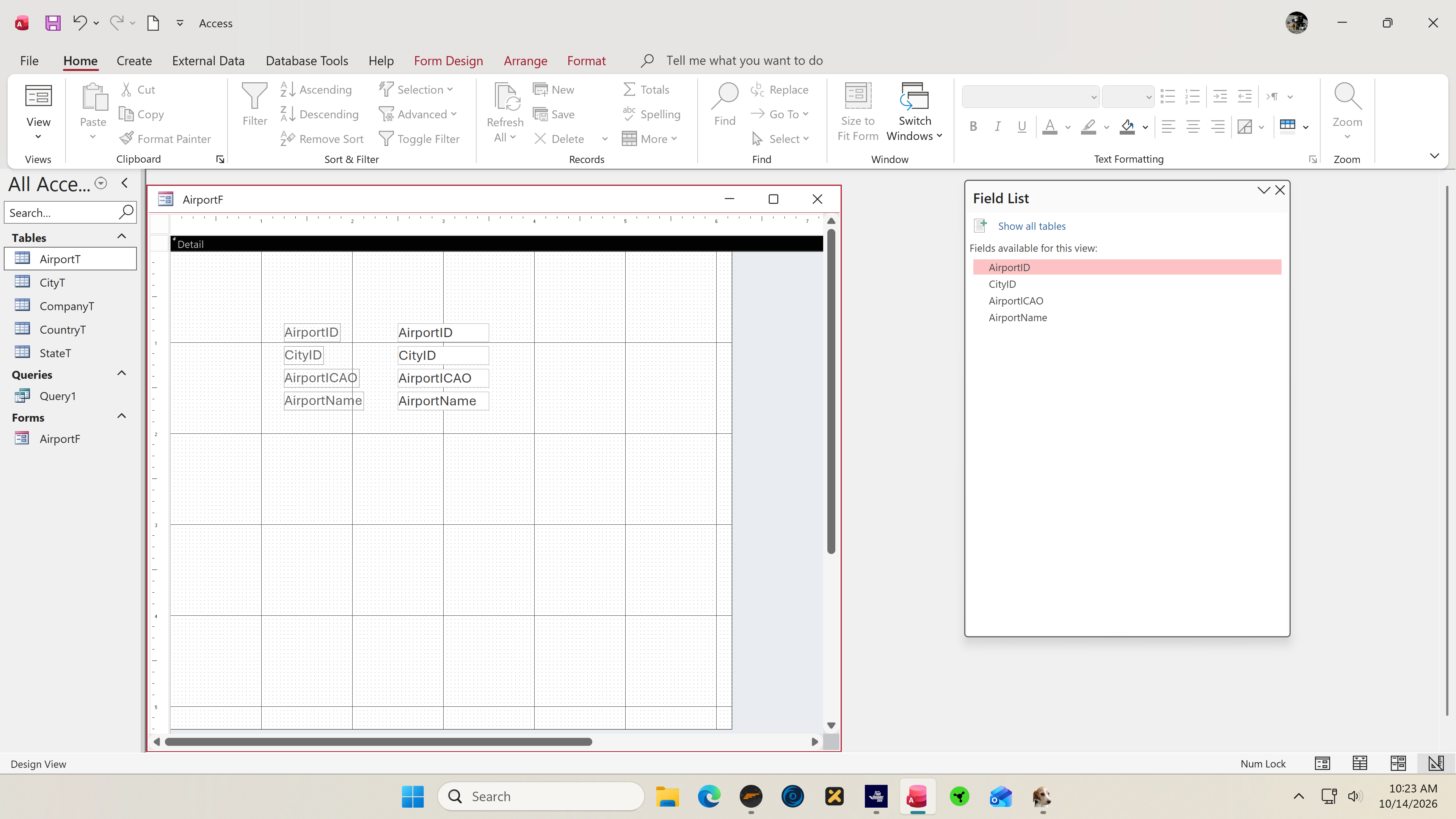
For the combo boxes, the foreign key gets stored in the table for the record you're editing. For example, on an AirportF bound to AirportT, the City combo box should display CityName but store CityID in AirportT. Likewise, on a CityF, the State combo displays StateName but stores StateID in CityT.

Don't try to keep all the related tables open while entering data. Build simple forms for CountryT, StateT, CityT, AirportT, and RunwayT, then use combo boxes for the "belongs to" relationships. Once you get that pattern down, it repeats everywhere.
Paul Jack Higginbotham OP  @Reply  
     
35 days ago
Gosh Richard, thanks. This is exactly the guidance I needed. So far it's coming along well and I have your courses and the people here to thank.
Paul Jack Higginbotham OP  @Reply  
     
34 days ago
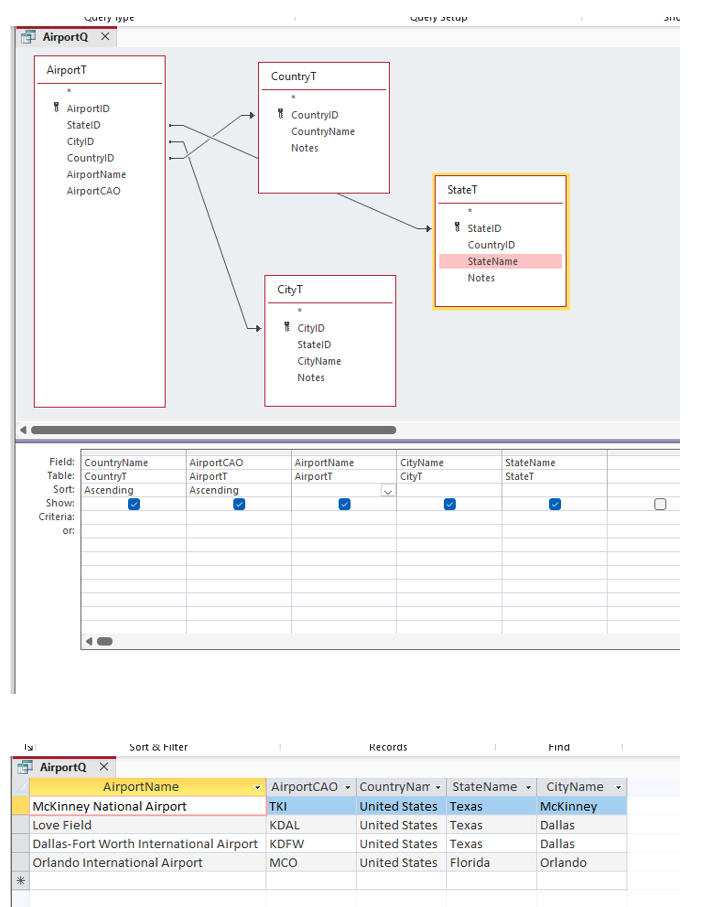
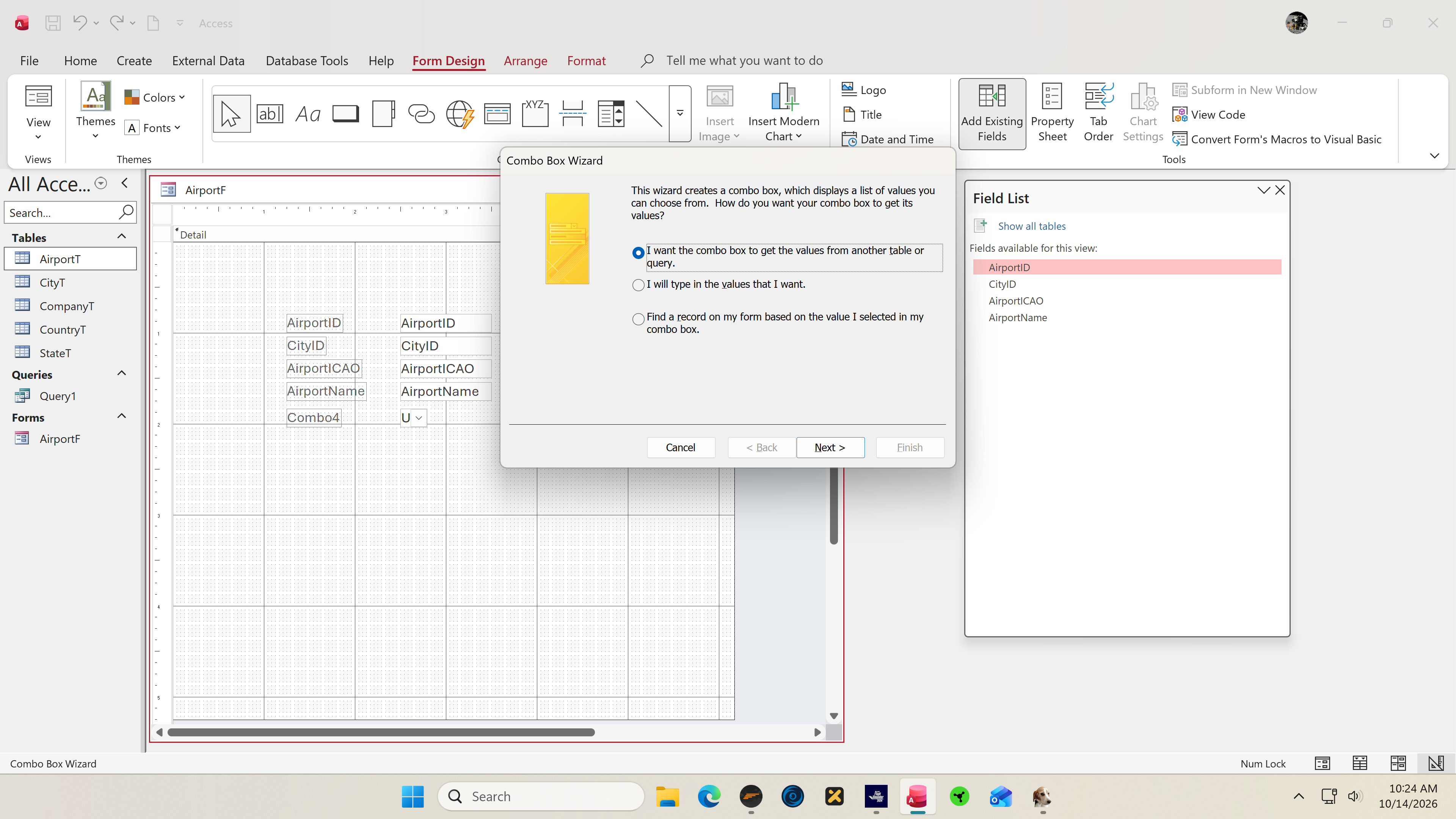
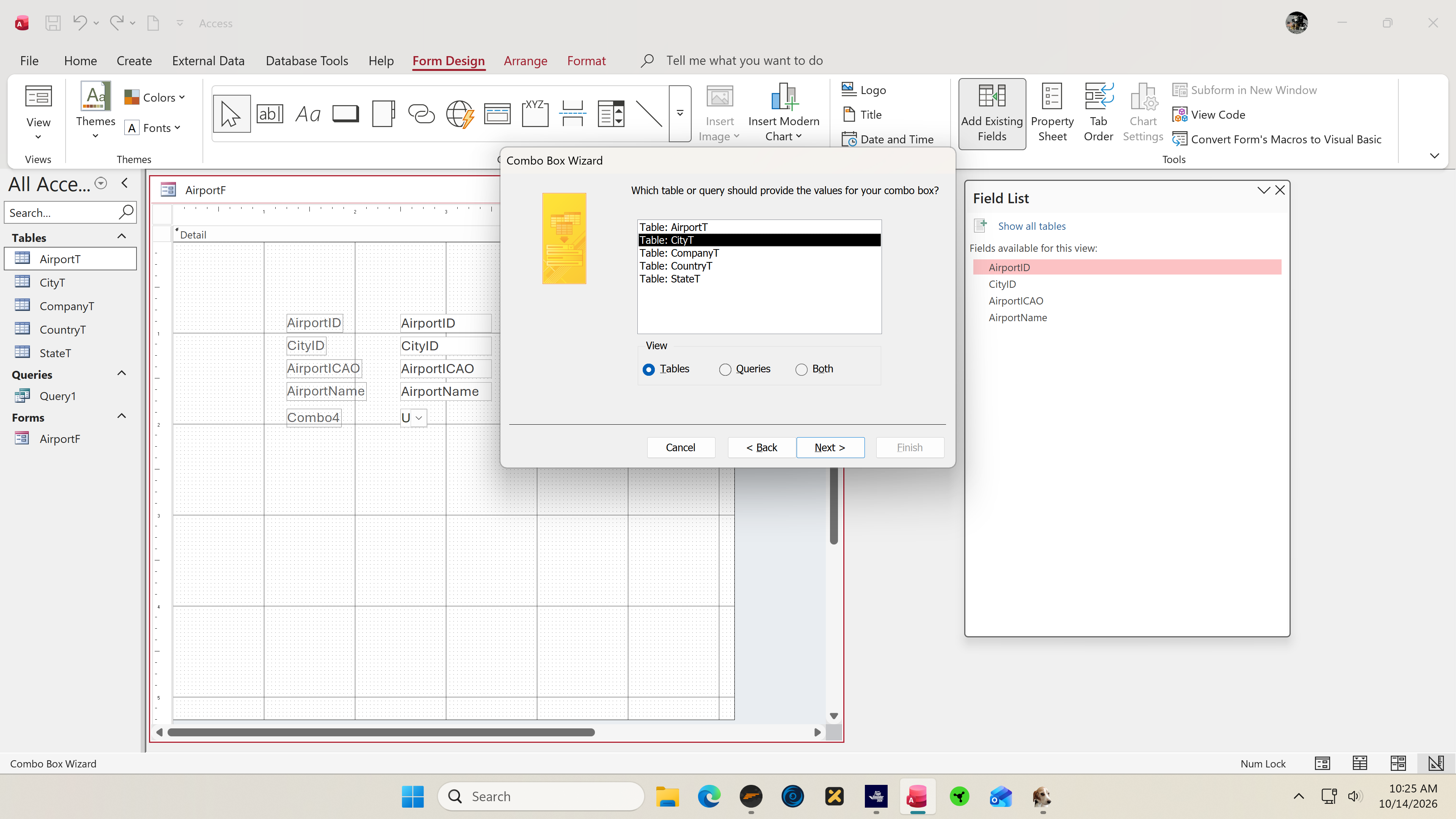
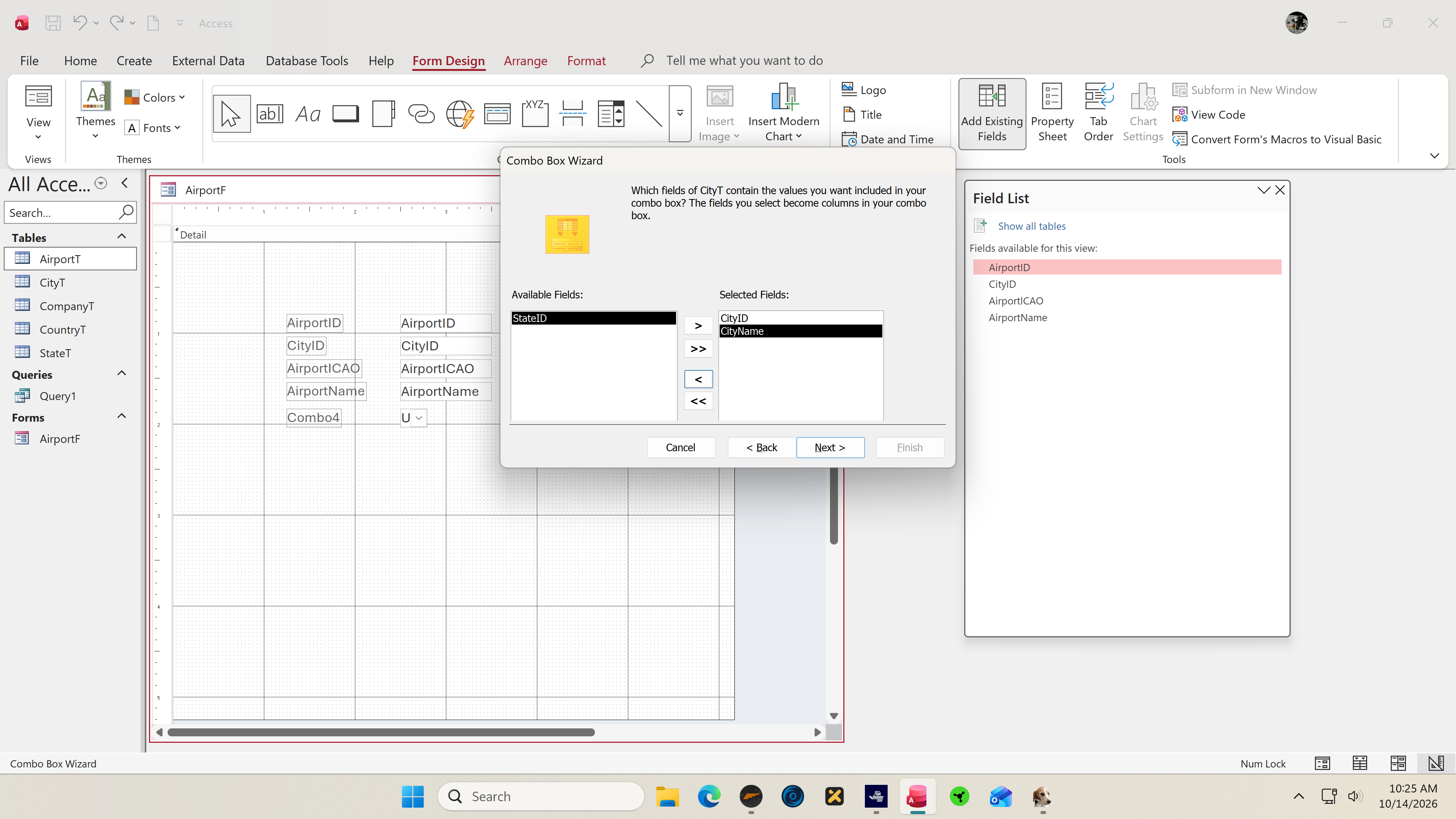
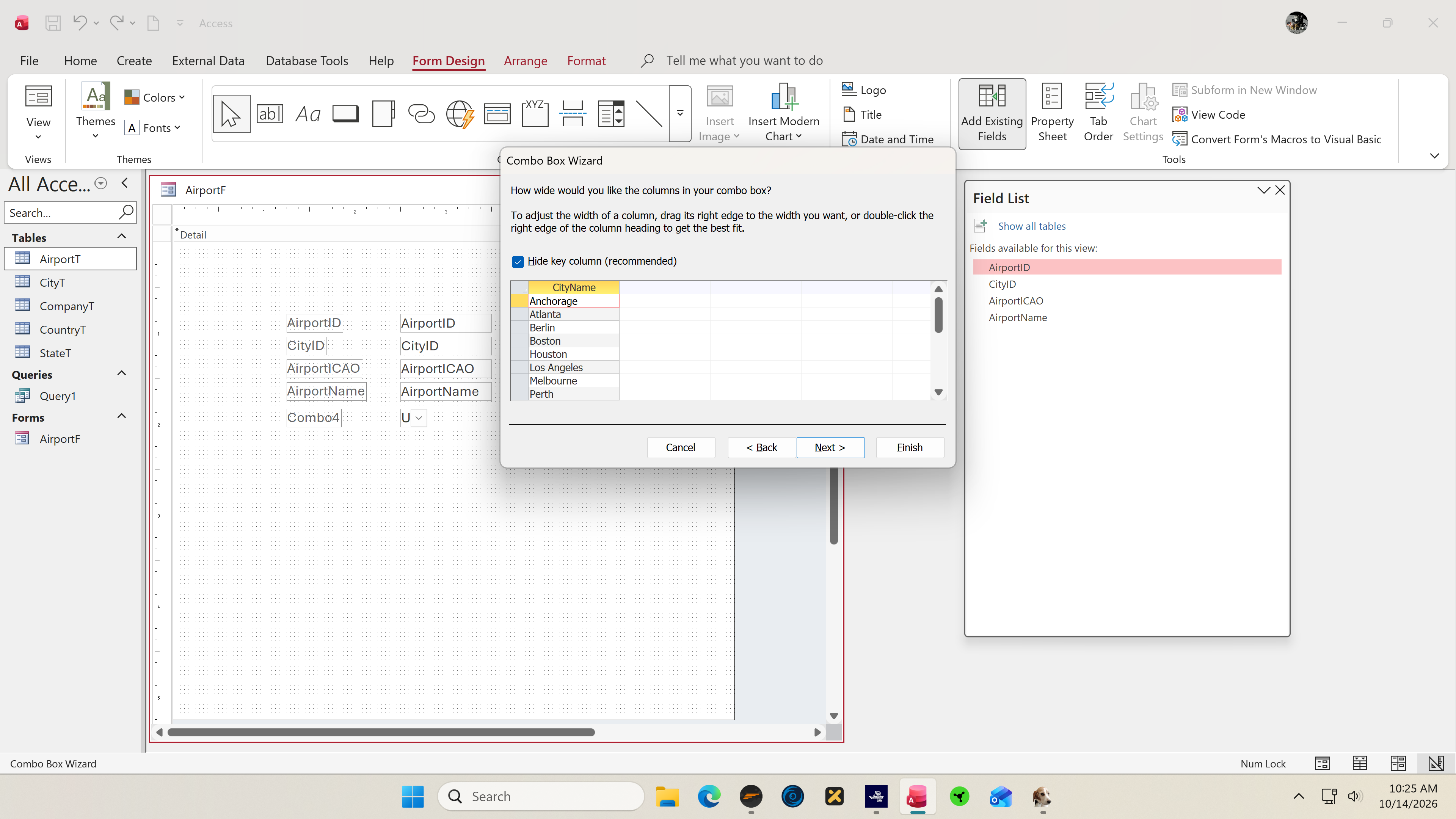
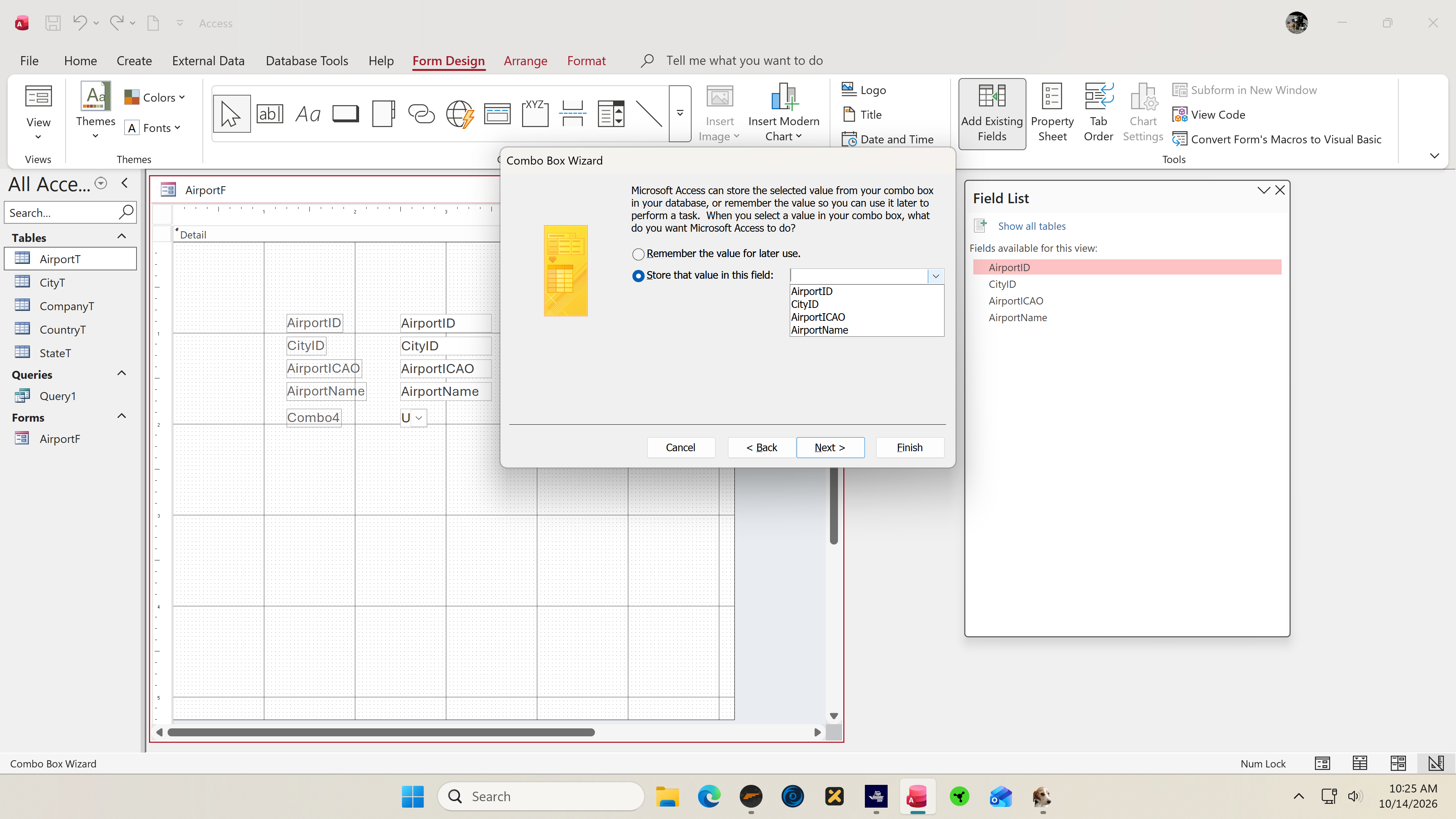
Richard Hi Richard, I just now tried this but am quite confused. I'm enclosing the steps I took. When you say "store CityID in AirportT" I don't see that in the last shot, Table I mean, I assume it IS the Airport Table? As you indicated in one of your videos the most important "money shots" is the last screen in the wizard. I'm not sure where to place the data, AirportID or CityID.
Also, in order to create a new City in the new City Form won't I have to first add the city to the City table in order for the combo box to let me choose it?
Thanks.
Paul Jack Higginbotham OP  @Reply  
     
34 days ago

Paul Jack Higginbotham OP  @Reply  
     
34 days ago

Paul Jack Higginbotham OP  @Reply  
     
34 days ago

Paul Jack Higginbotham OP  @Reply  
     
34 days ago

Paul Jack Higginbotham OP  @Reply  
     
34 days ago

Paul Jack Higginbotham OP  @Reply  
     
34 days ago

Richard Rost  @Reply  
           
34 days ago
Can you show me a mockup of what you want the final output report to look like? Do it in Word, Excel, or something similar so I can see exactly what results you're trying to produce.

What do you want the finished output to look like?
Paul Jack Higginbotham OP  @Reply  
     
34 days ago
Will do, thanks Richard.
Paul Jack Higginbotham OP  @Reply  
     
34 days ago
USA
Georgia
KATL - Atlanta - Orbx - 09L/27R 12,390' - 08R26L 9999' - 08L/26R 9000' - 09R/27L 9000' 10/28 9000' - Detailed interior and interior.
KSAV - Savannah - Fly2High - Orbx - 10/28 9351' - 01/19 7002' Poor exterior, no interior.

Tennessee
KBNA - Nashville International - Feel There - Orbx - 13/31 11,030' - 2C20C 8001' - -2R/20L 8001' - 02L/20R 7704' - Huge airport, good exterior, no interiors.

Italy
LIPZ - Venice Marco Polo - Atelic - Orbx - 04R/22L 10,827' - 04L22R 9121' - Excellent interior and exterior.
Richard Rost  @Reply  
           
34 days ago
Paul, your screenshots help. You've selected CityT, CityID, and CityName correctly. In that last wizard screen, choose CityID - the second option under "Store that value in this field."

AirportID identifies the airport record you're editing. CityID records which city that airport belongs to. That dropdown is listing fields, so you won't see AirportT itself there. Finish the wizard and label the combo box City.

Then open AirportF and select Atlanta for an airport. The combo will display Atlanta, while the CityID textbox already on the form will show its number. They're both referring to the same CityID field.

And yes, a city has to exist before you can select it for an airport. Add it with CityF: enter the city name in a regular CityName textbox, select its state, and save the record. That automatically saves the new city in CityT. You don't have to enter it directly into the table separately.

Atlanta is already in your combo preview, so use that existing city for this first test.
Paul Jack Higginbotham OP  @Reply  
     
34 days ago
Richard Thanks again Richard. My problem is combo boxes, do all my forms need them? I can't remember what video it was, but you showed how to do this. You removed the ID number field and replaced it with a box that listed what it related to. For example, Mary Picore was say, 5, I want to see Mary Picore but not her ID #5. I'm getting there...
Richard Rost  @Reply  
           
34 days ago
Paul Jack Higginbotham OP  @Reply  
     
33 days ago
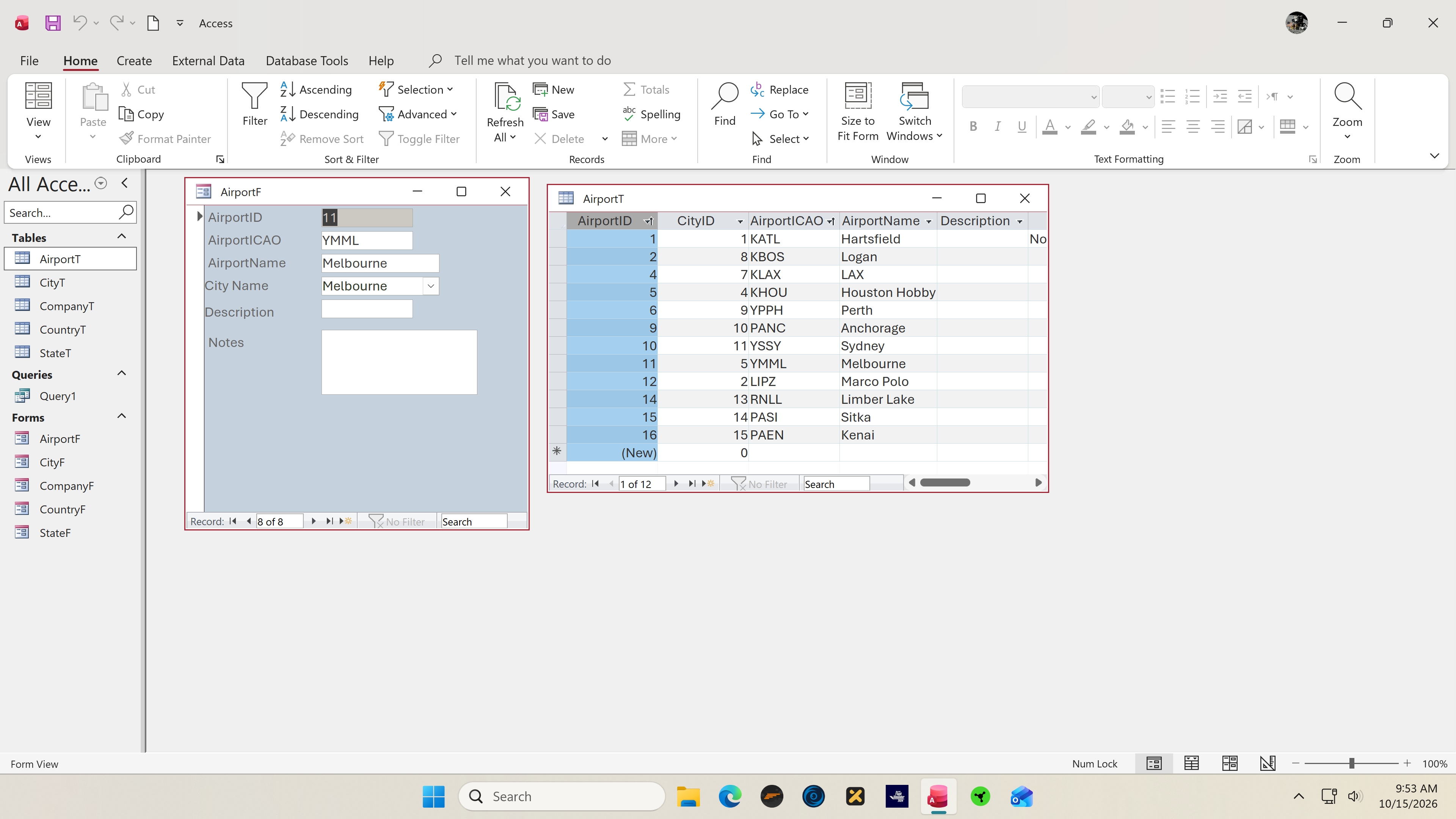
I'm really not understanding this. I created a form yesterday. Today I wanted to add some airports to it. But I had previously added airports to the AirportT, the table itself yet they do not show up in the form I had created. I always, "Save, Close, and Reopen."
Paul Jack Higginbotham OP  @Reply  
     
33 days ago

Kevin Robertson  @Reply  
          
33 days ago
If the Record Source of the Form based on the Table or a Query?
I would get the records directly from the Table.
Paul Jack Higginbotham OP  @Reply  
     
33 days ago
Kevin Hi Kevin, that was it, it somehow had a lot of text in the record source. I wish I had saved the text to post here. But when I set it to AirportT and reran the form it saw all the records. Much appreciated kind sir.
Paul Jack Higginbotham OP  @Reply  
     
33 days ago
I dunno. I'm pulling my hair out. I'm gonna have to either rewatch every single one of the beginner and expert, and seminar courses I bought from the very beginning and try to figure this out or just quit Access all together.

I've got the Query relationship join lines pretty much figured out.

The biggest difficulty I have is with so many tables. The CityID in the City form does not send to the Airport Table, so it always shows Alaska, no matter where in the world it is.

Then, Combo Boxes, Relational Combo boxes. Richard makes it looks so easy but since I'm not building a business database it's very difficult to understand what I need to do in my own database.

I want to do what he does, have a combo box where I make a selection of a name of an airport or city instead of having to have so many tables open and trying to put the correct ID's in the fields.
Alex Hedley  @Reply  
           
33 days ago
Have you built the dbs in the videos from scratch yourself to practice the principles?
Paul Jack Higginbotham OP  @Reply  
     
33 days ago
Alex Not yet, in fact I just started at B1 1 and I’m going to do exactly that. It sometimes takes me a while till it clicks.
Richard Rost  @Reply  
           
32 days ago
Paul, I think that's exactly the right move. If you're back at Beginner Level 1, don't try to tackle a project with multiple related tables and relational combo boxes just yet.

Work through the lessons and build the examples along with me first. Relationships, foreign keys, and relational combo boxes are things you really need to see repeatedly and get some hands-on experience with before trying to apply them to your own project. It'll make much more sense once you've got more of the Expert material under your belt.

That's something I stress right from the first lesson: don't try to build your own big project immediately. Learn the examples first, get comfortable with the patterns, and then come back to your airport database. What seems impossibly complicated now will be much, much easier then.
Paul Jack Higginbotham OP  @Reply  
     
32 days ago
Richard Thanks for the encouragement, Richard, I appreciate it. I'm doing exactly that right now. By the way, whenever I click on the like heart icon most of the time I get an Error 1 or Error 0.
Paul Jack Higginbotham OP  @Reply  
     
32 days ago
Richard Hi Richard, I'm on B! Lesson 7 and when I followed along and downloaded the Database Built in Class it downloads and I can open it, but it only has one record in it. So, I had to download the B1 after L9 and delete the tables except the one with all the names in it, so it matches. I don't know if you were aware of this. I tried it three times.
Richard Rost  @Reply  
           
32 days ago
I've been doing some work on the website today, so you might have seen a few errors while I was modifying things. I'll take a look at the heart-icon errors too.

As for the download files, that's normal. The database from after Lesson 6 only has the one record that exists at that point in the class. By the time you get to the download after Lesson 9, it has more records because we add them during those lessons.
Matt Hall  @Reply  
           
29 days ago
Paul Jack , One option might be just typing in some of this "relational" data, until you come to relationships in the lessons.

For what it's worth, airports are kind of a different animal.  KDTW (Detroit Metropolitan Airport) serves Detroit, MI but is located in Romulus, MI.  The Facility Name, Country, State, City, and City Served seem to be friendly descriptors for lay-people, like me.  

Critical airport info includes things like ICAO code (also, FAA, IATA), Longitude, Latitude, ServiceType, etc..  I just looked it up because I'm nosy.  :)

This thread is now CLOSED. If you wish to comment, start a NEW discussion in Access Forum.
 

Next Unseen


What's This?


The following is a paid advertisement
Computer Learning Zone is not responsible for any content shown or offers made by these ads.
 

Learn
 
Access - index
Excel - index
Word - index
Windows - index
PowerPoint - index
Photoshop - index
Visual Basic - index
ASP - index
Seminars
More...
Customers
 
Login
My Account
My Courses
Lost Password
Memberships
Student Databases
Change Email
Info
 
Latest News
New Releases
User Forums
Topic Glossary
Tips & Tricks
Search The Site
Code Vault
Collapse Menus
Help
 
Customer Support
Web Site Tour
FAQs
TechHelp
Consulting Services
About
 
Background
Testimonials
Jobs
Affiliate Program
Richard Rost
Free Lessons
Mailing List
PCResale.NET
Order
 
Video Tutorials
Handbooks
Memberships
Learning Connection
Idiot's Guide to Excel
Volume Discounts
Payment Info
Shipping
Terms of Sale
Contact
 
Contact Info
Support Policy
Mailing Address
Phone Number
Fax Number
Course Survey
Email Richard
[email protected]
Blog RSS Feed    YouTube Channel

LinkedIn
Copyright 2026 by Computer Learning Zone, Amicron, and Richard Rost. All Rights Reserved. Current Time: 11/17/2026 2:16:50 AM. PLT: 1s