Free Lessons
Courses
Seminars
TechHelp
Fast Tips
Templates
Topic Index
Forum
ABCD
 
Home   Courses   TechHelp   Help   Contact   Merch   Join   Order   Logon   Forums   
 
Back to Access Forum    Comments List
Upload Images | @Reply | Bookmark | Link | Email | Next Unseen |
Copy Control with Code
Edwin Siew 
    
14 hours ago
Hi all,

Does anyone know how to copy and paste a control that includes a copy of the underlying event procedure into a new form?

If some controls were deleted but their codes remain, even exporting the form into a new one will transfer all the codes relevant or obsolete. But there has to be an existing solution somewhere because I cannot be the first ever to want controls and relevant event procedures copied.

Could someone please point the way?

Thanks!

BR,
Ed
Alex Hedley  @Reply  
           
14 hours ago
Macros do.

Might be worth turning it into a shared Function or Sub to save having duplicate code.
Edwin Siew OP  @Reply  
    
13 hours ago
yes, and that's something I suppose anyone would think to do unless the situation has become overwhelming with too many controls in a project that has been around for some years now....
Kevin Yip  @Reply  
     
13 hours ago
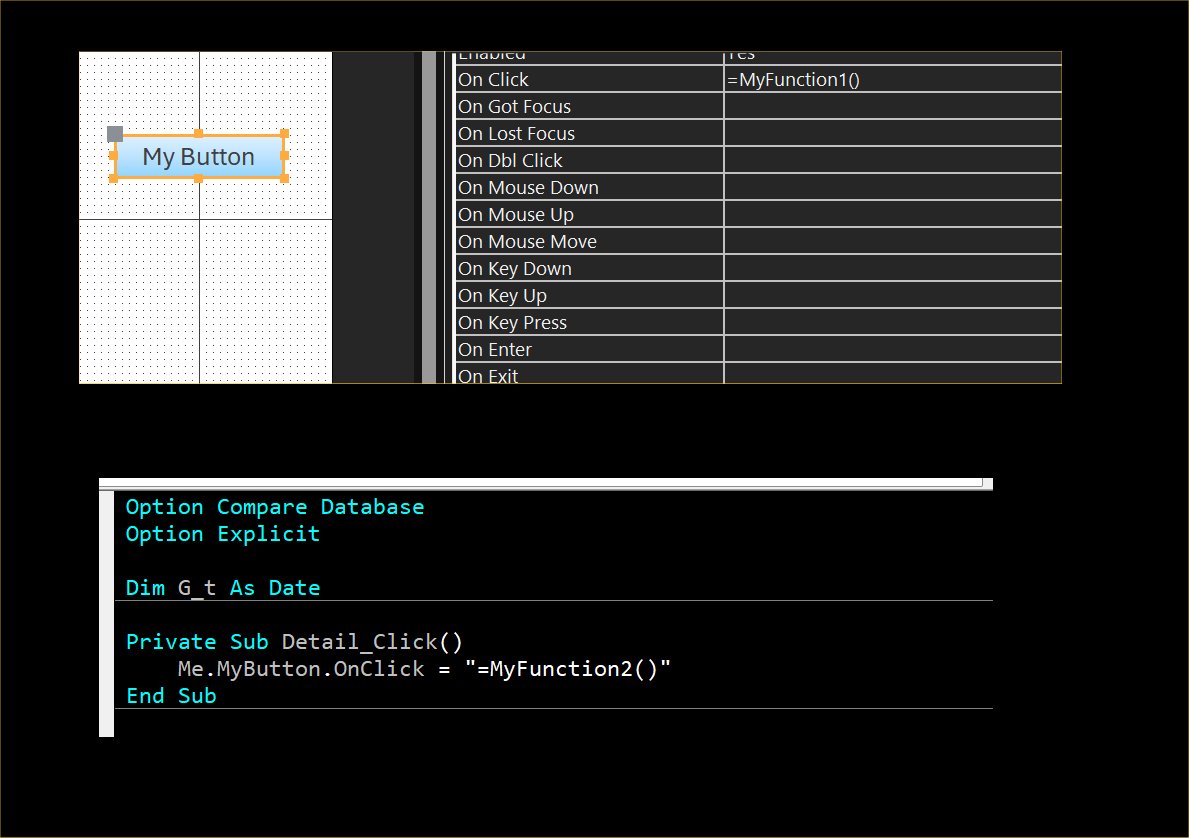
That can't be done because a control's event procedure can be changed dynamically, so Access wouldn't know which one is associated with the control.  The picture below shows you can assign any procedure to an event -- in my case, MyFunction1().  It doesn't have to be the standard "[Event Procedure]".  The second picture shows that VBA can also change the event procedure at run time -- in this case, it changes it to MyFunction2().  In other words, a control's event procedure can be *anything*, so Access wouldn't know what to delete if the control is deleted.
Kevin Yip  @Reply  
     
13 hours ago

Edwin Siew OP  @Reply  
    
13 hours ago
Well... that is pointing to a function. If what I want to copy is an event procedure and not an independent function which may make references to the parent form for example. I can re-write all those references of course... so shall I conclude that the answer is no, such a function does not exist?

Richard Rost  @Reply  
          
13 hours ago
Ed, for the built-in copy/paste command, the answer is no: it doesn't bring a control's VBA event procedures into another form's module. That doesn't mean a custom utility is impossible, but I don't have a verified one to recommend. Alex's distinction is useful here: an embedded macro is stored with the control, while VBA code lives in the form's module.

For an existing project, you don't have to reorganize everything at once. Work on a backup, copy the control, then use its event property's Code Builder in the destination form to create the correctly named procedure. Copy the original procedure's body into that stub. Check any helper routines, module-level variables and references to other controls that the code depends on, then compile and test that button before moving on.

Kevin's screenshot also shows why an event property deserves checking: it can call a named function rather than use [Event Procedure]. I'd treat removing apparently orphaned procedures as a separate cleanup, not assume every routine left after deleting a control is safe to delete.
Donald Blackwell  @Reply  
       
12 hours ago
Richard's latest Developer courses teach how to find orphaned code and to clean up code, etc.

The techniques he uses could be used to find a control off of one form or report and then copy the control, with its properties intact to another form or report. Then repeat the process to duplicate code attached to the control.

Another option, if you're creating several forms with similar objects and functionality might be to sub-class your forms and then just have one or more class modules. Daniel Pineat has some good articles on this method on his site.

Other than that, I haven't heard of any functions generally available for what you describe, sorry.
Kevin Yip  @Reply  
     
12 hours ago
Edwin   That's something you have to create yourself.  Access does not have a built-in feature for this, for the reason I stated: Access does not necessarily know what procedure is associated to which control.  This seems like an unusual operation -- copying controls to another form that can make use of local procedures of another form.  Local procedures are usually only useful locally.  If both forms need the same code, a better approach may be a single public procedure that can be called from both forms.
Edwin Siew OP  @Reply  
    
12 hours ago
okie thanks. but surely this happens a lot, and probably enough to inspire someone to provide a ready solution? I won't be surprise if it exists already because that's if I were to write a procedure to do it, it would be a part of what's already done by Access when I export the form and controls.
Edwin Siew OP  @Reply  
    
12 hours ago
Kevin It would be just referencing something in the parent form, but this is an example only.
Add a Reply Upload an Image
Next Unseen


What's This?


The following is a paid advertisement
Computer Learning Zone is not responsible for any content shown or offers made by these ads.
 

Learn
 
Access - index
Excel - index
Word - index
Windows - index
PowerPoint - index
Photoshop - index
Visual Basic - index
ASP - index
Seminars
More...
Customers
 
Login
My Account
My Courses
Lost Password
Memberships
Student Databases
Change Email
Info
 
Latest News
New Releases
User Forums
Topic Glossary
Tips & Tricks
Search The Site
Code Vault
Collapse Menus
Help
 
Customer Support
Web Site Tour
FAQs
TechHelp
Consulting Services
About
 
Background
Testimonials
Jobs
Affiliate Program
Richard Rost
Free Lessons
Mailing List
PCResale.NET
Order
 
Video Tutorials
Handbooks
Memberships
Learning Connection
Idiot's Guide to Excel
Volume Discounts
Payment Info
Shipping
Terms of Sale
Contact
 
Contact Info
Support Policy
Mailing Address
Phone Number
Fax Number
Course Survey
Email Richard
[email protected]
Blog RSS Feed    YouTube Channel

LinkedIn
Copyright 2026 by Computer Learning Zone, Amicron, and Richard Rost. All Rights Reserved. Current Time: 10/26/2026 4:44:41 AM. PLT: 0s