Free Lessons
Courses
Seminars
TechHelp
Fast Tips
Templates
Topic Index
Forum
ABCD
 
Home   Courses   TechHelp   Help   Contact   Merch   Join   Order   Logon   Forums   
 
Back to Access Forum    Comments List
Upload Images | @Reply | Bookmark | Link | Email | Next Unseen |
Command Button Colors Require UseTheme
David Campbell 
      
16 hours ago
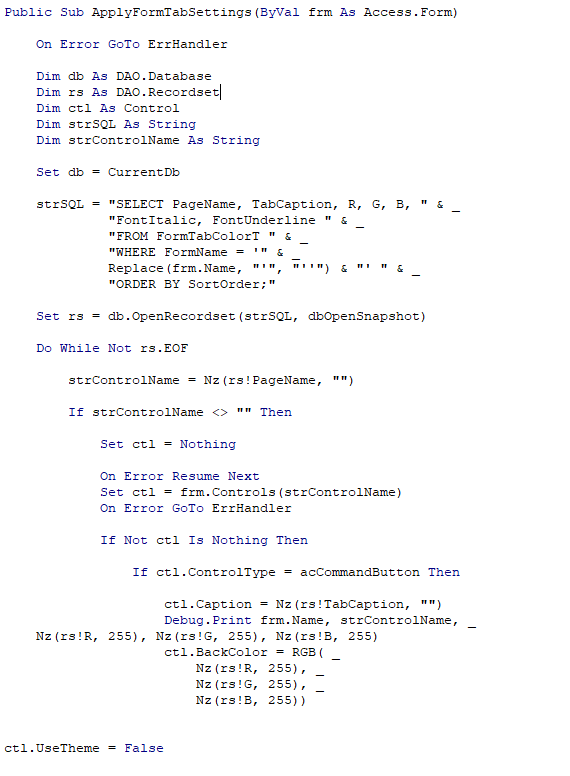
I have command buttons on a form that  show all white and light blue when hovering   use themes is no  I'm trying to be able to have the user select the color.  In on load to set the colors. even when the form loads it shows design properties in design view but does not change when the form loads in form view
David Campbell OP  @Reply  
      
15 hours ago

David Campbell OP  @Reply  
      
15 hours ago

David Campbell OP  @Reply  
      
15 hours ago

Alkan Toykan  @Reply  
       
13 hours ago
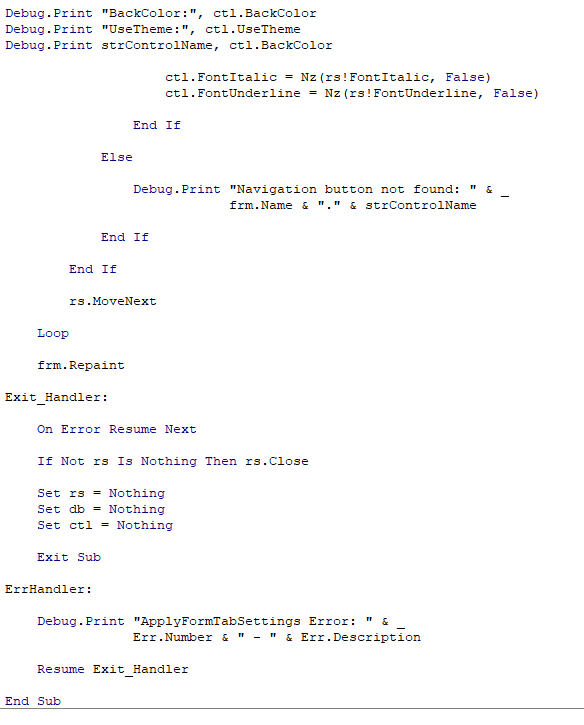
I can see a couple of issues with the current approach. First, you are setting the BackColor property before setting UseTheme = False. I would reverse that order and disable themes before applying the colors. Second, you are only setting the BackColor property. If you also want to control how the buttons appear when the mouse hovers over them or when they are pressed, you need to account for the HoverColor and PressedColor properties as well.

Before suggesting a solution, could you clarify a couple of things? I just want to make sure we fully understand the issue before proposing the most appropriate solution Do you want users to select a different color for each command button, or should their selection apply to all buttons on the form? Do you want to customize only the normal button color, or the hover and pressed colors as well? With that information, we can work towards a solution that does exactly what you need rather than trying to patch the current code.
Alkan Toykan  @Reply  
       
13 hours ago
One other small suggestion, you probably don't need quite so many Debug.Print statements. A few targeted messages are usually sufficient when troubleshooting, and keeping the code cleaner makes it easier to understand and maintain.
Donald Blackwell  @Reply  
       
13 hours ago
From what I can tell, in newer versions, Microsoft has moved all coloring and display rendering to the office document themes renderer so if you don't have "Use Theme" set to Yes, you have no control over any of the colors of buttons (command or toggle). It just sticks to whatever defaults are set in your windows settings.

With Use Themes turned off, if you check the BackColor property of a button, it will give whatever color is used in the property dialog. Then changing the color in vba and checking again will report the new color, but no visual change is made.

Essentially, Use Theme tells Access to use the application rendering engine if Yes and Use the windows rendering engine if No so to change the colors then, you'd need to likely use an API call and depending on how it's handle, may change colors throughout windows and not just be isolated to your Access application.
Alkan Toykan  @Reply  
       
9 hours ago
Donald yes your observation is correct. I initially considered whether we could accomplish this through the Windows API and the Windows rendering mechanism, using approaches such as owner-drawn controls, WM_DRAWITEM, DrawFrameControl, and CreateSolidBrush. However, making Access's own Command Button controls owner-drawn, potentially involving subclassing, is a considerably more complicated undertaking. Subclassing, if not handled correctly, can even cause Access to crash. When I factor in the complexity of implementing and testing such an approach, along with my current workload, I have to admit that I probably won't be able to dedicate the necessary time to it right now.

Considering Donald's observation as well, I think I may have jumped into answering this a little too quickly. Perhaps a bit of professional blindness brought on by a busy schedule. LOL

That said, my original questions about what exactly you want to achieve still stand. Understanding the intended behavior will help us determine the most appropriate approach.
Kevin Yip  @Reply  
      
6 hours ago
Donald  I'm using the latest Access 2024 version 2610 build 20527.20196, dated 11/10/26, and I don't have any problem setting custom color properties in VBA.  Where did you hear that API calls are needed to set colors?  That sounds pretty far-fetched.

David  Check if you use valid color values.  Also, your code Nz(rs!R, 255) will turn a null color value to white (255), which is how your buttons look in your picture.  Try turning off error handling (On Error...) to see if any untrapped error causes lines to be skipped.  If lines that set the colors are skipped, then of course no colors are set.
Kevin Yip  @Reply  
      
5 hours ago
David  Also try setting these color properties in VBA to see if they work.  They should:

ForeColor -- color of button text
HoverColor -- color of button's background when mouse hovers on it
HoverForeColor -- color of button text when mouse hovers on it
PressedColor -- color of button's background when user clicks on it
PressedForeColor -- color of button text when user clicks on it
Kevin Yip  @Reply  
      
5 hours ago
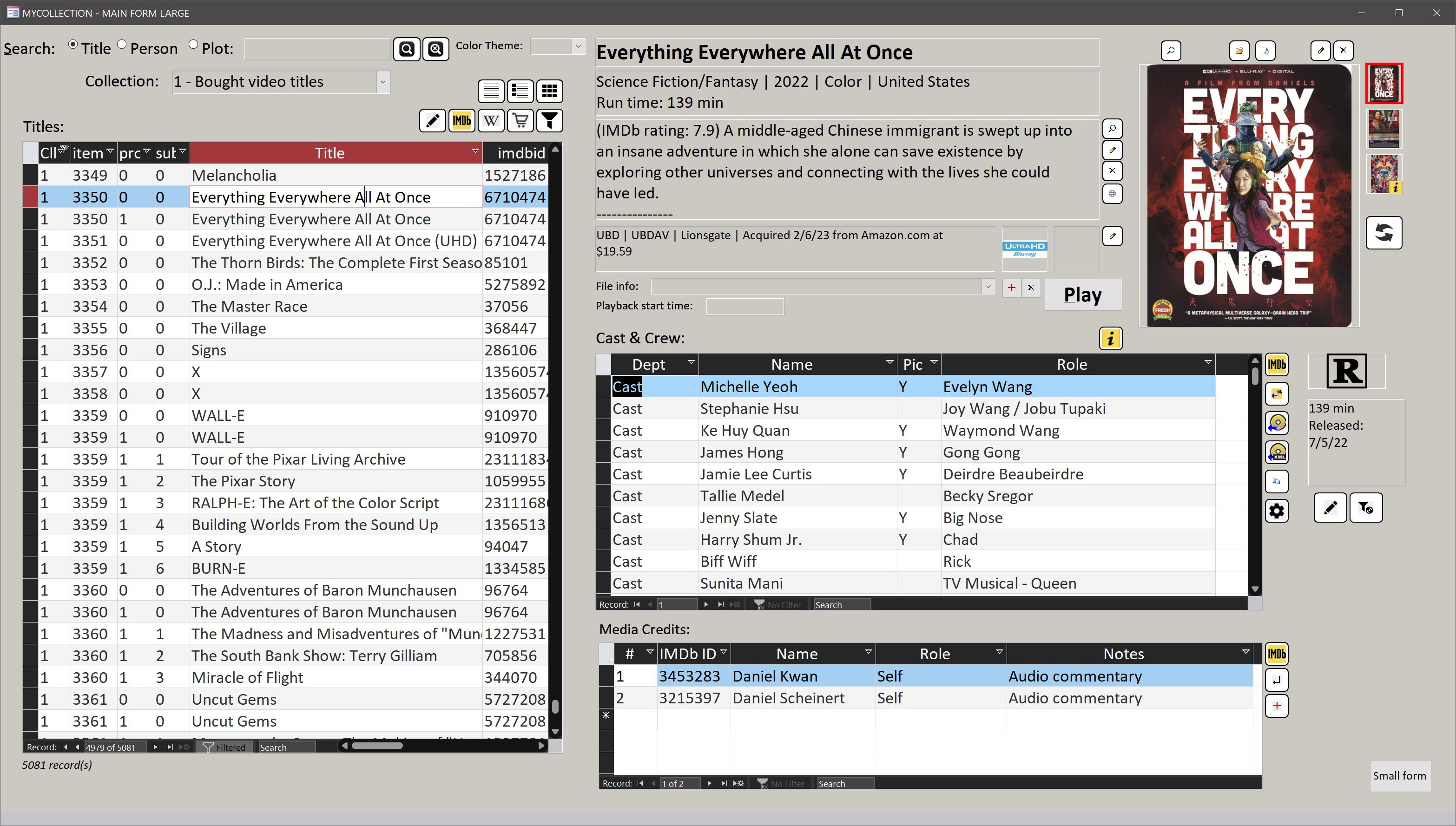
Some colors are indeed controlled only by Windows system colors, such as the colors of a subform's column headers, record selectors, and scroll bars, which will all be black (as pictured below) if you use 'dark theme" in Windows display settings.
Kevin Yip  @Reply  
      
5 hours ago

Donald Blackwell  @Reply  
       
4 hours ago
Kevin Changing colors is easy both in the property pane and VBA except that he is trying to modify colors with "Use Theme = No / False"
David Campbell OP  @Reply  
      
2 hours ago
I want each command button to be able to be assigned its own color based on what the user would like to set it as.
David Campbell OP  @Reply  
      
2 hours ago
I found the problem  I'm using access 2021  and in code usetheme to no   changed it to yes and its works fine
Donald Blackwell  @Reply  
       
78 minutes ago
You can easily do that, but from what I've experienced, you have to have "Use Theme" set to yes in the property pane and True in VBA. Basically, the default.

While the name "Use Theme" may sound like you want to use the actual "Theme" color system in Access, you don't have to, but it has to be enabled for the button to accept any deviation from the windows settings on the machine. Alternatively, if each user is able to personalize their Windows, then they would get buttons that match the rest of their Windows settings if you turn Use Theme off.

That said, Kevin has significantly more experience than me, so if he can walk you through changing the colors with Use Theme No/False then we'll both learn something :)

On 3 of my machines, I've tried creating a blank form with a button with that setting off and had the same result. 2 of the machines are running betas and the other, I will have to check the version / build information but it is a Windows 10 64-bit running 365 versions.

Alkan Toykan  @Reply  
       
67 minutes ago
David ok I understand what you wanna do and you don't need UseTheme. The forum rules avoid me sharing the whole refactored code with you so my advice is use this as a prompt with your ai assistant which generated this code to you:

"Please revise my existing ApplyFormTabSettings procedure to apply the user's saved RGB values to each Command Button's BackColor, ForeColor, HoverColor, HoverForeColor, PressedColor, and PressedForeColor properties. Do not use or modify the UseTheme property. Preserve the existing functionality, handle Null values appropriately, and remove unnecessary Debug.Print statements. Also identify any additional table fields required to store these color preferences."
Also, make sure you ask "Please explain every change you make, step by step, so I can understand the reasoning behind it and learn from the process." at the end of the prompt.

And don't forget to take the time to study the revised code and understand how it works. AI is a great tool for making our work easier and helping us find solutions, but if we simply use whatever it generates without understanding the underlying logic, we miss the opportunity to learn. More importantly, when something goes wrong, we may not know where to start looking or how to fix it. Use AI to accelerate your learning, not to replace it mate, keep up the goog work.
Alkan Toykan  @Reply  
       
56 minutes ago
One additional reference you might find useful is published in 2023 but still helpfull.

It discusses the relationship between UseTheme and Command Button color properties, including some limitations when UseTheme = False. However, behavior may vary between Access versions. I have access to several different versions of Access, but unfortunately, I don't have the time to test this in each of them at the moment (I'm very sorry ), so I would recommend testing the properties directly in your version rather than relying solely on the article.
Richard Rost  @Reply  
            
18 minutes ago
Glad you tracked it down, David. Thanks for posting what worked in Access 2021, and thanks to everyone who helped investigate. Keep UseTheme = True in your working version; you can still apply each button's saved RGB color.

For the next step, remember that the normal, hover and pressed appearances have separate color properties. If you want the user's choice reflected in all three states, account for BackColor, HoverColor and PressedColor, and check that the text stays readable in each state. Test one button through all three states before applying the settings to the rest. No need to replace your working approach with Windows API code.
Kevin Yip  @Reply  
      
2 minutes ago
I did not know setting Use Theme to No would have such an effect, so thanks to all for the info.  As Richard says, I always set it to Yes, and never had a reason not to.  I've always been able to customize my colors that way.
Add a Reply Upload an Image
Next Unseen


What's This?


The following is a paid advertisement
Computer Learning Zone is not responsible for any content shown or offers made by these ads.
 

Learn
 
Access - index
Excel - index
Word - index
Windows - index
PowerPoint - index
Photoshop - index
Visual Basic - index
ASP - index
Seminars
More...
Customers
 
Login
My Account
My Courses
Lost Password
Memberships
Student Databases
Change Email
Info
 
Latest News
New Releases
User Forums
Topic Glossary
Tips & Tricks
Search The Site
Code Vault
Collapse Menus
Help
 
Customer Support
Web Site Tour
FAQs
TechHelp
Consulting Services
About
 
Background
Testimonials
Jobs
Affiliate Program
Richard Rost
Free Lessons
Mailing List
PCResale.NET
Order
 
Video Tutorials
Handbooks
Memberships
Learning Connection
Idiot's Guide to Excel
Volume Discounts
Payment Info
Shipping
Terms of Sale
Contact
 
Contact Info
Support Policy
Mailing Address
Phone Number
Fax Number
Course Survey
Email Richard
[email protected]
Blog RSS Feed    YouTube Channel

LinkedIn
Copyright 2026 by Computer Learning Zone, Amicron, and Richard Rost. All Rights Reserved. Current Time: 11/14/2026 6:31:19 PM. PLT: 1s