Free Lessons
Courses
Seminars
TechHelp
Fast Tips
Templates
Topic Index
Forum
ABCD
 
Home   Courses   TechHelp   Help   Contact   Merch   Join   Order   Logon   Forums   
 
Home > Forums > Access Forum > Help with VBA by David Clement
Back to Access Forum    Comments List
Upload Images | @Reply | Bookmark | Link | Email | Next Unseen |
Help with VBA
David Clement 
      
18 hours ago
I have a slightly different database I am working with. Still a searchable Bible database. What I am trying to do is, choose a book from combo box, choose book, have it show how many chapters it has, then display chapters, then eventually show the appropriate verses. Between ChatGPT and I, it is partially working. I don't have a paid account with chatGPT, so I ran out of chats. This is what I have sor far:

DetailsPrivate Sub Combo4_AfterUpdate()

    Dim strSQL As String
    

    strSQL = "SELECT DISTINCT Chapter FROM [1KJVT] " & _
             "WHERE BookName = '" & Me.Combo4.Value & "' " & _
             "ORDER BY Chapter;"

    Set rs = CurrentDb.OpenRecordset(strSQL)

    MsgBox "Chapters found: " & rs.RecordCount

    rs.Close
    Set rs = Nothing

    Me.cboChapter.RowSource = strSQL
    Me.cboChapter.Requery

End Sub

Private Sub Combo4_AfterUpdate()

    Dim strSQL As String
    

    strSQL = "SELECT DISTINCT Chapter FROM [1KJVT] " & _
             "WHERE BookName = '" & Me.Combo4.Value & "' " & _
             "ORDER BY Chapter;"

    Set rs = CurrentDb.OpenRecordset(strSQL)

    MsgBox "Chapters found: " & rs.RecordCount

    rs.Close
    Set rs = Nothing

    Me.cboChapter.RowSource = strSQL
    Me.cboChapter.Requery

End Sub
David Clement OP  @Reply  
      
18 hours ago
can it be fixed, or should i scrap it?
David Clement OP  @Reply  
      
18 hours ago
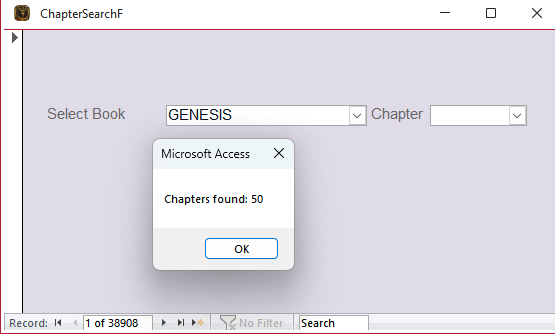
when you select a book, a little message box pops up and say how many chapters were found. That works. but cant get the chapter combo box to fill with how ever many chapters there are.
David Clement OP  @Reply  
      
18 hours ago

David Clement OP  @Reply  
      
18 hours ago
I am sorry that I don't understand this better. I feel like i'm getting there, but not quite.
Thank you!
Kevin Yip  @Reply  
      
18 hours ago
It's missing the declaration of rs:  Dim rs As Recordset

When you compile your code, it should show an error about the missing declaration, unless you don't have "Option Explicit" in your code, which is not a good practice.
Richard Rost  @Reply  
            
18 hours ago
Don't scrap it, David. The screenshot shows the chapter query is finding rows for Genesis. The message box pauses the code before it gets to the lines that fill the combo, so first click OK and actually open the Chapter dropdown. A blank box before you select anything is normal; an empty dropdown is what we're trying to fix.

If the dropdown is still empty, check the Chapter combo's Name in Design View (not its label) and make sure it matches cboChapter in your code. Its Row Source Type should be Table/Query. Also, if the two copies of Combo4_AfterUpdate are both in the form module, keep just one, and declare rs as Kevin suggested. Then use Debug > Compile and see whether Access points to a line.

This is a cascading combo box. My Cascading Combo Boxes video walks through the After Update and Requery part. Get Book to Chapter working first, then use the same idea to show the verses.
Richard Rost  @Reply  
            
18 hours ago
And yes, like Kevin says, you should DEFINITELY have Option Explicit in all of your modules.
Add a Reply Upload an Image
Next Unseen


What's This?


The following is a paid advertisement
Computer Learning Zone is not responsible for any content shown or offers made by these ads.
 

Learn
 
Access - index
Excel - index
Word - index
Windows - index
PowerPoint - index
Photoshop - index
Visual Basic - index
ASP - index
Seminars
More...
Customers
 
Login
My Account
My Courses
Lost Password
Memberships
Student Databases
Change Email
Info
 
Latest News
New Releases
User Forums
Topic Glossary
Tips & Tricks
Search The Site
Code Vault
Collapse Menus
Help
 
Customer Support
Web Site Tour
FAQs
TechHelp
Consulting Services
About
 
Background
Testimonials
Jobs
Affiliate Program
Richard Rost
Free Lessons
Mailing List
PCResale.NET
Order
 
Video Tutorials
Handbooks
Memberships
Learning Connection
Idiot's Guide to Excel
Volume Discounts
Payment Info
Shipping
Terms of Sale
Contact
 
Contact Info
Support Policy
Mailing Address
Phone Number
Fax Number
Course Survey
Email Richard
[email protected]
Blog RSS Feed    YouTube Channel

LinkedIn
Copyright 2026 by Computer Learning Zone, Amicron, and Richard Rost. All Rights Reserved. Current Time: 11/21/2026 3:54:08 PM. PLT: 1s