Free Lessons
Courses
Seminars
TechHelp
Fast Tips
Templates
Topic Index
Forum
ABCD
 
Home   Courses   TechHelp   Help   Contact   Merch   Join   Order   Logon   Forums   
 
Back to Access Forum    Comments List
Upload Images | @Reply | Bookmark | Link | Email | Next Unseen |
A Question About Auto Numbers
David Clement 
      
17 hours ago
Richard,
This is more of a curiosity question than anything else. As you know I have building a Bible Datbase.
My questions is this,
Why does using an auto number mess up the order of anything if it is formatted like this:Vulcan Book of Surak
BookChapterVerse-Logic 1:1-Before the blade, the question.
BookChapterVerse-Logic 1:2-Before the question, stillness.
BookChapterVerse-Logic 1:3-The one who cannot govern his anger is governed by it.
BookChapterVerse-Logic 1:4-Logic is a lamp, not a wall; it shows the road but does not forbid the traveler.
BookChapterVerse-Logic 1:5-Where certainty ends, let patience begin.

BookChapterVerse would be on Coulmn A1 Header
Logic 1:1
Logic 1:2
Logic 1:3
Logic 1:4
Logic 1:5
would be in Coulmn A2-A6
and so on.

David Clement OP  @Reply  
      
17 hours ago
The Text Would be on Coulmn B1, and so on.
I didn't want to post actual Bible verses, but I think you get my point.
For what ever reason, it messes up the order if importing form an Excel .xlsx file if an Auto Number is used.
I hope you like the Star Trek reference.
Thank you!
David Clement OP  @Reply  
      
17 hours ago
I had to use Formulas in excel to separate the book, chapter and verse for 66 books that contain over 31,000 records. When I started, I didn't realize it would be this complicated. I thought I could just do a few imports and boom, done!
I hope there wasn't an easier way to do this this, after spending a week or so building this.
Anyway, it was interesting. Thank you for your help.
Kevin Yip  @Reply  
      
15 hours ago
Autonumbers shouldn't and can't be used to store any meaningful data.  Please see one of Richard's best videos: AutoNumbers Are NOT For You.  Autonumbers should only be used to uniquely identify records.  They should not be used for sorting, or achieving any meaningful purposes for you, because their values are, and meant to be, meaningless.  You have no control over them, and they can never be changed.  Therefore, any attempt to use them purposefully will run into problems like you are facing now.  If you need values for sorting, create the values yourself, such as a separate field for storing bible verse numbers.
Debbie Heaney  @Reply  
     
9 hours ago
Part of the reason the ordering is getting messed up is the difference between numerical sorting and alphabetical sorting.
Simple numbers keep things sorted by numerical value 8,9,10,11,12 sort of thing.
Alphabetical sorting tends to give you A1,A10,A2 type of thing, instead of A1, A2, A10.  Which messes up your sorting.

Hopefully someone can come up with a workaround to help you with your sorting issue.
David Clement OP  @Reply  
      
7 hours ago
I appologize for the earlier post, I may have mis spoken. As is ALWAYS the case with me, I wanted to show you a sample of what I ran into. I think because I spent over a week, hours a day working on this, I fixed everything. There WAS some sort of issue when I used Auto Numbers for the databas. Anyway, the only way I could think of to fix was this.....
David Clement OP  @Reply  
      
7 hours ago

David Clement OP  @Reply  
      
7 hours ago
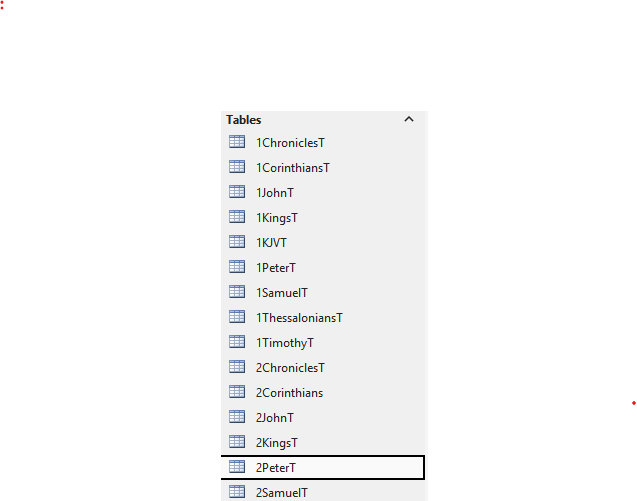
I did this for all 66 books. 66 tables, 66 forms and so on. It works great, just a lot of time doing it. Maybe ChatGPT was part of the problem, I just don't know. I wish I could show you how it all works. On my Menu Form, I've even got it set to produce a single random selection form one of the books. Book,Chapter and Verse that produces a new on each time the menu is opened.
I't okay if you want to scold me for the way I did this, but it works. I didn't know how else to do it.
Thank you!
Donald Blackwell  @Reply  
       
7 hours ago
Ahh, you were trying to get it sorted in the Navigation Pane, not in a form that makes it clearer.

The Navigation Pane uses Text sorting putting the # in front forces the order you want. Just remember if you should ever get to a situation where you have 1BookT, 2BookT, .... , 10 BookT, it will likely sort it as 1BookT, 10BookT, 2BookT as a zero comes before an alphabet character.
David Clement OP  @Reply  
      
7 hours ago
Donald, those are the names of the books of the bible. So if I entered 1JohnT, that is the name of the book. 1 John or some people might say The First Book of John. Following Richard's naming convention, I named the books that way. So Genesis would be GenesisT and so on. To me, it doesn't matter how access sorts things in the navigation pane. I fixed (apparently) all the Excel files I used for the database. There was a sorting issue of some kind if I used an AutoNumber.
David Clement OP  @Reply  
      
6 hours ago
Donald, If i had a column in my Excel File that looked like this. Genesis 1:1 in cell A2 then the text in B2 then carry that out to Genesis 50:26 which would be A1534 and B1534 for the text. So this is another way to show this, Genesis 1:1 = Genesis Chapter 1 Verse 1.
I guess that why who ever made the Excel file they chose this method, Genesis 1:1 and so on. In excel, it's easier to read.
I am no expert, I'm trying to be.
Thank you!
Donald Blackwell  @Reply  
       
5 hours ago
OK, as Kevin said, an autonumber shouldn't have an effect on sorting unless you specifically set it as a sort criteria, which often may cause issues since sometimes things can get entered out of order.

So in a table, if you tried to sort as indicated, it would still sort by text sorting, so for instance (and yeah, I'm omitting several chapters and verses):

Genesis 1:1
Genesis 2:1
Genesis 3:1
Genesis 4:1
Genesis 4:2
Genesis 42:15
Genesis 5:1

Because when text sorting, the algorithm will look character by character. Everything in this example matches up (Genesis ) until you get to the chapter #'s. That's where it will get goofy. All of the chapters where the first or only digit is 1 will be together, the 2's together and so on. and then it looks at the second # if there is one. The colon sorts lower than #'s but 42 will sort before 5 because it already sorted on the 4.

To get it to truly sort, you'd need to add some custom fields or calculated fields in a query to sort on. It depends on how your database and tables are laid out.
David Clement OP  @Reply  
      
4 hours ago
Donald, since I don't even pretend to be an expert, to get this work right, (in my mind anyway) I tore the original Excel Sheet all apart, separating the like of Genesis 1:1 in the first Excel row to this, Genesis 1 1, (with appropriate first row headings in Excel)
so now in Access, it reads like this, (with the appropriate header row) Genesis Chapter 1 Verse 1. It took me a long time to do this. This way the database is searchable.
I did another table where the entire table is set like this Genesis 1:1 through Revelation 22:19 so it can be used as way to read it instead of searching it. Thats 38,908 rows total! Whew!
Thank you!
David Clement OP  @Reply  
      
4 hours ago
Donald, by the way, after I tore apart the Excel file and re imported to Access, I did use AutoNumber and it works. It's just the original file didn't work the first time as I described earlier.
Thank you!
David Clement OP  @Reply  
      
4 hours ago
Richard and others,
Please tell me if there is a better way to do this type of database. I am now retired and a lot of time on my hands. I am trying to keep mt mind as sharp as possible, hence the database I have built.
Thank you!
David Clement OP  @Reply  
      
3 hours ago
Richard and others,
Once again, looking at my original Excel file as an example, Header Row=BookChapterVerse in cell A1, in Cell A2 is Psalm 1:1 Cell B1 has the text for the Cell A1.
leaving it the original format, I couldn't figure out how to do search for Psalm 1:1 which occupies 1 coulumn in access. That's why I tore it apart, so I could get it to work.
I am pretty sure I am missing something here, what it is, I do not know.
As always, Thank you!
David Clement OP  @Reply  
      
3 hours ago
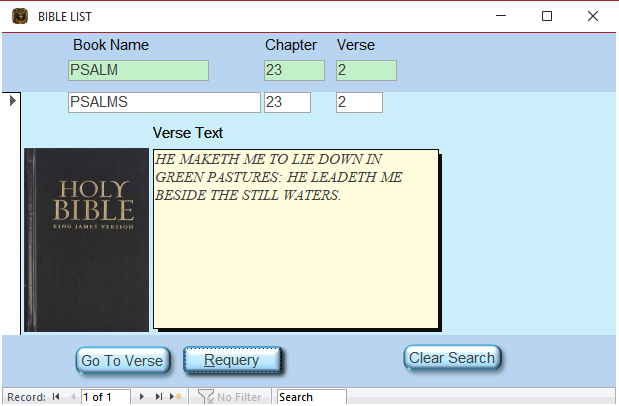
As you can see, I did get it to work.
David Clement OP  @Reply  
      
3 hours ago

David Clement OP  @Reply  
      
3 hours ago
Richard and others,
This is what happens when I import the Excel file into Access, I didn't change anything. Just the file as it is in Excel.
David Clement OP  @Reply  
      
3 hours ago

David Clement OP  @Reply  
      
3 hours ago
I didn't set Chapter and Verse to a Number field, access did that. I didn'd want to mess with the origianl Excel file. That's most likely why I had the earlier issues.
Please tell me a better way.
Thank you!
Richard Rost  @Reply  
            
2 hours ago
David, I got a kick out of the Book of Surak example. And no scolding. You got the search working, and splitting the chapter and verse into Number fields was a good move. Kevin, Debbie, and Donald are right about the distinction here: the AutoNumber identifies the record. It doesn't change the other fields or tell Access what order the verses should be read in. Sorting a reference as text can put Genesis 10:1 before Genesis 2:1. Sorting the chapter and verse as numbers fixes that.

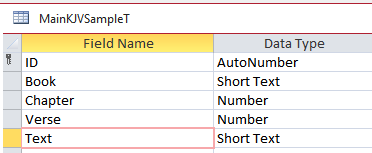
The biggest change I'd make is to keep all the verses in one table, not one table and form per book. Your MainKJVSampleT screenshot already shows most of what you need. I'd make a BookT with BookID (AutoNumber), BookName, and BookOrder (Number). Then use one VerseT with VerseID (AutoNumber), BookID (Number, Long Integer), ChapterNumber (Number), VerseNumber (Number), and VerseText (Long Text). Set BookOrder to the order you want the books read in, then sort a query by BookOrder, ChapterNumber, and VerseNumber, all ascending. The BookID links the tables. BookOrder is what you sort on.

You can use that same data for reading and searching. One form can show all the verses in reading order or filter down to a book, chapter, and verse. You can still show Psalm 23:2 as a single label on screen without storing it as one field. Keep your working database intact and try it with two books in a copy first. That'll let you test the design before moving the rest.

Kevin already linked my AutoNumbers video. The one I'd add here is Too Many Tables, which covers why rows with the same kinds of fields belong in one table.
Add a Reply Upload an Image
Next Unseen


What's This?


The following is a paid advertisement
Computer Learning Zone is not responsible for any content shown or offers made by these ads.
 

Learn
 
Access - index
Excel - index
Word - index
Windows - index
PowerPoint - index
Photoshop - index
Visual Basic - index
ASP - index
Seminars
More...
Customers
 
Login
My Account
My Courses
Lost Password
Memberships
Student Databases
Change Email
Info
 
Latest News
New Releases
User Forums
Topic Glossary
Tips & Tricks
Search The Site
Code Vault
Collapse Menus
Help
 
Customer Support
Web Site Tour
FAQs
TechHelp
Consulting Services
About
 
Background
Testimonials
Jobs
Affiliate Program
Richard Rost
Free Lessons
Mailing List
PCResale.NET
Order
 
Video Tutorials
Handbooks
Memberships
Learning Connection
Idiot's Guide to Excel
Volume Discounts
Payment Info
Shipping
Terms of Sale
Contact
 
Contact Info
Support Policy
Mailing Address
Phone Number
Fax Number
Course Survey
Email Richard
[email protected]
Blog RSS Feed    YouTube Channel

LinkedIn
Copyright 2026 by Computer Learning Zone, Amicron, and Richard Rost. All Rights Reserved. Current Time: 11/22/2026 3:50:12 PM. PLT: 1s