Free Lessons
Courses
Seminars
TechHelp
Fast Tips
Templates
Topic Index
Forum
ABCD
 
Home   Courses   TechHelp   Help   Contact   Merch   Join   Order   Logon   Forums   
 
Home > Forums > Access Forum > Advice on Book Writing Database. by Paul Jack Higginbotham
Back to Access Forum    Comments List
Upload Images | @Reply | Bookmark | Link | Email | Next Unseen |
Advice on Book Writing Database.
Paul Jack Higginbotham 
     
16 hours ago
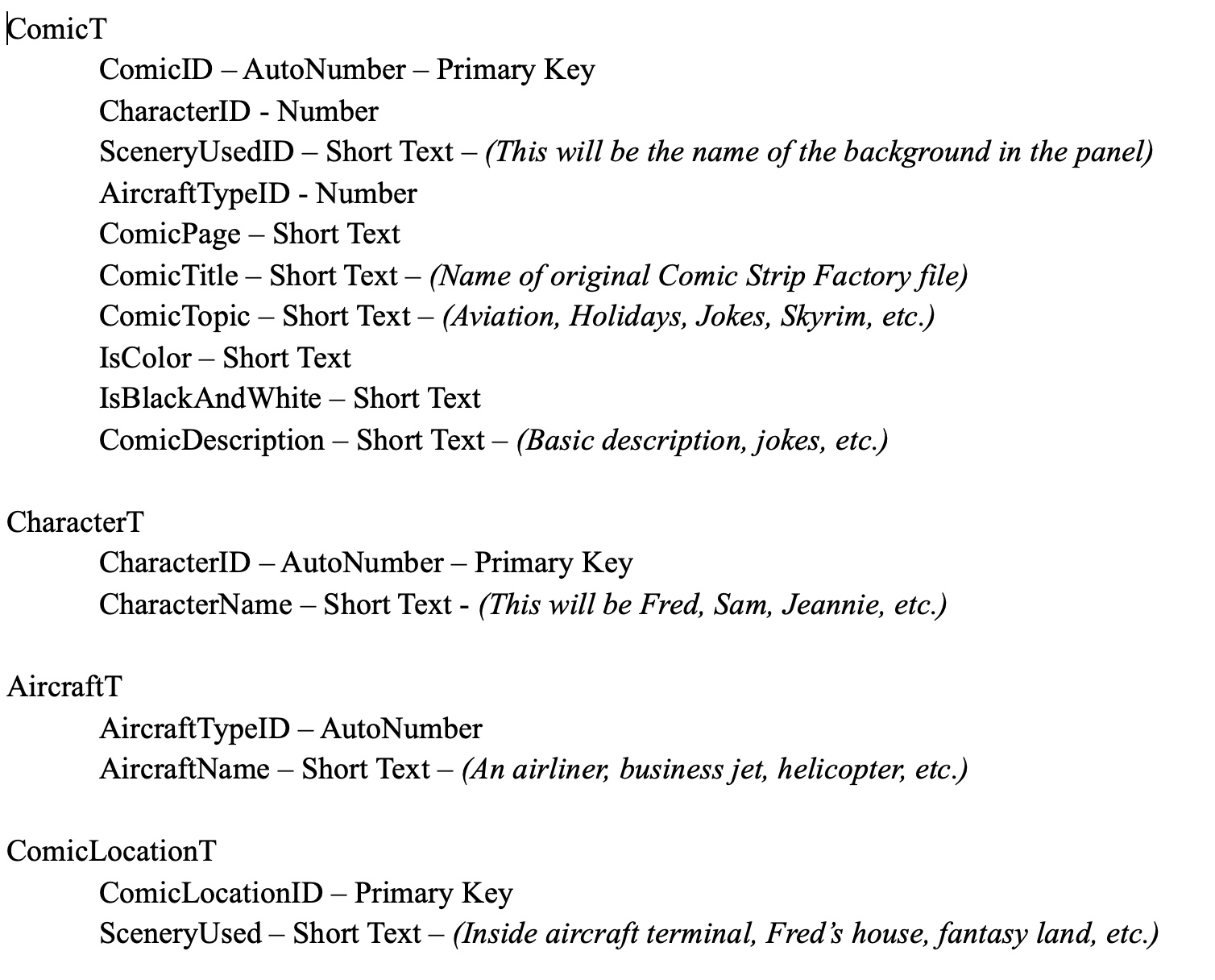
With two books under my belt and working on another comic book, a novel, and another book of aviation short stories I need a way to track things.

Any advice would be really appreciated.

I just typed out a list of Tables and Fields.

Do they look ok or need improvements?

Thanks, Paul
Paul Jack Higginbotham OP  @Reply  
     
16 hours ago

Donald Blackwell  @Reply  
        
15 hours ago
I think your table plans look good. A couple of notes that are more a matter of preference than necessity:

1) I try to stick with standardized use of field names. For instance, in ComicT, you use SceneryUsedID and in ComicLocationT you use SeceneryUsed, both Short Text. My personal preference but not a hard rule is if something ends in "ID" it's going to be a reference to a numeric ID field in another table, but again, sometimes it can be text.

2) ComicT, IsColor and IsBlackAndWhite, typically fields prefaced with Is or Has are used as boolean (Yes/No) fields. If it's going to be just yes/no or True/False, you might want to consider that. Also, if that is the case, do you need separate fields, or would you be able to use: IsColor - if Yes, it's color, If No it's black and white.

On the other hand, if you're going to describe the colors a field name such as "ColorDetails" might be an option and "BlackAndWhiteDetails". Whether that could be done with one field or not depends on what kind of information you want to store.

3) ComicT - ComicTopic, If you have multiple comics that about the various topics, this might be better as ComicTopicID with the ID in a TopicT table that lists the various topics available

4) AircraftT - AircraftName, again, just a personal preference, but when I think of "Name" I think of a specific item where there might be multiple aircraft of the same type but, for instance each pilot might name their aircraft a different name. i.e. "Enola Gay". Instead of "AircraftName", I would personally use "AircraftType". Semantics and won't at all effect the performance of your database.

5) AircraftT - More semantics - is it referring to specific aircraft or aircraft types. I would either call the table AircraftTypeT or change the ID to AircraftID

6) CharacterT and AircraftT - I usually add a comments or notes field to tables such as this. For example, if your comic were "Dennis the Menace" a comment field might store something like "Dennis is the bane of Mr. Wilson's existence.", lol. Just the kind of thing I think of when designing a db. Such a field is easy enough to add later as well if you decide you want that kind of extra info.

Your plan looks solid and should work great. My above sections are just some of my thought processes and in no way "set in stone" rules of database design.
Paul Jack Higginbotham OP  @Reply  
     
3 hours ago
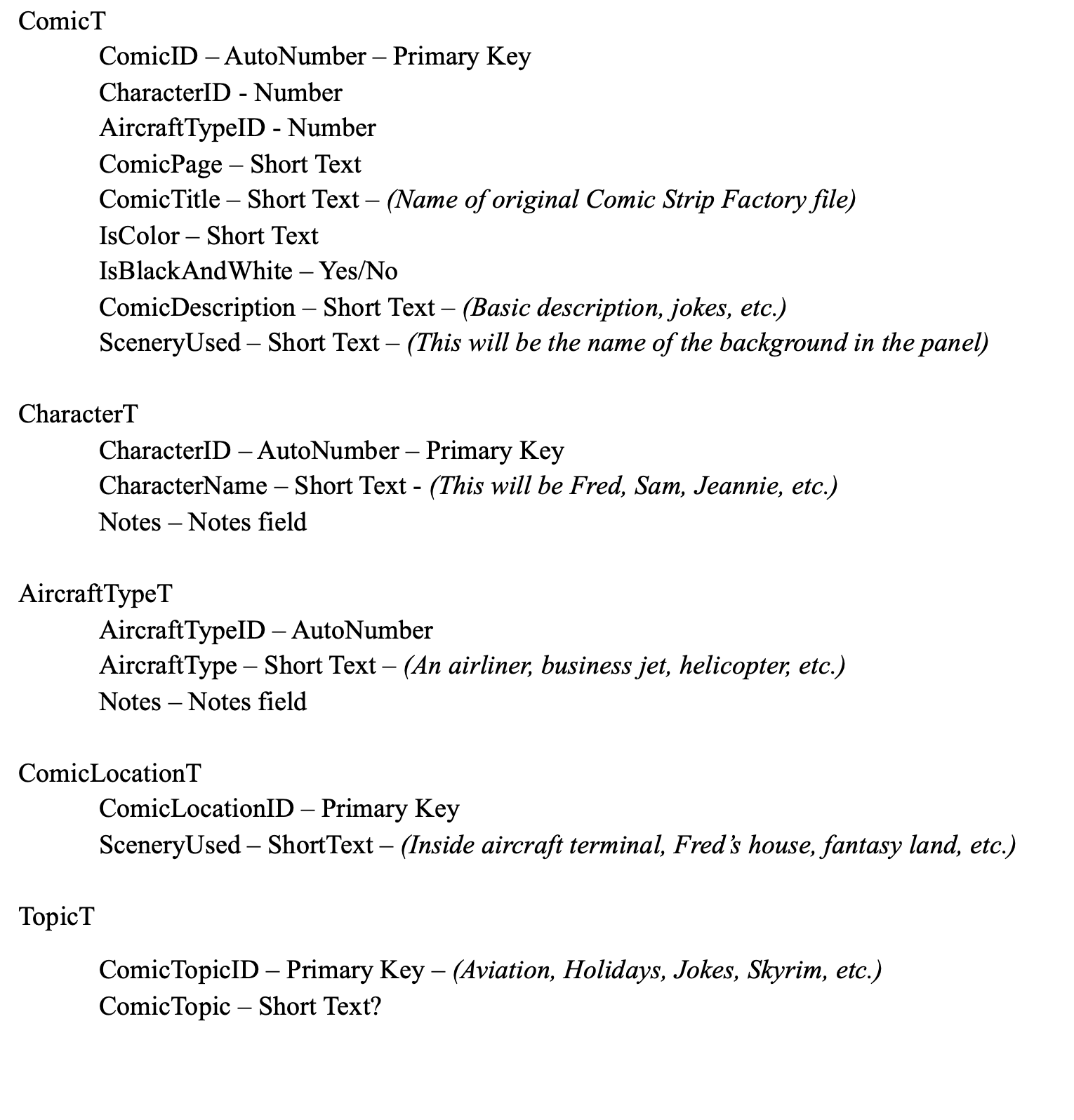
Donald Donald, thank you! Your advice is precisely what I was looking for. I'm going to incorporate it in my design. #2 isn't important, by color and B&W I meant some comics are in color and some are B&W. #4, AircraftType is a much better idea as 747, helicopter etc is what I'm looking for. #6, yes, excellent advice, I wasn't sure how to go about doing this. I'll make the changes to my plan and post it again. Much appreciated kind sir.
Paul Jack Higginbotham OP  @Reply  
     
3 hours ago
Donald How does this look Donald? The only thing I need to change is SceneryUsed in those two tables as Short Text because I need to use text to describe the scenery. But if they're Short Text can they still be linked to each other with a join line in a query? Or can join lines only be used in Number fields? Thanks.
Paul Jack Higginbotham OP  @Reply  
     
3 hours ago

Add a Reply Upload an Image
Next Unseen


What's This?


The following is a paid advertisement
Computer Learning Zone is not responsible for any content shown or offers made by these ads.
 

Learn
 
Access - index
Excel - index
Word - index
Windows - index
PowerPoint - index
Photoshop - index
Visual Basic - index
ASP - index
Seminars
More...
Customers
 
Login
My Account
My Courses
Lost Password
Memberships
Student Databases
Change Email
Info
 
Latest News
New Releases
User Forums
Topic Glossary
Tips & Tricks
Search The Site
Code Vault
Collapse Menus
Help
 
Customer Support
Web Site Tour
FAQs
TechHelp
Consulting Services
About
 
Background
Testimonials
Jobs
Affiliate Program
Richard Rost
Free Lessons
Mailing List
PCResale.NET
Order
 
Video Tutorials
Handbooks
Memberships
Learning Connection
Idiot's Guide to Excel
Volume Discounts
Payment Info
Shipping
Terms of Sale
Contact
 
Contact Info
Support Policy
Mailing Address
Phone Number
Fax Number
Course Survey
Email Richard
[email protected]
Blog RSS Feed    YouTube Channel

LinkedIn
Copyright 2026 by Computer Learning Zone, Amicron, and Richard Rost. All Rights Reserved. Current Time: 11/24/2026 11:10:45 AM. PLT: 0s