Free Lessons
Courses
Seminars
TechHelp
Fast Tips
Templates
Topic Index
Forum
ABCD
 
Home   Courses   TechHelp   Forums   Help   Contact   Merch   Join   Order   Logon  
 
Back to Access Forum    Comments List
Upload Images   @Reply   Bookmark    Link   Email   Next Unseen 
Add Condition OpenReport
Elaine Heltman 
     
5 years ago
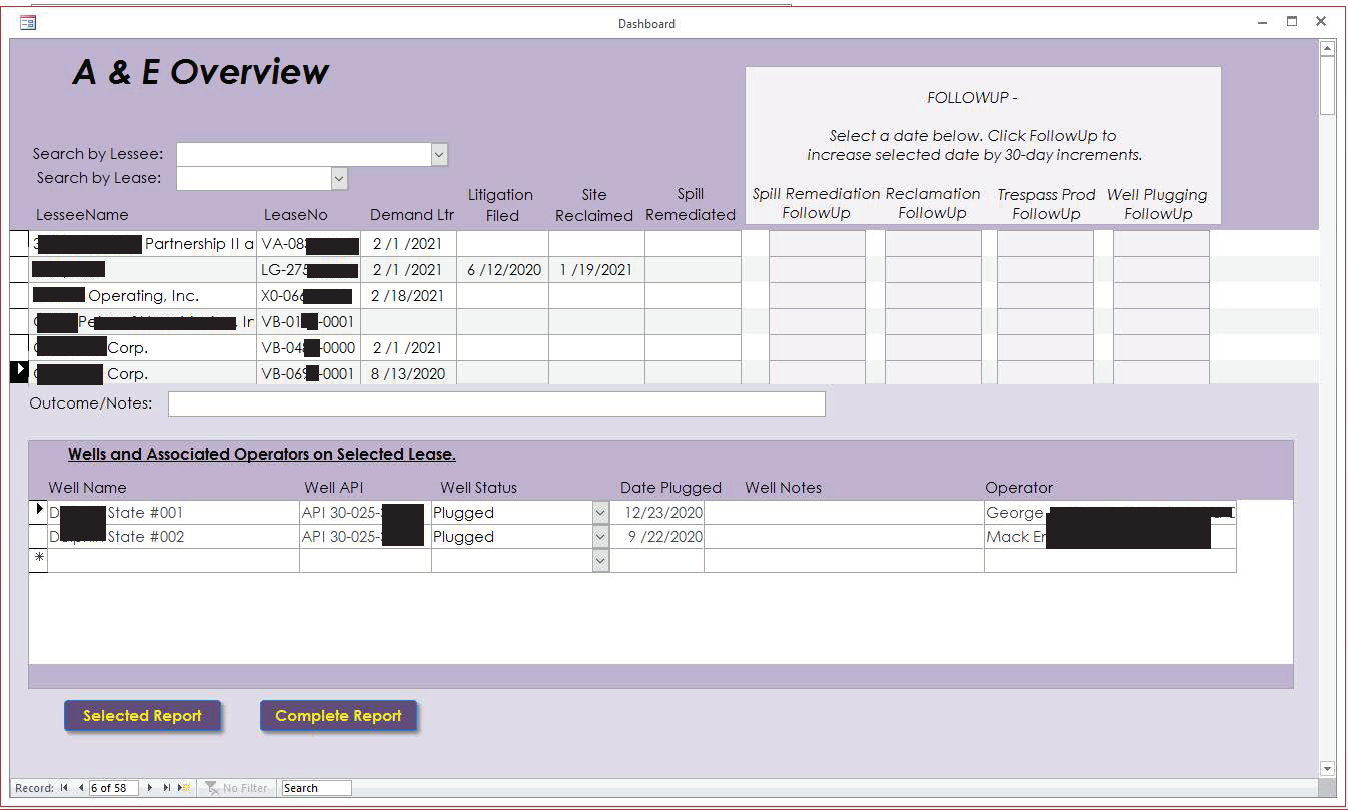
Hi, Richard. Id like to please know how to properly add another condition to a DoCmd.OpenReport code. Ive attached a redacted screen shot of my Dashboard form.
The form comprises a continuous form A with a continuous subform B in the footer. Form A shows each lessee, its related leases and lease details.

Select a record from form A and the records associated with each lease (there are multiple leases per lessee) are shown in subform B.

Using that selection, how do I edit the code in the Selected Report button to run a report showing the selected lessee and lease record from A and only that leases related well records from B.

The code currently returns the selected lessee and lease from A, and all the lessees well records from B, not just those related to the selected lease.
DoCmd.OpenReport "DashboardR", acViewPreview, , "[LesseeID] = " & [LesseeID]

I see the problem with using the LesseeID, but don't know how to add a condition that returns only the selected lease's form B data. I've tried using AND and lots of variations of defining LeaseID, but they've failed. Thank you!
Elaine Heltman OP  @Reply  
     
5 years ago

Richard Rost  @Reply  
          
5 years ago
I suspect your report isn't set up right. I would have the Lessee as the main report, which you have already, and then set up a Subreport for the other records. Once that's set up right, you won't need anything else in the WHERE condition of your OpenReport.
Elaine Heltman OP  @Reply  
     
5 years ago
I reworked all the forms and subforms as you suggested and the Lessee is now properly shown only once. The selected report button code didnt work correctly in the main form, so I moved it to the lease subform. It now returns the selected lease information and MOSTLY works: DoCmd.OpenReport "DashboardR", acViewPreview, , "Lease_T![LeaseID] = " & [LeaseID]
Problem: theres a related well subform to the lease form, and with this code if WellName is null, then NO data is shown in the report, not even lease data.

How do I add a line to my button code to open the report with lease data even if WellName is null.  I dont really know how to do this, but enjoy faking it: If IsNull (DashboardSubF!WellName) Then
Something?  . docmd.openreport  . Without well info..
Thanks always!
Richard Rost  @Reply  
          
5 years ago
It's real hard to tell without seeing your database, but it sounds to me like you need an Outer Join somewhere.
Elaine Heltman OP  @Reply  
     
5 years ago
Thanks! Made sure the Outer Joins were properly done and all the records show. But, if I select a single lease that doesn't have a related well in the well subform NO data is shown in the report, not even lease data. It's not a deal breaker since I can run a report for the Lessee and all related Lease and Well data appear, but I'd like to learn how to do this. Thanks, again!
Richard Rost  @Reply  
          
5 years ago
Your report must be based off a query that needs an outer join too.
Elaine Heltman OP  @Reply  
     
5 years ago
Checked that - outer joins made.
Richard Rost  @Reply  
          
5 years ago
Now we're getting into the territory of "difficult to diagnose unless I can see the database." Without knowing how everything is set up, it's tough for me to say. It's not one of my databases. I have no idea what's under the hood. :(
Elaine Heltman OP  @Reply  
     
5 years ago
Yep, I understand, and I always appreciate your help! :) Trying to build the airplane while flying it is a daunting task, as the overall goal for my project keeps evolving. On the up side, I keep learning. Thanks for the reminders to check the basics!
Richard Rost  @Reply  
          
5 years ago
Yep. And for the weird problems, don't forget the Troubleshooter.

This thread is now CLOSED. If you wish to comment, start a NEW discussion in Access Forum.
 

Next Unseen

 
New Feature: Comment Live View


The following is a paid advertisement
Computer Learning Zone is not responsible for any content shown or offers made by these ads.
 

Learn
 
Access - index
Excel - index
Word - index
Windows - index
PowerPoint - index
Photoshop - index
Visual Basic - index
ASP - index
Seminars
More...
Customers
 
Login
My Account
My Courses
Lost Password
Memberships
Student Databases
Change Email
Info
 
Latest News
New Releases
User Forums
Topic Glossary
Tips & Tricks
Search The Site
Code Vault
Collapse Menus
Help
 
Customer Support
Web Site Tour
FAQs
TechHelp
Consulting Services
About
 
Background
Testimonials
Jobs
Affiliate Program
Richard Rost
Free Lessons
Mailing List
PCResale.NET
Order
 
Video Tutorials
Handbooks
Memberships
Learning Connection
Idiot's Guide to Excel
Volume Discounts
Payment Info
Shipping
Terms of Sale
Contact
 
Contact Info
Support Policy
Mailing Address
Phone Number
Fax Number
Course Survey
Email Richard
[email protected]
Blog RSS Feed    YouTube Channel

LinkedIn
Copyright 2026 by Computer Learning Zone, Amicron, and Richard Rost. All Rights Reserved. Current Time: 5/7/2026 2:02:25 PM. PLT: 1s