Free Lessons
Courses
Seminars
TechHelp
Fast Tips
Templates
Topic Index
Forum
ABCD
 
Home   Courses   TechHelp   Forums   Help   Contact   Merch   Join   Order   Logon  
 
Back to Access Forum    Comments List
Upload Images   @Reply   Bookmark    Link   Email   Next Unseen 
Requires a Newer Version
Mark Fannin 

5 years ago
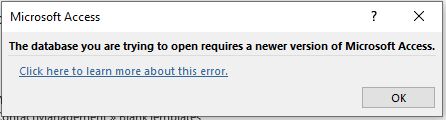
I've been transporting my database from home to work for a month now - back and forth via thumb drive.  Never had an issue.  But now when I try and open my database at work I get the "The database you are trying to access requires a newer version of Microsoft Access", message.  It still works fine from home.  Both versions are identical.  The IT guru doesn't know why either.  I did some research online and nothing substantial.  Thoughts?  I'm at a stand still trying to develop this database for work.  Fingers crossed in Colorado.
Mark Fannin OP  @Reply  

5 years ago

Alex Hedley  @Reply  
           
5 years ago
Are they the exact same version of Access? One isnt using 365 which might auto update and another using 2019?
Adam Schwanz  @Reply  
           
5 years ago
Assuming you've tried this?

https://docs.microsoft.com/en-us/office/troubleshoot/access/database-requires-newer-access

Also looking around it appears that it's possible to be stuck on the older version of access. From reddit:

Can you directly open the database (instead of connecting to it)? If you can, follow this note

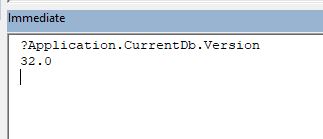
You can determine a database's file format version by pressing Ctrl-G to open the Immediate window. Type ?Application.CurrentDB.Version in the window, and then press Enter. The use of a Large Number data type sets the file format to version 16.7.

Just some ideas.
Mark Fannin OP  @Reply  

5 years ago
Yes, exact same desktop version.  No 365 involved (ever).  I researched this for days before posting.  Others have had this error message and it seems to be the Sasquatch of the access community - only fuzzy pictures with ambiguous explanations that lead nowhere.  I am now going to backwards de-construct my database in an effort to find the "feature" where it started this mess.  I added some buttons as Richard did in Access Beginner 7, Video 5 at 8:56 seconds.  I like that overlapping invisible button feature (so cool!).  We'll see if that was the culprit.  Many thanks.  Determined in Colorado.
Richard Rost  @Reply  
          
5 years ago
That's weird. I have not come across this one yet. Try creating a new, blank database on the PC that gives you the error message. Import the objects from the database. See if it works. If not, try importing the objects one at a time until it doesn't work. That will tell you what form/report/module is causing the problem. I'm assuming you've run down the rest of the troubleshooter.
Mark Fannin OP  @Reply  

5 years ago
I did find the article in BigInt but honestly didn't think it applied because I'm not using any big numbers.  Just simple forms and such.  I did follow the steps and the version number came back 32.0.  (screen capture follows)  Sooo, again I'm not sure if 32 versus 16.7 is good or not.  I am heading off to work to run the version number on the computer at work.  Thank you for helping.  You and Richard are great.  Cheers to you both.
Mark Fannin OP  @Reply  

5 years ago

Mark Fannin OP  @Reply  

5 years ago

Richard Rost  @Reply  
          
5 years ago
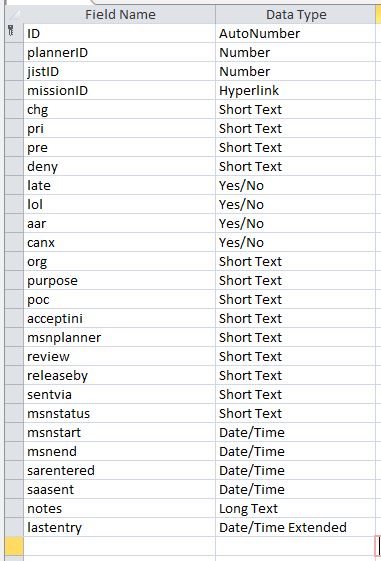
I see your problem. Date/Time Extended is new. Change it to Date/Time. You shouldn't need that.
Mark Fannin OP  @Reply  

5 years ago
YOU ARE THE MAN !!!!  Thanks to you and Alex for your help.  You saved the project!.  Changed away from extended to just Date/Time.  Cannot thank you guys enough.  Salute to you gentlemen.
Richard Rost  @Reply  
          
5 years ago
You are welcome. Never would have seen it without your screen shot. So glad I added that to the site. :)

This thread is now CLOSED. If you wish to comment, start a NEW discussion in Access Forum.
 

Next Unseen

 
New Feature: Comment Live View


The following is a paid advertisement
Computer Learning Zone is not responsible for any content shown or offers made by these ads.
 

Learn
 
Access - index
Excel - index
Word - index
Windows - index
PowerPoint - index
Photoshop - index
Visual Basic - index
ASP - index
Seminars
More...
Customers
 
Login
My Account
My Courses
Lost Password
Memberships
Student Databases
Change Email
Info
 
Latest News
New Releases
User Forums
Topic Glossary
Tips & Tricks
Search The Site
Code Vault
Collapse Menus
Help
 
Customer Support
Web Site Tour
FAQs
TechHelp
Consulting Services
About
 
Background
Testimonials
Jobs
Affiliate Program
Richard Rost
Free Lessons
Mailing List
PCResale.NET
Order
 
Video Tutorials
Handbooks
Memberships
Learning Connection
Idiot's Guide to Excel
Volume Discounts
Payment Info
Shipping
Terms of Sale
Contact
 
Contact Info
Support Policy
Mailing Address
Phone Number
Fax Number
Course Survey
Email Richard
[email protected]
Blog RSS Feed    YouTube Channel

LinkedIn
Copyright 2026 by Computer Learning Zone, Amicron, and Richard Rost. All Rights Reserved. Current Time: 5/7/2026 6:16:49 AM. PLT: 1s