Free Lessons
Courses
Seminars
TechHelp
Fast Tips
Templates
Topic Index
Forum
ABCD
 
Home   Courses   TechHelp   Help   Contact   Merch   Join   Order   Logon   Forums   
 
Home > Forums > Access Forum > lookup function by Julian Dyer
Back to Access Forum    Comments List
Upload Images   @Reply   Bookmark    Link   Email   Next Unseen 
lookup function
Julian Dyer 
     
5 years ago
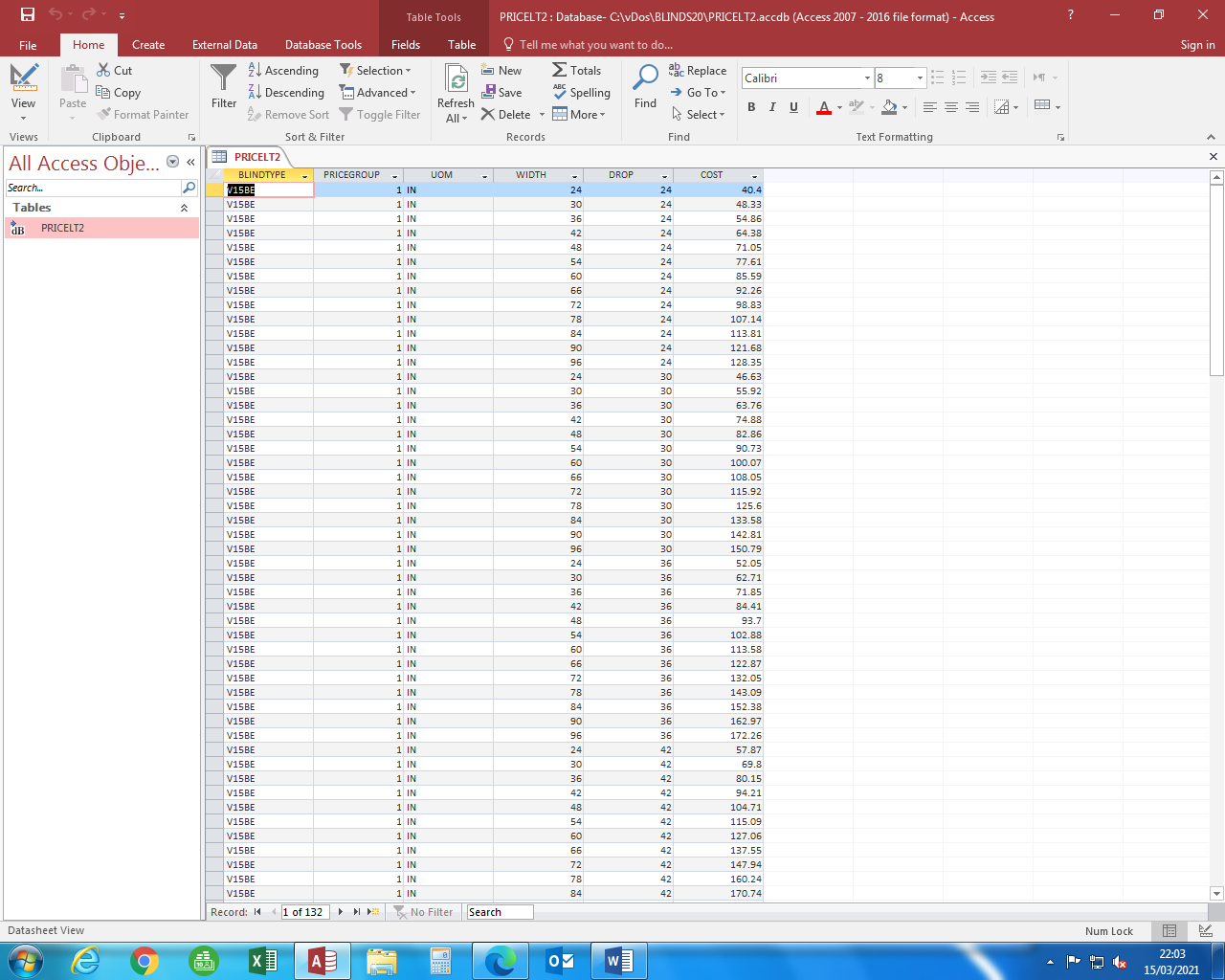
i have an access file
product pricegrp width drop price  fields

v15       1       24     30       $56.00
v15       1       30     30       $57.67

etc

i have an excel table

a1 content v15

a2 content 1

then

a5 is  width, c5  24, 30, 36, 42, 48 etc
a6 is drop
a7 is 30        therefore c7 should equal $56.00
a8 is 36

ive lost the lookup text and keep getting programme errors.

each grid is a product as v15  and has various price groups  say 1 to 10 then widths 24 to 120  then drops 30 to 180 etc

so i need to lookup product, price group, width, drop the price ends up in the excel grid.  

i wish i could post a screen print to show you.

thanks
Richard Rost  @Reply  
          
5 years ago
You can post screen shots. See the Upload Images link at the top of the thread.
Julian Dyer OP  @Reply  
     
5 years ago

Julian Dyer OP  @Reply  
     
5 years ago
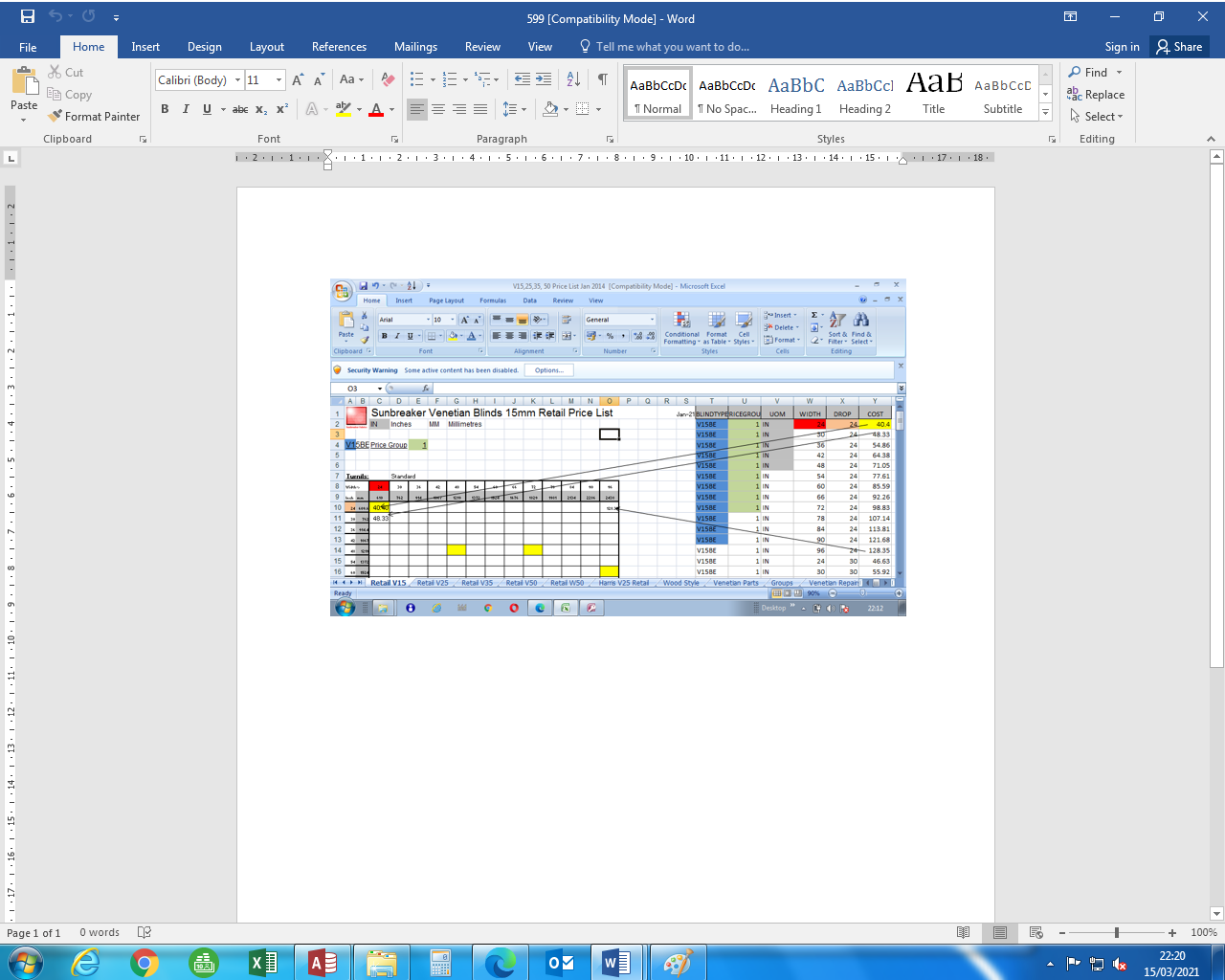
What I have done is copy and pasted the Paste Values and over wrote the functions in the boxes, hence white blank boxes, as the prices have now changed.

normally, I cut and paste the access file into excel and it populates the blank boxes.

You may have an easier way, but my brain is fried from maths
Julian Dyer OP  @Reply  
     
5 years ago

Juan C Rivera  @Reply  
            
5 years ago
I like to help but not sure what the end game is do you need the result sent to excel?  Or do you just need drop down or combo box to pick and send results to a field?

Juan
Julian Dyer OP  @Reply  
     
5 years ago
Hi,  

I need the cost price in the access file to appear in the excel spreadsheet.  There was a formula or code in excel which transferred the price automatically.  Which meant when the access file changed, when I loaded up the excel file the prices would automatically change.   To make it easier, I copied the access file into the excel spread sheet and highlighted where the info was coming from by colouring the cells. to post for the question forum.
Richard Rost  @Reply  
          
5 years ago
While you CAN go back and forth between Access and Excel, the timing is very particular. You have to save the Excel file. CLOSE Excel. Open Access. Load up the linked table (Excel data). Make the changes. CLOSE Access. Open Excel. Then you MIGHT see the changes. It's quirky. I'd recommend keeping everything in Access.

This thread is now CLOSED. If you wish to comment, start a NEW discussion in Access Forum.
 

Next Unseen


What's This?


The following is a paid advertisement
Computer Learning Zone is not responsible for any content shown or offers made by these ads.
 

Learn
 
Access - index
Excel - index
Word - index
Windows - index
PowerPoint - index
Photoshop - index
Visual Basic - index
ASP - index
Seminars
More...
Customers
 
Login
My Account
My Courses
Lost Password
Memberships
Student Databases
Change Email
Info
 
Latest News
New Releases
User Forums
Topic Glossary
Tips & Tricks
Search The Site
Code Vault
Collapse Menus
Help
 
Customer Support
Web Site Tour
FAQs
TechHelp
Consulting Services
About
 
Background
Testimonials
Jobs
Affiliate Program
Richard Rost
Free Lessons
Mailing List
PCResale.NET
Order
 
Video Tutorials
Handbooks
Memberships
Learning Connection
Idiot's Guide to Excel
Volume Discounts
Payment Info
Shipping
Terms of Sale
Contact
 
Contact Info
Support Policy
Mailing Address
Phone Number
Fax Number
Course Survey
Email Richard
[email protected]
Blog RSS Feed    YouTube Channel

LinkedIn
Copyright 2026 by Computer Learning Zone, Amicron, and Richard Rost. All Rights Reserved. Current Time: 9/15/2026 3:09:38 PM. PLT: 0s