Free Lessons
Courses
Seminars
TechHelp
Fast Tips
Templates
Topic Index
Forum
ABCD
 
Home   Courses   TechHelp   Forums   Help   Contact   Merch   Join   Order   Logon  
 
Back to Access Forum    Comments List
Upload Images   @Reply   Bookmark    Link   Email   Next Unseen 
Validations and grouping
Juan C Rivera 
            
5 years ago
Good Morning All,
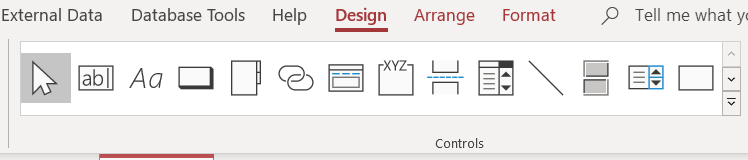
I was looking on my design Ribbon and was looking for radio button group.  It's gone!  Then I copy two option button thinking they will group up again no luck.  So I am trying to set up 3 buttons with only one can be active.  also if none are active when the form does a validation check it will turn the background red.  
Thanks Alex for showing me the video on turning control background red if null that was right on the money.  Now I like to kick it up some more... I like to do that with check box, group 3 I got it to work where only one can be checked learned that from taking the courses. Need a trick to perform validation I like if none selected turn the background red...So I copy a text box placed it on the back worked ok until I missed the checkmark and hit the background which brought it to the front.  Anyone out there have a cool trick for this one?

V/r
Juan
Adam Schwanz  @Reply  
           
5 years ago
I'm not sure what you are asking, to change the background of the checkboxes or of the whole page?

If checkboxes, I don't think it can be done. you could mess around with this https://599cd.com/blog/display-article.asp?ID=352&CommentID=29832#StartOfComments and could probably change the background color of that icon.

If the whole page, just have it check if Check1=False and Check2=False and Check3=False then change background color. You could use nulls there if they're starting as null. Probably easiest way is just to make a function that does the work and then run the function on the checkboxes on click event, save you from needing the code in multiple spots.

If I'm even further off, let me know xD.
Juan C Rivera OP  @Reply  
            
5 years ago
I was trying to use 3 buttons in a group, where only one can be selected.  If none selected change the background of the group.  Don't know if that can be done as I looked at the ribbon that option is gone.  So I say to my self... Self can this be done with 3 checkboxes.  Everything I read says nothing even the property have no background field.  also if Microsoft Access is reading any of this you guys forgot that when TV max res  of 640X 480 the check box were  big now everything is HD so the box got very tiny.  My blind butt has a hard time selecting with out getting my face on the screen.  OK sorry Adam, really mad at that right now... Any ways no need to change the document just the control, but checkmarks are way different than button.  maybe the radio button group is tucked away some place and just need to add it to the ribbon.
Juan C Rivera OP  @Reply  
            
5 years ago
Sorry for got to say Thanks

Thanks

V/r
Juan
Adam Schwanz  @Reply  
           
5 years ago

Adam Schwanz  @Reply  
           
5 years ago
Can you send a screenshot? I'm interested to see, it's not in the double down arrow to see all controls to the bottom right side is it?
Juan C Rivera OP  @Reply  
            
5 years ago

Juan C Rivera OP  @Reply  
            
5 years ago

Juan C Rivera OP  @Reply  
            
5 years ago

Juan C Rivera OP  @Reply  
            
5 years ago
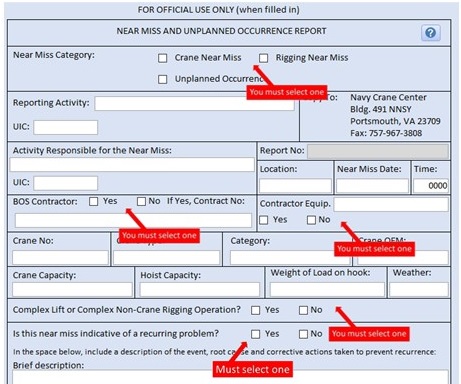
Pic 1 is the form before validation, Pic 2 is after validation with none selected.  Pic 3 is what happens if you don't get the check mark right on.  The back ground move to the front.  Just need a nice trick to show the individual using the form you missed this.  It need to be BOLD and scream LOOK AT ME.  
And when all is done it's probably a simple fix I just cant think outside of the box.  :)

V/r
Juan
Adam Schwanz  @Reply  
           
5 years ago
I meant a pic of your not having a checkbox :)
Juan C Rivera OP  @Reply  
            
5 years ago
pic 3 or bottom pic if you miss the check mark box the background moves to the front.   When I get home I will set up a google cloude and upload it then I will send you my email so we can exchange I think if I get the form to you then you can see what Im trying to do.
V/r
Juan
Juan C Rivera OP  @Reply  
            
5 years ago
Adam shoot me an email at Juan_rivera999@yahoo
Adam Schwanz  @Reply  
           
5 years ago
I shot you an e-mail.

What about just making those labels backcolor red? I don't think you could miss that.
Richard Rost  @Reply  
          
5 years ago

Richard Rost  @Reply  
          
5 years ago
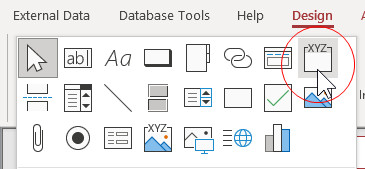
Yeah... I'm curious too. I'd like to see what your toolbox looks like. You don't have ^^^^ that guy???
Juan C Rivera OP  @Reply  
            
5 years ago
WOW Yup I got that I dropped it on the form and try to add the buttons, button past on the form but not in the box.  I recall a video on adding buttons to the group.  I think it was one of the beginners' class I have to review them this weekend.  My Commander n Chief (Wife) says I have some me time all day Sat as she spends some stimulus cash.  I plan to do the bar code tech tip 1st and see how that goes...I recall some time back I had a box with 3 buttons on it and it was on the bar ... or am I so old that I'm having wishful thoughts and think it's true?

Yo any ways want to say Big Thank to you guys for the support.  may be one day we can zoom and get to know eachother.

V/r
Juan

Juan C Rivera OP  @Reply  
            
5 years ago

Juan C Rivera OP  @Reply  
            
5 years ago
BOOM - Thanks Richard you Tech Help video with flags sparked and I burned the last of my brain cells.  Transparent PNG.  
Just had to place the PNG as to not cover the checkmarks
V/r
Juan
Live long and prosper
Richard Rost  @Reply  
          
5 years ago
Remember with those option groups, if you aren't careful and you don't drop the option button INTO the group right the first time, then you have to CUT and PASTE an option into the group. Someone else actually asked me about this a little while back. I've got a TechHelp video on the list for it.

This thread is now CLOSED. If you wish to comment, start a NEW discussion in Access Forum.
 

Next Unseen

 
New Feature: Comment Live View


The following is a paid advertisement
Computer Learning Zone is not responsible for any content shown or offers made by these ads.
 

Learn
 
Access - index
Excel - index
Word - index
Windows - index
PowerPoint - index
Photoshop - index
Visual Basic - index
ASP - index
Seminars
More...
Customers
 
Login
My Account
My Courses
Lost Password
Memberships
Student Databases
Change Email
Info
 
Latest News
New Releases
User Forums
Topic Glossary
Tips & Tricks
Search The Site
Code Vault
Collapse Menus
Help
 
Customer Support
Web Site Tour
FAQs
TechHelp
Consulting Services
About
 
Background
Testimonials
Jobs
Affiliate Program
Richard Rost
Free Lessons
Mailing List
PCResale.NET
Order
 
Video Tutorials
Handbooks
Memberships
Learning Connection
Idiot's Guide to Excel
Volume Discounts
Payment Info
Shipping
Terms of Sale
Contact
 
Contact Info
Support Policy
Mailing Address
Phone Number
Fax Number
Course Survey
Email Richard
[email protected]
Blog RSS Feed    YouTube Channel

LinkedIn
Copyright 2026 by Computer Learning Zone, Amicron, and Richard Rost. All Rights Reserved. Current Time: 5/6/2026 6:26:59 PM. PLT: 1s