Free Lessons
Courses
Seminars
TechHelp
Fast Tips
Templates
Topic Index
Forum
ABCD
 
Home   Courses   TechHelp   Forums   Help   Contact   Merch   Join   Order   Logon  
 
Back to Access Forum    Comments List
Upload Images   @Reply   Bookmark    Link   Email   Next Unseen 
Start date and End date
Michelle Seidelin 
    
5 years ago
Hello everyone

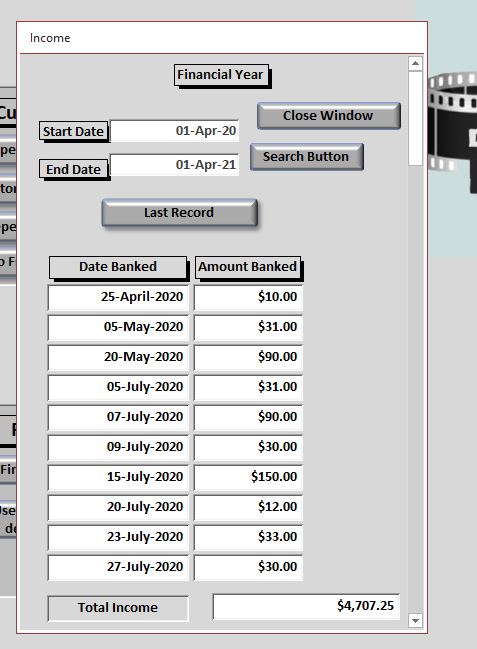
I'm trying to find the best way of filtering with a button between a start date and end date can anyone suggest a good video of Richards which explains how to build this I would prefer not to have VBA I would be grateful for any assistance anyone can give me I want to set up a eerier in my database which will show me between start date and end date how much money came in

Thank you in advance

Michelle
Michelle Seidelin OP  @Reply  
    
5 years ago

Michelle Seidelin OP  @Reply  
    
5 years ago
Here is the design that I have created quite a few years back when I decided to put this on a 'subform the search button no longer works I'm guessing there is a problem with the coding in the button as it works perfectly when it's on its own form
Michelle Seidelin OP  @Reply  
    
5 years ago
Here is the current code a person who did this for me was not one of Richard students so I would like to get it working plus yet into the format that Richard and stayed out there coding which is in it now I would like to stick to Richards methods
Michelle Seidelin OP  @Reply  
    
5 years ago
Private Sub Command48_Click()

End Sub

Public Sub SearchButton_Click()
Dim txtEndDates As String
Dim txtStartDates As String
Dim task As String

txtStartDates = "[DateBanked]"
txtEndDates = "[DateBanked]"
Dim strDateField As String

Const strcJetDate = "\#mm\/dd\/yyyy\#"

    
If IsDate(Me.txtStartDate) And IsDate(Me.txtEndDate) Then

strCriteria = "(" & txtStartDates & " >= " & Format(Me.txtStartDate, strcJetDate) & ")"

strCriteria = strCriteria & "AND " & "(" & Format(txtEndDates, strcJetDate) & " < " & Format(Me.txtEndDate, strcJetDate) & ")"


End If


task = "select * from TransactionsHeader where (" & strCriteria & ") order by [DateBanked]"
        
DoCmd.ApplyFilter task


End Sub


Public Sub Command51_Click()
' Search Financial Year
Call FSearch
End Sub

Sub FSearch()
Dim strCriteria, task As String
Me.Refresh
    strCriteria = "([DateBanked] >= #" & "1-Apr-16" & "# And [DateBanked] <= #" & "31-Mar-17" & "#)"
    task = "select * from TransactionsHeader where (" & strC
Alex Hedley  @Reply  
           
5 years ago
Search Dates - Tech Help
Alex Hedley  @Reply  
           
5 years ago
Michelle Seidelin OP  @Reply  
    
5 years ago
Thanks Alex
John Davy  @Reply  
         
5 years ago
Hi Michelle, if you want to send me the form I will take a look at it.

John
Michelle Seidelin OP  @Reply  
    
5 years ago
hello john

First of all I would like to apologize for any funny words that may appear in this message because of voice recognition it sometimes makes mistakes specially this one I'm using at the moment wow my main one is down also I like to apologize for the delay in answering health reasons I'm not able to do as much as I used to do it takes me a bit longer these days too keep up with my emails and messaging

If you are interested in helping by having a look I can send you the URL to the video which explains what I'm trying to do I've tried to look at the database which Richard wrote to see if I could figure out the coding but could not work out which part of code was the one to do with the button

Just contact me if you would like to know more such as the URL

Michelle

This thread is now CLOSED. If you wish to comment, start a NEW discussion in Access Forum.
 

Next Unseen

 
New Feature: Comment Live View


The following is a paid advertisement
Computer Learning Zone is not responsible for any content shown or offers made by these ads.
 

Learn
 
Access - index
Excel - index
Word - index
Windows - index
PowerPoint - index
Photoshop - index
Visual Basic - index
ASP - index
Seminars
More...
Customers
 
Login
My Account
My Courses
Lost Password
Memberships
Student Databases
Change Email
Info
 
Latest News
New Releases
User Forums
Topic Glossary
Tips & Tricks
Search The Site
Code Vault
Collapse Menus
Help
 
Customer Support
Web Site Tour
FAQs
TechHelp
Consulting Services
About
 
Background
Testimonials
Jobs
Affiliate Program
Richard Rost
Free Lessons
Mailing List
PCResale.NET
Order
 
Video Tutorials
Handbooks
Memberships
Learning Connection
Idiot's Guide to Excel
Volume Discounts
Payment Info
Shipping
Terms of Sale
Contact
 
Contact Info
Support Policy
Mailing Address
Phone Number
Fax Number
Course Survey
Email Richard
[email protected]
Blog RSS Feed    YouTube Channel

LinkedIn
Copyright 2026 by Computer Learning Zone, Amicron, and Richard Rost. All Rights Reserved. Current Time: 5/7/2026 10:09:13 AM. PLT: 1s