Free Lessons
Courses
Seminars
TechHelp
Fast Tips
Templates
Topic Index
Forum
ABCD
 
Home   Courses   TechHelp   Forums   Help   Contact   Merch   Join   Order   Logon  
 
Back to Access Forum    Comments List
Upload Images   @Reply   Bookmark    Link   Email   Next Unseen 
Deleting Records
Joseph Messina 
    
5 years ago
Hi Richard:

    Can you help me please?  I have SCAT database that I keepm tracked of all y trips when I use SCAT and I want to delete records i don't need that are blank.  I highlight the blanks and delete them and after I delete them they come back.,  They don't delete.
Richard Rost  @Reply  
          
5 years ago
Two things to always do before asking for help:

1. Have you compacted and repaired your database?
2. Did you run down the Access Troubleshooter?

If you did both of those things, what happens when you delete them directly from the table?
Joseph Messina OP  @Reply  
    
5 years ago
Hi Richard:

    Sorry about that.  I forggt about the troubleshooting check list before asking...  I will see they delete from the table.
Richard Rost  @Reply  
          
5 years ago
See Rick's Rule #1 at the top of the page.
Joseph Messina OP  @Reply  
    
5 years ago
Hi Richard:

   I'm sorry about that again.  I will do that for now go thru the troubleshooting checklist first.  I will remember to do that for now on.  I got them to delete from the table.  The blank records wanted to delete I got them to delete.
Richard Rost  @Reply  
          
5 years ago
There ya go. Something wrong in your form design then.
Joseph Messina OP  @Reply  
    
5 years ago

Richard Rost  @Reply  
          
5 years ago
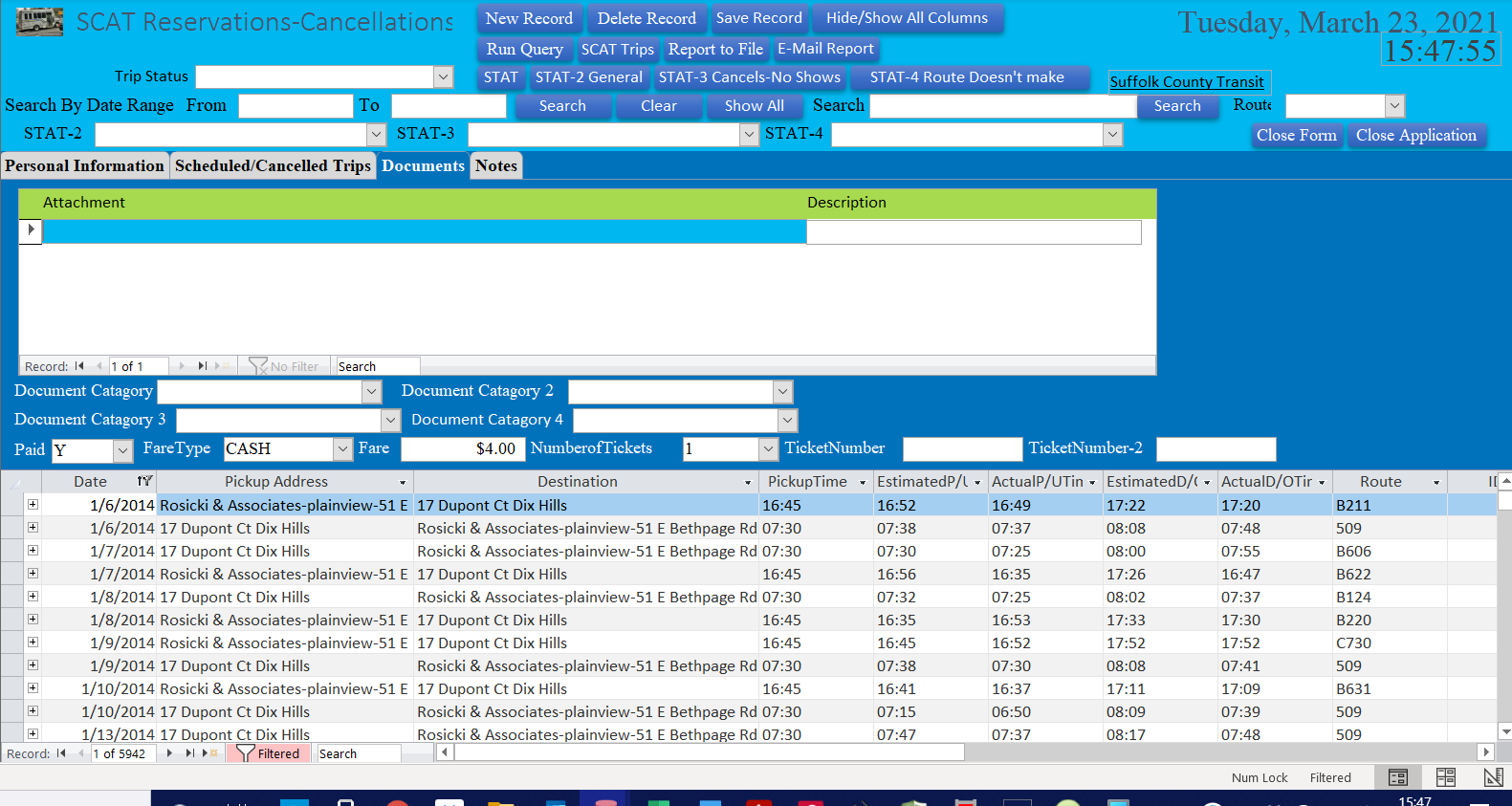
Is the problem deleting records in your lower subform? I see you have it in datasheet mode with subdatasheets on (related records). That causes problems. You'll NEVER see me use them in my lessons. I recommend a continuous form for your subform.

Also you've got "category" spelled wrong everywhere.
Joseph Messina OP  @Reply  
    
5 years ago
Hi Richard:

    Please see attached screen shot.  I think I know why records wron't delete from the form, cause on the tab control I have attachmentsthat i created to have files and documents in my database.  Not sure if you can see there is a plus sign to the left of the record on the datasheet at the bottom.  Not sure if has to do with that that i have split form, cause when I go to search for dates in my SCAT database I have search by date range if you can see I have in the database.  Cause when I was watching a video a while ago before I knew about your website I saaw a video how to search by date range in a database and shows split form in the video. I don't think can do it with just sign form.  That why I have the split form in my SCAT database.
Richard Rost  @Reply  
          
5 years ago
Oh... split forms are even worse. Get rid of it. If you need something like that, use a form/subform like I always use in my classes. I hate split forms too. Nothing but headaches.
Joseph Messina OP  @Reply  
    
5 years ago
HI Richard:

   I understand what you are saying.
Joseph Messina OP  @Reply  
    
5 years ago
Is there way I can fix it to have continous form in stead of rthe split form without redoing the whole database over?.  I would like to have the form so I can see the data in the form on top and have the data in the subformat the bottom?
Richard Rost  @Reply  
          
5 years ago
You don't have to rebuild the whole database. Just create a subform. Actually, you probably don't even need to do that. Just create a continuous form for your listing, and then you can double-click on one of the items to open up the full detail form. Just like I do with the Customer List in the Free Template.
Joseph Messina OP  @Reply  
    
5 years ago
Hi Richard:

   Thank you for letting me know.  Cannot stop saying this.  you are the best instuctor.  I will work on it and will let you know how it goes.  So glad I'm learning from you.
Joseph Messina OP  @Reply  
    
5 years ago
I got it done.  I did what you told me to do and works.  I was also watching the continous form techhelp video.  Techhelp videos ddefinitely help.
Joseph Messina OP  @Reply  
    
5 years ago
HI Richard:

      So prousd of myself.  I created a continous form and in my main SCAT database form I put the subform so I can see the records besides on the main form.
Joseph Messina OP  @Reply  
    
5 years ago
Hi Richard:

    Even brtter.  I made a contnious form and in the continous form I would like to do the on double vlick and open the msin form and csn see all the details of the record I'm on.  What lesson do you cover the on double click evrnt to open a record from a continous form?  I thought I saw it somewhere don't remember?  So glad I did the continous form and now I don't to delete my blank records from my tsble.  DEFINITELY do glad I'm  learning from you.
Joseph Messina OP  @Reply  
    
5 years ago
Hi Richard:

I found the video with the on double click event.  I'm going to do that in my SCAT database on the continous for to open up full details of my SCAT Reservations form.
Joseph Messina OP  @Reply  
    
5 years ago
Hi Richard:

     I have awsome news for you.  I did the on double click in the ID Field in the continous for to open the full details of my SCAT reservations main form and it opens.  Now in the continous form going to setup search by date range to search by date range and crrate a button to show all data in continous after i do the search.

This thread is now CLOSED. If you wish to comment, start a NEW discussion in Access Forum.
 

Next Unseen

 
New Feature: Comment Live View


The following is a paid advertisement
Computer Learning Zone is not responsible for any content shown or offers made by these ads.
 

Learn
 
Access - index
Excel - index
Word - index
Windows - index
PowerPoint - index
Photoshop - index
Visual Basic - index
ASP - index
Seminars
More...
Customers
 
Login
My Account
My Courses
Lost Password
Memberships
Student Databases
Change Email
Info
 
Latest News
New Releases
User Forums
Topic Glossary
Tips & Tricks
Search The Site
Code Vault
Collapse Menus
Help
 
Customer Support
Web Site Tour
FAQs
TechHelp
Consulting Services
About
 
Background
Testimonials
Jobs
Affiliate Program
Richard Rost
Free Lessons
Mailing List
PCResale.NET
Order
 
Video Tutorials
Handbooks
Memberships
Learning Connection
Idiot's Guide to Excel
Volume Discounts
Payment Info
Shipping
Terms of Sale
Contact
 
Contact Info
Support Policy
Mailing Address
Phone Number
Fax Number
Course Survey
Email Richard
[email protected]
Blog RSS Feed    YouTube Channel

LinkedIn
Copyright 2026 by Computer Learning Zone, Amicron, and Richard Rost. All Rights Reserved. Current Time: 5/6/2026 7:38:48 PM. PLT: 7s