Free Lessons
Courses
Seminars
TechHelp
Fast Tips
Templates
Topic Index
Forum
ABCD
 
Home   Courses   TechHelp   Help   Contact   Merch   Join   Order   Logon   Forums   
 
Back to Access Forum    Comments List
Upload Images   @Reply   Bookmark    Link   Email   Next Unseen 
base on d23 lesson
Qun Yu 
    
5 years ago
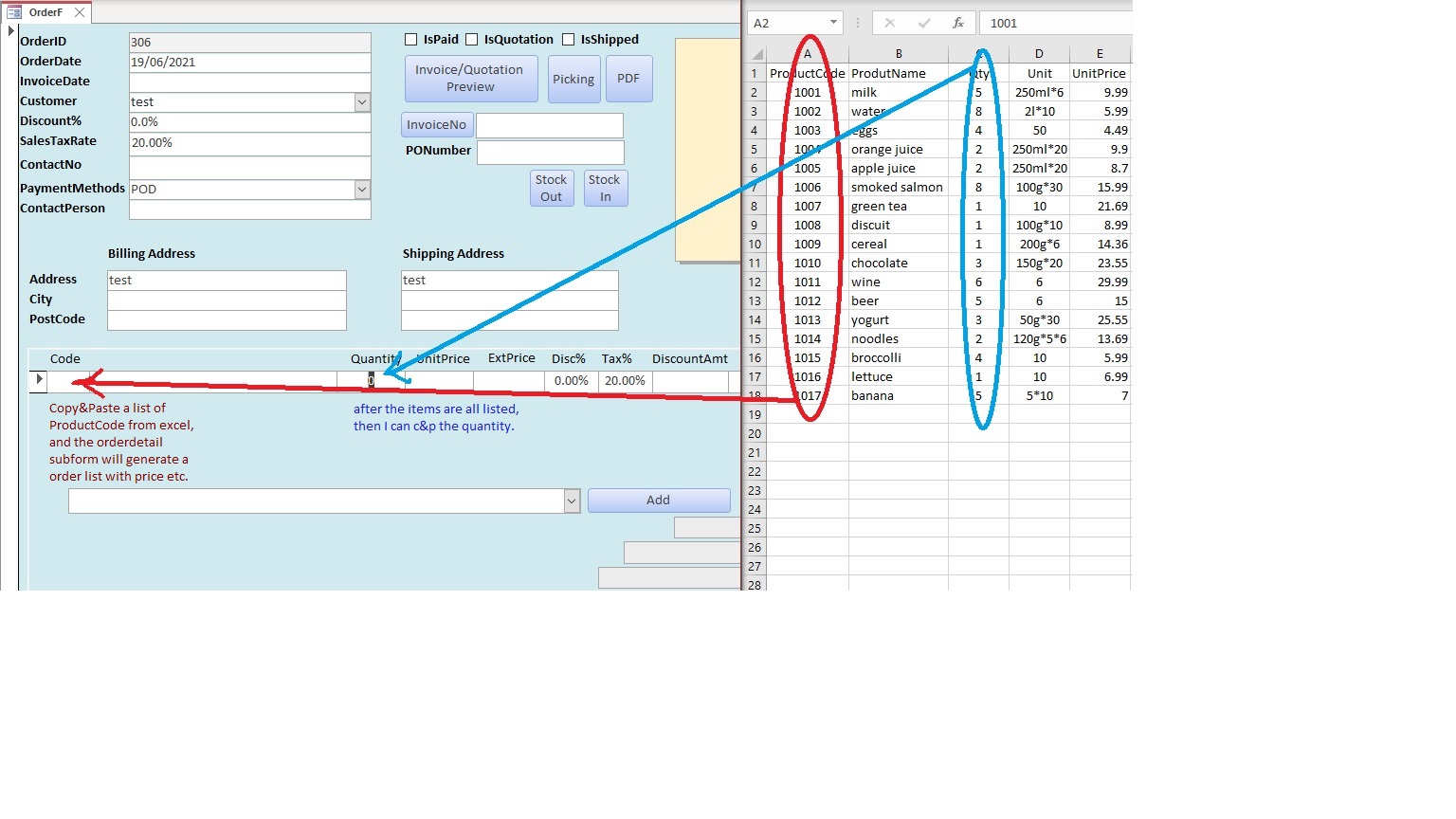
Hi everyone, in d23, I learned how to create an order form that allow you to enter 1 product code after another and calculate the tax, discount, total, etc. Is there a way if I can copy a list of product codes from a excel file and paste it. Then I can enter the quantity for each product. I run a startup wholesale company, Richard's lessons helped me saved a lot of time and increased our productivity. If the batch entering can be done, my life will be a lot easier. Thanks a lot.
Adam Schwanz  @Reply  
           
5 years ago
Access Expert 20 shows importing from excel, you could use that to import bulk products into your tables. If you're just looking for product codes you can just only import that field.
Qun Yu OP  @Reply  
    
5 years ago

Qun Yu OP  @Reply  
    
5 years ago
Thanks for the answer, but import a list from excel to a table is not what I meant. Richard taught us to add product 1 by 1 from productcombo using add btn. Is there a way allows you to c&p all the productcode from customer order form into code field, follow with quantity, and the final order will be generated? looking forward to hearing from you. thx
Adam Schwanz  @Reply  
           
5 years ago
Ah, that's quite a bit different. Do you have to make them in excel and then move to access after? It would be a lot simpler if you could just make them in access.

I don't really have any experience doing what you're trying to do beyond setting up access with the beginning data and then using access from then on. However, if you're going to be doing this long term and frequently, transferring over every order from excel into access, it looks like something that DoCmd.TransferSpreadsheet could do. Maybe start there.
Scott Axton  @Reply  
      
5 years ago
Qun Yu -
I think you have skipped a step somehow.  The Products in your Excel would be imported into your ***  ProductT *** table.

The OrderDetailF subform you have highlighted in the screen capture is "filled in" or added to the OrderDetailT for each item sold FOR THAT ORDER by the combobox next to the ADD button.  It is basically a lookup of the products you have FROM the ProductT table.

I suggest you re-watch the Developer 23 videos at least starting at Lesson #3.
And yes - you can import your data from the Excel to Access very easily.  Either with a copy and paste (if the fields match exactly between Access and Excel) or through an append query.  Adam gave you some lessons but also search above for "append query" if you need additional resources.
Scott Axton  @Reply  
      
5 years ago
This TechHelp Video should also give you some help:

Import New and Changed Records
https://599cd.com/blog/display-article.asp?ID=1459

Richard Rost  @Reply  
          
5 years ago
If I understand you correctly, you're getting an order from the customer and it's a spreadsheet containing a column of product numbers that he wants to buy. You want to copy and paste that into Access and have it fill in the details in your order form. Correct? If that's the case then yes, Scott has the right idea. You want Access Developer 23.  It's a concept similar to what I do with the rental inventory where you can bulk-scan in a bunch of returned books. You'll just need to copy the list of products from the Excel sheet, paste them into a form in Access, parse the items, DLookup the product details, and use a recordset (or SQL INSERT) them individually into the order.

This thread is now CLOSED. If you wish to comment, start a NEW discussion in Access Forum.
 

Next Unseen

 
New Feature: Comment Live View


The following is a paid advertisement
Computer Learning Zone is not responsible for any content shown or offers made by these ads.
 

Learn
 
Access - index
Excel - index
Word - index
Windows - index
PowerPoint - index
Photoshop - index
Visual Basic - index
ASP - index
Seminars
More...
Customers
 
Login
My Account
My Courses
Lost Password
Memberships
Student Databases
Change Email
Info
 
Latest News
New Releases
User Forums
Topic Glossary
Tips & Tricks
Search The Site
Code Vault
Collapse Menus
Help
 
Customer Support
Web Site Tour
FAQs
TechHelp
Consulting Services
About
 
Background
Testimonials
Jobs
Affiliate Program
Richard Rost
Free Lessons
Mailing List
PCResale.NET
Order
 
Video Tutorials
Handbooks
Memberships
Learning Connection
Idiot's Guide to Excel
Volume Discounts
Payment Info
Shipping
Terms of Sale
Contact
 
Contact Info
Support Policy
Mailing Address
Phone Number
Fax Number
Course Survey
Email Richard
[email protected]
Blog RSS Feed    YouTube Channel

LinkedIn
Copyright 2026 by Computer Learning Zone, Amicron, and Richard Rost. All Rights Reserved. Current Time: 8/8/2026 2:30:55 AM. PLT: 1s