Free Lessons
Courses
Seminars
TechHelp
Fast Tips
Templates
Topic Index
Forum
ABCD
 
Home   Courses   TechHelp   Forums   Help   Contact   Merch   Join   Order   Logon  
 
Back to Access Forum    Comments List
Upload Images   @Reply   Bookmark    Link   Email   Next Unseen 
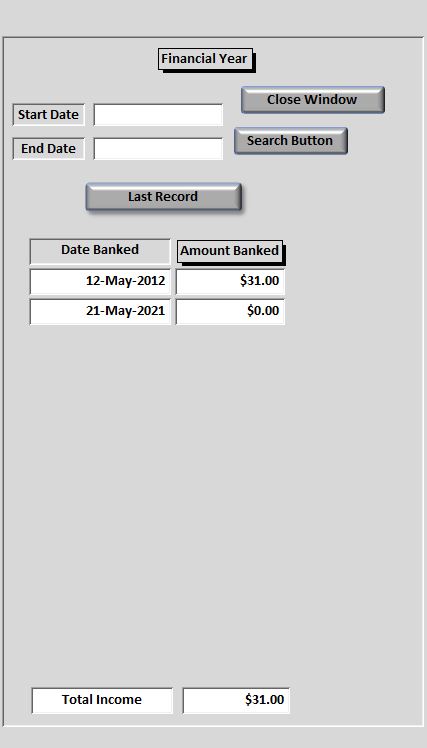
only the start date showing
Michelle Seidelin 
    
5 years ago
The problem I'm having is when I have this form set up like this one named financial year it will only show the start date amount will not show the total from start date to end date the same form will do this if it is not a subform any suggestions I have included photo of in form view and the code behind the button

Private Sub Command48_Click()

End Sub

Public Sub SearchButton_Click()
Dim txtEndDates As String
Dim txtStartDates As String
Dim task As String

txtStartDates = "[DateBanked]"
txtEndDates = "[DateBanked]"
Dim strDateField As String

Const strcJetDate = "\#mm\/dd\/yyyy\#"

    
If IsDate(Me.txtStartDate) And IsDate(Me.txtEndDate) Then

strCriteria = "(" & txtStartDates & " >= " & Format(Me.txtStartDate, strcJetDate) & ")"

strCriteria = strCriteria & "AND " & "(" & Format(txtEndDates, strcJetDate) & " < " & Format(Me.txtEndDate, strcJetDate) & ")"


End If


task = "select * from TransactionsHeader where (" & strCriteria & ") order by [DateBanked]"
        
DoCmd.ApplyFilter task


End Sub


Public Sub Command51_Click()
' Search Financial Year
Call FSearch
End Sub

Sub FSearch()
Dim strCriteria, task As String
Me.Refresh
    strCriteria = "([DateBanked] >= #" & "1-Apr-16" & "# And [DateBanked] <= #" & "31-Mar-17" & "#)"
    task = "select * from TransactionsHeader where (" & strCriteria & ") order by [DateBanked]"
    DoCmd.ApplyFilter task
End Sub

Public Sub Command61_Click()
Call F17Search
End Sub

Sub F17Search()
Dim strCriteria, task As String
Me.Refresh
    strCriteria = "([DateBanked] >= #" & "1-Apr-17" & "# And [DateBanked] <= #" & "31-Mar-18" & "#)"
    task = "select * from TransactionsHeader where (" & strCriteria & ") order by [DateBanked]"
    DoCmd.ApplyFilter task
End Sub

Private Sub Command63_Click()
Call F18Search
End Sub

Sub F18Search()
Dim strCriteria, task As String
Me.Refresh
    strCriteria = "([DateBanked] >= #" & "1-Apr-18" & "# And [DateBanked] <= #" & "31-Mar-19" & "#)"
    task = "select * from TransactionsHeader where (" & strCriteria & ") order by [DateBanked]"
    DoCmd.ApplyFilter task
End Sub

Private Sub Command64_Click()
Call F19Search
End Sub

Sub F19Search()
Dim strCriteria, task As String
Me.Refresh
    strCriteria = "([DateBanked] >= #" & "1-Apr-19" & "# And [DateBanked] <= #" & "31-Mar-20" & "#)"
    task = "select * from TransactionsHeader where (" & strCriteria & ") order by [DateBanked]"
    DoCmd.ApplyFilter task
End Sub

Private Sub Command65_Click()
Call F20Search
End Sub

Sub F20Search()
Dim strCriteria, task As String
Me.Refresh
    strCriteria = "([DateBanked] >= #" & "1-Apr-20" & "# And [DateBanked] <= #" & "31-Mar-21" & "#)"
    task = "select * from TransactionsHeader where (" & strCriteria & ") order by [DateBanked]"
    DoCmd.ApplyFilter task
End Sub

Private Sub Command66_Click()
Call F21Search
End Sub

Sub F21Search()
Dim strCriteria, task As String
Me.Refresh
    strCriteria = "([DateBanked] >= #" & "1-Apr-21" & "# And [DateBanked] <= #" & "31-Mar-22" & "#)"
    task = "select * from TransactionsHeader where (" & strCriteria & ") order by [DateBanked]"
    DoCmd.ApplyFilter task
End Sub


Private Sub Command67_Click()
Call F22Search
End Sub

Sub F22Search()
Dim strCriteria, task As String
Me.Refresh
    strCriteria = "([DateBanked] >= #" & "1-Apr-22" & "# And [DateBanked] <= #" & "31-Mar-23" & "#)"
    task = "select * from TransactionsHeader where (" & strCriteria & ") order by [DateBanked]"
    DoCmd.ApplyFilter task
End Sub

Public Sub Command68_Click()
Call F23Search
End Sub

Sub F23Search()
Dim strCriteria, task As String
Me.Refresh
    strCriteria = "([DateBanked] >= #" & "1-Apr-23" & "# And [DateBanked] <= #" & "31-Mar-24" & "#)"
    task = "select * from TransactionsHeader where (" & strCriteria & ") order by [DateBanked]"
    DoCmd.ApplyFilter task
End Sub

Public Sub Command69_Click()
Call F24Search
End Sub

Sub F24Search()
Dim strCriteria, task As String
Me.Refresh
    strCriteria = "([DateBanked] >= #" & "1-Apr-24" & "# And [DateBanked] <= #" & "31-Mar-25" & "#)"
    task = "select * from TransactionsHeader where (" & strCriteria & ") order by [DateBanked]"
    DoCmd.ApplyFilter task
End Sub


Public Sub Search_Button_Click()

End Sub

Private Sub txtStartDate_Click()

End Sub
Michelle Seidelin OP  @Reply  
    
5 years ago

Michelle Seidelin OP  @Reply  
    
5 years ago
can you have a sidebar on a form which is a subform
Michelle Seidelin OP  @Reply  
    
5 years ago
correction to previous message it should have said can you have a scrollbar on a subform
Michelle Seidelin OP  @Reply  
    
5 years ago
To clarify my last couple of messages what I'm trying to find out is that possible to have a subform with a scroll bar when there is 3 subform on a main form I do have subforms showing how many jobs I have done for a customer but they uh forms that are one that can be moved around so I don't know if you would call that even a subform any help anyone can give me would be greatly appreciated I can't put up more photos of the way it looks with the three forms together if required but as I see it it seems to be only recognizing the 1st date from the table or from the start date which I type in but does not recognize the end date it only shows the first entry as shown in my original photo but if any photos are required to clarify anything please asked for them to be put up describing what you want to see thank you in advance for anyone who may be able to assist me

Michelle
Scott Axton  @Reply  
        
5 years ago
Things I see -
  - You dim the txtStartDates and EndDates and set both of them to "[DateBanked]"
      That would be the same value for both the start and end.
  - The biggest thing I see is you have the dates 'hard coded' into  the strCriteria strings.
  - You have a lot of empty subs that may be confusing you.  If you aren't using them I would get rid of those.
    Command48_Click() - Search_Button_Click() - txtStartDate_Click()
  - Did you change the name of the search button after you wrote the code?  That would separate the program from the button.
  - Yes it is possible for a subform to have it's own scroll bars (and record selectors as well as navigation buttons)

Try setting a breakpoint and step through your code.  If you have it, re-watch Lesson 2 - Debugging Level 2 in Developer 15
Search for "debug" and for "troubleshooting" on this site.

Scott Axton  @Reply  
        
5 years ago
Got cut short sorry...
- Last, but not least, some constructive criticism.  
The post above is just one big long block of text.  No punctuation and or paragraphs.  I'm assuming that you are using voice to text for your post.
That is very difficult to read as well as decipher what you are trying to convey.  Many people will just skip on by.
In the future you would help yourself if you would edit a bit before hitting submit.
Scott Axton  @Reply  
        
5 years ago
Just spotted another
You use dates in some places and date in others.
the following code block will fail because you are testing for different variables.
    If IsDate(Me.txtStartDate) And IsDate(Me.txtEndDate) Then
       ...
       ...
   End If
Michelle Seidelin OP  @Reply  
    
5 years ago
Hello Scott

All understood actually I did not write that code myself I wouldn't have a clue how to write it at this stage and I understand what you are saying about things are in a long paragraph unfortunately I did not notice that thanks for the criticism about that I will have to scrub the idea in the meantime until I get to that level thanks again
Kevin Robertson  @Reply  
           
5 years ago
Michelle

I just built your example and you can filter the records with only one line of code. Just set the RecordSource in the Search button.

Me.RecordSource = "SELECT DateBanked, AmountBanked FROM BankedT " & _
                        "WHERE DateBanked Between #" & StartDate & "# And #" & EndDate & "#"

I hope that's what you are looking for.
Michelle Seidelin OP  @Reply  
    
5 years ago
Thank you Kevin

I will have a look at it tomorrow when I am fresh answer those six 37 PM Saturday night when I saw your message thanks again for trying to help me I'll let you know as soon as I have tried the code but from what you have written it looks to be suitable

Thank you again
Michelle Seidelin OP  @Reply  
    
5 years ago
Hello Kevin I might have been doing something wrong but it did not work for me if you're willing to have a look at the database itself I'm quite willing to give you a job if you are interested I would send a cut down version of the database another part of the problem I'm having with this is it is not showing everything when it is a subform it only shows the first entry in a table which it gets its information from will have another look

I think that part of the problem is I'm not quite sure if I'm putting it into the right part if you're willing to contact me direct I will get you to give me your email address and I will pay you to fix a couple of problems

I am wondering if you had a look at the technical help video which Richard made for me a while back timesheet having problems with figuring out what I've done wrong here too thank you again for taking the time to try to help I'll read your information again tomorrow when I am fresh
Michelle Seidelin OP  @Reply  
    
5 years ago
Another thing Kevin you will see in that photo it is only showering 1 amount then the next line down shows 0.00 dollars
Kevin Robertson  @Reply  
           
5 years ago
Michelle,

I will certainly have a look, my E-Mail is: [email protected]

This thread is now CLOSED. If you wish to comment, start a NEW discussion in Access Forum.
 

Next Unseen

 
New Feature: Comment Live View


The following is a paid advertisement
Computer Learning Zone is not responsible for any content shown or offers made by these ads.
 

Learn
 
Access - index
Excel - index
Word - index
Windows - index
PowerPoint - index
Photoshop - index
Visual Basic - index
ASP - index
Seminars
More...
Customers
 
Login
My Account
My Courses
Lost Password
Memberships
Student Databases
Change Email
Info
 
Latest News
New Releases
User Forums
Topic Glossary
Tips & Tricks
Search The Site
Code Vault
Collapse Menus
Help
 
Customer Support
Web Site Tour
FAQs
TechHelp
Consulting Services
About
 
Background
Testimonials
Jobs
Affiliate Program
Richard Rost
Free Lessons
Mailing List
PCResale.NET
Order
 
Video Tutorials
Handbooks
Memberships
Learning Connection
Idiot's Guide to Excel
Volume Discounts
Payment Info
Shipping
Terms of Sale
Contact
 
Contact Info
Support Policy
Mailing Address
Phone Number
Fax Number
Course Survey
Email Richard
[email protected]
Blog RSS Feed    YouTube Channel

LinkedIn
Copyright 2026 by Computer Learning Zone, Amicron, and Richard Rost. All Rights Reserved. Current Time: 5/6/2026 9:40:58 AM. PLT: 0s