Free Lessons
Courses
Seminars
TechHelp
Fast Tips
Templates
Topic Index
Forum
ABCD
 
Home   Courses   TechHelp   Forums   Help   Contact   Merch   Join   Order   Logon  
 
Back to Access Forum    Comments List
Upload Images   @Reply   Bookmark    Link   Email   Next Unseen 
Combo Box
Larry Fisackerly 
      
5 years ago
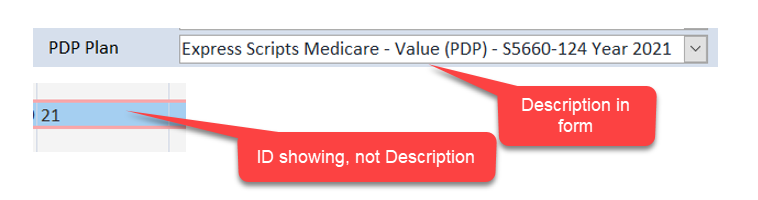
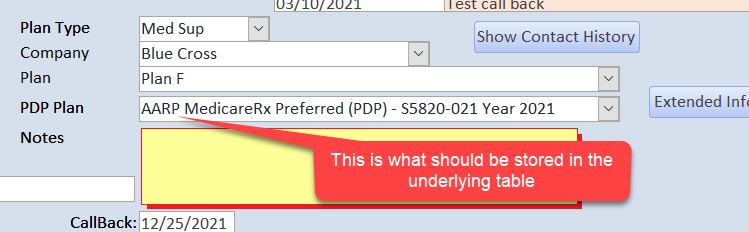
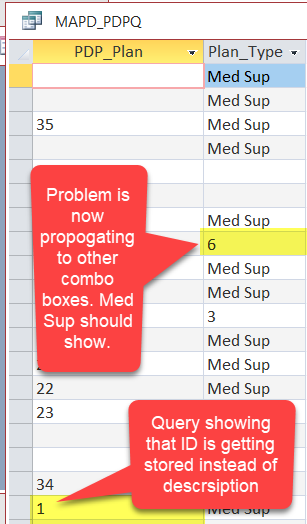
I have created a new combo box based on a table with 2 fields, and ID field and description field. In the form, I can select and see the description as you would expect, but when I view the underlying table, the ID field has been stored in the description field, not the description. I have recreated the combo box several times with the same error. Other combo boxes work as expected. Help!
Larry Fisackerly OP  @Reply  
      
5 years ago

Scott Axton  @Reply  
        
5 years ago
Larry -
The way you describe it above sounds exactly correct.  For a relational combo that is what you want it to do
I have an idea that you are just displaying it incorrectly.  In the properties you set the column width to 0 (zero) for the ID and the other data is what gets displayed.  The ID is what is stored.
In general you don't want to, or allow your users to,  work directly with the underlying tables.  That is what forms and reports are for.  
Go re-watch Expert 1 Lesson 4.  That should help
Kevin Robertson  @Reply  
          
5 years ago
Larry,

Is the ControlSource of your ComboBox set to the correct field (the ID)?
Larry Fisackerly OP  @Reply  
      
5 years ago
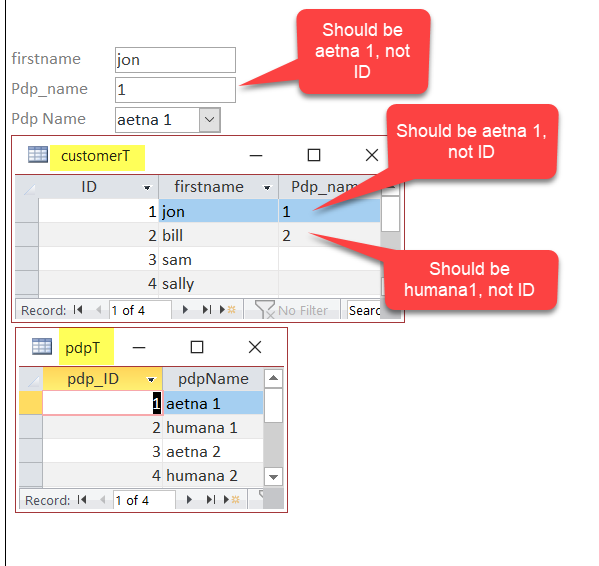
I have tried trouble shooting check list. I have opened database on 2 different computers running different versions of Windows 10 and different updates of Access from Microsoft 365. The problem repeats itself. I imported all my objects into a new accdb file. Problem repeats. I created a new simple database and the problem repeats. See screen shots. The combo box is storing the field ID instead of the field contents. Please help.
Larry Fisackerly OP  @Reply  
      
5 years ago

Alex Hedley  @Reply  
           
5 years ago
The idea with a Relationship like this is to store the Foreign Key (FK) ID field (pdp_ID) in your corresponding table i.e. CustomerT and then in a Query joining CustomerT to pdpT to then pull in the pdpName, that way the JOIN is faster as you are using Numbers not Text, and you can change the Name and it will update to all related records.
Richard Rost  @Reply  
           
5 years ago
What everyone is saying about relational combo boxes is EXACTLY how they're supposed to work. You usually store the ID as a foreign key in the other table UNLESS you really want to store the text so that the user can edit it. There are instances where you might want this. If that's the case, when you build the combo box, make sure to ONLY select the name field and NOT the ID. If you are using the Combo Box Wizard to create this combo box, then it is ALMOST ALWAYS going to assume you want an ID in the first column as the bound field. There is NO WAY to get rid of it unless you edit the properties of the combo box and remove it yourself. Someone else recently sent me in a question like this via TechHelp, so I'll make a video on how to do it. My cold is real bad today, so no recording for the rest of today.
Larry Fisackerly OP  @Reply  
      
5 years ago

Larry Fisackerly OP  @Reply  
      
5 years ago

Larry Fisackerly OP  @Reply  
      
5 years ago

Richard Rost  @Reply  
           
5 years ago
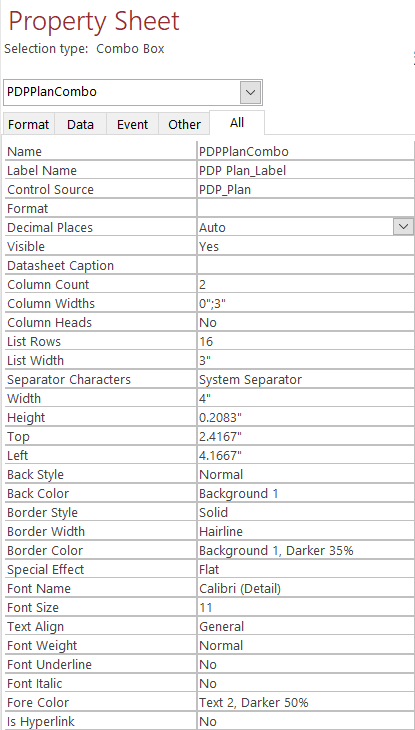
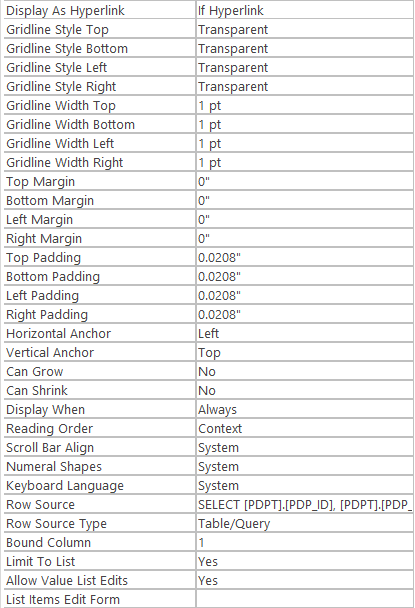
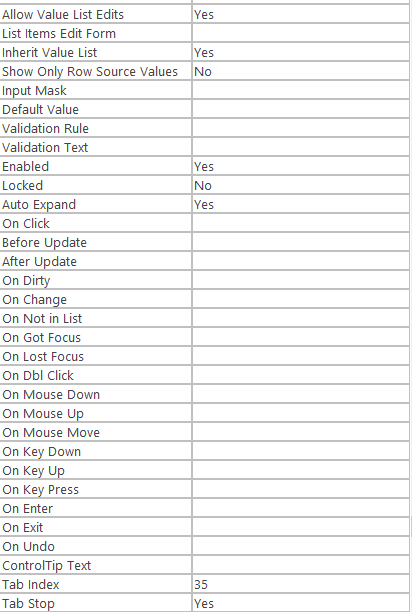
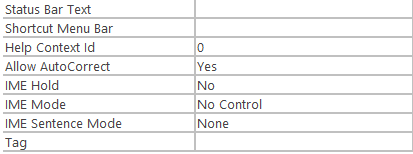
Let me see the properties for that combo box.
Larry Fisackerly OP  @Reply  
      
5 years ago

Larry Fisackerly OP  @Reply  
      
5 years ago

Larry Fisackerly OP  @Reply  
      
5 years ago

Larry Fisackerly OP  @Reply  
      
5 years ago

Larry Fisackerly OP  @Reply  
      
5 years ago

Richard Rost  @Reply  
           
5 years ago
There ya go. The first field in your Row Source is the ID. You have to get rid of that and then change the Column Count and Widths properties accordingly.
Larry Fisackerly OP  @Reply  
      
5 years ago
That was the solution!!. Thank you! Thank you! Thank you! Thank you! Thank you! Thank you! Somehow using Beginner 08 didn't work, but your recommendation did. I appreciate so very much your assistance with this. I hope your cold get better quickly. Once again thanks for your assistance!

This thread is now CLOSED. If you wish to comment, start a NEW discussion in Access Forum.
 

Next Unseen

 
New Feature: Comment Live View


The following is a paid advertisement
Computer Learning Zone is not responsible for any content shown or offers made by these ads.
 

Learn
 
Access - index
Excel - index
Word - index
Windows - index
PowerPoint - index
Photoshop - index
Visual Basic - index
ASP - index
Seminars
More...
Customers
 
Login
My Account
My Courses
Lost Password
Memberships
Student Databases
Change Email
Info
 
Latest News
New Releases
User Forums
Topic Glossary
Tips & Tricks
Search The Site
Code Vault
Collapse Menus
Help
 
Customer Support
Web Site Tour
FAQs
TechHelp
Consulting Services
About
 
Background
Testimonials
Jobs
Affiliate Program
Richard Rost
Free Lessons
Mailing List
PCResale.NET
Order
 
Video Tutorials
Handbooks
Memberships
Learning Connection
Idiot's Guide to Excel
Volume Discounts
Payment Info
Shipping
Terms of Sale
Contact
 
Contact Info
Support Policy
Mailing Address
Phone Number
Fax Number
Course Survey
Email Richard
[email protected]
Blog RSS Feed    YouTube Channel

LinkedIn
Copyright 2026 by Computer Learning Zone, Amicron, and Richard Rost. All Rights Reserved. Current Time: 6/16/2026 6:58:30 PM. PLT: 1s