Free Lessons
Courses
Seminars
TechHelp
Fast Tips
Templates
Topic Index
Forum
ABCD
 
Home   Courses   TechHelp   Forums   Help   Contact   Merch   Join   Order   Logon  
 
Back to Access Forum    Comments List
Upload Images   @Reply   Bookmark    Link   Email   Next Unseen 
Comparing two picture sets
Ferenc Dalnoki-Veress 
   
5 years ago
I have two tables of pictures that are unrelated, say set A of 10 pictures and set B of another 10 pictures. I would like to have a form or report, where each page is a new picture in set A (this is easy). The hard part is to have beside each picture the ability to scroll through the pictures of Set B in order to compare each picture in Set A to pictures in Set B. Does anyone have an idea how this can be done? An unacceptable solution is to have a DB where we have 100 rows in the DB where for ever A you have 10 B's. There must be another way to do that, that is not so image intensive since we are only comparing 10 of the same pictures to every picture in A.
Scott Axton  @Reply  
        
5 years ago
Ferenc -
First you don't want to actually store your images in your database.  It will make it bloat very fast and as you may know they can be quite large files which would make your data exceed the limits of Access very quickly.
Check out the free TechHelp video Images.

Also look into the Imaging Seminar

The thing you will have to decide is how to relate the images together then it would be a matter of filtering the images so you get the results desired.
Ferenc Dalnoki-Veress OP  @Reply  
   
5 years ago
Dear Scott, Thanks for your response. I am aware of that, saw all the videos, but that was not the point of my question. My question is how to have side-by-side images from 2 tables (set A and set B) where the second set repeats. Thus on the form on page 1 it shows picture 1 of set A and then allows on that page to scroll through all pictures of set B (below I am assuming it only has 3 pictures), then on page 2 it shows picture 2 of Set A and allows scrolling through the same 3 pictures of set B etc. The only way I know how to do it is to have a bloated table that looks like below, but is really inefficient because set B constantly repeats. Sorry, if I was not clear.
Set A Set B
1       1
1       2
1       3
2       1
2       2
2       3
3       etc.
Scott Axton  @Reply  
        
5 years ago
Ah I think I understand.  
I'm not sure of your knowledge level as I can see your not a Access Learning Zone current student so...
This might be a little more advanced.  ( Gotta learn how to drive before you jump on the highway at 5:00 on a Friday. )

Take a look at this video:  Nested Continuous Subforms
That might give you some ideas.  Even though some examples are not specific about what you are trying to accomplish you can apply the method to what you are doing.

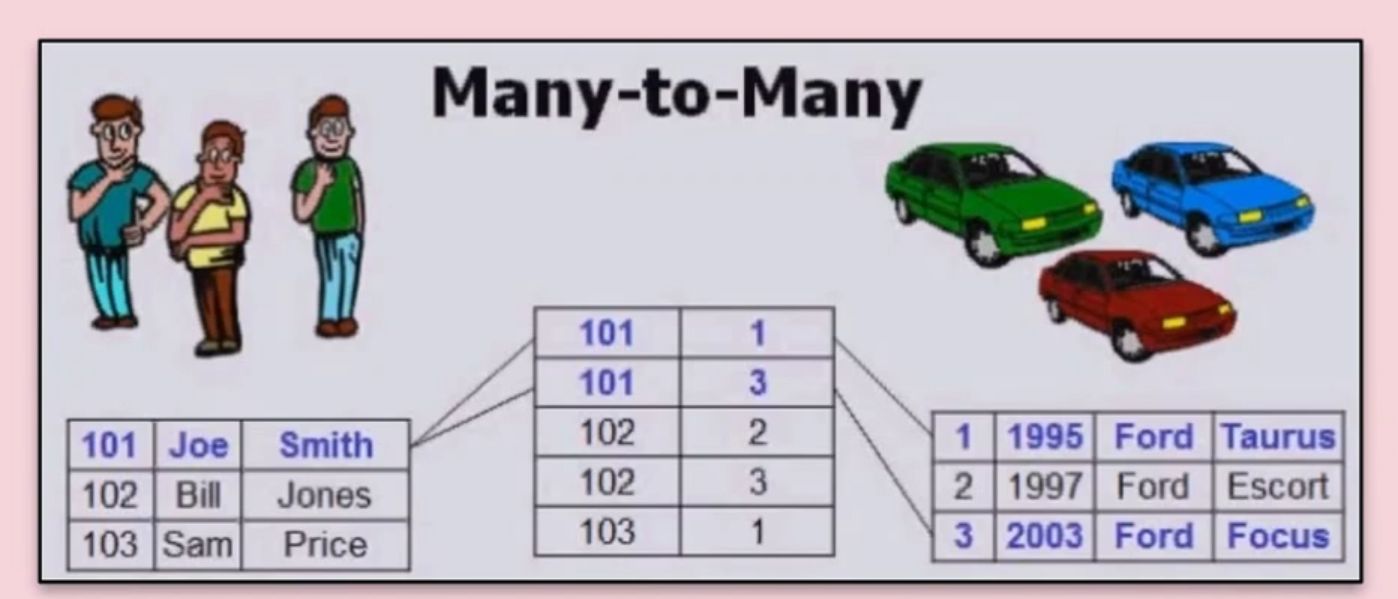
Even though you have two forms you would still have to relate the records in some fashion.  My mind is telling me Many - to - Many relationship using a junction table.  Do a search above for relationships.  There are a TON of videos in the TechHelp section and Richard provides even more in the courses than could possibly be covered here in a forum.

If you are in need of Developer help there is the Microsoft Access Developer Network here on this site.
Scott Axton  @Reply  
        
5 years ago
Shameless plug for Richard here (unsolicited)

You are really missing out on a lot of GREAT content if you are not a "TechHelp Member".
The extended cuts are worth their weight in gold!
Just give up one Starbucks a month and you're there!

TechHelp Memberships
Ferenc Dalnoki-Veress OP  @Reply  
   
5 years ago
Shameless plug understood ;-) One further question if I may. I think it is clear how to do this. The problem is that I want the same many-to-many relationship between every record in Set A to Set B. What I could do I suppose is to have a table of:
Set A Set B
1       1
1       2
1       3
2       1
2       2
2       3
And then have another table relating Set A to the actual pictures as a subform on the main form of Set A.
However, it still means I have to have a table as above that connects Set A to Set B. The good news is that won't be very data intensive because it only contains indexes to pictures not the pictures themselves (as you suggested they can be linked making it even less data-heavy) but it is still bloated, because all I am doing is repeating Set B for every record in Set A. What would be nice is if I could link every record in Set A to every record in Set B (ie. 1 to records 1 to 3, then 2 to records 1 to 3 etc). Do you have an idea at how to do that.
Scott Axton  @Reply  
        
5 years ago
In my previous message I said you need to look at Many-to-Many Relationships.

If you put in a junction table, a table in between the SetA and SetB tables, that is what gives you the ability to look at the relationships between the two tables.  
In essence you can say, "For record 1 in table SetA show me all of the related records in the SetB table."

Or vice versa.  You can go either way.
Each record , depending how you set it up, can have 0 relationships or 10,000 related records.  You are only storing the data once.
By using the Junction Table it is VERY much more efficient and does not bloat your tables.  You can even display the images efficiently because you are just linking to the image and not storing it in your DB.

See this video:  Many-to-Many

For even more info than I can type here, type in "relationships" in the search box above.  There is a bunch of info there.
Ferenc Dalnoki-Veress OP  @Reply  
   
5 years ago
Thanks very much. But the junction table must still have Set A * Set B rows. So that if there are 5 records in Set A and 4 in Set B then there are a total of 20 rows in the junction table. When really you only need to have 5 + 4 since you are repeating the same links to information 5 times. That is what I meant by making the table bloated. Please correct me if I am wrong about that. The only way that I could do it is to have a junction table with (in this case) 20 rows. Thanks very much for your time.
Scott Axton  @Reply  
        
5 years ago
Did you watch ANY of the videos?  It literally walks you through, between them all, what to do.

Your junction just has the IDs from each table NOT the data, linking them together.

JunctionT

ID   SetA_ID   SetA_ID
1          1             1
2          1             2
3          1             3
4          2             1
5          2             2
6          2             3

As I said above, I have no knowledge of your skill set in Access -  you have to learn to crawl,  before you walk, before you can run.
Start out with the free beginner lessons and move on to the other free topics.  Access is not all that tough,  once you have the basics down.  The topics here are more advanced and you are just going to be frustrated by not having the basics down.

The other alternative is to hire it done by one of the developers in the AccessDev.NET section.
Scott Axton  @Reply  
        
5 years ago

Richard Rost  @Reply  
           
5 years ago
Let me chime in here. Are you saying that you have two sets of pictures, and you want to be able to scroll down the list of set A and as you click on the next record, have the same picture from set B appear? In other words, you want to synchronize scrolling between two sets of photos? To, for example, compare differences?

Astronomers used to use a device called a "blink comparator" to rapidly switch between two photos of the same patch of the sky to see if anything moves. This is how Pluto was discovered, for example. Are you saying that for each set, the pictures are similar and you want to have them appear side by side, and then when you click on the next picture (#2) it loads up both number 2s from each set so you can see them at the same time?

This thread is now CLOSED. If you wish to comment, start a NEW discussion in Access Forum.
 

Next Unseen

 
New Feature: Comment Live View


The following is a paid advertisement
Computer Learning Zone is not responsible for any content shown or offers made by these ads.
 

Learn
 
Access - index
Excel - index
Word - index
Windows - index
PowerPoint - index
Photoshop - index
Visual Basic - index
ASP - index
Seminars
More...
Customers
 
Login
My Account
My Courses
Lost Password
Memberships
Student Databases
Change Email
Info
 
Latest News
New Releases
User Forums
Topic Glossary
Tips & Tricks
Search The Site
Code Vault
Collapse Menus
Help
 
Customer Support
Web Site Tour
FAQs
TechHelp
Consulting Services
About
 
Background
Testimonials
Jobs
Affiliate Program
Richard Rost
Free Lessons
Mailing List
PCResale.NET
Order
 
Video Tutorials
Handbooks
Memberships
Learning Connection
Idiot's Guide to Excel
Volume Discounts
Payment Info
Shipping
Terms of Sale
Contact
 
Contact Info
Support Policy
Mailing Address
Phone Number
Fax Number
Course Survey
Email Richard
[email protected]
Blog RSS Feed    YouTube Channel

LinkedIn
Copyright 2026 by Computer Learning Zone, Amicron, and Richard Rost. All Rights Reserved. Current Time: 6/16/2026 1:44:14 PM. PLT: 0s