Free Lessons
Courses
Seminars
TechHelp
Fast Tips
Templates
Topic Index
Forum
ABCD
 
Home   Courses   TechHelp   Help   Contact   Merch   Join   Order   Logon   Forums   
 
Back to Access Forum    Comments List
Upload Images   @Reply   Bookmark    Link   Email   Next Unseen 
Cell in SubForm
Dg Ewing 
     
5 years ago
I cannot get this to work:


Private Sub IcwMemID_Click()
     'Data for the field IcwMemID on subform A_IcwInputF is coming from recordsource A_IcwInput_wMDKAQ
     'This field [IcwMemID] is passed from A_IcwT to the above qry and is the same as MemID in the
     main form A__MDKAMemExtMainF (note that the underscore is two underscores  _ and _)
    
     Dim MemICW As Integer
     MemICW = Me!IcwMemID
     DoCmd.OpenForm "A__MDKAMemExtMainF", , , "MemID =" & MemICW
     Debug.Print MemICW
End Sub
Adam Schwanz  @Reply  
           
5 years ago
Why are you declaring a variable just to use the field as the variable? You can take that whole part out.

Also since you mentioned it, going to assume the double __ is correct

DoCmd.OpenForm "A__MDKAMemExtMainF",,,"MemID=" & IcwMemID

Now you mentioned subforms, i didn't follow what you said there, that could change the syntax you need. Are ALL of the fields you're using in the subform with this button click event as well? Or are some fields on the main form, some on the subform?
Dg Ewing OP  @Reply  
     
5 years ago
Thanks Adam,
I tried without declaring a variable and that didnt work so I shot in the dark and added it.  I did not think that I needed it.

the subform has 4 fields, and the field IcwMemID in the subform is a foreign field in the IcwT, that represents the MemID in the MemT which is the source for the main form.

The mainform opens but the MemID is blank as well as all fields in the main form and the subforms.

I also tried the following, and it opened the main form with the record that it should have, but when enter any of the fields on the form,  I got a msg that " the changes your requested to the table were not successful because they would create duplicate values in the index...."   It thought that I was trying to duplicate the entire record

                Private Sub IcwMemID_Click()
    
                                 Me.Parent!MemID = Me!IcwMemID
  
                End Sub


I have been shoting in the dark for 2 days....I know that it is going to be something really simple
Alex Hedley  @Reply  
           
5 years ago
Dg Ewing OP  @Reply  
     
5 years ago
Thanks Alex, but that and the extended cut show how to gets a value from the subform but not how to send back to the main form

I am getting the value of IcwMemID from the subform. and I test by sending it to a msgbox.  below are the last two attempts:

Private Sub IcwMemID_Click()
    
      MsgBox [Forms]![A__MDKAMemExtMainF]![A_IcwInputF]!IcwMemID
    
'1.   DoCmd.OpenForm "A__MDKAMemExtMainF", , , "MemID =" & IcwMemID
'2.   DoCmd.OpenForm "A__MDKAMemExtMainF", , , "MemID =" & [Forms]![A__MDKAMemExtMainF]![A_IcwInputF]!IcwMemID
'3     DoCmd.OpenForm "A__MDKAMemExtMainF", , , "MemID =" & [Forms]![A__MDKAMemExtMainF]![A_IcwInputF.Form]!IcwMemID
    
End Sub
#1 opens up a blank main form and the subforms are also blank.  I think it may be some thing in the main form that is creating a blank???

#2 opens up a blank main form and the subforms are also blank
# 3 I added .Form on the subform label per extended cut.  I get an error "cant find field A_IwcInputF
Scott Axton  @Reply  
      
5 years ago
# 3 I added .Form on the subform label per extended cut.  I get an error "cant find field A_IwcInputF

Typo#3 - Is it Icw or Iwc?

My opinion:
The use of singular underscore and double underscore in my opinion is going to cause you issues - if it hasn't already.  I would strongly suggest, if you are going to use the underscore at all, that you only use one.  Too hard to distinguish.
The other reason I don't like it, is it's on the same key as the minus / hyphen ( - ).  To easy to mistype - and then computer thinks you are trying to subtract something.

I hope you comment well for the future you and or someone else that would ever go into your code if you were not around.
Maybe, in your line of work, these names make sense, but the names are not exactly "meaningful names" to me.  Very difficult to tell if you typed wrong here or is it in the code? Make sure that when you go to read this 6 months from now or longer you are going to know what you were thinking and meaning.
Scott Axton  @Reply  
      
5 years ago
Another reason to not use the underscore is Access "views" or uses that as a line continuation character.

Dg Ewing OP  @Reply  
     
5 years ago
Thanks Scott, those comments are very solid and I will adopt.  
1. the icw/iwc was my typo in this forum. look at the 3rd attempt where I added .form --the form name is exactly like #2

Working (testing) this problem until midnight again last night , I have a significant find.  I hope I can explain :
If the main form i showing all 900+ records , then #1 above works --does not open a blank --it opens the record that matches the subform value.

However I have done a search using the following then it does not work, I assume that the recordset after the search does not contain all 900+ records (it only contains the records with the matching selection criteria??)

I will put in next comment box as it exceeds the character limitation of this dialog box.
Dg Ewing OP  @Reply  
     
5 years ago
Private Sub command555_Click()
    Dim strsearch2 As String
    Dim strTest2 As String
    strText2 = Me.TxtSearch.Value
    strsearch2 = "SELECT * from A_MemberT where  ((MemName like ""*" & strText2 & "*"")or (Group like ""*" & strText2 & "*"")or (MemIDer like ""*" & strText2 & "*"") or (SourceName like ""*" & strText2 & "*"") or (email like ""*" & strText2 & "*"")or ([Managedby] like ""*" & strText2 & "*"") or (MemID like ""*" & strText2 & "*"")) "
    Me.RecordSource = strsearch2
End Sub
What is weird is that when I look at the mainform record source property it only has SELECT * FROM A_MemberT;  with out the where criteria, even though only the records that match the criteria are presented record selector box  is reduced from 900+ to 3, 45 , 86 etc count of matching records.  I need to repopulate the rs before reopening the mainform.  How??
Dg Ewing OP  @Reply  
     
5 years ago
The sentence above should read:  However IF I have done...  and BTW Icw is In common with, a common genetic genealogy term, and I think if a person reviewing the naming convention was a genetic genealogist they would not struggle too much .  MDKA is most distant known ancestor. And the remaining names above , I think most folks would not struggle with.

Scott Axton  @Reply  
      
5 years ago
I know I gave you a hard time on naming.  I'm not a genetic genealogist (heck I'm not even a rocket scientist - LOL )  I was just pointing out that depending on the industry you are in you use certain acronyms that don't mean anything to me for instance.  So we just kind of have to take it at face value.

Are you doing a copy / paste or retyping into the forum?

In the code you have Dim strTest2 As String but then later on you use strText2.  Watch spelling and typos.  
If you are not already doing so I recommend placing Option Explicit up at the top like this:
   Option Compare Database
   Option Explicit
That will help catch typos in variables.

If you have your code in a "regular" query (outside the code) do you get the desired results?
It may pay you to hard code in a known entity until you get the code working before switching to the variables.  Rule out one issue at a time until it works.
Scott Axton  @Reply  
      
5 years ago
Check out Access Advanced Level 6 for guidance on changing record source via SQL
Scott Axton  @Reply  
      
5 years ago
Dg - Maybe post a screenshot of your form(s). Blur any sensitive info if needed.  Even design mode would work.

Also, screen shot your code.  I can't help  thinking you are missing some little thing too.
Dg Ewing OP  @Reply  
     
5 years ago
Thanks Scott, to really show my ignorance, how do I post a screen shot.  I have a screen shot and I copied and tried to paste...but nothing happened?
Dg Ewing OP  @Reply  
     
5 years ago

Dg Ewing OP  @Reply  
     
5 years ago

Dg Ewing OP  @Reply  
     
5 years ago
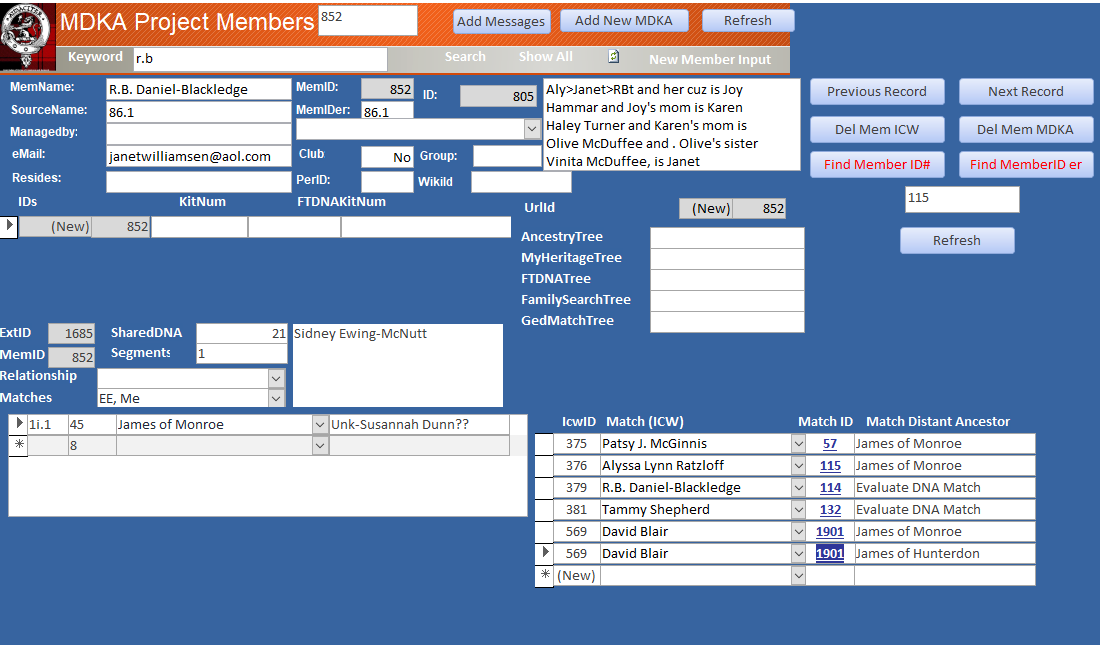
So in the first image I have entered r.b. in the "keyword" txtbox and clicked search.  and then when i click the Match ID "1901" on the bottom right hand subform , it opens up a blank "entry" type form.  

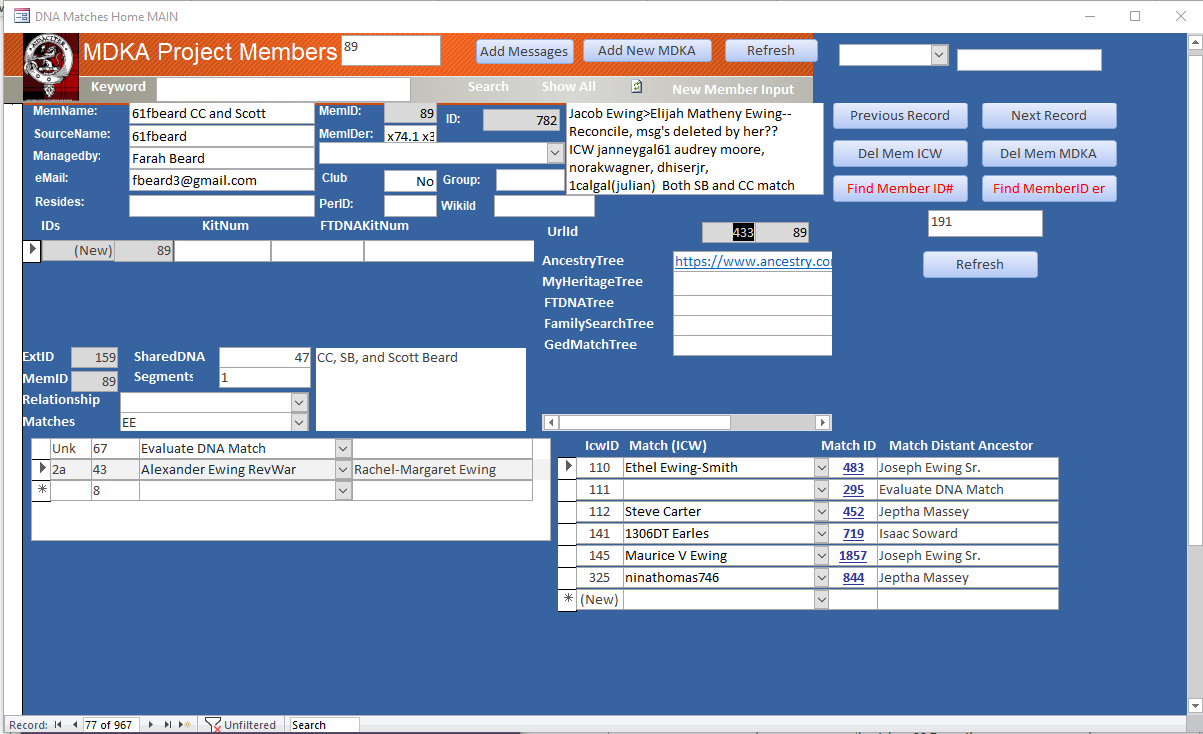
in the 2nd image all 967 records of the table are "available" and if I clicked any of the Match IDs i.e 844 then the form reopens with 844 in the MemID field and all is good.

as long as I have not "down" selected by using either : the "search", "Find Member ID# or "Find MemberID er" it works just fine.  

I deduce that once I have searched for matches then apparently there is a code generated qry that only has the records that matched my selection criteria.
To answer your q , I copy paste my code, and yes as a very old rookie, I was sloppy in the beginning and left used dim statements, which were primarily generated as I would shot gun (guess) different attempts to get something to work and when it did I did not go back and clean up the stuff that didn't unless it caused an error
Dg Ewing OP  @Reply  
     
5 years ago
And to really give you a head ache :  look at the main form middle , I have 3 yes 3 ID numbers, ID, MemID and MemIDer.  I developed an Access db to track  my on DNA matches.  And as the Ewing Y DNA Project admin, I developed a similiar db for the 300+ Ewing surnamed males who had their Y DNA tested and belonged to our project.  And then I developed another similiar db for tracking autosomal DNA for several hundred  descendants of known Ewing progenitors  (male and female--with any current surname) .. I just recently combined all 3 db and did not want to create clean new IDs , so the ID from the last db, MemID is from the Y DNA Project and MemIDer is my original DNA matches.  any new adds  all 3 ID fields are the same number.

Sloppy and regretful...but it is
Dg Ewing OP  @Reply  
     
5 years ago
Finally, I do not like hunting with a shot gun, but sometimes you bag your game.....I just kept guessing and this code now works even after doing a search:  No doubt some of this can be eliminated, but I dont know what and I would have to Shot Gun some more...but after 3 days , it works and I am moving on.

Private Sub IcwMemID_Click()
     Dim strsearch As String
     Dim passvalue As String
    
     MsgBox [Forms]![A__MDKAMemExtMainF]![A_IcwInputF]!IcwMemID
    
     passvalue = Me!IcwMemID
    
     strsearch = "SELECT * from A_MemberT"
    
     [Forms]![A__MDKAMemExtMainF].RecordSource = strsearch
    
    
     MsgBox passvalue
    
    
   DoCmd.OpenForm "A__MDKAMemExtMainF", , , "MemID =" & passvalue
   ' DoCmd.OpenForm "A__MDKAMemExtMainF", , , "MemID =" & [Forms]![A__MDKAMemExtMainF]![A_IcwInputF]!IcwMemID.Value
    
End Sub
Scott Axton  @Reply  
      
5 years ago
Well I see you found the Upload the Images.

I've done the same thing while trouble shooting.  Now that it appears you have solved your problem,  go clean up and comment your code.  This took a bit and you won't forget it in a week but I can promise you a month or six you will have fun figuring out what you did.  Ask me how I know.

Regarding 3 ID's - WOW I don't know where to even go on that one.  As much as a hassle as it might seem I would pick one and standardize on it, updating all your databases.  In the short term it might be painful but long term you will be glad you did.

I'm glad you got it figured out.
Dg Ewing OP  @Reply  
     
5 years ago
Yep , apparently the problem was that after a search a "code qry" was created that did not have the all the records. And my guess of the following code repopulated (refreshed) the recordsource to all records

strsearch = "SELECT * from A_MemberT"
    
  [Forms]![A__MDKAMemExtMainF].RecordSource = strsearch  (this was just luck and created out of frustration..)

DoCmd.OpenForm "A__MDKAMemExtMainF", , , "MemID =" & passvalue

Thanks for sticking around and cheering me on...

I created a MS OneNote for all of my coding, using tabs and pages to organize different functions:  i.e. Passing values from Subform to Main, Restroring deleted key IDs -autonumbers, etc.

this entire string of posts has its own page in the tab!!  (btw a new tab:  Richard's Forum, pg 2 , how to upload image, pg 1 "helpful responders"  you are the first on the list.

thanks again for sticking it our!!

This thread is now CLOSED. If you wish to comment, start a NEW discussion in Access Forum.
 

Next Unseen

 
New Feature: Comment Live View


The following is a paid advertisement
Computer Learning Zone is not responsible for any content shown or offers made by these ads.
 

Learn
 
Access - index
Excel - index
Word - index
Windows - index
PowerPoint - index
Photoshop - index
Visual Basic - index
ASP - index
Seminars
More...
Customers
 
Login
My Account
My Courses
Lost Password
Memberships
Student Databases
Change Email
Info
 
Latest News
New Releases
User Forums
Topic Glossary
Tips & Tricks
Search The Site
Code Vault
Collapse Menus
Help
 
Customer Support
Web Site Tour
FAQs
TechHelp
Consulting Services
About
 
Background
Testimonials
Jobs
Affiliate Program
Richard Rost
Free Lessons
Mailing List
PCResale.NET
Order
 
Video Tutorials
Handbooks
Memberships
Learning Connection
Idiot's Guide to Excel
Volume Discounts
Payment Info
Shipping
Terms of Sale
Contact
 
Contact Info
Support Policy
Mailing Address
Phone Number
Fax Number
Course Survey
Email Richard
[email protected]
Blog RSS Feed    YouTube Channel

LinkedIn
Copyright 2026 by Computer Learning Zone, Amicron, and Richard Rost. All Rights Reserved. Current Time: 8/7/2026 7:18:12 PM. PLT: 1s