Free Lessons
Courses
Seminars
TechHelp
Fast Tips
Templates
Topic Index
Forum
ABCD
 
Home   Courses   TechHelp   Forums   Help   Contact   Merch   Join   Order   Logon  
 
Back to Access Forum    Comments List
Upload Images   @Reply   Bookmark    Link   Email   Next Unseen 
Multiple toggle switch filter
Jose Figueroa 
   
5 years ago
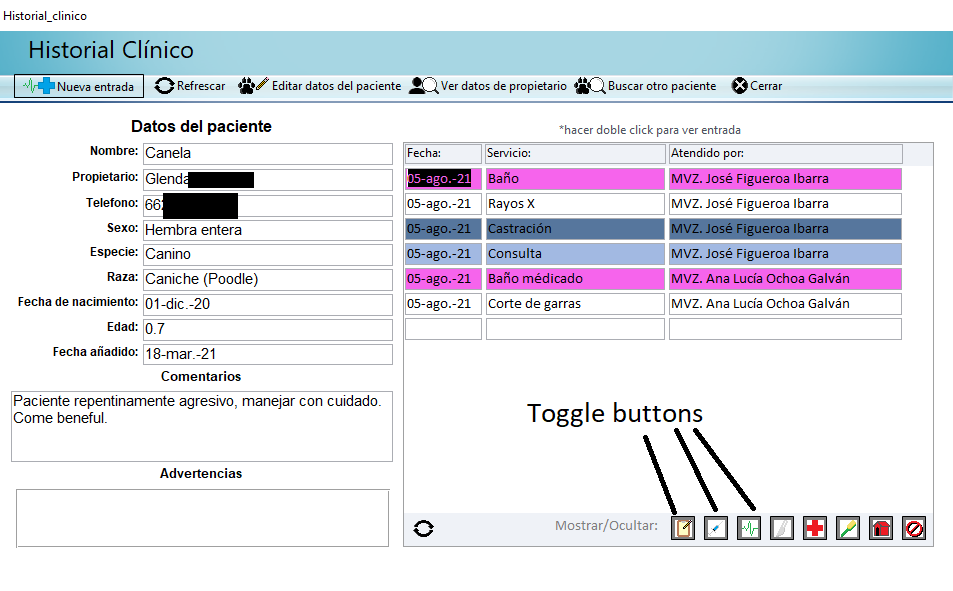
Hi, I'm working on a database for a Vet clinic (I'm a veterinarian myself). Vet clinics offer different kinds of service (surgery, vaccines, some of them even pet grooming) and I have different forms for each, but, I would like a way to filter my "Patient history" that would allow me to toggle specific entry types invisible since a Doctor may not be interested in the grooming visits and would like to toggle them off from the list.

In my continuous form I have a field called "Entry type" and it has a vallue between 1 and 12 (1 being quick entry, 2 being medical visit, 3 being vaccine, 4 being surgery, etc.) and the value on that field defines what form it used to open the entry and what colour it's displayed as (Entries with "Entry type" value = 1 are white and so on).

What I would like to do is if there's a way so when for example the "Vaccine" toggle switch is set as false, then all entries where Entry type = 3 are not shown (and the same for all the other services)
Jose Figueroa OP  @Reply  
   
5 years ago

Jose Figueroa OP  @Reply  
   
5 years ago
If you guys need to see any query of table I would be glad to show and translate it (since it's mainly build in spanish)

Appreciate the help
Adam Schwanz  @Reply  
           
5 years ago
How comfortable are you with VBA? This would be really easy with VBA, you just need an after update event on the toggle button that changes the record source. Changing it to "SELECT * FROM TABLE WHERE EntryType=1" or whatever.
Jose Figueroa OP  @Reply  
   
5 years ago
I'm comfortable using VBA, but wouldn't using that method erase my previous filter when a toggle another button? or would that activate the filter for both?
Adam Schwanz  @Reply  
           
5 years ago
If you want to use multiple criteria at once i would just dim a variable and a function. Then just add onto the variable what choices are toggled.

Basically just making a where statement with the variable, so you end up with "select * from table where " & variable

If you need an example ill make one up

Scott Axton  @Reply  
        
5 years ago
Jose: I'm comfortable using VBA, but wouldn't using that method erase my previous filter when a toggle another button? or would that activate the filter for both?

The answer to that is another question.  How do you want it to work?  
The benefit of VBA is you could do either.
Personally, I would make it so that pressing the toggle would be added to the filter.  I would then make a "Show All" button that would reset all the toggles to off.

Something to plan for is how do you want the toggles to work when you move to another client?
Do you want them reset to "Show All"?  Or do you toggle the same buttons on a regular basis? It might be helpful to make it so that your default toggles are set when you open a different record?
Keep in mind that you as a Dr. might have different needs than a Vet Tech or a Groomer.
Richard Rost  @Reply  
          
5 years ago
Looks like your toggle buttons are in the subform footer. That's good. Like the guys said, just re-write your subform's SQL depending on which buttons are toggled ON. I wouldn't give them values from 1 to 12. I would make them independent yes/no checkboxes or toggles.

SQL = "SELECT * FROM MyTableT WHERE ID=" & ParentID
if CheckBox1 then SQL = SQL & " AND Service1=TRUE "
if CheckBox2 then SQL = SQL & " AND Service2=TRUE "
if CheckBox3 then SQL = SQL & " AND Service3=TRUE "
etc.


I cover this in my Search Seminar.

This thread is now CLOSED. If you wish to comment, start a NEW discussion in Access Forum.
 

Next Unseen

 
New Feature: Comment Live View


The following is a paid advertisement
Computer Learning Zone is not responsible for any content shown or offers made by these ads.
 

Learn
 
Access - index
Excel - index
Word - index
Windows - index
PowerPoint - index
Photoshop - index
Visual Basic - index
ASP - index
Seminars
More...
Customers
 
Login
My Account
My Courses
Lost Password
Memberships
Student Databases
Change Email
Info
 
Latest News
New Releases
User Forums
Topic Glossary
Tips & Tricks
Search The Site
Code Vault
Collapse Menus
Help
 
Customer Support
Web Site Tour
FAQs
TechHelp
Consulting Services
About
 
Background
Testimonials
Jobs
Affiliate Program
Richard Rost
Free Lessons
Mailing List
PCResale.NET
Order
 
Video Tutorials
Handbooks
Memberships
Learning Connection
Idiot's Guide to Excel
Volume Discounts
Payment Info
Shipping
Terms of Sale
Contact
 
Contact Info
Support Policy
Mailing Address
Phone Number
Fax Number
Course Survey
Email Richard
[email protected]
Blog RSS Feed    YouTube Channel

LinkedIn
Copyright 2026 by Computer Learning Zone, Amicron, and Richard Rost. All Rights Reserved. Current Time: 6/30/2026 8:06:30 AM. PLT: 0s