Free Lessons
Courses
Seminars
TechHelp
Fast Tips
Templates
Topic Index
Forum
ABCD
 
Home   Courses   TechHelp   Help   Contact   Merch   Join   Order   Logon   Forums   
 
Back to Access Forum    Comments List
Upload Images   @Reply   Bookmark    Link   Email   Next Unseen 
Duplicates, Required
Brent Rinehart 
        
5 years ago
Other areas I constantly run into when creating databases is trying to prevent duplicate records and require certain fields to be filled in before they can save, I have seen so many different ways and a ton of code to really make it work and I seem to not get it to work properly, if you can show so good examples of preventing the user from saving a record unless multiple fields on a form are filled in and a way to search the tables on the info they are typing in, to make sure it is not already in the table, I try to prevent this with combo boxes on cities and anywhere else they would be retyping the same info possibly. Maybe you have these in some of the classes and I need to remember which class to go back to and review?
Juan C Rivera  @Reply  
            
5 years ago
I think Richard just covered this in cascading combo box.  Take a look at the extended cut.  
https://599cd.com/blog/display-article.asp?ID=1752
Brent Rinehart OP  @Reply  
        
5 years ago

Brent Rinehart OP  @Reply  
        
5 years ago
That tech help I will definitely use but not what I was going for I have three fields that are working off three separate tables and want to make sure they are filled in before the record gets saved as well as check that the records in each table do not exists if so it would prompt the user that the fields already exists.
Richard Rost  @Reply  
           
5 years ago
Help me to understand your data requirements. So the user picks JobNo, JobName, and CompanyID separately? Wouldn't the latter two be pulled from the Job table? Pick (or enter) the JobNo and you can DLookup the other two? Explain to me in detail what exactly the problem is and I'll be happy to go into more detail on what I think the best way to handle it is.
Brent Rinehart OP  @Reply  
        
5 years ago
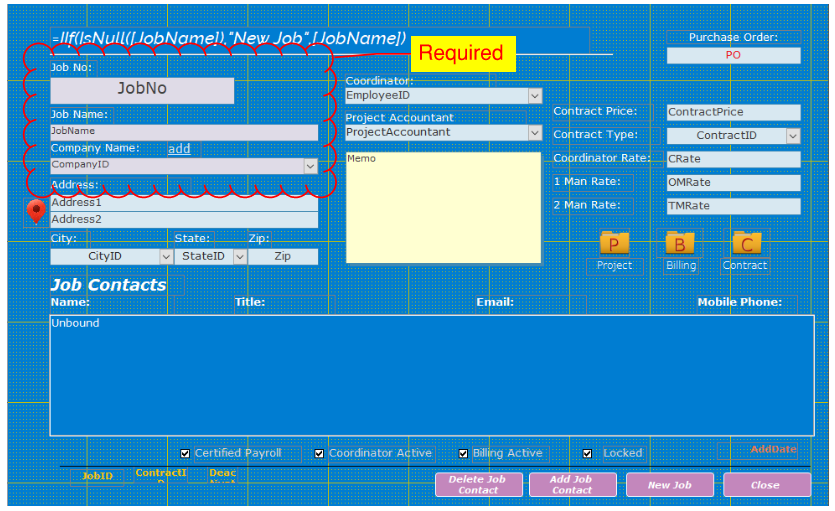
Now I looked at it again its two tables, guess you cant help me if I dont tell you the correct information.  The Form is based on JobT the three fields clouded I need required before record can be saved. JobNo & JobName are stored in the JobT and Company Name is stored in the JobT in a field Called CompanyID which the combo box is tied to a company table (CompanyT), I would like to make sure all three fields are populated with Data and really the JobNo must be unique and if Company Name is not in the drop down they need to be able to add and make sure what they are adding is not in the Company Table, After watching your video on List Item Edit this might do the trick with the Combo Box?  CompanyT to JobT would be a 1 to Many relationship. The easy way I  know is make that field required at the table level but I thought that was a bad idea?
Brent Rinehart OP  @Reply  
        
5 years ago
One idea that would be great to learn and have never seen is someway where even though you might have different Job numbers if someone were to key the same address or Job Name or phone number it prompts you and tell you a suspected duplicate record could have been found?
Adam Schwanz  @Reply  
           
5 years ago
You can do that with DCOUNT DCount

Basically just dcount the amount of records that have a specific address and if it's > 1 you have a duplicate, popup a messagebox.
Richard Rost  @Reply  
           
5 years ago
My advice is to not make things required... UNLESS THEY'RE REQUIRED. If we're talking about phone numbers and ZIP codes, you don't make them required because you don't want your users typing in something bogus just to close the form. BUT, if we're talking about a Job Number that you MUST have, then by all means make it required.

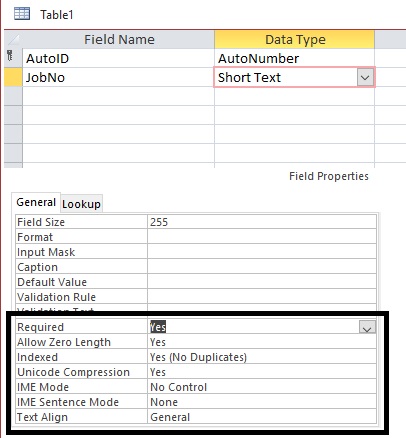
As far as finding duplicates goes, if this is the ONLY job that will have that job number or name, then just set it to Indexed, No Duplicates. Problem solved. :)
Juan C Rivera  @Reply  
            
5 years ago

Juan C Rivera  @Reply  
            
5 years ago
This may help, but the real juju is with VBA before Update event
if isnull ([JobNo]) then
msgbox "Must have a Job Number."
exit sub
end if

Everything you are asking for there is a tech help video.  recommend companyID as a list from list box.  Let me know if this puts you on the right track.  I'm more than happy to help.
Brent Rinehart OP  @Reply  
        
5 years ago
Thank You guys I will give these items a try and let you know how they work thank you for the help really appreciate it.
Richard Rost  @Reply  
           
5 years ago
TechHelp video finished. Uploading now. :)

This thread is now CLOSED. If you wish to comment, start a NEW discussion in Access Forum.
 

Next Unseen

 
New Feature: Comment Live View


The following is a paid advertisement
Computer Learning Zone is not responsible for any content shown or offers made by these ads.
 

Learn
 
Access - index
Excel - index
Word - index
Windows - index
PowerPoint - index
Photoshop - index
Visual Basic - index
ASP - index
Seminars
More...
Customers
 
Login
My Account
My Courses
Lost Password
Memberships
Student Databases
Change Email
Info
 
Latest News
New Releases
User Forums
Topic Glossary
Tips & Tricks
Search The Site
Code Vault
Collapse Menus
Help
 
Customer Support
Web Site Tour
FAQs
TechHelp
Consulting Services
About
 
Background
Testimonials
Jobs
Affiliate Program
Richard Rost
Free Lessons
Mailing List
PCResale.NET
Order
 
Video Tutorials
Handbooks
Memberships
Learning Connection
Idiot's Guide to Excel
Volume Discounts
Payment Info
Shipping
Terms of Sale
Contact
 
Contact Info
Support Policy
Mailing Address
Phone Number
Fax Number
Course Survey
Email Richard
[email protected]
Blog RSS Feed    YouTube Channel

LinkedIn
Copyright 2026 by Computer Learning Zone, Amicron, and Richard Rost. All Rights Reserved. Current Time: 8/24/2026 10:36:24 AM. PLT: 1s